In this article, we will learn about the most common vulnerability scanning tools that hackers use. In addition, you can also see 10 more security exploit tools used by experts here.
| Join the channel Telegram belong to AnonyViet ???? Link ???? |
Vulnerability Scan
Once you’ve completed the targeted crawling phase, it’s time to start looking for security holes. Vulnerability scanning is the process of using tools to scan targets and find vulnerabilities. There are different tools that can perform vulnerability scanning, and the type of target you are scanning will determine which tool you use. For example, if you are looking for vulnerabilities affecting services on a server then you can use Nmap, Nessus, OpenVAS and many others. However, if you are attacking a web application then you can use Nikto, Burp Suite, OWASP ZAP or some other tool.
Vulnerability Scan with Nmap
Nmap is a great vulnerability scanner. When I first started my career, I had many misconceptions about Nmap. I think it is merely a network scanner used to determine which servers are online and which services are running. But actually Nmap is a comprehensive network testing tool that can identify and exploit vulnerabilities. I use it for almost every project I’m involved in. I strongly recommend reading more about the different flags and scripts before running the command.
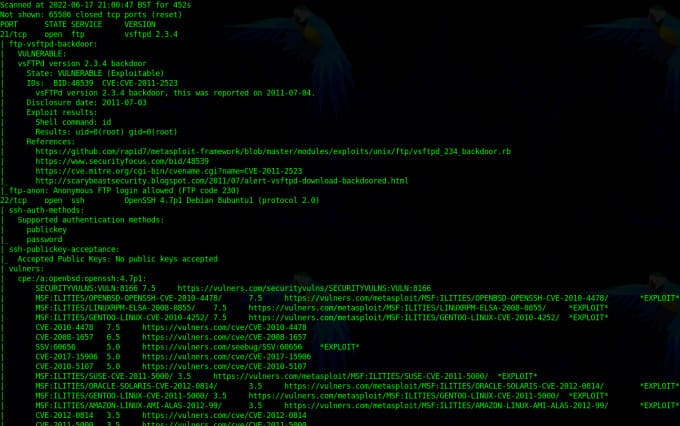
The image below shows the Nmap scan command used to find vulnerabilities. You can see from the results that it found some CVE vulnerabilities. First, I specified the ‘-g’ flag to set the source port to 53. This is useful for avoiding firewalls as some firewalls can be configured to allow inbound DNS traffic from any which source. Then I specify the ‘-f’ flag to defrag the packets. This works by splitting packets into multiples of 8, which will also benefit firewall evading. Then I specify ‘-sV’ for service instances and ‘-p0-‘ for all ports. Next, I specify the ‘–script’ parameter, followed by different categories of scripts to execute. Finally, I added the IP address and ‘-T5’ to increase the speed.
This configuration is extremely reckless and you should never use it in an environment production. I only used it to demonstrate the power of Nmap.
sudo nmap -g 53 -f -sV -p0- -O --script vuln,auth,exploit 10.0.2.5 -T5
Vulnerability Scan with Nessus
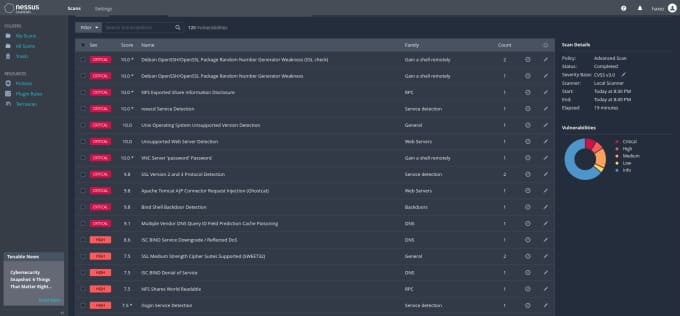
Nessus from Tenable is a powerful multi-function vulnerability scanning and testing solution. It can be used to scan the entire range of IP addresses or perform tests from uploaded configuration files. Whether you’re on the red or blue team, chances are you’ve used it or at least heard of it. Nessus will likely be your tool of choice when doing a full vulnerability assessment or penetration test. All you need to know now is that it is an effective vulnerability scanner. Tenable provides an essential version for you to experiment with and I highly recommend you give it a try. However, the pro version has more cool toys.
The image below is an advanced scan that I performed on a Metasploitable 2 virtual machine. I configured it to scan all ports (0–65535) and disabled the DoS plugin. As you can see, it found a bunch of problems.
Scan Web with Nikto
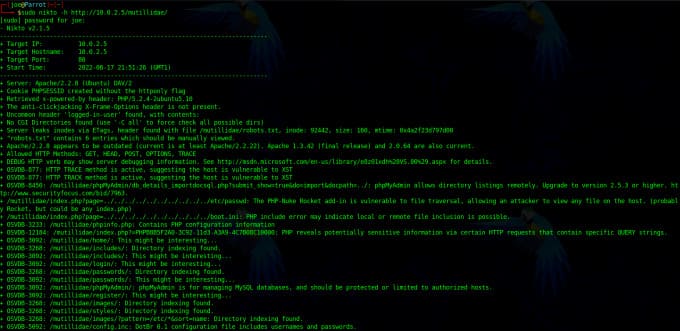
Nikto is a free CLI web application vulnerability scanner. It will search for interesting folders and files, analyze response headers, check for outdated software, and look for vulnerabilities. Nikto can hack and I’ve seen web apps experience performance issues when scanning them. I also noticed that Nikto can be tricked by the web application firewall. It will report code 200 for every directory it attacks, even if it doesn’t exist. Either it will misidentify a vulnerability or some other incorrect server-side configuration.
Scan the Web with Burp Suite
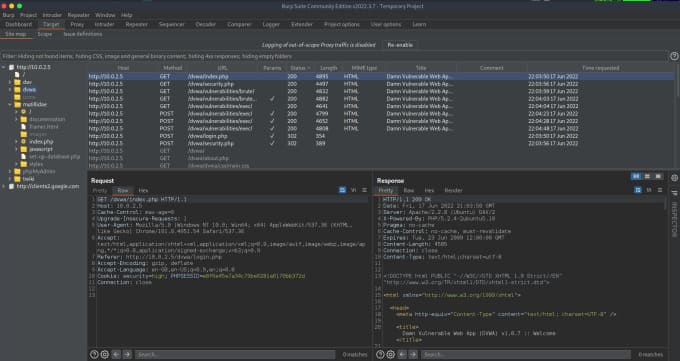
The pro version has more features allowing automatic scanning and vulnerability detection. You still need to manually review and verify those findings, but Burp took a lot of the guesswork out of it. It also has an extensive list of additional plugins that you can install for added functionality. If you’re looking for a job in cybersecurity, knowing how to use Burp Suite will likely improve your chances of taking those technical exams.