Brand deadlines are coming, and you are looking for a way to finish editing work. Try CapCut Creative Suite, an all-in-one solution to all the editing requirements. It offers free templates for personal and commercial use, an online image editor and an online video editor, team collaboration, and cloud backup. Using this suite, you can add subtitles to video using auto-generated captions, add transitions, use animations, remove background, etc. This is a complete package to showcase your skills, so let’s learn about it here.
Creative Suite’s Features to Showcase Your Creativity
Are you tight on your budget and need to be in a state to invest in editing software? Try using the CapCut Creative suite to show your audience what you can create in the best possible way. Here is the list of features this Creative Suite offers you to bring the best version of your assignment to the table.
Professional Online Video Editor
Creative Suite offers a professional online video editor so you can market your services or products in a more professional yet attractive way. You can create promo videos, presentations, social media reels, and more. It allows you to add speech-to-text and text-speech features to your videos. It will make it more captivating, accessible, and compelling. To make your videos more searchable, this professional online video editor auto-transcribes your videos into different languages.
Full-Featured Image Editor Online
Do you own some beauty products and don’t know where to start to boost sales? Creating appealing images is the best way to do so. CapCut has an online image editor with all the pro features for free to use. You can remove the background image using the latest AI tools. You can add color and pictures to your background. This creative Suite lets the users add text to the image, animate text, try fonts, change size, and place, and whatnot. In the edit photo tab, one can play with colors to enhance the vibrance, brightness, and overall feel of the image.
Variety of Free Personal and Commercial Templates
When it comes to designing a single photo for a brand promotion that will stand out in the crowd, it takes a hell of thinking and imagination. It’s always hard to find the perfect color scheme, proper elements, and desired font that matches your brand vibe. This Creative Suite offers a wide range of free commercial templates and personal templates. You will find templates related to Vlog, games, status, household, Instagram reels, Facebook ads, and much more.
Team Collaboration
In a professional setting, team collaboration is essential to get the desired results. Usually, managers get work reports for each team member individually, resulting in wasting hours and productivity. To solve this problem, the CapCut creative suite offers “Team Collaboration” where you can invite to be part of your team to work as a single unit. Everyone can track the progress of a project at the same time. Therefore, take a back seat and enjoy the efficiency and effectiveness of your project.
Files Management and Cloud Backup
It would be a disaster if you lost your important files. In addition, buying storage or investing in a hard drive to store data is not a cheap option. What if you do not have finances to invest? CapCut offers free cloud storage to provide you with more storage space on your computer. The data stored in cloud backup is always easy to manage and easy to access. The main feature of cloud backup is the security of your data. No one can steal your data or erase anything from your cloud backup.
No Watermarks on Downloads
No watermarks on downloads is a dream for many of us. Usually, online video editors require a pro account, and a subscription to buy, to enjoy no watermark feature. However, CapCut offers no watermark features at zero cost. Without a watermark, people can see the true colors of your image. No watermark feature allows the person to take full credit for what he has created. In this way, this online video editor empowers its users to post images and videos anywhere or on any social media platform they want.
Smart AI-based Tools
Time is the main issue when it comes to generating written content for your ads. It takes a lot of research, the selection of writing vocabulary, and brainstorming on how to develop an error-free script. CapCut Creative suite introduces free AI-based tools to save time and make work easier. You have to give input about how you want your script to be, salient features, pros, and cons of your product. Al will generate multiple scripts that will create your video or image in a short time.
What Are the Steps to Use Creative Suite?
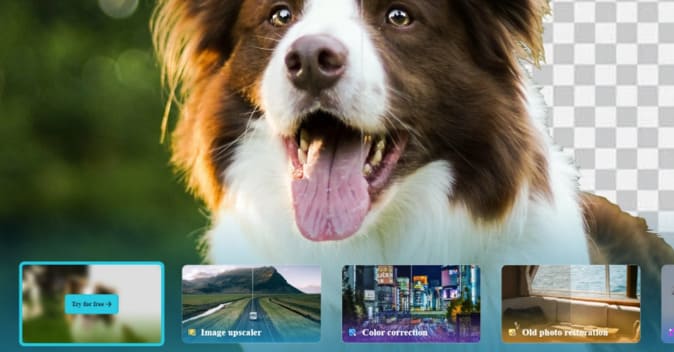
CapCut Creative suite is a collection of tools that allows users to unlock their creativity with the help of a few steps. It’s a matter of seconds, and you will be playing with numerous tools and becoming the master of the editing world. Are you getting excited? Follow these below-given steps and enjoy your journey!
Step 1: Signup and Singin
In this fast-paced world, where everyone is in a hurry, people do not want to fill out lengthy forms. CapCut Creative Suite saves you from this hassle. You can simply go to any browser on any device and search about CapCut or simply open the URL: https://www.capcut.com/creative-suite. This will direct you to the signup page. Just enter your Email address and proceed by answering simple questions. Besides, you can sign up by using Facebook or TikTok ID, or by Google account. Now, you will receive a verification email, click on the email and verify your account. Now you can sign in to your account on any device.
Step 2: Upload Photo/Video
The second step is to export your photo/video to the Creative Suite. If you are using this on your mobile, tap the upload button. It will redirect you to the mobile gallery where you can choose single or multiple items to upload. After making the selection, all the selected photos/videos will be uploaded to the Creative Suite. Now you can start working on them.
Step 3: Edit
Then comes the most exciting part of your editing journey where you have to make edits. CapCut Creative suite provides a collection of tools to spice up your images and videos. You can change text font, text color, and size, add transitions and animations, add trendy music, and use sound effects. If you are a YouTuber creating fun videos for children, you can create an exceptional piece of art by using tools in the editing phase.
Step 4: Export
Here comes the time when you have to get the final product to upload at any desired platform. When you are editing your content, you can export it on any device with the help of just a few clicks. Click on export, then choose the file format ie, MP4, JPEC, PNG, PPT, DOC, or what else, and download it. This Creative suite allows the users to change the image or video resolution as well.
Conclusion
Having very little knowledge about editing or graphic designing? You can take full advantage of this Creative Suite despite having little to zero knowledge. Sit tight and read the article to gain a handful of knowledge on what features it offers and how easy they are to apply. Do not worry about the paid subscription or the paid version, because it’s free with all the Pro features available.