

This post is yours Andy Pham In the Addiction Tech group, there is a fairly easy to understand analysis of the working mechanism of SSDs and the possible/impossible reasons to recover data on SSD hard drives.
| Join the channel Telegram of the AnonyViet 👉 Link 👈 |
SSD/TRIM – SSD Data Recovery on Mac/Win
People often call SSD is a hard drive, it is actually a memory chip, it works like a memory chip (memory/flash). Therefore, if you look at SSDs from the perspective of a memory chip, all the problems will be explained more easily.
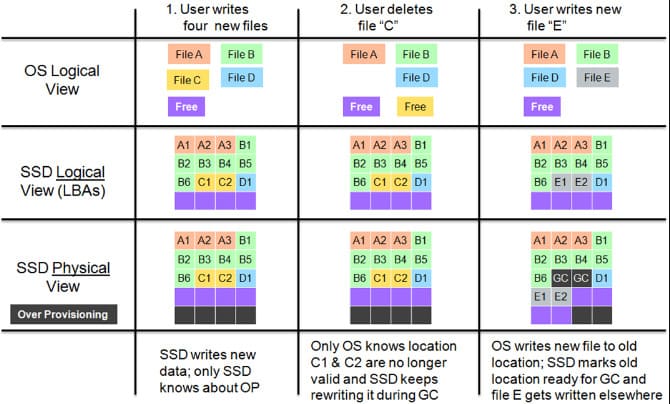
The default SSD will thoroughly erase:
Since the SSD is a memory chip, it must be blanked before it can be written to (different from the disk from the HDD). Usually when the system delete filessystem only mark as deprecated (mark as unused). Therefore, whenever you want to write data to those places, the SSD must first erase it before it can be written. This makes data logging takes twice as long.
SSDs are so fast, even if it lasts twice as long, it’s not worth much, maybe some of you will think so. In a real environment, SSDs perform thousands of writes/reads in a minute, then that double is multiplied by a thousand times, which will be a huge burden, causing the system to drop dramatically in performance.
TRIM was born to solve this “performance” problem. While the Operating System is doing other things, the SSD is idle, TRIM will order it to leisurely erase the places that have been cleared. mark deprecated, ready for the next write command, this is a thorough erase command performed by SSD controller. So if data is mistakenly deleted on an SSD, it cannot be recovered even by the most advanced data recovery centers.
SSD with Defragmentation:
Because it is a memory chip, SSD writes data in blocks. I say roughly a block has 5 data units, for example. If the data file to be written has 6 data units, then 2 blocks must be used (the first block has 5 units and second block only 1 unit). So 2nd block 4 units left blank. Sadly, the next time I write data, the SSD won’t take advantage of these 4 free units, but has to write a new block (because it’s written in blocks, simple as that).
You can see, if the data file is always 5, 10, 15, 20 data units, everything will be very nice, the SSD will write it into 1,2,3,4 data blocks, there will be no data block with some redundant space. Life is not so beautiful, that is rare in reality. So, what kind? last block also a few units empty (small waste). With the terrible speed of today’s SSDs, writing and reading thousands of files in a few minutes, this last block number increases rapidly, at this point the waste is no longer small but starts to be huge.
To solve this problem, the system has a very good plan, on the next write, the OS will read the isolated data unit at second block above out a temporary memory (cache), combine it with 4 other data units to form a standard block and then write it back to the SSD, so there is no waste, just beautiful. But the new problem arises, SSD has to do thousands of such cases in a minute (reading data out, concatenating blocks, writing in reverse), just hearing it is annoying, a terrible waste of time, but in this world of technology, time is speed.
TRIM was born to do that, it still does the above, but it quietly does it when the SSD is idle, so it does not affect the speed of the SSD.
I take a real example like this:
in the classroom every 5 people sit at a table, but if there are 6 people, it is mandatory to use 2 tables, Friday Mr will sit at the second table, he sits at the top of the tableevery time someone wants to sit at this second table, 6th man This guy has to go out of the place to let people in before he can sit (same caching process above). The class only needs about 10 men sitting at the head of the table like Friday Mr This is all seats (fragmentation, wasted seats).
TRIM’s homeroom teacher will solve this problem, TRIM will collect the he sat at the head of the table This is a group of 5 people and then put it at a table. Thus, the head teacher of TRIM solves two problems: the remaining tables are ready for new people to sit in, and the second is that everyone is focused (not fragmented). That’s why everyone says SSDs never get fragmented.









