
• Home
  • News
  • Software
  • Knowledge
  • MMO
  • Tips
  • Security
  • Network
  • Office
AnonyViet - English Version
  • Home
  • News
  • Software
  • Knowledge
  • MMO
  • Tips
  • Security
  • Network
  • Office
No Result
View All Result
  • Home
  • News
  • Software
  • Knowledge
  • MMO
  • Tips
  • Security
  • Network
  • Office
No Result
View All Result
AnonyViet - English Version
No Result
View All Result

Instructions to Open Network Port without entering Modem or Router

AnonyViet by AnonyViet
January 26, 2023
in Network
0

Opening Port is an operation for outsiders to access a certain service on your computer. To correctly transmit and receive data calls when there is an external access request, we need to open the port. If the port is open, we can completely open an Online Game Server right on the computer or simply use information stealing tools like Rat or Keylogger. AnonyViet will guide you to open the port without accessing the modem or router.

Join the channel Telegram of the AnonyViet 👉 Link 👈

Now with the 4.0 technology era, opening the port is completely easy when you just need to access the Router and proceed to open the port port. But there are many Modems that are locked by the network operators to not open the port, so many people struggle all day and still do not know how to open the port or even call people from the switchboard.

So I searched on foreign forums and read an interesting trick that helps you open ports without accessing the router. How to do it, please read the article below.

Instructions to Open Port Without Router

Step 1: Open Port in Windows

First you need to add the port on your computer’s Firewall. Go to windows search and type ” Windows Defender Firewall with Advanced Security ” and then press enter.

open windows firewall port

Select item Inbound Rules then press New Rules in the Actions section on the right.

inbounds rule

Select Port > TCP Port (Enter the port you want) > Allow the connection > Next > Enter the port name.

tcp port

Step 2: Use IPjetable

After adding the port on the firewall, you visit the website below to get VPN information to help open the port.

Website Links

You proceed to register as normal websites. Remember to enter the correct email as it will send the account information to your email.

open port with ipjetable

Then go to your email to get the confirmation link and then log in to your account.

  • Note: Only the green link to activate the account you need fake ip then Click on the green link to activate or use Unblock proxy or any VPN software.

Link Unblock Proxy

Unblock proxy opens a port that does not enter the modem

Select Windows to get VPN information.

info vpn

The website will then show you how to configure VPN on your computer through images and text in an easy to understand way in English.

After the configuration is complete, you connect VPN then use the tool listen port (go to google type tool listen port RAT then access rat and enter port port is done.

Instructions to Open the Network Port without entering the Modem or Router 2

Use port check sites to check if the port is open or not.
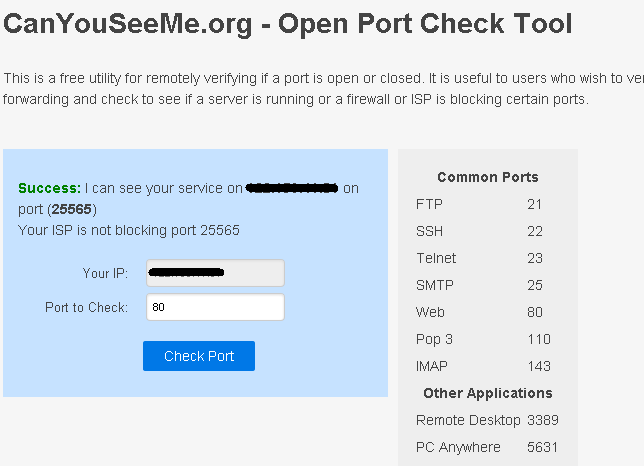
canyouseeme check port

If you want to turn off the port, disconnect the VPN. If you want to reopen, connect.

In addition to the above method, you can also use Open Port with Ngrok to not have to configure on Modem or Router.

So I have instructed to open the Internet Port simply without having to configure it in the Modem. If you have any questions, you can comment below. I will answer your question as soon as possible.

Good luck
CTV: TMQ.

The article achieved: 5/5 – (100 votes)

Tags: enteringInstructionsModemnetworkopenPortRouter
Previous Post

Hacker attacks to take over your account

Next Post

[Tạo 2D Platformer Game với Godot] Part 22: Level Map Design.

AnonyViet

AnonyViet

Related Posts

Save image as Type contains malicious code: Remove immediately before losing money unfairly!
Network

Save image as Type contains malicious code: Remove immediately before losing money unfairly!

March 19, 2026
Instructions on how to register a .co.uk domain name for free for 1 year
Network

Instructions on how to register a .co.uk domain name for free for 1 year

March 12, 2026
How to Setup Paperclip AI: Create a Company for AI Agent
Network

How to Setup Paperclip AI: Create a Company for AI Agent

March 12, 2026
Compilation of free and cheap APIs to run OpenClaw stably
Network

Compilation of free and cheap APIs to run OpenClaw stably

March 10, 2026
3 Services to Determine IP Location for Website (IP Geolocation API)
Network

3 Services to Determine IP Location for Website (IP Geolocation API)

March 10, 2026
How to buy a .STORE domain name for 1 USD (2026): Detailed instructions from A–Z
Network

How to buy a .STORE domain name for 1 USD (2026): Detailed instructions from A–Z

March 3, 2026
Next Post
[Tạo 2D Platformer Game với Godot] Part 22: Level Map Design.

[Tạo 2D Platformer Game với Godot] Part 22: Level Map Design.

0 0 votes
Article Rating
Subscribe
Login
Notify of
guest

guest

0 Comments
Oldest
Newest Most Voted
Inline Feedbacks
View all comments

Recent News

How to convert HEIC photos to JPG on iPhone without using an app

How to convert HEIC photos to JPG on iPhone without using an app

June 5, 2026
Get free Cambridge courses to prepare for IELTS, Starters, Movers

Get free Cambridge courses to prepare for IELTS, Starters, Movers

June 4, 2026
How to check network speed on Apple TV when the image is jerky or lagging

How to check network speed on Apple TV when the image is jerky or lagging

June 3, 2026
Instructions on how to prevent acquaintances from seeing your Tiktok

Instructions on how to prevent acquaintances from seeing your Tiktok

June 2, 2026
How to convert HEIC photos to JPG on iPhone without using an app

How to convert HEIC photos to JPG on iPhone without using an app

June 5, 2026
Get free Cambridge courses to prepare for IELTS, Starters, Movers

Get free Cambridge courses to prepare for IELTS, Starters, Movers

June 4, 2026
How to check network speed on Apple TV when the image is jerky or lagging

How to check network speed on Apple TV when the image is jerky or lagging

June 3, 2026
AnonyViet - English Version

AnonyViet

AnonyViet is a website share knowledge that you have never learned in school!

We are ready to welcome your comments, as well as your articles sent to AnonyViet.

Follow Us

Contact:

Email: anonyviet.com[@]gmail.com

Main Website: https://anonyviet.com

Recent News

How to convert HEIC photos to JPG on iPhone without using an app

How to convert HEIC photos to JPG on iPhone without using an app

June 5, 2026
Get free Cambridge courses to prepare for IELTS, Starters, Movers

Get free Cambridge courses to prepare for IELTS, Starters, Movers

June 4, 2026
  • Home
  • Home 2
  • Home 3
  • Home 4
  • Home 5
  • Home 6
  • Next Dest Page
  • Sample Page

6789 kv999

No Result
View All Result
  • Home
  • News
  • Software
  • Knowledge
  • MMO
  • Tips
  • Security
  • Network
  • Office

6789 kv999

wpDiscuz
0
0
Would love your thoughts, please comment.x
()
x
| Reply








