• Home
  • News
  • Software
  • Knowledge
  • MMO
  • Tips
  • Security
  • Network
  • Office
AnonyViet - English Version
  • Home
  • News
  • Software
  • Knowledge
  • MMO
  • Tips
  • Security
  • Network
  • Office
No Result
View All Result
  • Home
  • News
  • Software
  • Knowledge
  • MMO
  • Tips
  • Security
  • Network
  • Office
No Result
View All Result
AnonyViet - English Version
No Result
View All Result

Instructions to change Proxy, Socks for the browser

AnonyViet by AnonyViet
January 27, 2023
in Network
0

When participating in the Internet world, sometimes you will encounter some cases where you will have to change to another Country’s IP such as changing your Facebook 1 character name, Registering for hosting at x10hosting.com, or joining a forum Some people only have the IP permission of a particular Country to enter.

Join the channel Telegram of the AnonyViet 👉 Link 👈

Ways to change proxy, socks

  • Find and enter IP manually
  • Use browser addons (GepIP, Hola)
  • Use software (hidemyass…)

Today I will guide you to find and enter IP manually

Step 1: Find a site that provides proxy, socks.

You can go to google and type in the keywords “Free proxy list”, “free socks” and there will be a lot of pages that provide. VD:

http://proxylist.hidemyass.com/
http://www.xroxy.com/proxylist.php
http://www.proxynova.com/proxy-server-list
http://spys.ru/free-proxy-list

The proxy structure consists of two parts: IP:Port

VD: 111,112.54.98:8080

Step 2: Change the proxy for the browser

For Chrome

Go to the browser, select the icon in the upper right corner of the screen, select Setting
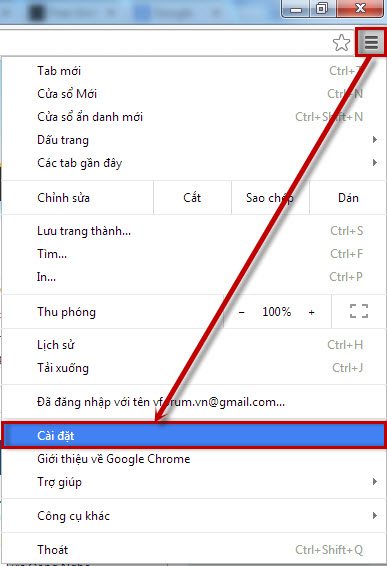
first

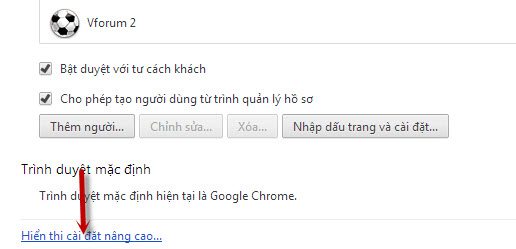
Select Show advanced settings…

2

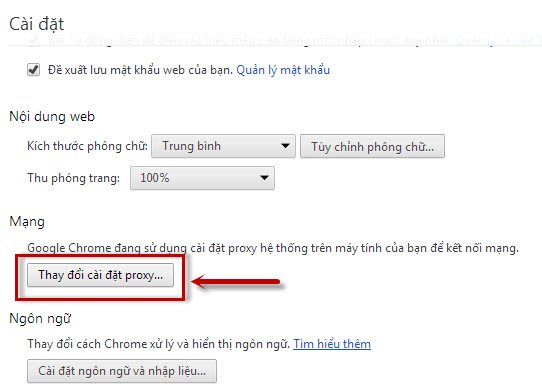
Select Change Proxy settings

3

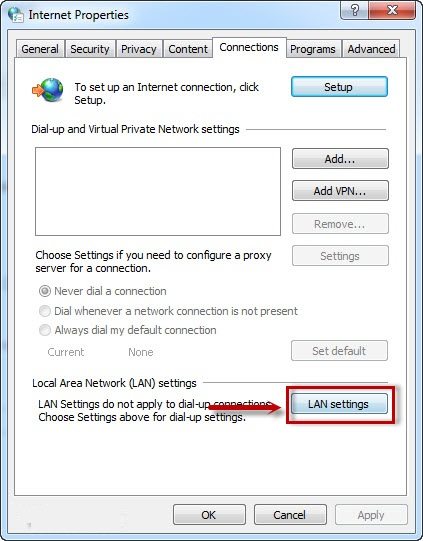
Select LAN settings

4

If Proxy Then enter the IP and Port in the Proxy Server box
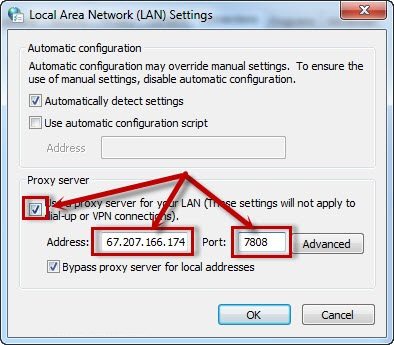
5

If Socks then select Advance, A new table appears, fill in Socks and Port in the box Socks:
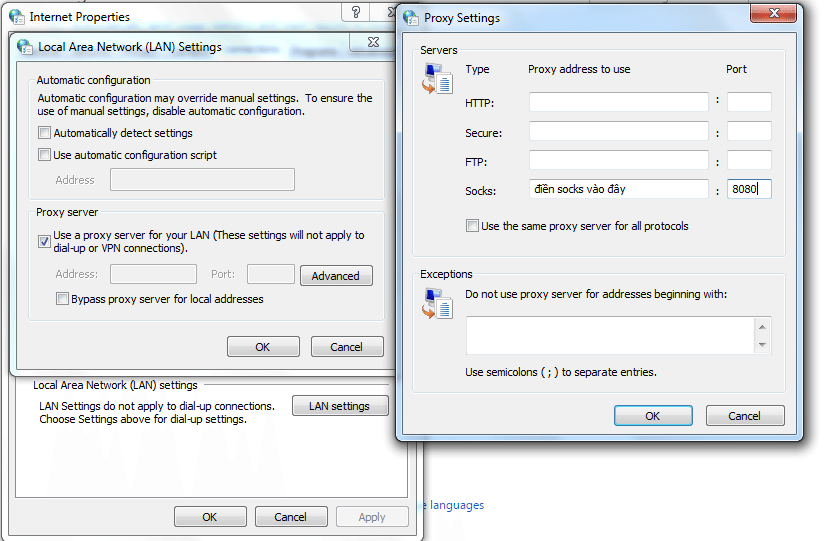
socks

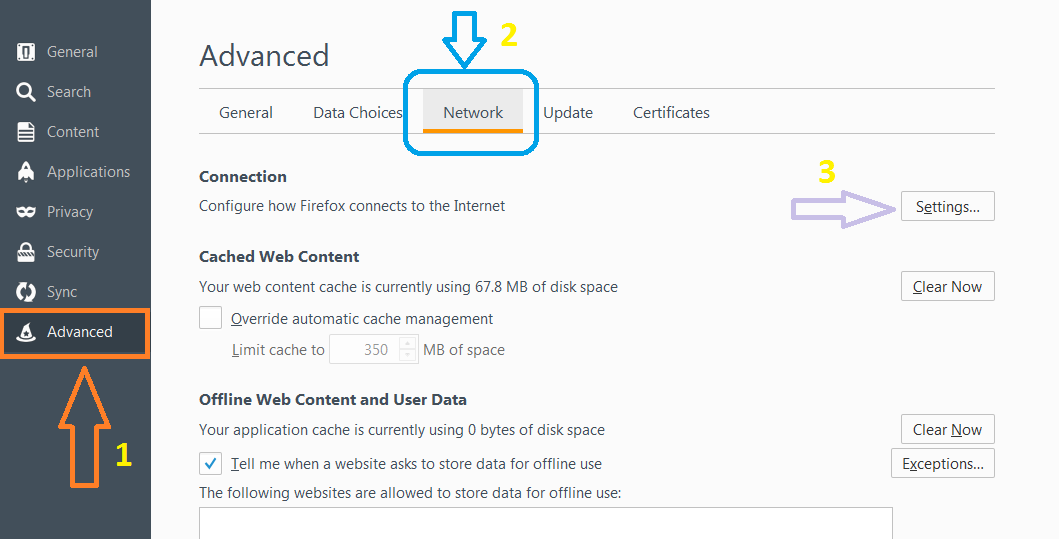
For Firefox do the same as in the picture
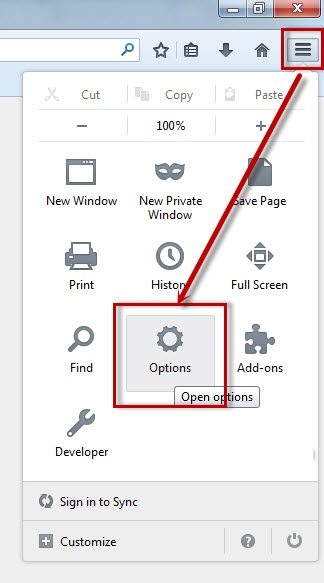
6

Do in turn 3 arrows 1,2,3

first

  • If it is a Proxy, enter the IP and Port in the HTTP Proxy line
  • If it’s Socks, enter the IP and Port in the Socs Host line
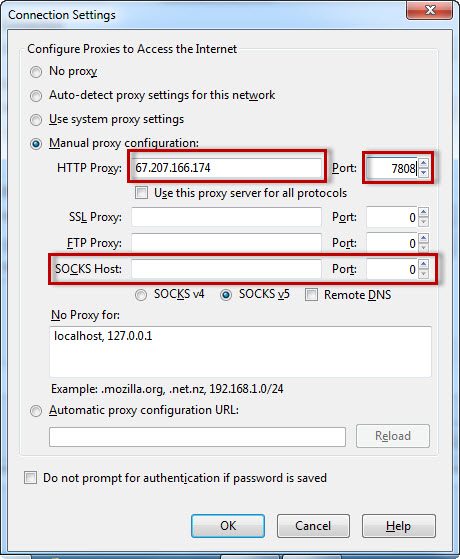
8

Some issues to note:

  • To check if proxy, socks are working? You go to the page http://cmyip.com If the correct IP of the proxy appears, the socket I just changed is successful.
  • If the Web does not load, it means that the Proxy, Socks is dead, I need to replace another one.
  • The life of Proxy with Socks is very short, if you want to use it continuously, you should create your own Proxy or Socks. It belongs to an advanced network knowledge, I will do another post on this topic


The article achieved: 5/5 – (100 votes)

Tags: browserchangeInstructionsProxySocks
Previous Post

Summary of ways to Hack Password that Hackers most often use

Next Post

How to schedule a meeting in Google Meet

AnonyViet

AnonyViet

Related Posts

Is Renting a Cheap VPS to Run Docker Really Effective?
Network

Is Renting a Cheap VPS to Run Docker Really Effective?

July 2, 2026
How to get a free domain for 1 year from Gravatar
Network

How to get a free domain for 1 year from Gravatar

June 23, 2026
Cloud Infrastructure Resilience: Mitigating Advanced Layer 7 Vulnerabilities and Securing High-Throughput Database Handshakes
Network

Cloud Infrastructure Resilience: Mitigating Advanced Layer 7 Vulnerabilities and Securing High-Throughput Database Handshakes

June 20, 2026
Save image as Type contains malicious code: Remove immediately before losing money unfairly!
Network

Save image as Type contains malicious code: Remove immediately before losing money unfairly!

March 19, 2026
Instructions on how to register a .co.uk domain name for free for 1 year
Network

Instructions on how to register a .co.uk domain name for free for 1 year

March 12, 2026
How to Setup Paperclip AI: Create a Company for AI Agent
Network

How to Setup Paperclip AI: Create a Company for AI Agent

March 12, 2026
Next Post
How to schedule a meeting in Google Meet

How to schedule a meeting in Google Meet

0 0 votes
Article Rating
Subscribe
Login
Notify of
guest

guest

0 Comments
Oldest
Newest Most Voted

Recent News

Some reasons I don’t like Windows 11

Some reasons I don’t like Windows 11

July 27, 2026
Instructions on how to get free Facebook white ticks

Instructions on how to get free Facebook white ticks

July 27, 2026
How to delete hidden files on Samsung phones, free up device space

How to delete hidden files on Samsung phones, free up device space

July 27, 2026
Collection of Windows 11 wallpapers for computers and phones

Collection of Windows 11 wallpapers for computers and phones

July 26, 2026
Some reasons I don’t like Windows 11

Some reasons I don’t like Windows 11

July 27, 2026
Instructions on how to get free Facebook white ticks

Instructions on how to get free Facebook white ticks

July 27, 2026
How to delete hidden files on Samsung phones, free up device space

How to delete hidden files on Samsung phones, free up device space

July 27, 2026
AnonyViet - English Version

AnonyViet

AnonyViet is a website share knowledge that you have never learned in school!

We are ready to welcome your comments, as well as your articles sent to AnonyViet.

Follow Us

Contact:

Email: anonyviet.com[@]gmail.com

Main Website: https://anonyviet.com

Recent News

Some reasons I don’t like Windows 11

Some reasons I don’t like Windows 11

July 27, 2026
Instructions on how to get free Facebook white ticks

Instructions on how to get free Facebook white ticks

July 27, 2026
  • Home
  • Home 2
  • Home 3
  • Home 4
  • Home 5
  • Home 6
  • Next Dest Page
  • Sample Page

say88 tỷ lệ kèo nhà cái kèo nhà cái 5 febet

No Result
View All Result
  • Home
  • News
  • Software
  • Knowledge
  • MMO
  • Tips
  • Security
  • Network
  • Office

say88 tỷ lệ kèo nhà cái kèo nhà cái 5 febet

wpDiscuz
0
0
Would love your thoughts, please comment.x
()
x
| Reply