

In this article, I will show you how to build a command line chat application in Python using socket library. If you don’t know what a socket is yet, don’t worry. I will explain it right away.
| Join the channel Telegram of the AnonyViet 👉 Link 👈 |

What are sockets?
Sockets are two end points that can communicate with each other on the same computer or on wireless devices.
Sockets are the backbone of the Internet, deep down all the communication we see today works from one point to another.
Socket programming is the way to make two node network to communicate with each other. One socket listens on a specific port at one IP (server), while another socket connects to the other socket to make a connection (client).
Socket modules are available by default in Python’s library. Therefore, you don’t need to install any more libraries.
Project structure
As explained above, sockets are nodes that can communicate with each other. And in this project, we will deploy 2 nodes using sockets, one is server and one is client.
Those two nodes will send messages to each other like a normal chat application.
Introduction to socket programming
Open command prompt and test the commands below.
Python 3.5.3 (default, Sep 27 2018, 17:25:39)
[GCC 6.3.0 20170516] on linux
Type "help", "copyright", "credits" or "license" for more information.
>>> import socket
>>> socket.gethostname() #getting our local host name
'kalebu-PC'
>>> socket.gethostbyname('www.google.com') #getting IP of Google
'172.217.170.4'
As we can see in the above example, you can get your hostname using the gethostname and get Google’s IP address using gethostbyname.
Create the first socket (nodes)
There are many communication protocols in use out there, depending on where it is being applied, such as Transmission communication Protocol (TCP), User Datagram Protocol (UDP), File transfer Protocol (FTP),…
To create a Chat application, you will use the Transmission communication protocol (TCP). If you don’t understand the protocol, that’s okay too.
To create a socket (nodes) in Python for TCP, we will need the following key parameters:
- socket.AF_INET means socket belongs to IPv4..
- socket.SOCK_STREAM means connection configured using TCP Protocol
Create a socket in python:
>>> import socket
>>> node = socket.socket(socket.AF_INET, socket.SOCK_SaTREAM)
Nodes above act as client or server on our chat application, it all depends on how we configure it, as we will create 2 applications, first we need to create nodes server.
Create Server nodes
I am an object-oriented programmer (OPP). Therefore, I will implement nodes server as a class.
Since I am building this node as a server, I will add some functionality that will allow this node to listen for incoming connection requests.
Create file Server.py
import socket
import threading

class ServerNode:
    def __init__(self):
        self.node = socket.socket(socket.AF_INET, socket.SOCK_STREAM)
        port_and_ip = ('127.0.0.1', 12345)
        self.node.bind(port_and_ip)
        self.node.listen(5)
        self.connection, addr = self.node.accept()

    def send_sms(self, SMS):
        self.connection.send(SMS.encode())

    def receive_sms(self):
        while True:
            data = self.connection.recv(1024).decode()
            print(data)

    def main(self):
        while True:
            message = input()
            self.send_sms(message)

server = ServerNode()
always_receive = threading.Thread(target=server.receive_sms)
always_receive.daemon = True
always_receive.start()
server.main()
Code explanation
Assign IP Address and Port
port_and_ip = ('127.0.0.1', 12345)
self.node.bind(port_and_ip)
Binding the IP address and port to our nodes is like using the IP key to enter the port’s room where the server node lives. Therefore, the client must need this IP key to connect to the server.
This means that the client node must access the correct server IP and port to connect to the server nodes. In this demo I will make the connection on one machine but you can also do it in the connected network by changing the IP address.
Listen to the connection
self.node.listen(5)
self.connection, addr = self.node.accept()
Nodes server will listen for incoming connection and then accept this connection.
send_sms() function
def send_sms(self, SMS):
    self.connection.send(SMS.encode())
This method is used to send message when connected, message must be in byte during transmission hence why we use encode() method on string.
receive_sms() function
def receive_sms(self):
    while True:
        data = self.connection.recv(1024).decode()
        print(data)
This function is used to receive notifications from the client during program operation, it will be threaded to prevent the application from freezing/lagging.
Main() function
def receive_sms(self):
    while True:
        data = self.connection.recv(1024).decode()
        print(data)
This function is used to display the message from the server and send it to the client.
Calling the function
server = ServerNode()
always_receive = threading.Thread(target=server.receive_sms)
always_receive.daemon = True
always_receive.start()
server.main()
The above 5 lines of code are to create the server and then run it by threading the receive functions (the receive_sms function).
Create Client nodes
Almost everything on the client node is similar to the server node except for the fact that the client node is connecting to the server instead of listening for connections.
Create file Client.py
import socket
import threading

class ClientNode:
    def __init__(self):
        self.node = socket.socket(socket.AF_INET, socket.SOCK_STREAM)
        port_and_ip = ('127.0.0.1', 12345)
        self.node.connect(port_and_ip)

    def send_sms(self, SMS):
        self.node.send(SMS.encode())

    def receive_sms(self):
        while True:
            data = self.node.recv(1024).decode()
            print(data)

    def main(self):
        while True:
            message = input()
            self.send_sms(message)

Client = ClientNode()
always_receive = threading.Thread(target=Client.receive_sms)
always_receive.daemon = True
always_receive.start()
Client.main()
So that’s it then. To run the chat application, you need to run the server.py file first and then run the client.py file.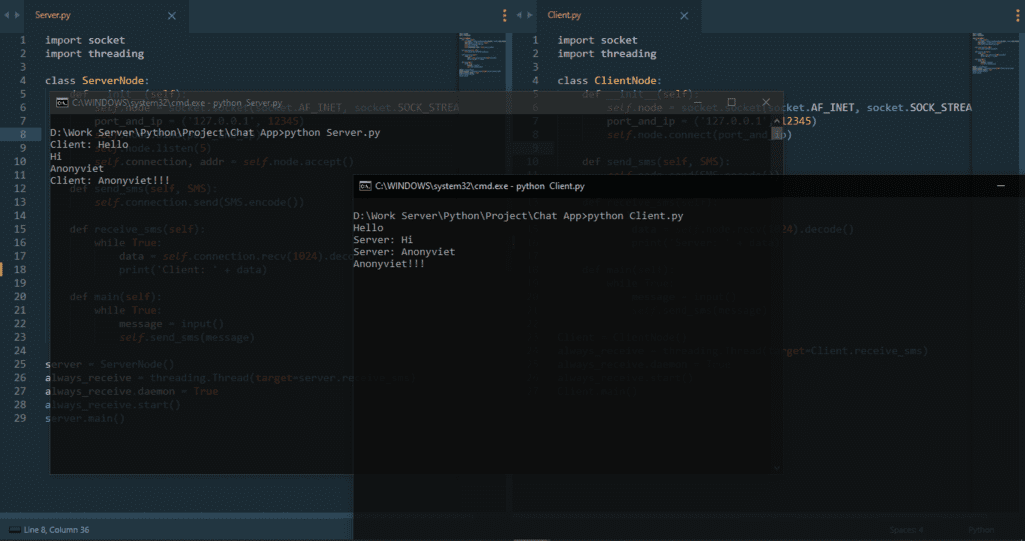
In addition to creating a Chat application, you can also watch a tutorial Create an application to check which country’s phone number is in Python by Anonyviet too.






