• Home
  • News
  • Software
  • Knowledge
  • MMO
  • Tips
  • Security
  • Network
  • Office
AnonyViet - English Version
  • Home
  • News
  • Software
  • Knowledge
  • MMO
  • Tips
  • Security
  • Network
  • Office
No Result
View All Result
  • Home
  • News
  • Software
  • Knowledge
  • MMO
  • Tips
  • Security
  • Network
  • Office
No Result
View All Result
AnonyViet - English Version
No Result
View All Result

How to move or turn off notification windows on Windows 10

AnonyViet by AnonyViet
October 24, 2024
in Tips
0

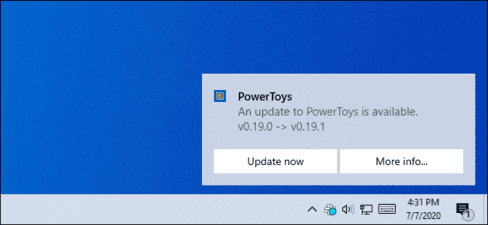
By default, the Windows 10 notification window appears in the bottom right corner of your screen. Windows itself doesn't let you move these notifications, but you can still move certain windows to other corners of the screen.

Join the channel Telegram belong to AnonyViet 👉 Link 👈

notification window

Registry cannot help you

Some websites will ask you to change the value of “DisplayToastAtBottom” in the registry to change the position of the notification. However, this only worked in early Preview versions of Windows and it was removed before the final release of Windows 10 was released.

Since the update Windows 10 May 2020there is still no built-in feature to move notifications on Windows 10, to the upper right, or left corner of the screen.

But there are still some things you can do to move those notifications.

Use Settings included in the application

Windows' built-in notifications are clearly inflexible. That's why many Windows applications have developed their own custom notification systems. If you want to turn off or move the notification in the right corner of the screen to another location, see the instructions below.

Some apps even support Windows 10's built-in notifications system. These apps let you choose where notifications appear in their settings,

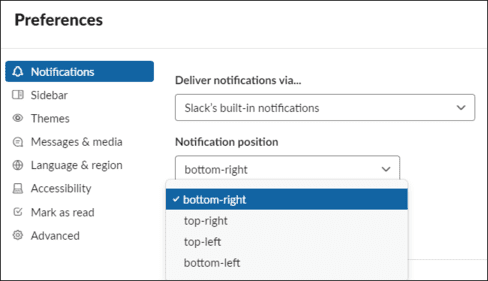
For example, in Slack, you can tap your workspace name in the upper left corner of the screen and select “Preferences“. Scroll down to the Notifications pane and you will see the option “Deliver notifications via“. Select “Slack's built-in notifications“, in section “Notification position“, you can choose where you like the notification to appear.

If you select “Windows Action Center” in Slack, you will no longer be able to choose the notification location because Windows 10 does not allow it.
How to move or turn off notification windows on Windows 10

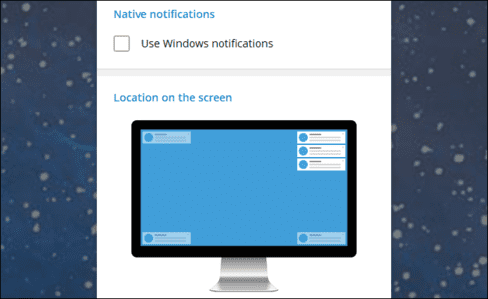
On Telegram, one of the popular chat applications, there is a similar option. If you open Settings and select “Notifications”you can deselect “Use windows notifications” and then you will be able to choose any corner of the screen to display Telegram notifications.
How to move or turn off notification windows on Windows 10

Not all apps have this option. It depends on each application developer. But, on Windows 10, all you can do is hope that the app offers options to edit notification placement. Check in the app's Settings to see if there is any such option.

Turn off (or hide) the application's notification window

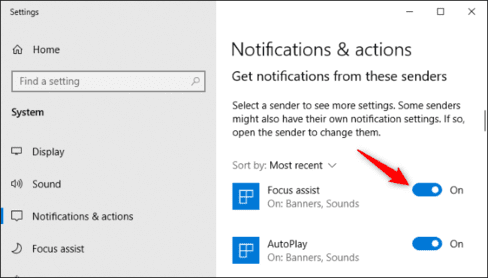
If an app's notifications are constantly distracting you and it uses Windows 10's built-in notifications, you can turn it off. You can disable all app notifications by going to Settings > System > Notifications & actions. In section “Get notifications from these senders”switch the apps to which you want to turn off notifications “Off”.
How to move or turn off notification windows on Windows 10

You can also hide notifications for those applications by clicking on the app in “Get notifications from these senders”.

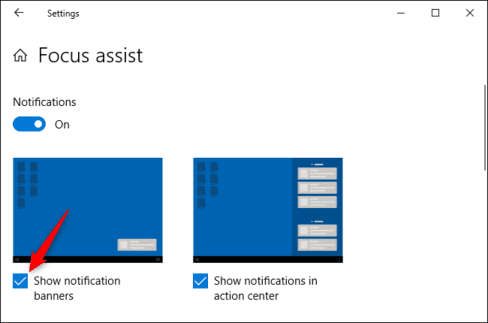
Deselect “Show notification banners” and turn on “Show notifications in action center”.
How to move or turn off notification windows on Windows 10

Those notifications will disappear and you can view them by opening them Action Center. Press Win + A or click the notification icon on the taskbar to open Action Center.


Previous Post

Facebook All in One: 30+ comprehensive social network management features

Next Post

Tips to hide IP address on iPhone are simple, anyone can do it

AnonyViet

AnonyViet

Related Posts

Windows 7/8.1/10 users will be upgraded to Windows 11 for free
Tips

Windows 7/8.1/10 users will be upgraded to Windows 11 for free

July 30, 2026
Instructions for receiving ChatGPT Plus for 1 month for free in 2026
Tips

Instructions for receiving ChatGPT Plus for 1 month for free in 2026

July 28, 2026
Some reasons I don’t like Windows 11
Tips

Some reasons I don’t like Windows 11

July 27, 2026
Instructions on how to get free Facebook white ticks
Tips

Instructions on how to get free Facebook white ticks

July 27, 2026
Collection of Windows 11 wallpapers for computers and phones
Tips

Collection of Windows 11 wallpapers for computers and phones

July 26, 2026
Don’t install leaked Windows 11
Tips

Don’t install leaked Windows 11

July 25, 2026
Next Post
Tips to hide IP address on iPhone are simple, anyone can do it

Tips to hide IP address on iPhone are simple, anyone can do it

0 0 votes
Article Rating
Subscribe
Login
Notify of
guest

guest

0 Comments
Oldest
Newest Most Voted

Recent News

Windows 7/8.1/10 users will be upgraded to Windows 11 for free

Windows 7/8.1/10 users will be upgraded to Windows 11 for free

July 30, 2026
Instructions for receiving the free Certified LLM Security Expert certificate

Instructions for receiving the free Certified LLM Security Expert certificate

July 30, 2026
MSI laptops are not just for gamers: Which line is suitable for students, office workers and creative people?

MSI laptops are not just for gamers: Which line is suitable for students, office workers and creative people?

July 29, 2026
What is quantum resistant cryptography? Why must the Internet change?

What is quantum resistant cryptography? Why must the Internet change?

July 29, 2026
Windows 7/8.1/10 users will be upgraded to Windows 11 for free

Windows 7/8.1/10 users will be upgraded to Windows 11 for free

July 30, 2026
Instructions for receiving the free Certified LLM Security Expert certificate

Instructions for receiving the free Certified LLM Security Expert certificate

July 30, 2026
MSI laptops are not just for gamers: Which line is suitable for students, office workers and creative people?

MSI laptops are not just for gamers: Which line is suitable for students, office workers and creative people?

July 29, 2026
AnonyViet - English Version

AnonyViet

AnonyViet is a website share knowledge that you have never learned in school!

We are ready to welcome your comments, as well as your articles sent to AnonyViet.

Follow Us

Contact:

Email: anonyviet.com[@]gmail.com

Main Website: https://anonyviet.com

Recent News

Windows 7/8.1/10 users will be upgraded to Windows 11 for free

Windows 7/8.1/10 users will be upgraded to Windows 11 for free

July 30, 2026
Instructions for receiving the free Certified LLM Security Expert certificate

Instructions for receiving the free Certified LLM Security Expert certificate

July 30, 2026
  • Home
  • Home 2
  • Home 3
  • Home 4
  • Home 5
  • Home 6
  • Next Dest Page
  • Sample Page

say88 tỷ lệ kèo nhà cái kèo nhà cái 5 febet

No Result
View All Result
  • Home
  • News
  • Software
  • Knowledge
  • MMO
  • Tips
  • Security
  • Network
  • Office

say88 tỷ lệ kèo nhà cái kèo nhà cái 5 febet

wpDiscuz
0
0
Would love your thoughts, please comment.x
()
x
| Reply