• Home
  • News
  • Software
  • Knowledge
  • MMO
  • Tips
  • Security
  • Network
  • Office
AnonyViet - English Version
  • Home
  • News
  • Software
  • Knowledge
  • MMO
  • Tips
  • Security
  • Network
  • Office
No Result
View All Result
  • Home
  • News
  • Software
  • Knowledge
  • MMO
  • Tips
  • Security
  • Network
  • Office
No Result
View All Result
AnonyViet - English Version
No Result
View All Result

How to hide the Home Bar on iPhone for uninterrupted gaming

AnonyViet by AnonyViet
November 28, 2023
in Software
0

How to hide the Home Bar on iPhone is one of the tricks that many iPhone users are interested in. The Home Bar is a virtual navigation bar that appears at the bottom of the iPhone screen, helping you perform operations such as returning to the home screen, switching applications, etc. However, it can also cause discomfort for some users. Some people, especially when watching videos, playing games, or reading books, can easily slide their hand into the Home Bar, causing you to return to the main screen.

Join the channel Telegram belong to AnonyViet 👉 Link 👈

Why does the iPhone have a Home Bar?

The Home Bar appears from Iphone X onwards, replacing the mechanical Home button on older iPhone versions.

This bar helps users operate their device or perform tasks such as swiping up to enter multitasking mode or quickly switching between recently opened applications. However, Apple has not allowed users to completely remove this navigation bar.
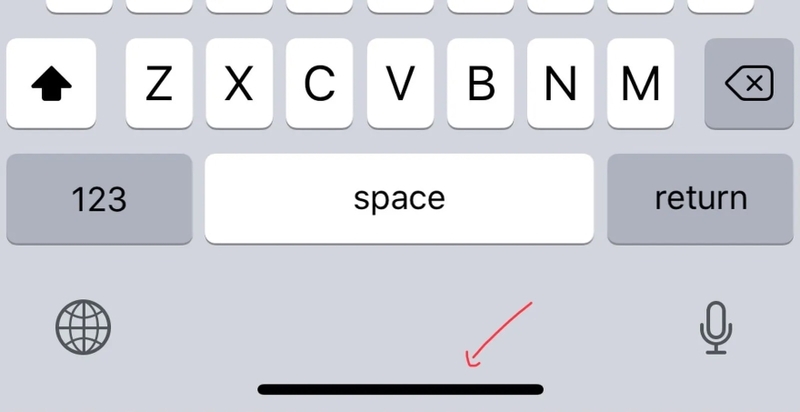
How to hide the Home Bar on iPhone
Thanh Home Bar

What is ‘Guided Access’?

‘Guided Access’ is an iOS feature that helps you control access to apps and other features on your iPhone. You can use this feature to limit screen time, block notifications, disable physical buttons, or hide unwanted parts of the screen, like the Home Bar.

Instructions on how to hide the Home Bar on iPhone

To hide the Home Bar on iPhone, you need to follow these steps:

Step 1: Open the Settings app on iPhone, select ‘Accessibility’
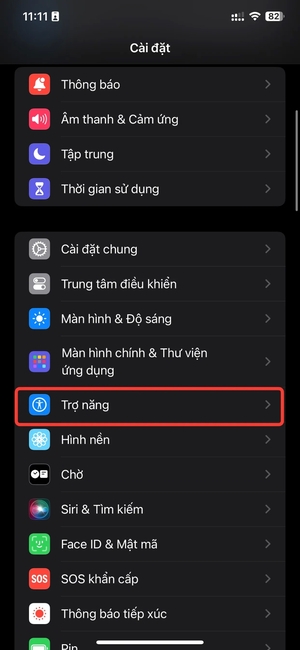
How to hide the Home Bar on iPhone
Select ‘Accessibility’

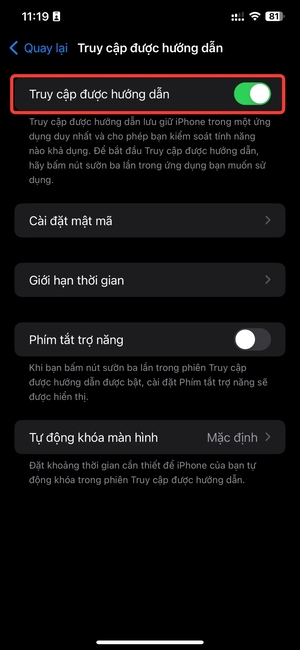
Step 2: Select enable ‘Guided Access’
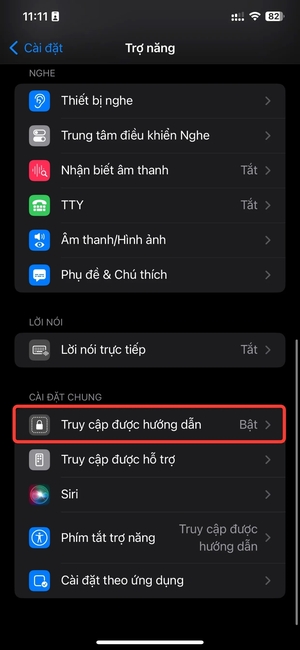
How to hide the Home Bar on iPhone
Click ‘Guided Access’
How to hide the Home Bar on iPhone
Enable this feature

Step 3: Open the app where you want to hide the Home Bar, for example the YouTube app. To activate the ‘Guided Access’ function, simply press the Power button 3 times in succession.

Step 4: Tap the ‘Get Started’ button > Enter iPhone password

Now, you can watch videos full screen or play games without being distracted or accidentally sliding into the Home Bar.

To turn off this function, you must press the Power button 3 times > Enter the password for iPhone > Select ‘Finish’ and you’re done.

Benefits of hiding the Home Bar on iPhone

Hiding the Home Bar on iPhone has many benefits, such as:

  • Optimize the interface: You will have a cleaner and simpler interface, without taking up space by the Home Bar. You also won’t get confused when using the on-screen swiping features.
  • Be more focused: You won’t be distracted by the Home Bar when watching videos, playing games, reading books or working. You can also use Guided Access to block notifications, sounds, or other physical buttons.
  • Easy on/off: You can quickly turn on/off the Home Bar hiding feature by pressing the Power button 3 times. You can also customize other options for each individual application.

Epilogue

Equal How to hide the Home Bar on iPhone, you will have a panoramic, uninterrupted, distraction-free screen when watching videos, playing games, or reading books on your device. You just need to follow the simple steps I have instructed above to enjoy a seamless entertainment experience without being affected by the Home Bar. Good luck!


Rate this post

Tags: bargaminghidehomeiPhoneuninterrupted
Previous Post

How to install flip clock on iPhone – Brings a new and unique interface

Next Post

Shopee affiliate marketing using VPS

AnonyViet

AnonyViet

Related Posts

Share Key Active Visual Studio 2026
Software

Share Key Active Visual Studio 2026

November 15, 2025
Instructions for using the online number-to-word conversion tool for accountants and offices
Software

Instructions for using the online number-to-word conversion tool for accountants and offices

November 15, 2025
2 applications to monitor flooding situation in Ho Chi Minh City
Software

2 applications to monitor flooding situation in Ho Chi Minh City

November 14, 2025
How to get 2000 free Manus credits in just 3 steps
Software

How to get 2000 free Manus credits in just 3 steps

November 14, 2025
Detailed instructions on how to submit red books on VNeID right at home
Software

Detailed instructions on how to submit red books on VNeID right at home

November 13, 2025
How to install Anh Hai’s Pho Shop on MacBook is super easy
Software

How to install Anh Hai’s Pho Shop on MacBook is super easy

November 11, 2025
Next Post
Shopee affiliate marketing using VPS

Shopee affiliate marketing using VPS

0 0 votes
Article Rating
Subscribe
Login
Notify of
guest

guest

0 Comments
Oldest
Newest Most Voted
Inline Feedbacks
View all comments

Recent News

Instructions on how to edit Facebook scheduled posts

Instructions on how to edit Facebook scheduled posts

November 16, 2025
Suggested AI command to create a rustic and charming image of a Ban Lien girl

Suggested AI command to create a rustic and charming image of a Ban Lien girl

November 16, 2025
Windows 10 will have a new, simpler interface

Windows 10 will have a new, simpler interface

November 16, 2025
Share Key Active Visual Studio 2026

Share Key Active Visual Studio 2026

November 15, 2025
Instructions on how to edit Facebook scheduled posts

Instructions on how to edit Facebook scheduled posts

November 16, 2025
Suggested AI command to create a rustic and charming image of a Ban Lien girl

Suggested AI command to create a rustic and charming image of a Ban Lien girl

November 16, 2025
Windows 10 will have a new, simpler interface

Windows 10 will have a new, simpler interface

November 16, 2025
AnonyViet - English Version

AnonyViet

AnonyViet is a website share knowledge that you have never learned in school!

We are ready to welcome your comments, as well as your articles sent to AnonyViet.

Follow Us

Contact:

Email: anonyviet.com[@]gmail.com

Main Website: https://anonyviet.com

Recent News

Instructions on how to edit Facebook scheduled posts

Instructions on how to edit Facebook scheduled posts

November 16, 2025
Suggested AI command to create a rustic and charming image of a Ban Lien girl

Suggested AI command to create a rustic and charming image of a Ban Lien girl

November 16, 2025
  • Home
  • Home 2
  • Home 3
  • Home 4
  • Home 5
  • Home 6
  • Next Dest Page
  • Sample Page

new88 trang chủ shbet trang chủ f168 trang chủ qq88 nhà cái 78win

No Result
View All Result
  • Home
  • News
  • Software
  • Knowledge
  • MMO
  • Tips
  • Security
  • Network
  • Office

new88 trang chủ shbet trang chủ f168 trang chủ qq88 nhà cái 78win

wpDiscuz
0
0
Would love your thoughts, please comment.x
()
x
| Reply