• Home
  • News
  • Software
  • Knowledge
  • MMO
  • Tips
  • Security
  • Network
  • Office
AnonyViet - English Version
  • Home
  • News
  • Software
  • Knowledge
  • MMO
  • Tips
  • Security
  • Network
  • Office
No Result
View All Result
  • Home
  • News
  • Software
  • Knowledge
  • MMO
  • Tips
  • Security
  • Network
  • Office
No Result
View All Result
AnonyViet - English Version
No Result
View All Result

How to get 12 months of Photoshop Web for free, no Visa card required

AnonyViet by AnonyViet
November 25, 2025
in Tips
0

Get 12 months of Photoshop Web for free is the hottest topic in the design and content creation community these days. This is a special cooperation program between Adobe and Google to provide a professional photo editing experience right on the browser without installing heavy software or requiring an international payment card.

Join the channel Telegram belong to AnonyViet 👉 Link 👈

The power of the web-based version of Photoshop

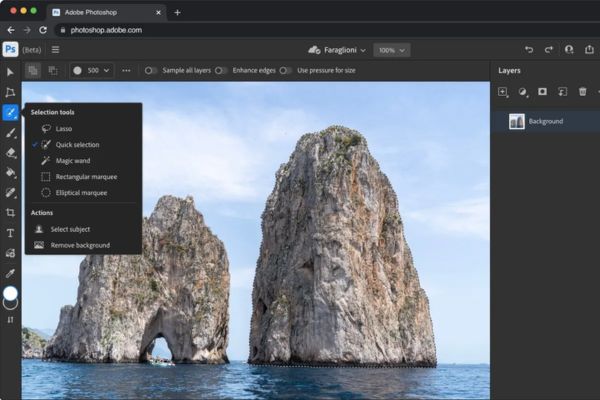
Although it cannot completely replace the Desktop version with full in-depth features, Photoshop Web is an extremely bright solution for quick tasks. Adobe is trying to expand the creative ecosystem, helping users work anytime, anywhere with just an office-configured laptop. This version is especially suitable for those who need to edit photos on the go without wanting to open heavy software.

Outstanding features that users will experience include:

  • Tools Generative Fill Using artificial intelligence (AI) to magically and naturally add or remove objects in photos.
  • The ability to remove background and separate subject background happens quickly and accurately with just a few simple mouse clicks.
  • Users can easily perform color correction, light balance and basic skin retouching for portrait photos.
  • Resizing images or creating thumbnails in bulk is more convenient than ever, helping to save time.
  • The system supports image cropping tools (crop) according to the standard ratios of today’s popular social networks.
The power of the web-based version of Photoshop

Privileges when activating the 12-month package

When you own this copyright account, your workflow will become much smoother thanks to deep integration into the browser. Adobe also commits that this extension will continuously be updated with new features in the near future to better serve the community. Specifically, users will receive the following benefits:

  • The ability to quickly open images from the web via the right-click menu helps eliminate cumbersome steps to save and open files.
  • Users can edit photos according to Instagram, Facebook or YouTube standards directly on Chrome or Edge browsers.
  • After editing, the works can be downloaded immediately to the computer with the highest quality.
  • Experience working quickly and smoothly without having to start Photoshop Desktop software that consumes computer resources.

How to get 12 months of Photoshop Web for free

To participate in this program, you do not need to prepare a bank card, just an Adobe account (new registration is possible for free) and a browser using the Chromium core such as Google Chrome or Microsoft Edge. The specific steps are as follows:

Step 1: You need to go to your browser’s online store and search for the extension called “Adobe Photoshop” or quick access HERE. Install this extension on your Chrome or Edge to start the process of receiving the offer.
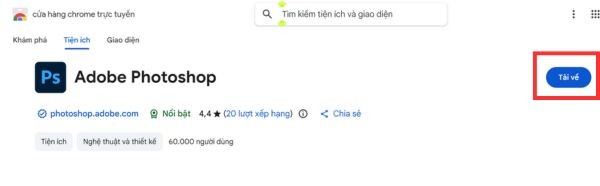
Install extensions "Adobe Photoshop"
Install the extension “Adobe Photoshop”

Step 2: After successful installation, a window or utility icon will appear. Here, find and click the button “Start free offers“, then continue to select “Get started now” for the system to record the request.
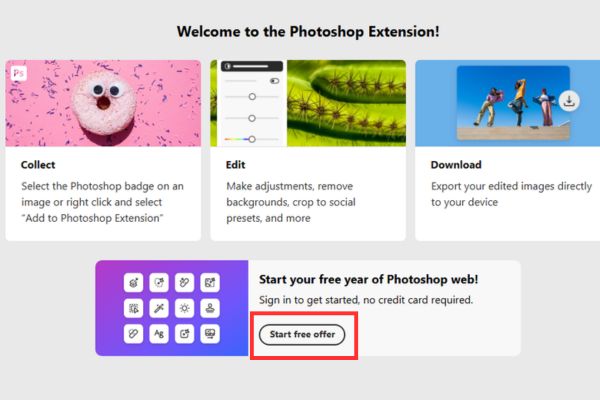
Click the button "Start free offers"
Click the “Start free offer” button

Step 3: The system will redirect to the page Log in to your account. Please use your personal Adobe account to log in, or create a new account for free if you have never used Adobe services.

Step 4: After successfully logging in, you will receive a notification confirming your 12-month free Photoshop Web access package. From now on, you can freely use copyright features.

Important note: You must install the extension and activate it before the date December 8 to enjoy benefits.
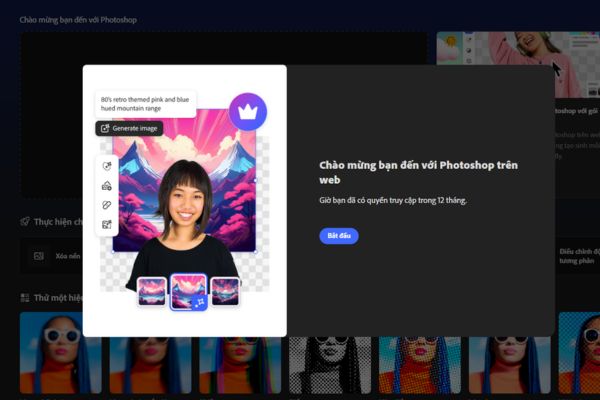
How to get 12 months of Photoshop Web for free, no Visa card needed

Conclusion

This incentive program is truly a great bargain for those who love creativity but do not want to invest in expensive monthly licensing fees. Please quickly follow the steps above Get 12 months of Photoshop Web for free before the registration portal closes on December 8!


Tags: cardfreeMonthsPhotoshoprequiredVISAweb
Previous Post

[Godot RPG] #4 : Tilemap

Next Post

How to experience Windows XP online, without installation

AnonyViet

AnonyViet

Related Posts

Get free Cambridge courses to prepare for IELTS, Starters, Movers
Tips

Get free Cambridge courses to prepare for IELTS, Starters, Movers

June 4, 2026
How to record reaction videos with Android phones, no app needed
Tips

How to record reaction videos with Android phones, no app needed

June 1, 2026
Instructions on how to get Google AI Pro 1 year for free for new accounts
Tips

Instructions on how to get Google AI Pro 1 year for free for new accounts

June 1, 2026
Top free AI tools to help write, test and optimize content
Tips

Top free AI tools to help write, test and optimize content

June 1, 2026
Instructions for receiving Lovable Pro 12 months for free
Tips

Instructions for receiving Lovable Pro 12 months for free

May 29, 2026
Instructions for receiving 1 month of ElevenLabs Creator for free worth
Tips

Instructions for receiving 1 month of ElevenLabs Creator for free worth $22

May 25, 2026
Next Post
How to experience Windows XP online, without installation

How to experience Windows XP online, without installation

0 0 votes
Article Rating
Subscribe
Login
Notify of
guest

guest

0 Comments
Oldest
Newest Most Voted
Inline Feedbacks
View all comments

Recent News

How to convert HEIC photos to JPG on iPhone without using an app

How to convert HEIC photos to JPG on iPhone without using an app

June 5, 2026
Get free Cambridge courses to prepare for IELTS, Starters, Movers

Get free Cambridge courses to prepare for IELTS, Starters, Movers

June 4, 2026
How to check network speed on Apple TV when the image is jerky or lagging

How to check network speed on Apple TV when the image is jerky or lagging

June 3, 2026
Instructions on how to prevent acquaintances from seeing your Tiktok

Instructions on how to prevent acquaintances from seeing your Tiktok

June 2, 2026
How to convert HEIC photos to JPG on iPhone without using an app

How to convert HEIC photos to JPG on iPhone without using an app

June 5, 2026
Get free Cambridge courses to prepare for IELTS, Starters, Movers

Get free Cambridge courses to prepare for IELTS, Starters, Movers

June 4, 2026
How to check network speed on Apple TV when the image is jerky or lagging

How to check network speed on Apple TV when the image is jerky or lagging

June 3, 2026
AnonyViet - English Version

AnonyViet

AnonyViet is a website share knowledge that you have never learned in school!

We are ready to welcome your comments, as well as your articles sent to AnonyViet.

Follow Us

Contact:

Email: anonyviet.com[@]gmail.com

Main Website: https://anonyviet.com

Recent News

How to convert HEIC photos to JPG on iPhone without using an app

How to convert HEIC photos to JPG on iPhone without using an app

June 5, 2026
Get free Cambridge courses to prepare for IELTS, Starters, Movers

Get free Cambridge courses to prepare for IELTS, Starters, Movers

June 4, 2026
  • Home
  • Home 2
  • Home 3
  • Home 4
  • Home 5
  • Home 6
  • Next Dest Page
  • Sample Page

6789 kv999

No Result
View All Result
  • Home
  • News
  • Software
  • Knowledge
  • MMO
  • Tips
  • Security
  • Network
  • Office

6789 kv999

wpDiscuz
0
0
Would love your thoughts, please comment.x
()
x
| Reply