This is how to edit the interface of the Client Game application League of Legends your 四 宮 shared on Group J2Team. You can contact the author of this guide via some of the following methods:
| Join the channel Telegram of the AnonyViet 👉 Link 👈 |
- Discord: Altina#9999
- Facebook: I temporarily stopped receiving contact via Facebook, hope everyone understands (January 9, 2023)
- Ingame LOL: glitter
Note before doing:
Before implementing the League of Legends Client Interface Mod you need to turn off Windows Defender before downloading and extracting the file because otherwise WD will delete the .exe file because this is a system intervention program and WD identifies as a threat. harmful.
So please turn off WD before loading and unpacking League Loader. Also, before turning it back on, everyone press Windows+ I -> Update & Recovery -> Virus & threat protection.
Under section Virus & threat protection settingsselect Manage settingsscroll down a bit and press Add or remove exclusions same picture.
Then add the folder path containing the file LeagueLoader.exe so that when WD is back on, it won’t scan to that folder and delete the .exe file anymore
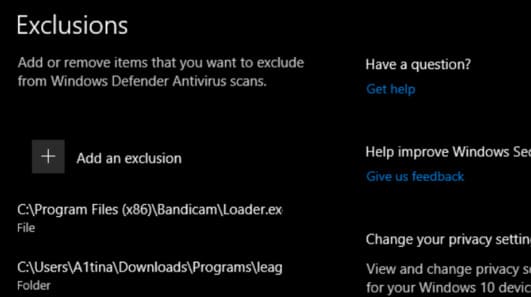
Let’s edit the CLIENT LOL . interface
Preparation stage:
Download App League Loader: Release league-loader-0.3b · nomi-san/league-loader (github.com)
Download 1 .js file and 1 .css file yourself to this Drive: mod client lol | Backup
How to edit the Client interface LOL
Download and extract the League Loader app, then run the League Loader.exe file. At the interface of the app, at the level of League Client path, people point the path to the folder containing the file LeagueClient.exe (Client file of LOL). Normally the default will be C:\Riot Games\League of Legends. After pointing the path, press Install to install the app on the client. Now open the client LOL will show Dev Tool (F12)
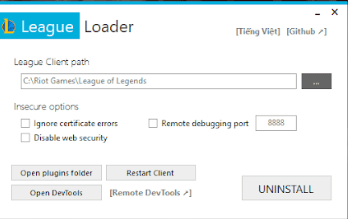
Copy files a1tina.js and paste it into the plugins folder of the League Loader app. At this step, people can open the game client, then select the Setting icon (the cogwheel), you will see the Reload theme button. Click on it and the LOL client interface will now look like the image below.
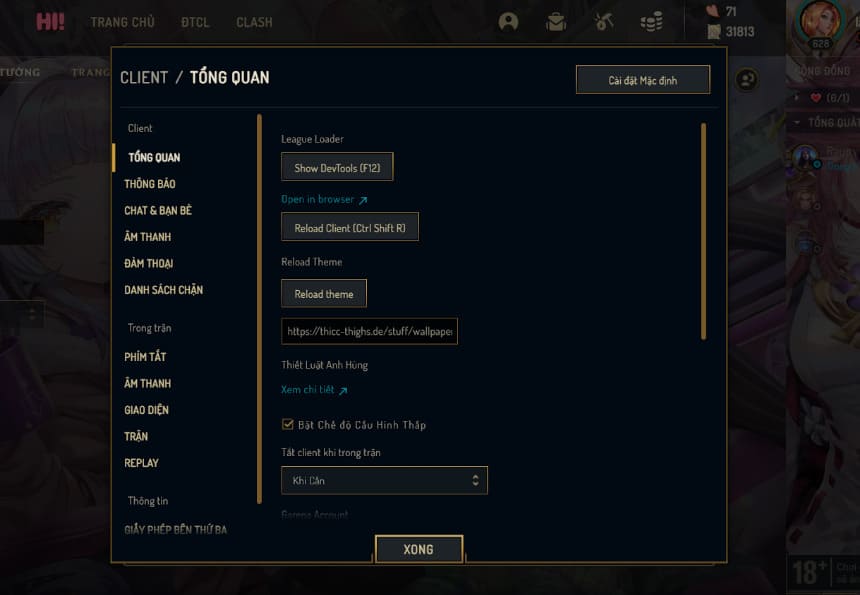
So how to customize the client to your liking? File a1tina.css the author’s will support that. At this step, everyone needs to prepare more:
- Discord (web or app versions are fine)
- A background that you want to resize to 1920×1080 or more to replace the client’s default background.
- 1 background sidebar size exactly is 225×720 to change the background of the friends list. People can use Paint or Photoshop to crop the image and get the desired frame in that 225×720 size.
Start making:
Step 1: Upload 2 backgrounds to Discord by sending pictures to a certain server, or create a server and upload photos (introverts like me >///<) then copy the links of both backgrounds, paste them in Notepad and leave there.
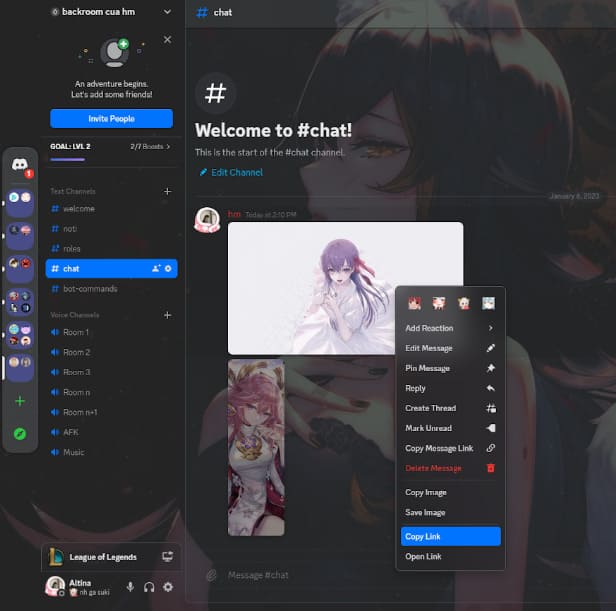
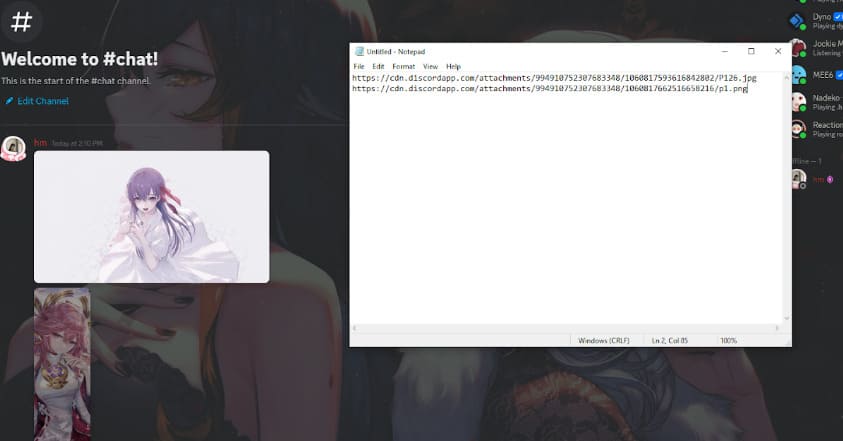
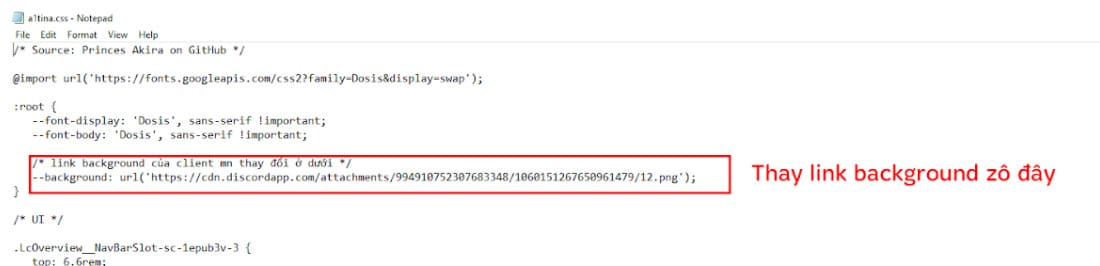
Step 2: Open file a1tina.css up, I have noted quite carefully in that file the positions that people can edit. I just need to change the background link in my file to the background link I just copied from Discord.
Continue to scroll down to adjust:
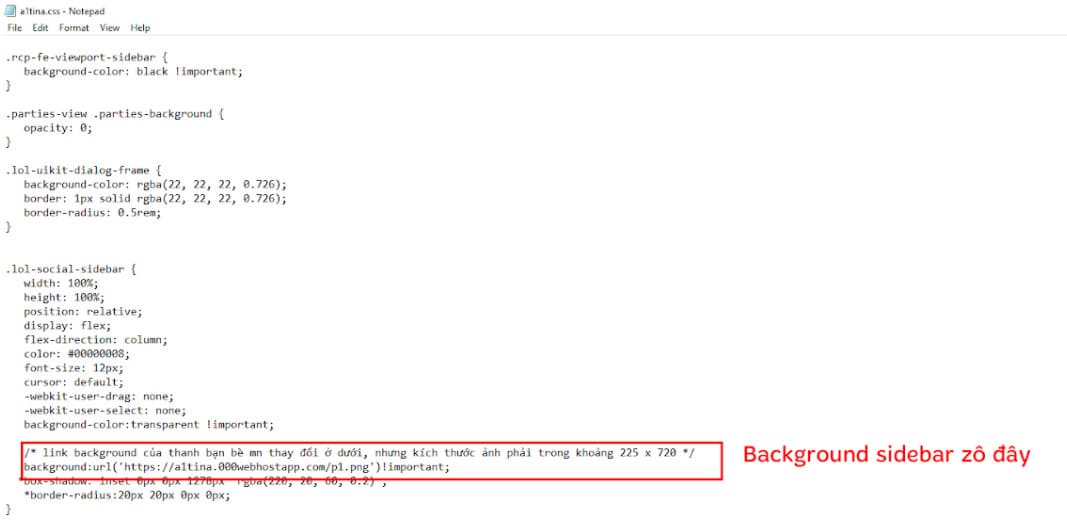
Some icon links to change the icon to display RP, THL, etc. I all noted in the file a1tina.css, to change them, everyone also upload their desired icon to Discord and then take the image link and paste it in the correct position. It’s fine to apply in the .css file. The icon size is optional, but it is recommended to be as small as 100×100.
Now need to Upload 2 files .css and .js up to call down the app.
At this final stage, people visit the website Host Static files online for Free – StaticSaveis a place to host .js, .css, .html… files for free. Click Get Started and create a new profile using gmail. Next, create a new folder with any name (as long as the folder name does not match the folders that ngta created before)
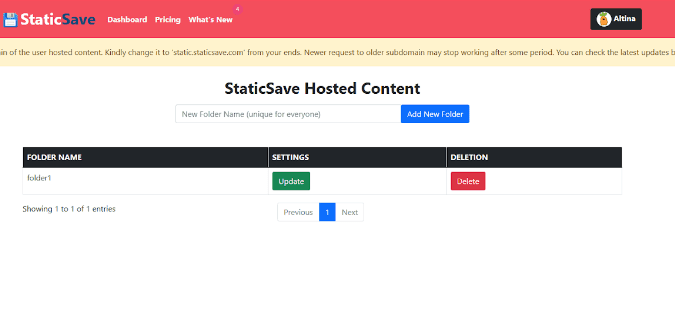
After creating the folder, proceed to create a new .css file with any name. I assume this file is named a.css.
You will see your a.css file with the following address:
https://static.staticsave.com/folder1/a.css
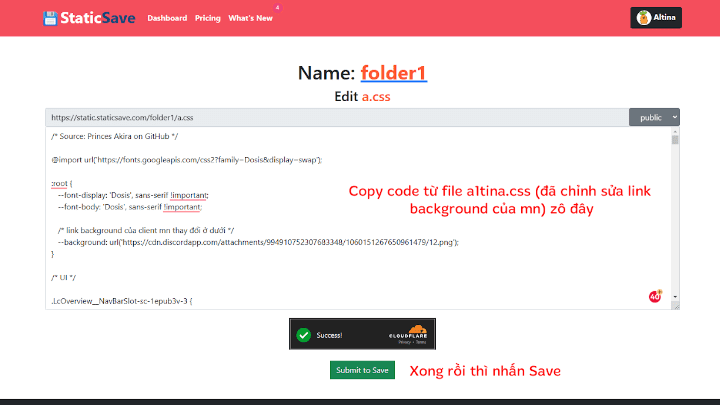
Everyone save the address of the .css file that everyone has created. Its address is located at the beginning of the file name (as shown above).
Next, go back to the a1tina.js file in the plugins folder of the League Loader app that you just pasted in. Open that file with Notepad and edit it as shown below:
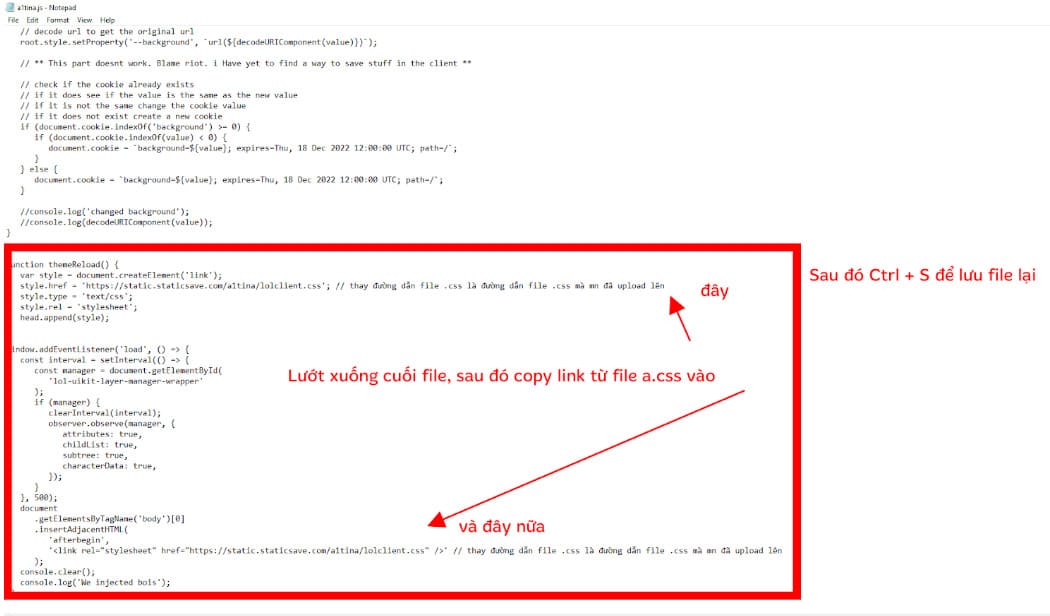
That’s all the steps are done, Now open the game client, select Settings -> Reload Theme and enjoy the result.
If you’ve followed the steps and still don’t show results, re-read them carefully to see if anyone missed a step. If there is an error, please respond to the author via the contact methods at the top of the article.
Link to original article: https://docs.google.com/document/d/19QwuCpfIcgd5peIPlNAWHtkrtTR5mRkkNgFgt1kmWZ4/edit?fbclid=IwAR2VKjmQrzY3TgJCU_CHxUFmfO__HuOA9uRqIzWh4Yl-9Ps4