
• Home
  • News
  • Software
  • Knowledge
  • MMO
  • Tips
  • Security
  • Network
  • Office
AnonyViet - English Version
  • Home
  • News
  • Software
  • Knowledge
  • MMO
  • Tips
  • Security
  • Network
  • Office
No Result
View All Result
  • Home
  • News
  • Software
  • Knowledge
  • MMO
  • Tips
  • Security
  • Network
  • Office
No Result
View All Result
AnonyViet - English Version
No Result
View All Result

Explore the AI ​​tool to write captions for products

AnonyViet by AnonyViet
November 20, 2023
in Tips
0

Did you know there is one AI writes captions for products quickly and effectively? This is a great tool to help you save time and effort in writing captions. So what is that tool? Let’s find out through this article!

Join the channel Telegram belong to AnonyViet 👉 Link 👈

Benefits of AI writing captions for products

AI writing captions for products is a tool based on artificial intelligence, capable of analyzing product images and creating appropriate, creative and unique captions, bringing benefits such as:

  • Helps you save time and effort, you no longer need to think or read many sources to get ideas for writing captions.
  • Helps you increase sales efficiency, because AI-generated captions will attract customers’ attention, demonstrate product features, benefits and value, and stimulate purchasing actions.
  • Helps you customize the language and style of your articles as you like. You can choose a friendly, professional, humorous, or any other style you like.
  • Add emojis and hashtags to make captions more vivid and prominent.

How to use AI to write captions for products

Step 1: You access the Aima page here > Select “Upload image” to upload the product image
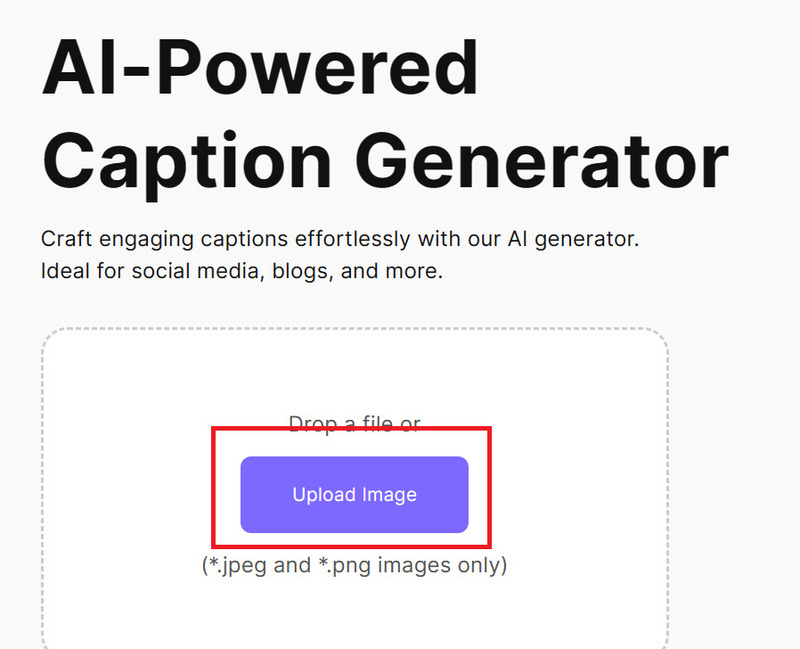
AI writes captions for products
Select “Upload image”

Step 2: Choose the language and writing style (friendly, professional, humorous,…)

AI writes captions for products
Choose language and post style

Step 3: Click “Setting” to add emoji and hashtags if you want
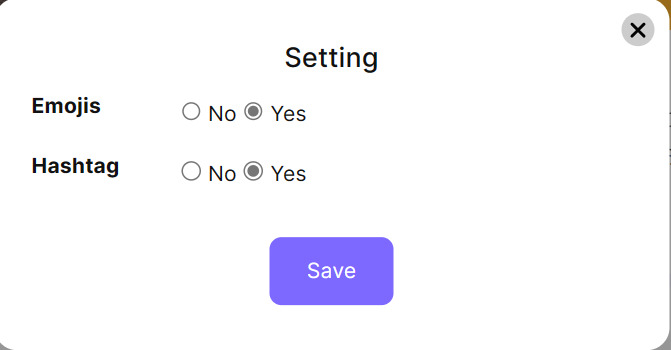
AI writes captions for products
Click “Setting” to add emoji and hashtags

Step 4: Finally, click “Generate”

And we have the result:

AI writes captions for products

You can click Copy to copy again or Regenerate to capture WHO Rewrite another caption.

Epilogue

AI writes captions for products is a useful and convenient tool for those who want quality and effective captions extremely quickly. You just need to upload a product image and let AI do the rest. Wish you a happy experience!


Rate this post

Tags: captionsexploreproductstoolwrite
Previous Post

Ho Chi Minh City digital map competes with Google Maps: Continuously and accurately updated home location

Next Post

How to turn off ZaloPay advertising notifications to avoid being bothered

AnonyViet

AnonyViet

Related Posts

How to add sliders to Facebook Stories to easily rewind videos
Tips

How to add sliders to Facebook Stories to easily rewind videos

April 21, 2026
How to change the default font on Windows 10
Tips

How to change the default font on Windows 10

April 13, 2026
5 tips for using a Browser to replace an App (helps save RAM, time and money)
Tips

5 tips for using a Browser to replace an App (helps save RAM, time and money)

April 13, 2026
How to make funny MeMe photos without Photoshop within 10 seconds
Tips

How to make funny MeMe photos without Photoshop within 10 seconds

April 11, 2026
How to quickly design your own Logo without Photoshop
Tips

How to quickly design your own Logo without Photoshop

April 10, 2026
How to convert Website into App on Windows
Tips

How to convert Website into App on Windows

April 9, 2026
Next Post
How to turn off ZaloPay advertising notifications to avoid being bothered

How to turn off ZaloPay advertising notifications to avoid being bothered

0 0 votes
Article Rating
Subscribe
Login
Notify of
guest

guest

0 Comments
Oldest
Newest Most Voted
Inline Feedbacks
View all comments

Recent News

Tips to completely turn off CAPTCHA codes on iPhone and Mac are super simple

Tips to completely turn off CAPTCHA codes on iPhone and Mac are super simple

April 25, 2026
Compare Poco X8 Pro and Poco X7 Pro: A new step for the “king” of mid-range performance

Compare Poco X8 Pro and Poco X7 Pro: A new step for the “king” of mid-range performance

April 24, 2026
How to compress online videos for free without losing quality

How to compress online videos for free without losing quality

April 24, 2026
Top 5 apps to view good days 2026 for free on iOS and Android

Top 5 apps to view good days 2026 for free on iOS and Android

April 23, 2026
Tips to completely turn off CAPTCHA codes on iPhone and Mac are super simple

Tips to completely turn off CAPTCHA codes on iPhone and Mac are super simple

April 25, 2026
Compare Poco X8 Pro and Poco X7 Pro: A new step for the “king” of mid-range performance

Compare Poco X8 Pro and Poco X7 Pro: A new step for the “king” of mid-range performance

April 24, 2026
How to compress online videos for free without losing quality

How to compress online videos for free without losing quality

April 24, 2026
AnonyViet - English Version

AnonyViet

AnonyViet is a website share knowledge that you have never learned in school!

We are ready to welcome your comments, as well as your articles sent to AnonyViet.

Follow Us

Contact:

Email: anonyviet.com[@]gmail.com

Main Website: https://anonyviet.com

Recent News

Tips to completely turn off CAPTCHA codes on iPhone and Mac are super simple

Tips to completely turn off CAPTCHA codes on iPhone and Mac are super simple

April 25, 2026
Compare Poco X8 Pro and Poco X7 Pro: A new step for the “king” of mid-range performance

Compare Poco X8 Pro and Poco X7 Pro: A new step for the “king” of mid-range performance

April 24, 2026
No Result
View All Result
  • Home
  • News
  • Software
  • Knowledge
  • MMO
  • Tips
  • Security
  • Network
  • Office

wpDiscuz
0
0
Would love your thoughts, please comment.x
()
x
| Reply




