• Home
  • News
  • Software
  • Knowledge
  • MMO
  • Tips
  • Security
  • Network
  • Office
AnonyViet - English Version
  • Home
  • News
  • Software
  • Knowledge
  • MMO
  • Tips
  • Security
  • Network
  • Office
No Result
View All Result
  • Home
  • News
  • Software
  • Knowledge
  • MMO
  • Tips
  • Security
  • Network
  • Office
No Result
View All Result
AnonyViet - English Version
No Result
View All Result

Create, Expand, Shrink, Convert VHD to VHDX – Windows Server 2012 R2

AnonyViet by AnonyViet
January 28, 2023
in Network
0

I) Introduction

Join the channel Telegram of the AnonyViet 👉 Link 👈

111111111

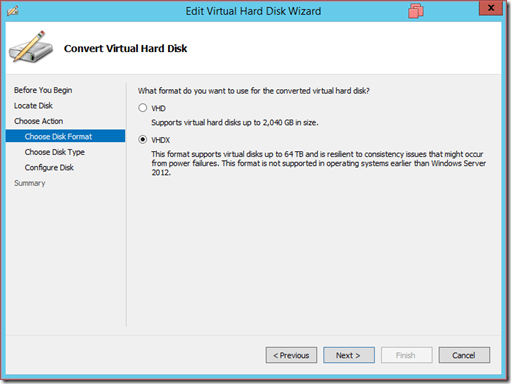
Starting with Windows Server 2012, virtual machines use the VHDX standard for storage by default. The VHDX standard supports storage up to 64TB (2TB for VHD). Supports block sizes up to 256MB and each sector is 4KB in size. The VHDX standard improves security and reduces corruption when something unexpected happens like a power failure.

II) Convert a VHD to VHDX

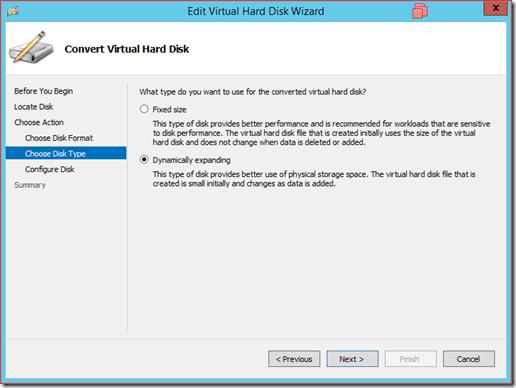
Converting VHD to VHDX will lose data for the case:

  • VHD according to the mechanism of Differencing Disk
  • VHD with snapshots (checkpoints) will be deleted
  • Which VHD is using Initial Replication, Resynchronize, Test Failover and Failover features.
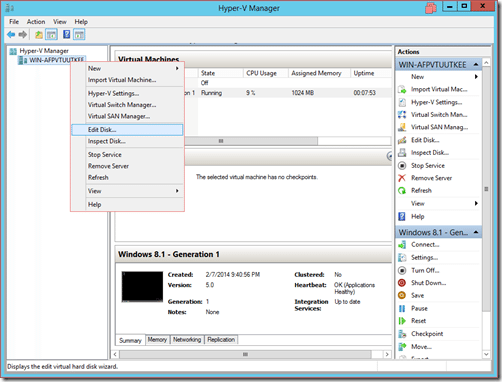
first

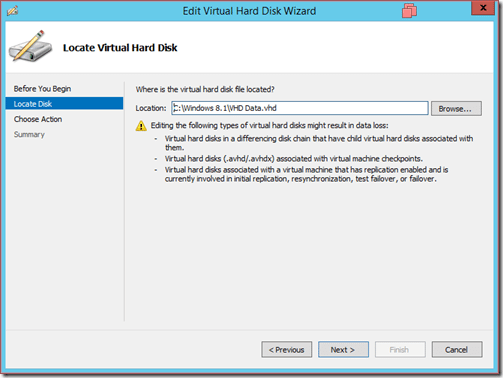
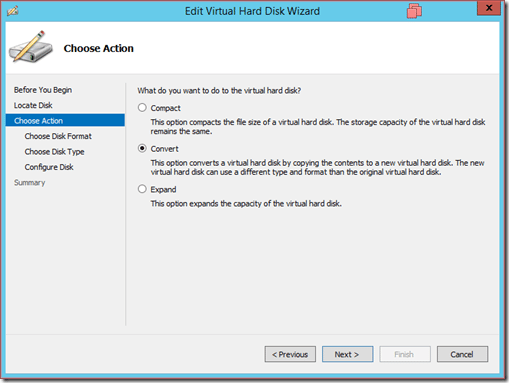
  • Select the VHD drive to convert

2

3

4

5

  • Choose the path to save the VHDX . file
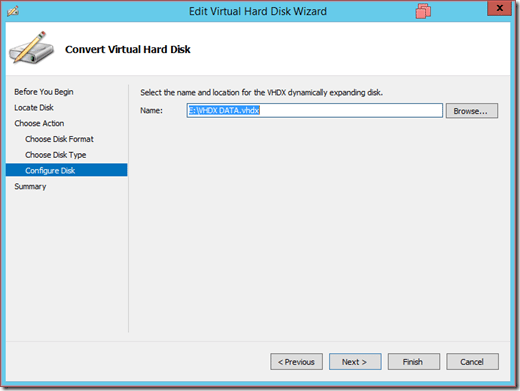
6

7

III) Create and mount a VHDX drive in the virtual machine

Windows Server 2012 allows you to mount a VHDX drive directly into virtual machines while they are running.

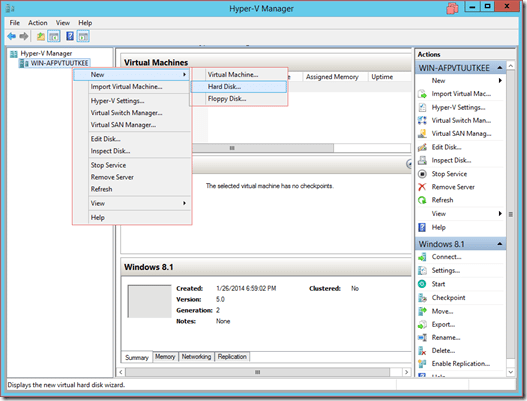
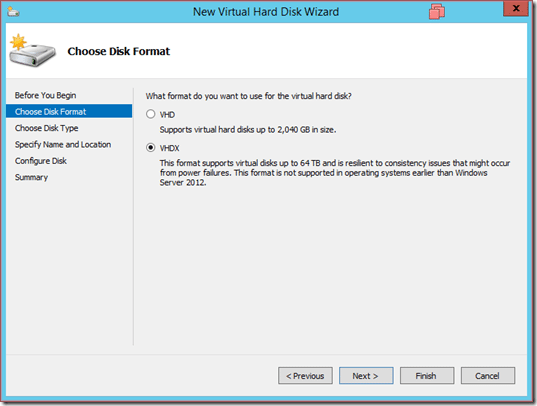
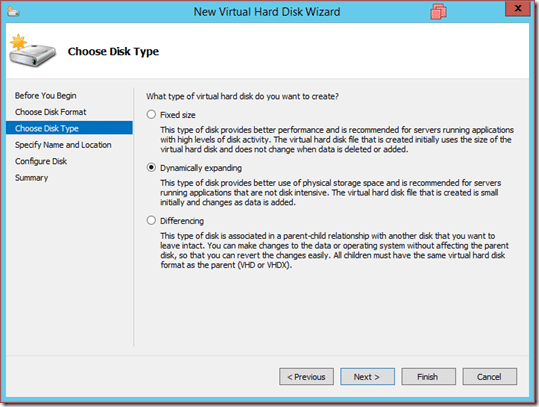
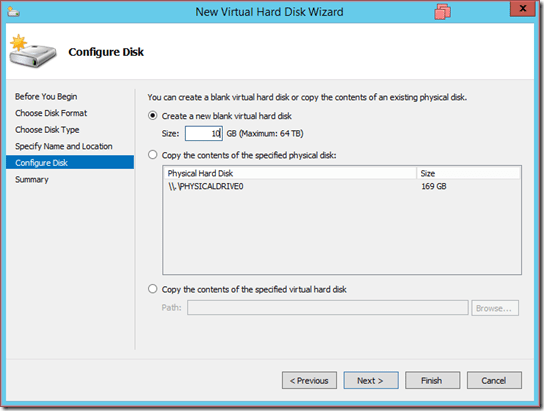
  • Create a VHDX . drive

first

2

3

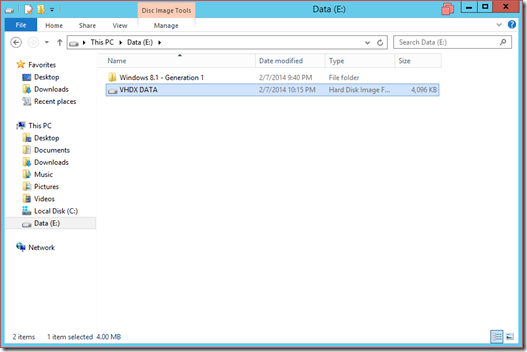
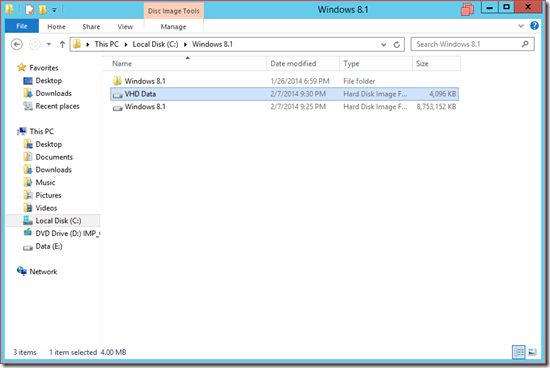
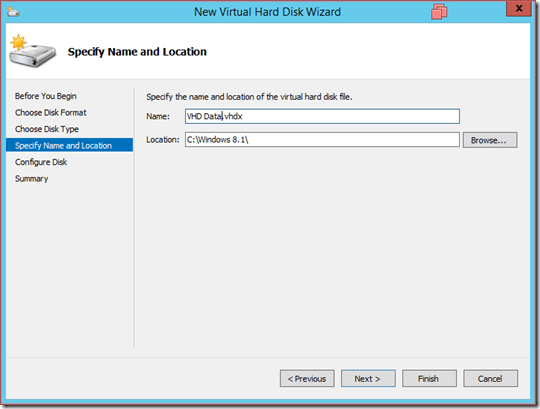
  • Name and select the path containing the VHDX . file
4

5

6

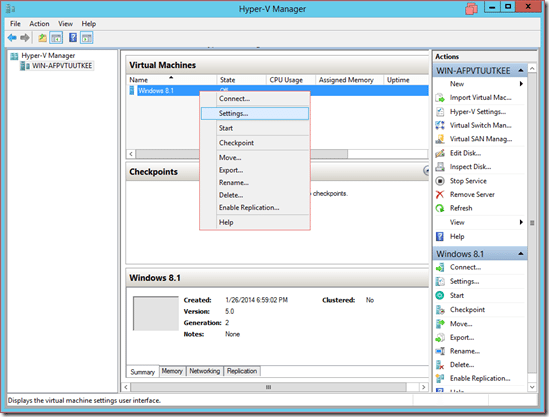
  • Implement VHDX mount to virtual machine
7

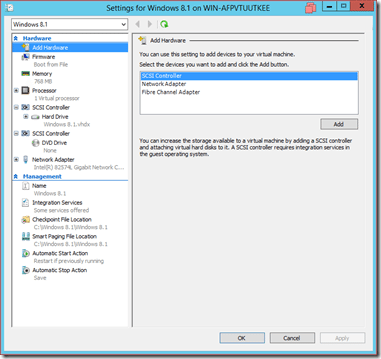
  • Add hardware –> Select SCSI controller to create a SCSI mechanism Device
8

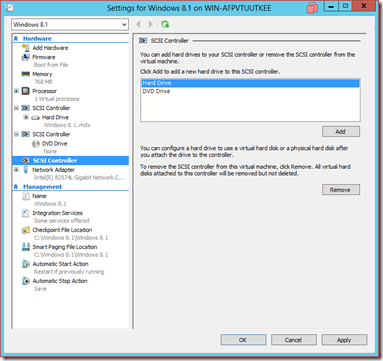
  • Select the Hard Drive type for the newly created SCSI Device
9

  • Then mount the newly created VHDX drive -> Select Browse and point to VHDX
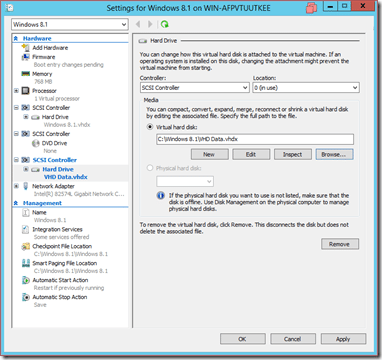
ten

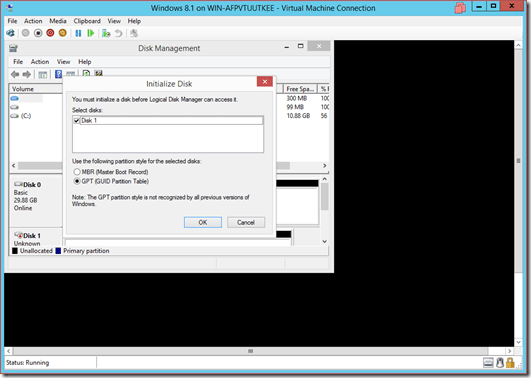
  • Open the virtual machine and check

11

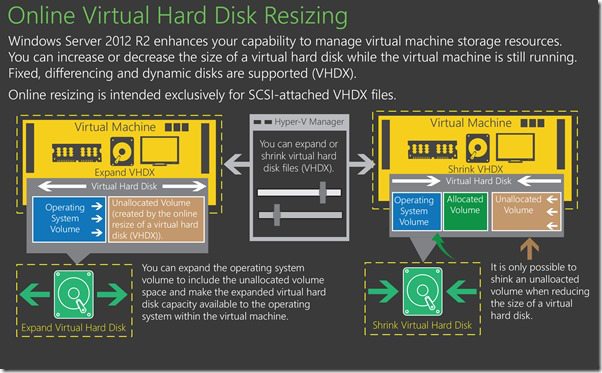
IV) Expand VHDX drive (Allows VHDX expansion while the virtual machine is running)

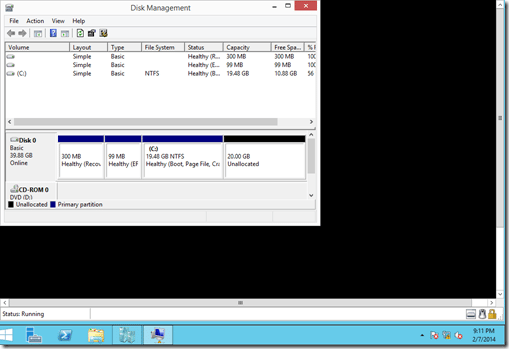
  • The virtual machine has a VHDX drive with a capacity of 20GB
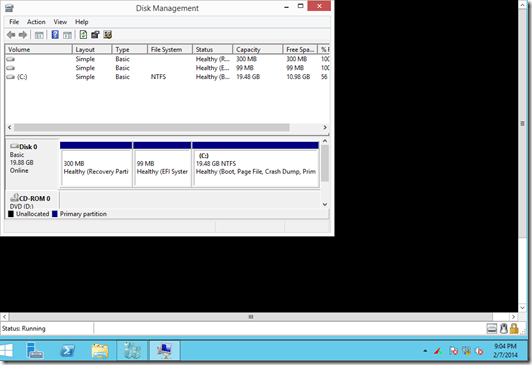
first

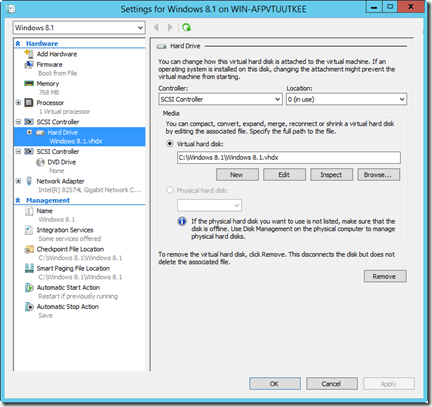
  • Right-click the virtual machine -> Select Settings
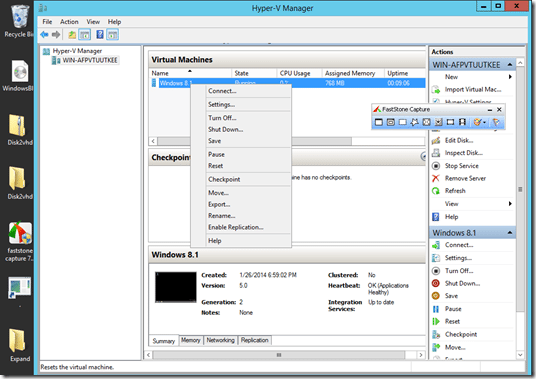
2

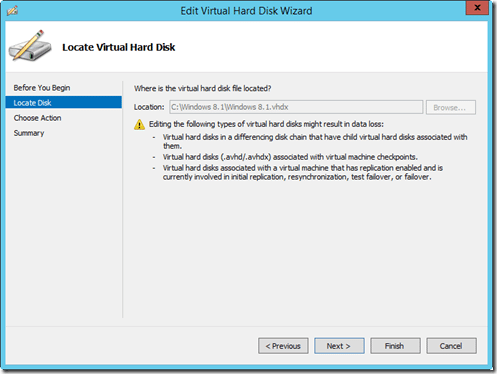
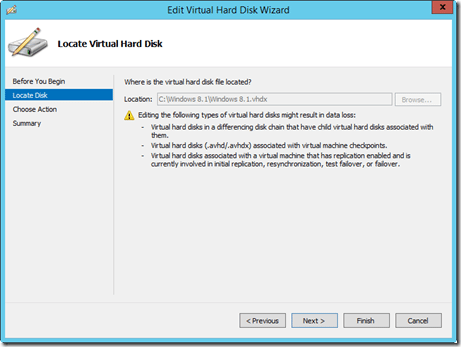
  • Select the VHDX drive -> Select Edit
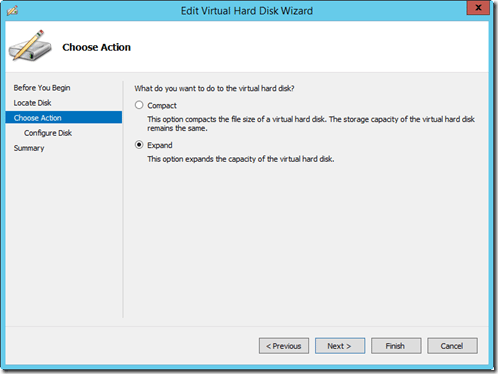
3

4

5

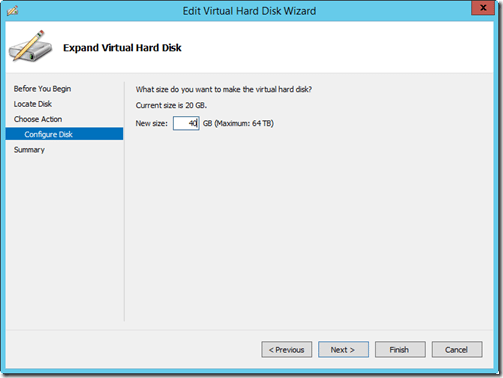
  • Available capacity is 20GB, you can increase up to 64TB (VHDX standard)
6

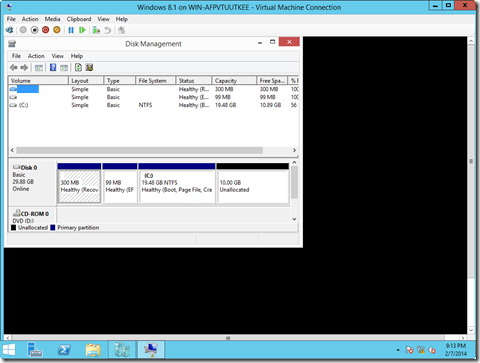
  • The result, 20GB more for the drive

7

V) Shrink VHDX drive (Reduce VHDX drive space while virtual machine is running)

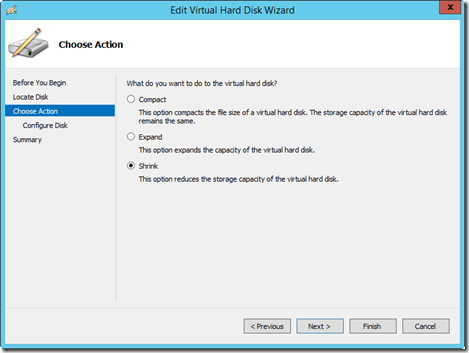
  • Same as above but choose Shrink

4

8

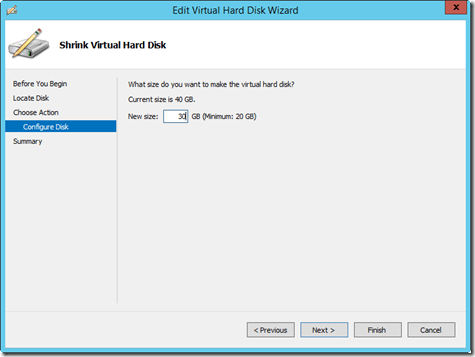
  • Current capacity is 40GB, at least 50% less disk space
9

ten

The article achieved: 5/5 – (100 votes)

Tags: convertcreateExpandServerShrinkVHDVHDXWindows
Previous Post

Share Tool Hades used to Troll and Phishing Password Windows

Next Post

The best and free Windows 10 repair tools

AnonyViet

AnonyViet

Related Posts

Save image as Type contains malicious code: Remove immediately before losing money unfairly!
Network

Save image as Type contains malicious code: Remove immediately before losing money unfairly!

March 19, 2026
Instructions on how to register a .co.uk domain name for free for 1 year
Network

Instructions on how to register a .co.uk domain name for free for 1 year

March 12, 2026
How to Setup Paperclip AI: Create a Company for AI Agent
Network

How to Setup Paperclip AI: Create a Company for AI Agent

March 12, 2026
Compilation of free and cheap APIs to run OpenClaw stably
Network

Compilation of free and cheap APIs to run OpenClaw stably

March 10, 2026
3 Services to Determine IP Location for Website (IP Geolocation API)
Network

3 Services to Determine IP Location for Website (IP Geolocation API)

March 10, 2026
How to buy a .STORE domain name for 1 USD (2026): Detailed instructions from A–Z
Network

How to buy a .STORE domain name for 1 USD (2026): Detailed instructions from A–Z

March 3, 2026
Next Post
The best and free Windows 10 repair tools

The best and free Windows 10 repair tools

0 0 votes
Article Rating
Subscribe
Login
Notify of
guest

guest

0 Comments
Oldest
Newest Most Voted
Inline Feedbacks
View all comments

Recent News

Instructions for looking up prescriptions on VNeID instead of paper medical books

Instructions for looking up prescriptions on VNeID instead of paper medical books

April 26, 2026
Tips to completely turn off CAPTCHA codes on iPhone and Mac are super simple

Tips to completely turn off CAPTCHA codes on iPhone and Mac are super simple

April 25, 2026
Compare Poco X8 Pro and Poco X7 Pro: A new step for the “king” of mid-range performance

Compare Poco X8 Pro and Poco X7 Pro: A new step for the “king” of mid-range performance

April 24, 2026
How to compress online videos for free without losing quality

How to compress online videos for free without losing quality

April 24, 2026
Instructions for looking up prescriptions on VNeID instead of paper medical books

Instructions for looking up prescriptions on VNeID instead of paper medical books

April 26, 2026
Tips to completely turn off CAPTCHA codes on iPhone and Mac are super simple

Tips to completely turn off CAPTCHA codes on iPhone and Mac are super simple

April 25, 2026
Compare Poco X8 Pro and Poco X7 Pro: A new step for the “king” of mid-range performance

Compare Poco X8 Pro and Poco X7 Pro: A new step for the “king” of mid-range performance

April 24, 2026
AnonyViet - English Version

AnonyViet

AnonyViet is a website share knowledge that you have never learned in school!

We are ready to welcome your comments, as well as your articles sent to AnonyViet.

Follow Us

Contact:

Email: anonyviet.com[@]gmail.com

Main Website: https://anonyviet.com

Recent News

Instructions for looking up prescriptions on VNeID instead of paper medical books

Instructions for looking up prescriptions on VNeID instead of paper medical books

April 26, 2026
Tips to completely turn off CAPTCHA codes on iPhone and Mac are super simple

Tips to completely turn off CAPTCHA codes on iPhone and Mac are super simple

April 25, 2026
No Result
View All Result
  • Home
  • News
  • Software
  • Knowledge
  • MMO
  • Tips
  • Security
  • Network
  • Office

wpDiscuz
0
0
Would love your thoughts, please comment.x
()
x
| Reply