• Home
  • News
  • Software
  • Knowledge
  • MMO
  • Tips
  • Security
  • Network
  • Office
AnonyViet - English Version
  • Home
  • News
  • Software
  • Knowledge
  • MMO
  • Tips
  • Security
  • Network
  • Office
No Result
View All Result
  • Home
  • News
  • Software
  • Knowledge
  • MMO
  • Tips
  • Security
  • Network
  • Office
No Result
View All Result
AnonyViet - English Version
No Result
View All Result

Create a simple RESTful API in 5 minutes

AnonyViet by AnonyViet
January 25, 2023
in Tips
0

Before we start, we must know What is API?As you all probably know API stands for Application Programming Interface. So what is it?

Join the channel Telegram of the AnonyViet 👉 Link 👈

Create a simple RESTful API in 5 minutes

According to Wikipedia, Application Programming Interface (API) is a connection between computers or between computer programs. It is a type of software interface that provides a service to other software.

If that sounds confusing, here is a simplified version of the above definition – an API is the medium through which two computer programs can “talk” to each other. Here, “chat” refers to the exchange of data.

There are many APIs in the world. Today we will talk about RESTful APIs.
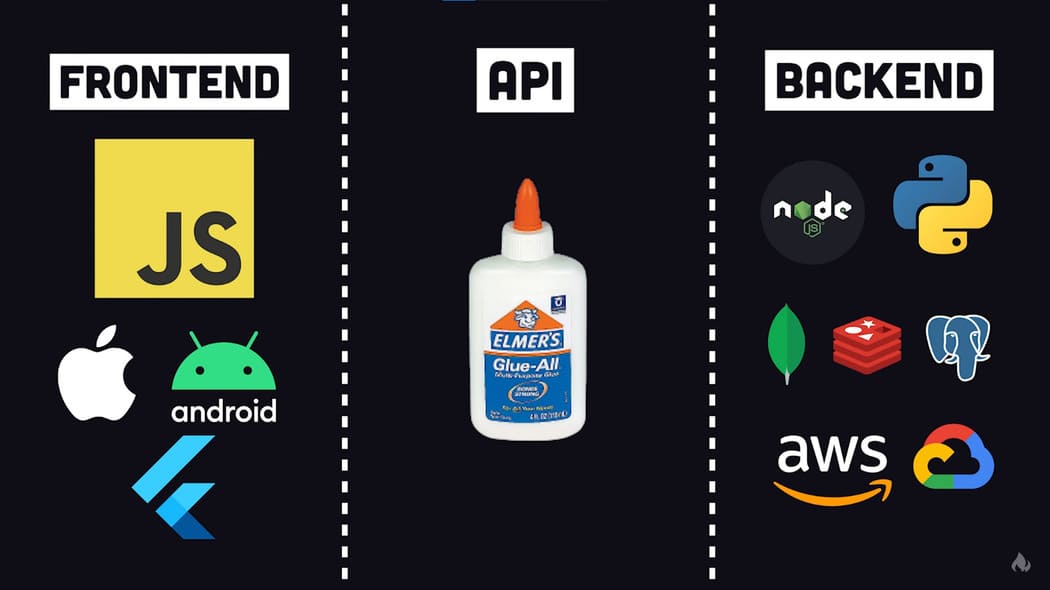
Create a simple RESTful API in 5 minutes 5

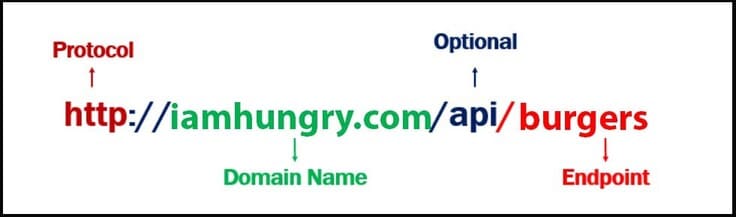
We will create a RESTful API. RESTful APIs are one of many possible ways that programs, servers, and websites can share data. The RESTful API organizes data into a series of unique URLs (URIs). The data can be anything (e.g. form data, weather data, product details).

Let’s see an example to understand better:
Create a simple RESTful API in 5 minutes 6

The URL above (the API endpoint) gets the data of all burgers. If sandwiches also available in the store, then by changing the endpoint we can get the desired result.

Now you have a clear understanding of what RESTful API is.

Next, we’ll build our REST API in Python using the FAST API. FastAPI is a modern Web framework for developing RESTful APIs in Python.

Request:

Create a simple RESTful API in 5 minutes

1. Install FAST API and Uvicorn

Create a new project.

As I said earlier, we will use the FAST API framework to build the API. So install it in the project using the following command:

pip install fastapi

Once it is installed, we need to install Uvicorn – A web server implementation for python.

pip install uvicorn

2. File creation and initialization

Create a new file api.py in your project. Include the following code to initialize the file.

from fastapi import FastAPI

# Tạo API
app = FastAPI()

We have now initialized the API we need to create routes. We will create 3 routes as follows

  1. Default route
  2. Burgers route
  3. Sandwiches route
# default route
@app.get("/")
async def root():
    return {
            "welcome_message": "Hello hungry Zucky, welcome!",
            "menu": [
                {
                    "burgers": "http://localhost:8000/api/v1/menu/burgers"
                },
                {
                    "sandwiches": "http://localhost:8000/api/v1/menu/sandwiches"
                }
            ]
    };

# burgers route
@app.get("/api/v1/menu/burgers")
async def burgers():
    return {
        "spicy burger": "10$",
        "cheesy burger": "12$",
        "Extra cheesy spicy burger": "18$"
    }

# sandwiches route
@app.get("/api/v1/menu/sandwiches")
async def burgers():
    return {
        "Egg sandwich": "10$",
        "cheesy sandwich": "11$",
        "Chicken sandwich": "13$"
    }

So you have successfully created REST API.

4. Upload to the server

To check the results, enter the following command.

uvicorn api:app --reload

This command starts the server. With the use of the –reload flag, the server will restart when it observes any new changes in your file i.e. api.py file

Enter the URL in your browser: http://127.0.0.1:8000
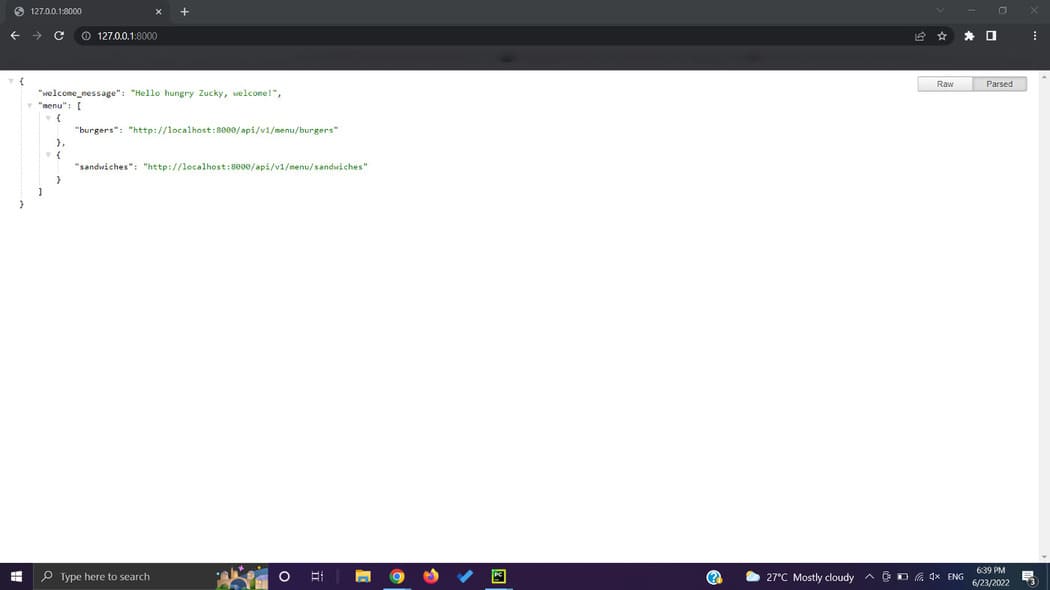
Create a simple RESTful API in 5 minutes 7

Conclusion

In this article, we created a simple REST API in Python using the FAST API framework. It has three routes and each returns JSON data. Furthermore, We can send JSON data to front-end as HTTP response.


The article achieved: 5/5 – (100 votes)

Tags: APIcreateminutesRESTfulsimple
Previous Post

MySQLDumper: Automatic MySQL Backup Tool Based on PHP and Perl

Next Post

Lesson 135: Calculating time in Excel

AnonyViet

AnonyViet

Related Posts

Instructions on how to make money from personal Facebook
Tips

Instructions on how to make money from personal Facebook

May 2, 2026
How to add sliders to Facebook Stories to easily rewind videos
Tips

How to add sliders to Facebook Stories to easily rewind videos

April 21, 2026
How to change the default font on Windows 10
Tips

How to change the default font on Windows 10

April 13, 2026
5 tips for using a Browser to replace an App (helps save RAM, time and money)
Tips

5 tips for using a Browser to replace an App (helps save RAM, time and money)

April 13, 2026
How to make funny MeMe photos without Photoshop within 10 seconds
Tips

How to make funny MeMe photos without Photoshop within 10 seconds

April 11, 2026
How to quickly design your own Logo without Photoshop
Tips

How to quickly design your own Logo without Photoshop

April 10, 2026
Next Post
Lesson 135: Calculating time in Excel

Lesson 135: Calculating time in Excel

0 0 votes
Article Rating
Subscribe
Login
Notify of
guest

guest

0 Comments
Oldest
Newest Most Voted
Inline Feedbacks
View all comments

Recent News

Instructions on how to make money from personal Facebook

Instructions on how to make money from personal Facebook

May 2, 2026
Create an avatar to celebrate April 30 with a beautiful red flag shirt with yellow stars

Create an avatar to celebrate April 30 with a beautiful red flag shirt with yellow stars

April 30, 2026
How to get 2 months of Super Duolingo for free worth 300k

How to get 2 months of Super Duolingo for free worth 300k

April 30, 2026
How to create a Face Sticker Collection using ChatGPT

How to create a Face Sticker Collection using ChatGPT

April 29, 2026
Instructions on how to make money from personal Facebook

Instructions on how to make money from personal Facebook

May 2, 2026
Create an avatar to celebrate April 30 with a beautiful red flag shirt with yellow stars

Create an avatar to celebrate April 30 with a beautiful red flag shirt with yellow stars

April 30, 2026
How to get 2 months of Super Duolingo for free worth 300k

How to get 2 months of Super Duolingo for free worth 300k

April 30, 2026
AnonyViet - English Version

AnonyViet

AnonyViet is a website share knowledge that you have never learned in school!

We are ready to welcome your comments, as well as your articles sent to AnonyViet.

Follow Us

Contact:

Email: anonyviet.com[@]gmail.com

Main Website: https://anonyviet.com

Recent News

Instructions on how to make money from personal Facebook

Instructions on how to make money from personal Facebook

May 2, 2026
Create an avatar to celebrate April 30 with a beautiful red flag shirt with yellow stars

Create an avatar to celebrate April 30 with a beautiful red flag shirt with yellow stars

April 30, 2026
No Result
View All Result
  • Home
  • News
  • Software
  • Knowledge
  • MMO
  • Tips
  • Security
  • Network
  • Office

wpDiscuz
0
0
Would love your thoughts, please comment.x
()
x
| Reply