ASUS Vivobook is a popular laptop line with many Intel and AMD configurations, ranging from study and office needs to light creativity. Choosing the right platform not only helps the device run smoothly, but also avoids buying too many configurations compared to real needs.
📢 Join the channel Telegram belong to AnonyViet
Update new articles, cool tools and IT tips fastest
Why is the question Intel or AMD worth considering?
When buying a popular laptop, many people often look first at the price, RAM, and SSD before paying attention to whether the device uses an Intel or AMD chip. This choice is not wrong, but for lines with many versions such as ASUS Vivobookthe processor platform can quite clearly affect the daily experience.
A laptop used for online learning, making reports, opening multiple browser tabs, and video meetings will need stability, good enough battery, and an easy-to-type keyboard. Meanwhile, people who often edit photos, create short videos, run data analysis software or are interested in AI features should take a closer look at the chip line, integrated graphics and multitasking capabilities.
Intel Group: suitable for people who need familiarity and a broad software ecosystem
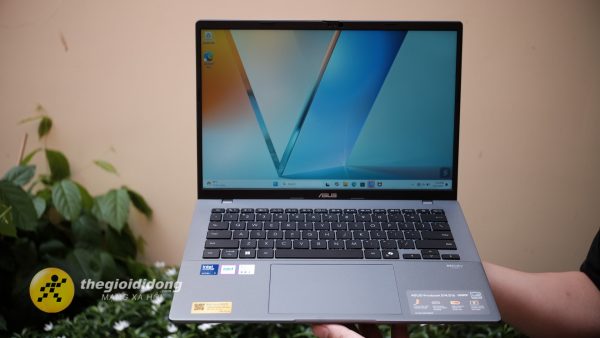
Vivobook versions using Intel Core i3, i5, i7 or new Core lines are often suitable for people who need an easy-to-use, stable machine for study and office. This is a familiar choice for many popular software such as Microsoft Office, browsers, Zoom, Teams, accounting software, foreign language learning or work management tools.
For office users, the notable point is not only how powerful the chip is, but whether the machine can maintain smoothness when opening multiple Excel files, multi-tab browsers, chat applications and online meetings at the same time. In this group, Intel still has the advantage of popularity and good software compatibility.
If you choose models using Intel Core Ultra, users may be more interested in the NPU, which is a processor specialized for some AI tasks. However, it should be correctly understood that AI laptops do not turn ordinary machines into professional artificial intelligence processing stations. Its practical value lies in tasks such as supporting online meetings, light image processing, smart features in Windows or new generation office applications.
AMD team: notable for its price performance and integrated graphics
Vivobook versions using AMD Ryzen are often of interest to users because of their good performance/price, especially in study, office and light creative groups. For the same price range, some AMD configurations can provide good multitasking capabilities, good integrated graphics and battery life suitable for regular school and work days.
If you often do basic photo editing, make slides with many effects, create short videos for subjects or social network content, Vivobook using Ryzen 5, Ryzen 7 or Ryzen AI is worth considering. The integrated graphics on many Ryzen lines today are enough to handle light visual tasks, as long as users do not expect to play heavy games or edit professional movies for long periods of time.
With Ryzen AI, the point of interest is similar to Core Ultra: the machine has the ability to handle some AI tasks on-site, supporting new experiences in the operating system and software. Buyers should see this as a plus factor for the near future, rather than the sole reason to raise the budget.
What should students prioritize?
For students, a reasonable choice is often a balanced configuration rather than the highest configuration. The device should have enough RAM for multitasking, an SSD large enough to store documents, presentations, learning software and some entertainment content. If you often bring your device to class, weight and battery life are just as important as the CPU.
If your main needs are studying online, doing homework, looking up, drafting and watching movies, both Intel Core i5 and AMD Ryzen 5 can meet the needs well when accompanied with appropriate RAM and SSD. People studying design, communications, engineering or information technology can consider higher configurations, better screens and newer processors to make the device more durable for several years.

Office workers should choose according to their working rhythm
For office workers, the point of concern is stability during many working hours. One laptop good for the office doesn’t necessarily need to be powerful, but needs to open apps quickly, switch tasks smoothly, and have a comfortable keyboard.
People who often work with spreadsheets, meet online, manage email and use multi-tab browsers can choose the mid-range Vivobook Intel or AMD. If the job involves large data, heavy Excel files, editing product photos or running many tools at the same time, priority should be given to higher CPU, larger RAM and larger screen.
One point that is easily overlooked is the connection port. Office workers may still need HDMI for presentations, USB-A for mice or USB, USB-C for hubs and charging. So, before choosing by chip, check your daily connection habits.
Should I choose an AI laptop right now?
AI laptops are being talked about more and more, but not everyone needs to upgrade immediately just because of the word “AI”. If you just study, type, watch movies and have basic online meetings, a good universal configuration is still enough.
On the contrary, if you want the device to have more room for new features in Windows, smart office tools, AI photo editing, content summarization or light video processing, Vivobook models using Core Ultra or Ryzen AI are worth considering. This is a suitable choice for people who want to use the device for a long time and are willing to pay more for a new platform.
Don’t just choose the chip, look at the screen and typing experience as well
A powerful configuration but a small screen, a keyboard that doesn’t fit your hand, or a device that’s too heavy can still cause discomfort after a few months of use. With Vivobook, buyers often have many size options such as 14 inches, 15 inches and 16 inches, suitable for different habits.
14 inch screen suitable for people who move a lot. 15 to 16 inch screens are more comfortable for spreadsheets, online learning, editing slides and watching entertainment content. If you choose an OLED screen, users will have a more outstanding color experience, but they should also use it wisely, such as avoiding leaving the interface static for too long and not always keeping the maximum brightness.

Suggestions for quick selection according to each user group
If you are a student majoring in social sciences, economics, foreign languages or need a machine mainly for studying, Vivobook using Intel Core i5 or AMD Ryzen 5 is an easy starting point to consider. You should prioritize large enough RAM and SSD instead of just looking at the CPU name.
If you work in an office, often have online meetings and process a lot of documents, choose a machine with a good keyboard, good webcam, pleasing screen and suitable battery life. Intel will suit those who like familiarity, while AMD is worth noting if you want to optimize performance within the price range.
If you study design, media, technology, or like trying out new AI tools, check out the Core Ultra, Ryzen AI models, or configurations with high-quality displays. This is the group that should invest more so that the machine does not quickly run out when demand increases.
Buy Vivobook at Mobile World: easy to filter according to real needs
At Mobile World, the ASUS Vivobook laptop group is arranged according to many familiar criteria such as price range, product type, screen size and CPU platform, helping buyers narrow down their choices according to their study, office, thin and light or AI laptop needs. The product page also has incentive signals such as coupons, old sales for renewal and 0% installment payments, suitable for people who want to upgrade their laptop but still need to balance their budget.
Conclude
There is no absolute answer as to whether to choose an Intel or AMD Vivobook. Intel is suitable for those who prioritize familiarity, a broad software ecosystem, and new Core Ultra options. AMD is attractive to people who focus on performance/price, integrated graphics and multitasking capabilities within a reasonable cost range.
The safest way to choose is to start from your real needs: what do you study, what do you do, do you move a lot, do you need AI or light graphics. Once these things are clearly defined, choosing the right Vivobook will be much easier than just comparing chip names on the spec sheet.