• Home
  • News
  • Software
  • Knowledge
  • MMO
  • Tips
  • Security
  • Network
  • Office
AnonyViet - English Version
  • Home
  • News
  • Software
  • Knowledge
  • MMO
  • Tips
  • Security
  • Network
  • Office
No Result
View All Result
  • Home
  • News
  • Software
  • Knowledge
  • MMO
  • Tips
  • Security
  • Network
  • Office
No Result
View All Result
AnonyViet - English Version
No Result
View All Result

faceIT – Powerful feature addition tool for Facebook

AnonyViet by AnonyViet
February 5, 2023
in Tips
0

FaceIT has now switched to Monokai Toolkit – The latest multifunctional Facebook Toolkit.

Join the channel Telegram belong to AnonyViet 👉 Link 👈

Please read here

—————————

Author Nguyen Anh Nhan of Multifunctional Facebook Tool continues to release a tool to add features for Facebook called faceIT. In my opinion, this is the most practical Toolkit you need when using Facebook. I also wanted Facebook to develop these features for a long time, but fortunately, there was a Vietnamese programmer.

faceIT – Tool to add features for Facebook

The author was too generous to add 5 features to this new tool. Mainly these features belong to privacy management. If before, you want delete all posts on wall then you need to use a script, now faceIT will support you on the interface. I would like to briefly introduce the features of faceIT:

Install faceIT

FaceIT is a web browser extension. So you need install faceIT into Chrome or Coc Coc to use. The main interface is English, the author will soon add Vietnamese to this tool

Log in, switch accounts

If you have multiple Facebook accounts, then use this feature to switch accounts. The advantage is that it is faster than Facebook’s feature, which uses the Cookies mechanism. You can login to Facebook with Cookies. If log out still don’t die cookies and tokens.

login faceit

Scan post – Scan all status to delete, set privacy, or hide

This function allows you to scan to find all your Facebook Status. You can find your posts based on date, article typeor private mode.

scan post

The scan result will be in the menu Query. You can choose the action: delete, reset post privacy, or hide from the wall for all posts by clicking the Action button.

For example: You want to change all posts to only me status

  1. You choose: Action: Set Privacy
  2. Next choose: Privacy Value: Onlyand press the button Start.
  3. Similar for the functions to delete posts, or hide posts

list of vietnamese songs

Schedule post – Schedule posts on personal Facebook

The timer feature is only integrated by Facebook on Groups and Fanpages, but faceIT cho has added this feature to his personal wall. Now you can choose a time to schedule a personal post mine. The Personal Facebook Post Timer feature can also post images.

You note: when setting the time, in the last cell is the value SA/ONLY (morning afternoon). See example image below:
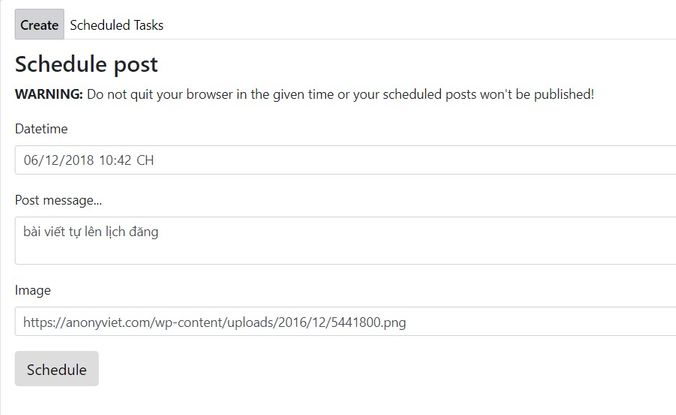
Schedule a personal fb postReactions – Automatically drop hearts on Facebook

You can automatically drop Reactions to Facebook. Support drop all emojis available on Facebook. This feature will drop hearts every 5 minutes on Newsfeed. According to many reviews, this feature is not complete, so you may be blocked if you abuse the feature.

Select Status: Enabled, and press the . button Save for the auto drop heart feature to work.Reactions

Friends – Scan friends – Automatically Post on the wall, poke, export friends list file

This feature will scan all your friends list. You can optionally scan under conditions such as: gender scanor scan by relationship.

Friends - Scan friends - Automatically Post on wall, poke, export friend list file

The scan result will be in Menu Query, Friends tab. Here you have the option to Post to all friends’ walls, or poke all friends, or export the friends list to a txt file.

If you export your friends list, it is recommended to use notepad++ to open the file. Now the list of IDs will display vertically.

faceIT – Powerful feature addition tool for FacebookSo I have introduced through the functions of faceIT, a powerful support tool for Facebook. These features will save you more time when managing your personal Facebook.


The article achieved: 5/5 – (100 votes)

Tags: additionFacebookfaceITfeaturepowerfultool
Previous Post

Quick download license 1 year OkayFreedom VPN

Next Post

Get a 180-day license for Bitdefender Internet Security 2016 ($30)

AnonyViet

AnonyViet

Related Posts

How to create a virtual Pet, a virtual character running around on the Desktop to relax
Tips

How to create a virtual Pet, a virtual character running around on the Desktop to relax

October 15, 2026
15 cách tăng tốc Windows 10 nhanh như gió
Tips

15 cách tăng tốc Windows 10 nhanh như gió

October 14, 2026
How to create Guest mode Shortcuts for Chrome and Edge
Tips

How to create Guest mode Shortcuts for Chrome and Edge

October 13, 2026
Test what breed of dog you are through 10 multiple choice questions
Tips

Test what breed of dog you are through 10 multiple choice questions

October 13, 2026
Fliqlo – Create digital clock screens on Windows and phones
Tips

Fliqlo – Create digital clock screens on Windows and phones

October 12, 2026
SynthID Detector: Genuine AI checking tool from Google
Tips

SynthID Detector: Genuine AI checking tool from Google

October 11, 2026
Next Post
Get a 180-day license for Bitdefender Internet Security 2016 ()

Get a 180-day license for Bitdefender Internet Security 2016 ($30)

0 0 votes
Article Rating
Subscribe
Login
Notify of
guest

guest

0 Comments
Oldest
Newest Most Voted

Recent News

Instructions for receiving pension through VNeID without going to the ward

Instructions for receiving pension through VNeID without going to the ward

October 16, 2026
MBTI, Big Five, DISC or Holland: which personality test should you choose?

MBTI, Big Five, DISC or Holland: which personality test should you choose?

October 15, 2026
How to create a virtual Pet, a virtual character running around on the Desktop to relax

How to create a virtual Pet, a virtual character running around on the Desktop to relax

October 15, 2026
Record first, choose focus later: how to use 4K 60 fps Cinema mode on iPhone 18 Pro

Record first, choose focus later: how to use 4K 60 fps Cinema mode on iPhone 18 Pro

October 15, 2026
Instructions for receiving pension through VNeID without going to the ward

Instructions for receiving pension through VNeID without going to the ward

October 16, 2026
MBTI, Big Five, DISC or Holland: which personality test should you choose?

MBTI, Big Five, DISC or Holland: which personality test should you choose?

October 15, 2026
How to create a virtual Pet, a virtual character running around on the Desktop to relax

How to create a virtual Pet, a virtual character running around on the Desktop to relax

October 15, 2026
AnonyViet - English Version

AnonyViet

AnonyViet is a website share knowledge that you have never learned in school!

We are ready to welcome your comments, as well as your articles sent to AnonyViet.

Follow Us

Contact:

Email: anonyviet.com[@]gmail.com

Main Website: https://anonyviet.com

Recent News

Instructions for receiving pension through VNeID without going to the ward

Instructions for receiving pension through VNeID without going to the ward

October 16, 2026
MBTI, Big Five, DISC or Holland: which personality test should you choose?

MBTI, Big Five, DISC or Holland: which personality test should you choose?

October 15, 2026
  • Home
  • Home 2
  • Home 3
  • Home 4
  • Home 5
  • Home 6
  • Next Dest Page
  • Sample Page

say88 tỷ lệ kèo nhà cái kèo nhà cái 5 febet

No Result
View All Result
  • Home
  • News
  • Software
  • Knowledge
  • MMO
  • Tips
  • Security
  • Network
  • Office

say88 tỷ lệ kèo nhà cái kèo nhà cái 5 febet

wpDiscuz
0
0
Would love your thoughts, please comment.x
()
x
| Reply