• Home
  • News
  • Software
  • Knowledge
  • MMO
  • Tips
  • Security
  • Network
  • Office
AnonyViet - English Version
  • Home
  • News
  • Software
  • Knowledge
  • MMO
  • Tips
  • Security
  • Network
  • Office
No Result
View All Result
  • Home
  • News
  • Software
  • Knowledge
  • MMO
  • Tips
  • Security
  • Network
  • Office
No Result
View All Result
AnonyViet - English Version
No Result
View All Result

Create a self-deleting secret chat on Facebook Messenger

AnonyViet by AnonyViet
February 5, 2023
in Tips
0

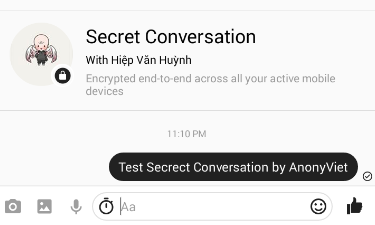
Secret chat is a security feature of Facebook Messenger. Only you and the person you’re talking to know the content of the exchange. This message will be automatically deleted at the specified time. And no one can restore the message. It is very suitable for you to exchange information that defames others, or has an affair… Please follow the instructions below to protect privacy yours!

Join the channel Telegram belong to AnonyViet 👉 Link 👈

Create a self-deleting secret chat on Facebook Messenger

In April 2016, Facebook officially launched the feature Secret Conversations (Secret Conversation). According to the information provided, no one including Mark Zuckerberg, NSA or any security firm that can read your encrypted messages. That way you can rest assured of its security. However, this feature is currently only available on the Messenger chat app for Android and iOS.

How to enable message encryption (secret chat) on Messenger

Step 1: Open the Messenger app on Android or iOS, tap the profile icon.
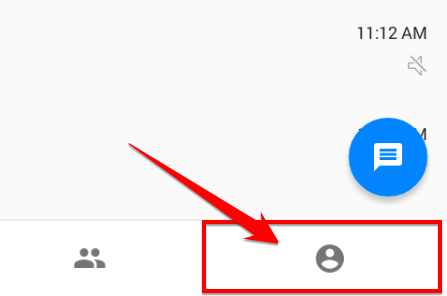
Select profile icon on messenger

Step 2: Scroll down and select the item Secret Conversations.
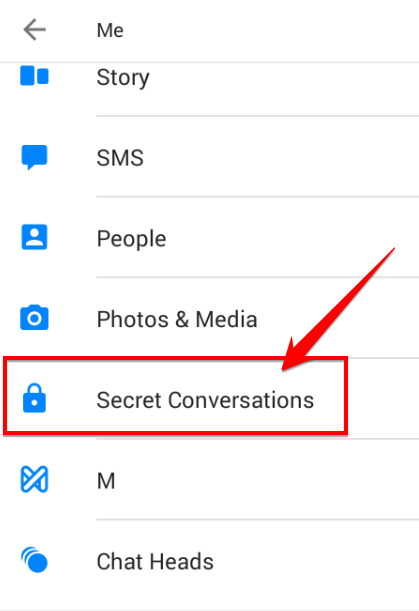
Select Secret Conversations

Step 3: In the section Secret Conversations, Please turn this feature on by pressing the switch and selecting TURN ON.
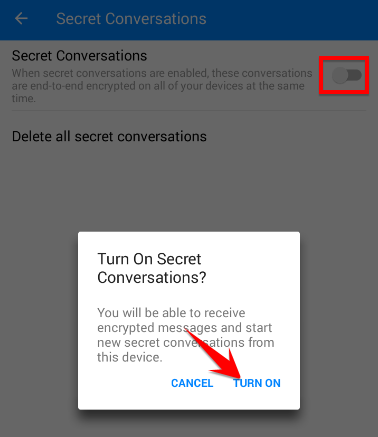
Enable Secret Conversations

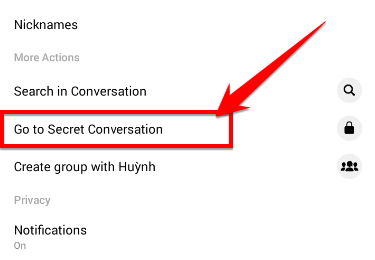
Step 4: To start a secret chat, select a friend and tap infomation in chat frame => Go to Secret Conversations.
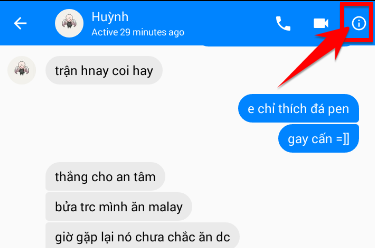
Click the info icon

Select Go to Secret Conversation

Open Secret Conversations

With that, we have successfully created a secret conversation. However, if your friend the feature is not enabled hey they will Can’t see the chat This. So tell them to turn it on.

Timer to automatically delete sent messages

Recently, Facebook has added a timer function to automatically delete messages to enhance security. You can try by tapping the stopwatch icon and selecting the time.
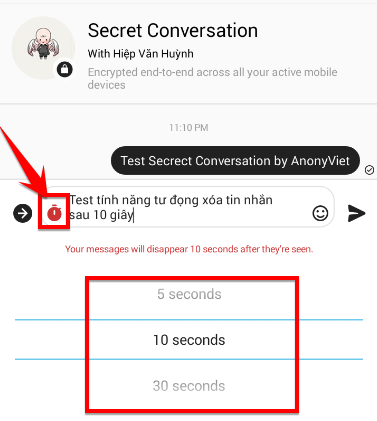
Timer to delete messages in Go to Secret Conversation

After sending the message, the time will count down and automatically delete the sent message.
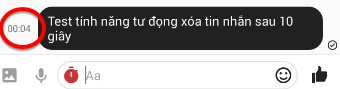
Timer to delete messages

Delete secret chats

To end the exchange of confidential information, you need to delete the content. By clicking on the . icon information as before and choose Delete Secret Conversations.
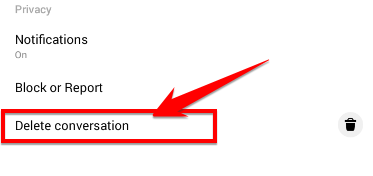
Delete secret chatsEpilogue

Thus, AnonyViet has guided you through simple steps to open a secret conversation right on Facebook Messenger. You can completely use this feature in internal meetings or to ensure the privacy of yourself and others. And can delete them if necessary.

N1412.
The article achieved: 5/5 – (100 votes)

Tags: chatcreateFacebookMessengersecretselfdeleting
Previous Post

PREY – Professional computer monitoring

Next Post

Quick download license 1 year OkayFreedom VPN

AnonyViet

AnonyViet

Related Posts

How to get 60 days of free web hosting without a card
Tips

How to get 60 days of free web hosting without a card

November 25, 2026
How to cancel Facebook Plus package to avoid automatic renewal
Tips

How to cancel Facebook Plus package to avoid automatic renewal

November 23, 2026
How to unlock iPhone Duo face on iOS 27.3 Beta 2
Tips

How to unlock iPhone Duo face on iOS 27.3 Beta 2

November 23, 2026
Naykia: App saves posts across multiple platforms, keeping the post intact even if the original post is deleted
Tips

Naykia: App saves posts across multiple platforms, keeping the post intact even if the original post is deleted

November 22, 2026
Free CNSF certification exam guide from Red Team Leaders
Tips

Free CNSF certification exam guide from Red Team Leaders

November 21, 2026
Instructions for registering Google AI Pro for 2 years for free until 2028
Tips

Instructions for registering Google AI Pro for 2 years for free until 2028

November 21, 2026
Next Post
Quick download license 1 year OkayFreedom VPN

Quick download license 1 year OkayFreedom VPN

0 0 votes
Article Rating
Subscribe
Login
Notify of
guest

guest

0 Comments
Oldest
Newest Most Voted

Recent News

How to get 60 days of free web hosting without a card

How to get 60 days of free web hosting without a card

November 25, 2026
Instructions on how to report to the police via SOS Security and order

Instructions on how to report to the police via SOS Security and order

November 24, 2026
How to cancel Facebook Plus package to avoid automatic renewal

How to cancel Facebook Plus package to avoid automatic renewal

November 23, 2026
SSHWATCH: Dashboard to see realtime VPS attacks using Honeypot

SSHWATCH: Dashboard to see realtime VPS attacks using Honeypot

November 23, 2026
How to get 60 days of free web hosting without a card

How to get 60 days of free web hosting without a card

November 25, 2026
Instructions on how to report to the police via SOS Security and order

Instructions on how to report to the police via SOS Security and order

November 24, 2026
How to cancel Facebook Plus package to avoid automatic renewal

How to cancel Facebook Plus package to avoid automatic renewal

November 23, 2026
AnonyViet - English Version

AnonyViet

AnonyViet is a website share knowledge that you have never learned in school!

We are ready to welcome your comments, as well as your articles sent to AnonyViet.

Follow Us

Contact:

Email: anonyviet.com[@]gmail.com

Main Website: https://anonyviet.com

Recent News

How to get 60 days of free web hosting without a card

How to get 60 days of free web hosting without a card

November 25, 2026
Instructions on how to report to the police via SOS Security and order

Instructions on how to report to the police via SOS Security and order

November 24, 2026
  • Home
  • Home 2
  • Home 3
  • Home 4
  • Home 5
  • Home 6
  • Next Dest Page
  • Sample Page

say88 tỷ lệ kèo nhà cái kèo nhà cái 5 febet

No Result
View All Result
  • Home
  • News
  • Software
  • Knowledge
  • MMO
  • Tips
  • Security
  • Network
  • Office

say88 tỷ lệ kèo nhà cái kèo nhà cái 5 febet

wpDiscuz
0
0
Would love your thoughts, please comment.x
()
x
| Reply