• Home
  • News
  • Software
  • Knowledge
  • MMO
  • Tips
  • Security
  • Network
  • Office
AnonyViet - English Version
  • Home
  • News
  • Software
  • Knowledge
  • MMO
  • Tips
  • Security
  • Network
  • Office
No Result
View All Result
  • Home
  • News
  • Software
  • Knowledge
  • MMO
  • Tips
  • Security
  • Network
  • Office
No Result
View All Result
AnonyViet - English Version
No Result
View All Result

Turn on notifications when someone else logs into your Facebook account

AnonyViet by AnonyViet
February 5, 2023
in Tips
0

Facebook is now an indispensable part of our lives. However, it also has potential risks that we cannot anticipate. Hackers can easily infiltrate an account in many ways: phishing, brute force or checkpass, etc. So proactively securing your own account is very important.

Join the channel Telegram belong to AnonyViet 👉 Link 👈

Today, AnonyViet We will guide you to turn on Facebook’s login alert feature to monitor whether your account is logged in by others from an unknown computer or device.

How to turn on the login warning feature to protect your Facebook account

First, log in to Facebook, go to Setting.
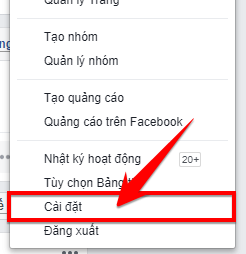
Go to settings

Step 2: On the Settings page, click Security and login.
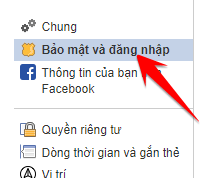
select Security and sign in

Step 3: Find the item Enhanced security and click Edit.

Navigate to the Enhanced Security section and click Edit

Step 4: Here, you can choose as you like about the Facebook login warning message and press Save changes.
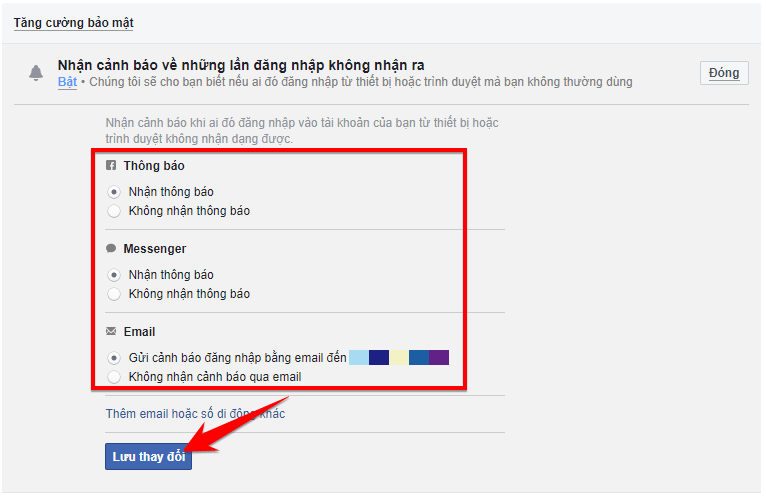
choose your own about the Facebook login warning message and press Save Changes

Final, Enter your password to confirm the change.
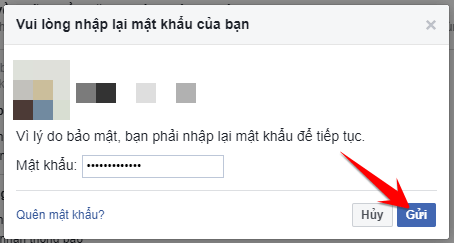
Enter the password to confirm the change

From now on, a message will be sent to you whenever your Facebook account is logged in from a new browser or device.
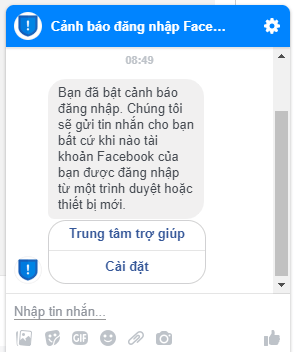
Message sent when there is a strange login to the account

Or you can review your login attempts in the section Where you logged in.
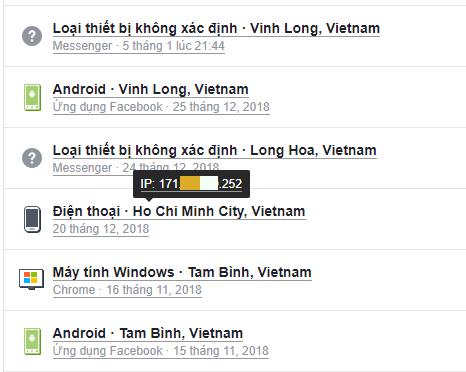
Turn on notifications when someone else logs into your Facebook account

Summary of the article

Thus, AnonyViet has shown you how to activate the security options that are equipped by Facebook. Upon activation, if your account is illegally logged into Facebook by someone else from an unknown device. A notification will be sent to include: time, location, device just logged in.

This way, you can more easily manage your Facebook account. However, this is still not enough for 100% account security. You should install Facebook’s 2-factor authentication to become more secure than ever.

N1412.

The article achieved: 5/5 – (100 votes)

Tags: accountFacebookLogsNotificationsturn
Previous Post

Tool Troll Glue Mouse

Next Post

Scan and generate QR Code directly on your computer in less than 2s

AnonyViet

AnonyViet

Related Posts

How to record reaction videos with Android phones, no app needed
Tips

How to record reaction videos with Android phones, no app needed

June 1, 2026
Instructions on how to get Google AI Pro 1 year for free for new accounts
Tips

Instructions on how to get Google AI Pro 1 year for free for new accounts

June 1, 2026
Top free AI tools to help write, test and optimize content
Tips

Top free AI tools to help write, test and optimize content

June 1, 2026
Instructions for receiving Lovable Pro 12 months for free
Tips

Instructions for receiving Lovable Pro 12 months for free

May 29, 2026
Instructions for receiving 1 month of ElevenLabs Creator for free worth
Tips

Instructions for receiving 1 month of ElevenLabs Creator for free worth $22

May 25, 2026
How to create beautiful studio-like preschool graduation photos for your child
Tips

How to create beautiful studio-like preschool graduation photos for your child

May 21, 2026
Next Post
Scan and generate QR Code directly on your computer in less than 2s

Scan and generate QR Code directly on your computer in less than 2s

0 0 votes
Article Rating
Subscribe
Login
Notify of
guest

guest

0 Comments
Oldest
Newest Most Voted
Inline Feedbacks
View all comments

Recent News

How to record reaction videos with Android phones, no app needed

How to record reaction videos with Android phones, no app needed

June 1, 2026
Instructions on how to get Google AI Pro 1 year for free for new accounts

Instructions on how to get Google AI Pro 1 year for free for new accounts

June 1, 2026
Top free AI tools to help write, test and optimize content

Top free AI tools to help write, test and optimize content

June 1, 2026
TruyenDrive: Turn Google Drive into a professional manga reader

TruyenDrive: Turn Google Drive into a professional manga reader

May 31, 2026
How to record reaction videos with Android phones, no app needed

How to record reaction videos with Android phones, no app needed

June 1, 2026
Instructions on how to get Google AI Pro 1 year for free for new accounts

Instructions on how to get Google AI Pro 1 year for free for new accounts

June 1, 2026
Top free AI tools to help write, test and optimize content

Top free AI tools to help write, test and optimize content

June 1, 2026
AnonyViet - English Version

AnonyViet

AnonyViet is a website share knowledge that you have never learned in school!

We are ready to welcome your comments, as well as your articles sent to AnonyViet.

Follow Us

Contact:

Email: anonyviet.com[@]gmail.com

Main Website: https://anonyviet.com

Recent News

How to record reaction videos with Android phones, no app needed

How to record reaction videos with Android phones, no app needed

June 1, 2026
Instructions on how to get Google AI Pro 1 year for free for new accounts

Instructions on how to get Google AI Pro 1 year for free for new accounts

June 1, 2026
No Result
View All Result
  • Home
  • News
  • Software
  • Knowledge
  • MMO
  • Tips
  • Security
  • Network
  • Office

wpDiscuz
0
0
Would love your thoughts, please comment.x
()
x
| Reply