• Home
  • News
  • Software
  • Knowledge
  • MMO
  • Tips
  • Security
  • Network
  • Office
AnonyViet - English Version
  • Home
  • News
  • Software
  • Knowledge
  • MMO
  • Tips
  • Security
  • Network
  • Office
No Result
View All Result
  • Home
  • News
  • Software
  • Knowledge
  • MMO
  • Tips
  • Security
  • Network
  • Office
No Result
View All Result
AnonyViet - English Version
No Result
View All Result

How to sign up for Figma Pro for free

AnonyViet by AnonyViet
January 10, 2023
in Tips
0

Figma is a web-based graphical editing and user interface design application. You can use it to do all kinds of graphic design work from drawing wireframes, designing app interfaces, designing prototypes, creating social media posts and much more.

Join the channel Telegram of the AnonyViet 👉 Link 👈

How to sign up for Figma Pro for free

Figma is different from other graphics editing tools. Mainly because it works directly on your web browser. This means you can access your projects and work from any computer or platform without having to install software.

Another reason why so many people like this app is that Figma offers a feature-rich free plan where you can create and host 3 active projects at the same time. I think this is more than enough for you to learn, experiment and work on small projects.

Due to the above advantages of Figma, more and more people are using this tool. However, because Figma’s license price is quite high, many people still cannot upgrade to the Pro version. So in this article, I will show you how to register for Figma Pro for free. Actually, this is an educational program support package like Google, Microsoft and Apple Education.

What does Figma Pro have?

Figma Pro costs $12 per user/month. While in Figma Free, you are limited to two users working on the same document, while the Pro version is unlimited.

You are also limited to three projects (not Files) in the free version, while the Pro version is unlimited. Projects are a way to organize more files and it’s very useful. Your project may have a specific common color scheme or shared UI elements, or project-specific user settings, etc.

The Pro version also offers unlimited version history, so you can go back and go through all the changes that have taken place on the file. Figma’s Free version also offers version history viewing, although it only records history for 30 days.

The Pro version also allows setting project-specific permissions. This allows you to manage who has access to each project, who can edit or view those projects, or even prevent certain users from accessing the project until the project is ready. . You can also make your assets read-only so they can be used in the project without being modified.

Group libraries are an extremely useful feature of the Pro version. With group libraries, you can store elements, palettes, stroke styles, gradients, fonts, and more.

How to sign up for Figma Pro for free

Step 1: First you go to Figma’s homepage and register a new account. You can use your Google account to sign up for your convenience.

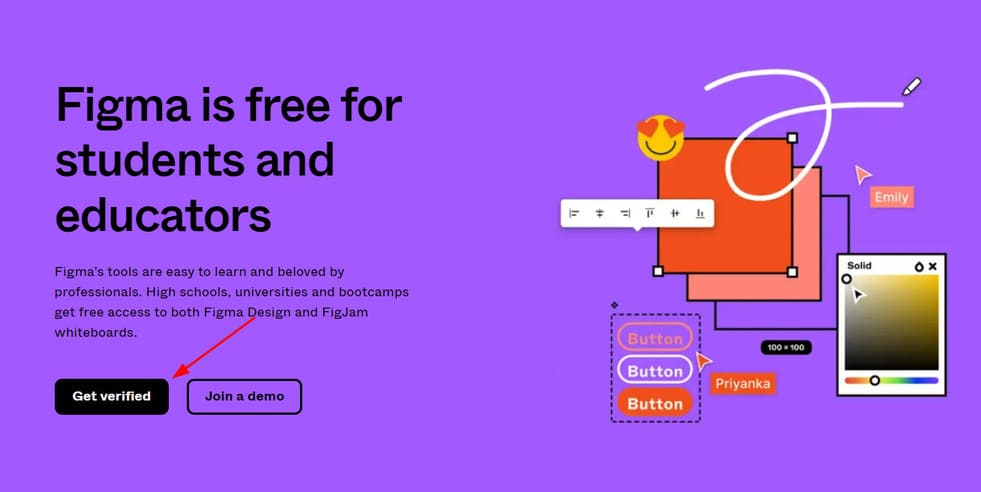
Step 2: You visit come in and choose “Get verified”.
How to register Figma Pro for free 8

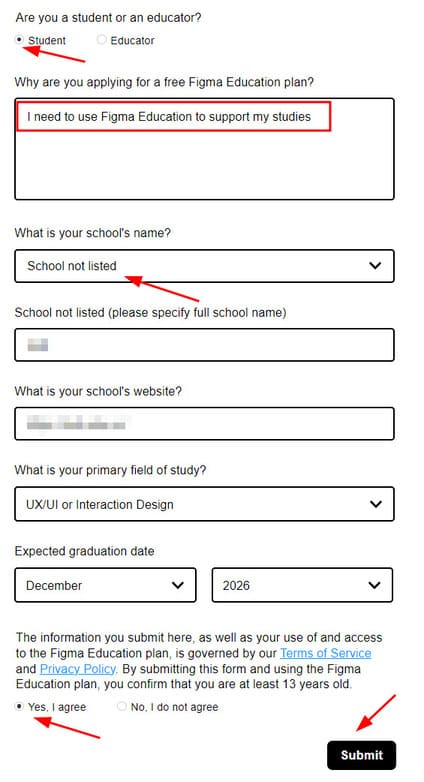
Step 3: Fill in the information as shown below.

1. You can choose student or Educator all okay.

2. The reason you need to use Figma Education, you fill in the same as me: I need to use Figma Education to support my studies.
3. Select “School not listed”.

4. You can enter any university name.

5. Fill in the website of that agent.

6. Select the field you want.

7. Choose your intended graduation date to be 2026.
How to register Figma Pro for free 9

8. Finally press “Yes, I agree” and choose Submit.
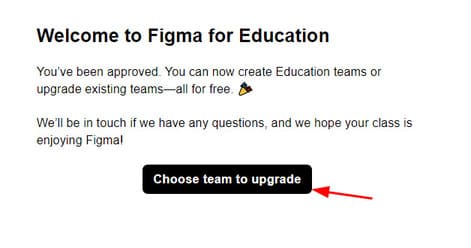
How to register Figma Pro for free 10

Step 4: Select the team you want and press next.
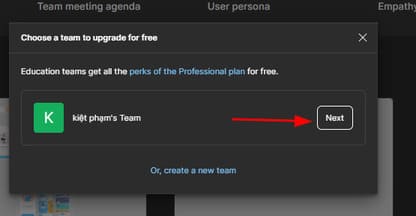
How to register Figma Pro for free 11

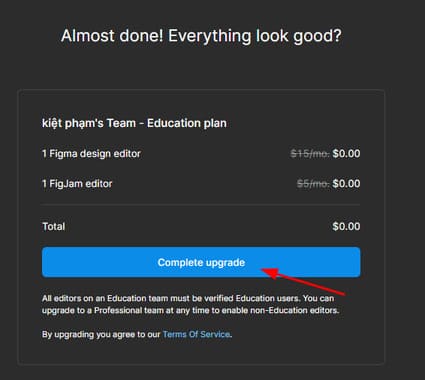
Step 5: Press “Complete upgrade”.

How to register for Figma Pro for free 12

So you have successfully upgraded to Figma Pro.
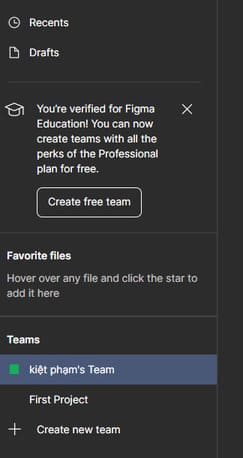
How to register Figma Pro for free 13

Also, if you don’t like using Figma, you can check out 5 other alternative softwares here.

The article achieved: 5/5 – (2 votes)

Tags: FigmafreeProsign
Previous Post

How to Install Virtualmin on Ubuntu Using VPS Orcale

Next Post

How to create a free Mail Domain with LarkSuite

AnonyViet

AnonyViet

Related Posts

15 cách tăng tốc Windows 10 nhanh như gió
Tips

15 cách tăng tốc Windows 10 nhanh như gió

October 14, 2026
How to create Guest mode Shortcuts for Chrome and Edge
Tips

How to create Guest mode Shortcuts for Chrome and Edge

October 13, 2026
Test what breed of dog you are through 10 multiple choice questions
Tips

Test what breed of dog you are through 10 multiple choice questions

October 13, 2026
Fliqlo – Create digital clock screens on Windows and phones
Tips

Fliqlo – Create digital clock screens on Windows and phones

October 12, 2026
SynthID Detector: Genuine AI checking tool from Google
Tips

SynthID Detector: Genuine AI checking tool from Google

October 11, 2026
Microsoft is preparing to launch Windows 11
Tips

Microsoft is preparing to launch Windows 11

October 9, 2026
Next Post
How to create a free Mail Domain with LarkSuite

How to create a free Mail Domain with LarkSuite

0 0 votes
Article Rating
Subscribe
Login
Notify of
guest

guest

0 Comments
Oldest
Newest Most Voted

Recent News

15 cách tăng tốc Windows 10 nhanh như gió

15 cách tăng tốc Windows 10 nhanh như gió

October 14, 2026
Which social network accounts must be linked to VNeID before December 31, 2026?

Which social network accounts must be linked to VNeID before December 31, 2026?

October 14, 2026
How to create Guest mode Shortcuts for Chrome and Edge

How to create Guest mode Shortcuts for Chrome and Edge

October 13, 2026
Test what breed of dog you are through 10 multiple choice questions

Test what breed of dog you are through 10 multiple choice questions

October 13, 2026
15 cách tăng tốc Windows 10 nhanh như gió

15 cách tăng tốc Windows 10 nhanh như gió

October 14, 2026
Which social network accounts must be linked to VNeID before December 31, 2026?

Which social network accounts must be linked to VNeID before December 31, 2026?

October 14, 2026
How to create Guest mode Shortcuts for Chrome and Edge

How to create Guest mode Shortcuts for Chrome and Edge

October 13, 2026
AnonyViet - English Version

AnonyViet

AnonyViet is a website share knowledge that you have never learned in school!

We are ready to welcome your comments, as well as your articles sent to AnonyViet.

Follow Us

Contact:

Email: anonyviet.com[@]gmail.com

Main Website: https://anonyviet.com

Recent News

15 cách tăng tốc Windows 10 nhanh như gió

15 cách tăng tốc Windows 10 nhanh như gió

October 14, 2026
Which social network accounts must be linked to VNeID before December 31, 2026?

Which social network accounts must be linked to VNeID before December 31, 2026?

October 14, 2026
  • Home
  • Home 2
  • Home 3
  • Home 4
  • Home 5
  • Home 6
  • Next Dest Page
  • Sample Page

say88 tỷ lệ kèo nhà cái kèo nhà cái 5 febet

No Result
View All Result
  • Home
  • News
  • Software
  • Knowledge
  • MMO
  • Tips
  • Security
  • Network
  • Office

say88 tỷ lệ kèo nhà cái kèo nhà cái 5 febet

wpDiscuz
0
0
Would love your thoughts, please comment.x
()
x
| Reply