RAM is a very important component inside a computer, but do you really know how many GB of RAM you need? If the installation is insufficient, the device will lag, if it is installed, it will cost money? This article will show you how to calculate the right amount of RAM for your computer needs.
| Join the channel Telegram of the AnonyViet 👉 Link 👈 |
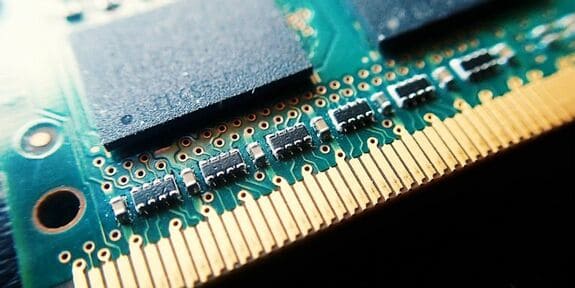
Learn how to see how much RAM you have available, how much RAM is right for different users, and some advice if you need more RAM.
What is RAM?
I have a detailed post about find out what is RAM? Before looking at how much RAM you need, you need to know what RAM is first. Watch the video above for more details, I’ll just make it short and easy to understand for you guys.
RAM, or random access memory, is a form of short-term storage in your computer. That’s where the operating system keeps processes for open programs. When you turn off the computer, the contents of the RAM are erased.
Because RAM allows quick access, you can switch between open programs quickly. It’s much more efficient to switch between programs running in RAM than pulling them off your drive.
How to check how much RAM your computer has?
Next, we will see how much RAM you have in your system to compare with the examples and objects in the article.
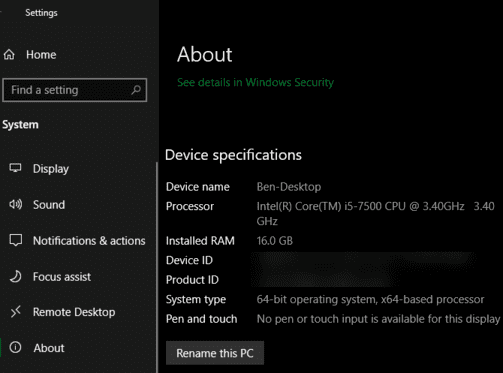
Above Windows 10enter Settings > System > About. In Device specificationsyou will see the line Installed RAM. Note that if your system is 32bit, you can only use 4GB of RAM no matter how much RAM you have in your machine. You will need to use 64-bit Windows to use more than 4GB of RAM.
For Windows 7, right-click My Computer and select Properties. See Installed Memory (RAM).
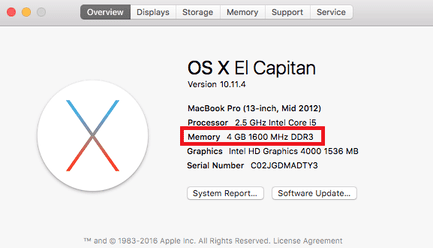
Above macOSopen Apple menu at the top left of the screen and select About this Mac. On the tab Overviewyou will see the line Memory shows how much RAM you are using.
If you use Linuxyou can enter the command free in Terminal to display RAM information. However, this command will show the amount of memory in kilobytes, which is a bit inconvenient. You just need to use free -h to display RAM information in gigabytes or megabytes.
How much RAM does the computer need?
Now that you know how much RAM your computer has, let’s take a look at some common memory capacities to see how much is right for your needs.
2GB or less: Weak
You’d be hard-pressed to find a modern computer with only 2GB of RAM. While this amount of RAM should be able to handle a simple task, such as basic web browsing, anything other than simple multitasking will slow down systems with 2GB of RAM.
Most cheap smartphones these days use even more RAM. You should avoid buying a computer with 2GB of RAM, and if your current machine has less RAM, consider upgrading when possible.
4GB RAM: Enough for basic needs

For a while, 4GB of RAM was considered the base level for most computers. Although the world is now moving towards the 8GB standard, you will still find some cheap laptops using 4GB memory. But is 4GB of RAM any good?
4GB of RAM is enough if you only use the computer for basic tasks like web browsing, light word processing or spreadsheet work and emailing. It’s not enough for many modern games, and will struggle if you have multiple Chrome tabs open or running dozens of programs at once.
8GB RAM: Standard for the Future
Most mid-range computers these days have 8GB of RAM. Notably, all Apple MacBook models use at least 8GB of RAM.
8GB is a good modern standard for RAM. It is enough to perform multiple tasks at the same time without slowing down and also enough for gaming.
You’ll probably want more RAM if you regularly edit 4K videos, stream heavy games, or always have a lot of resource-hungry programs open. But if you are not a heavy computer user, 8GB of RAM is more than enough.
16GB RAM: For Professionals

16GB of RAM is a great amount if you use the computer for heavy tasks. Design software, video editing, and AAA games require more hardware if you have 16GB of RAM.
However, it’s overkill if you don’t have the above needs. People who only have a few browser tabs open and don’t play games or work with large files can use less RAM (I have a brother, bought a 20+ old gaming laptop just to surf facebook and watch youtube :v) .
32GB+: For graphics people + virtual machines
32GB or more of memory is only needed by ultra-professional users. If you regularly edit 4K (or higher) videos and want to work on other tasks while your computer is editing videos, you will need a large amount of memory. For most people it’s a waste of money, and it’s better to spend that money on upgrading your PC.
Most games these days don’t need 32GB of RAM. You can see this paragraph To know how much RAM I need to play any game.
Video RAM is different from RAM
We learned about RAM above. However, if you have a dedicated graphics card in your PC, you should know that this card has its own memory. Called video RAM, or VRAM.
VRAM holds the information the game needs to display and efficiently transfers it to your screen. Even if you have plenty of RAM, game performance (or high-end design software) can suffer if you don’t have enough VRAM.
How to increase RAM
The fastest way is to access https://downloadmoreram.com/ to download RAM. Just kidding, read below.
The only way to get more RAM to use is to buy more for your computer. It’s relatively cheap and will make a big difference if you’re doing more RAM-intensive tasks now (RAM is much cheaper now).
Trying a temporary solution is increase RAM by USByou should only use it in an emergency situation.
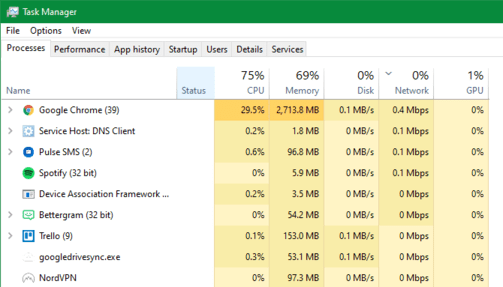
However, if you are currently unable to upgrade the memory, you can free up the available RAM on your Windows computer with some tricks. Most importantly, close programs if you’re not using them, so they don’t take up all of your available RAM.
Don’t forget to upgrade other components
If you’re looking to upgrade your current machine or build a new PC, remember that RAM isn’t the only component worth buying. Unused RAM is wasted RAM. There’s no point in buying 32GB of memory when you’re only using 4GB, because the extra RAM never works. You can also run RAPID or let the iGPU use it.
How much RAM does the computer need?
We’ve learned how to check the RAM in your computer, how much RAM you need for different tasks, and how to get the most out of your current memory. In short, aim for 8GB as a base and 16GB of RAM if you’re a pro. If used for graphics or virtual machines, you can think of upgrading to 32Gb or 64Gb