• Home
  • News
  • Software
  • Knowledge
  • MMO
  • Tips
  • Security
  • Network
  • Office
AnonyViet - English Version
  • Home
  • News
  • Software
  • Knowledge
  • MMO
  • Tips
  • Security
  • Network
  • Office
No Result
View All Result
  • Home
  • News
  • Software
  • Knowledge
  • MMO
  • Tips
  • Security
  • Network
  • Office
No Result
View All Result
AnonyViet - English Version
No Result
View All Result

Create, Expand, Shrink, Convert VHD to VHDX – Windows Server 2012 R2

AnonyViet by AnonyViet
January 28, 2023
in Network
0

I) Introduction

Join the channel Telegram of the AnonyViet 👉 Link 👈

111111111

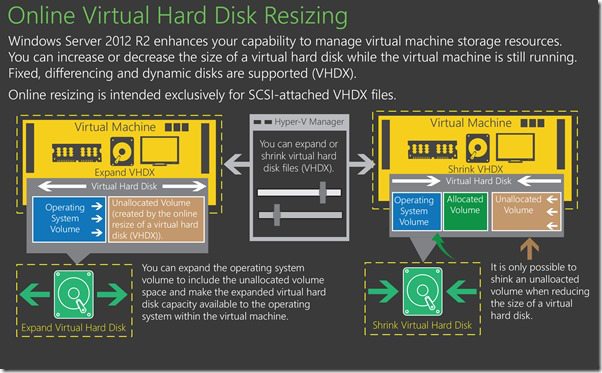
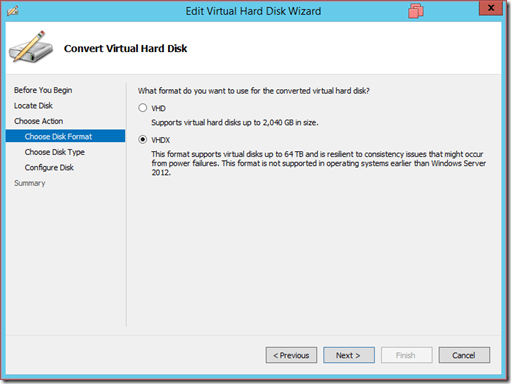
Starting with Windows Server 2012, virtual machines use the VHDX standard for storage by default. The VHDX standard supports storage up to 64TB (2TB for VHD). Supports block sizes up to 256MB and each sector is 4KB in size. The VHDX standard improves security and reduces corruption when something unexpected happens like a power failure.

II) Convert a VHD to VHDX

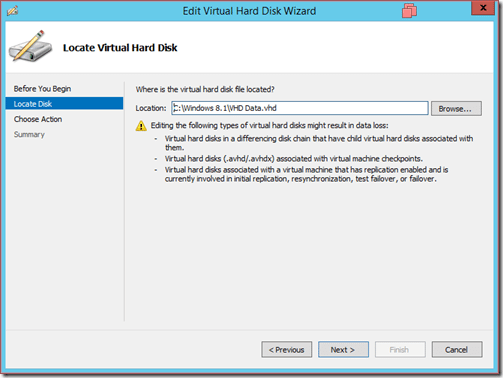
Converting VHD to VHDX will lose data for the case:

  • VHD according to the mechanism of Differencing Disk
  • VHD with snapshots (checkpoints) will be deleted
  • Which VHD is using Initial Replication, Resynchronize, Test Failover and Failover features.
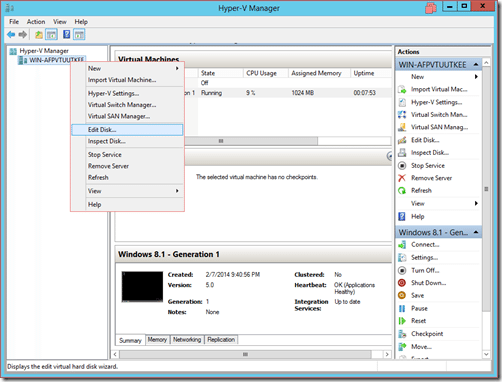
first

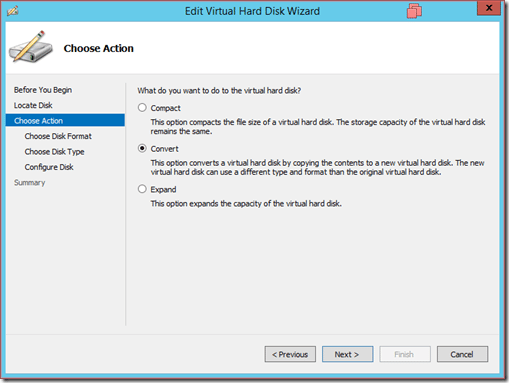
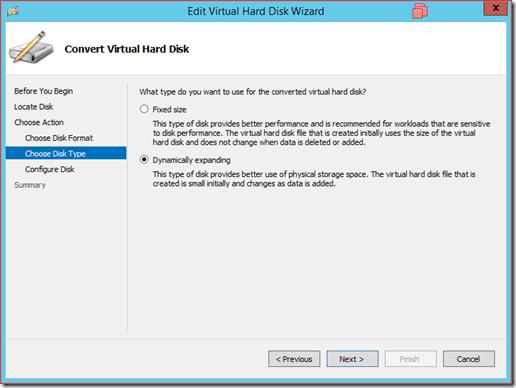
  • Select the VHD drive to convert

2

3

4

5

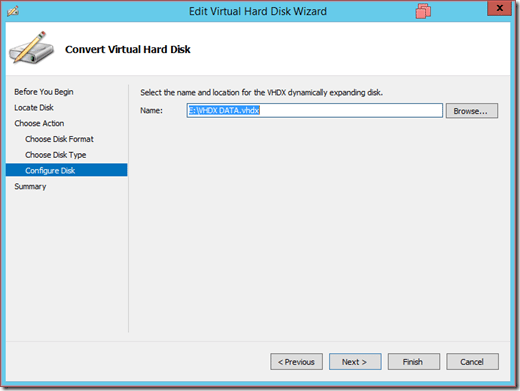
  • Choose the path to save the VHDX . file
6

7

III) Create and mount a VHDX drive in the virtual machine

Windows Server 2012 allows you to mount a VHDX drive directly into virtual machines while they are running.

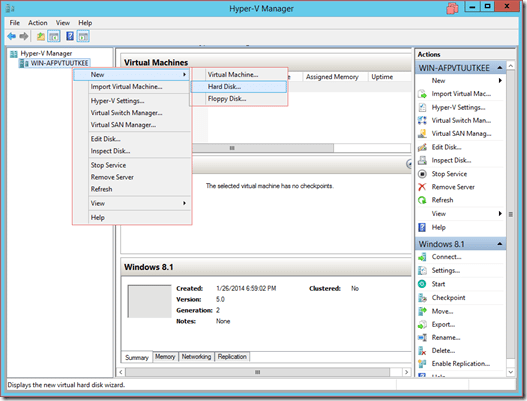
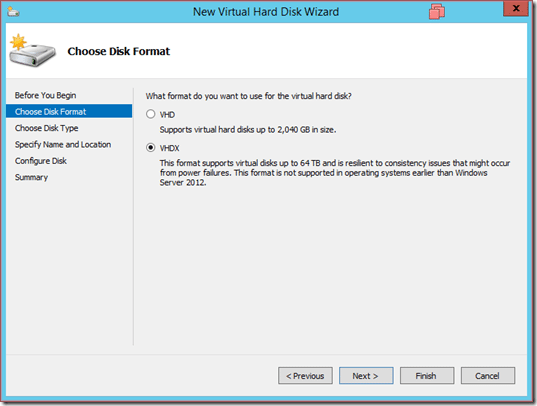
  • Create a VHDX . drive

first

2

3

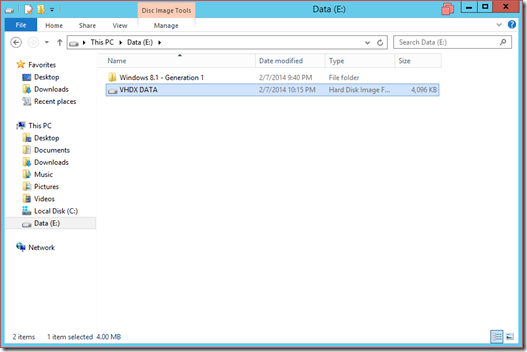
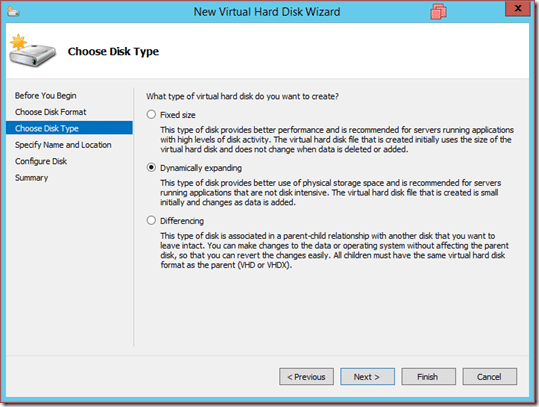
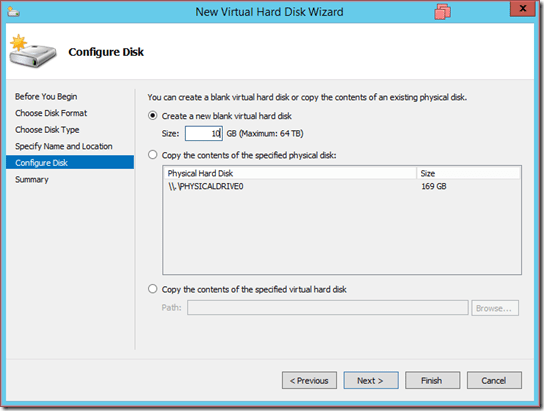
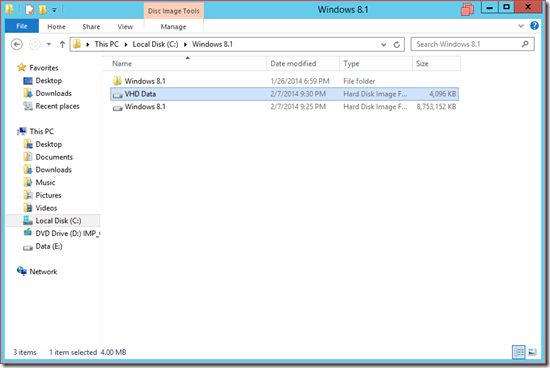
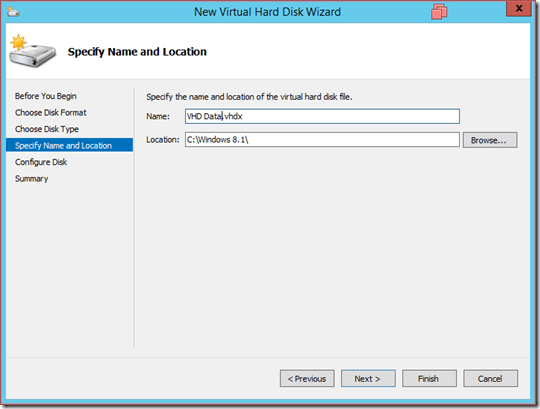
  • Name and select the path containing the VHDX . file
4

5

6

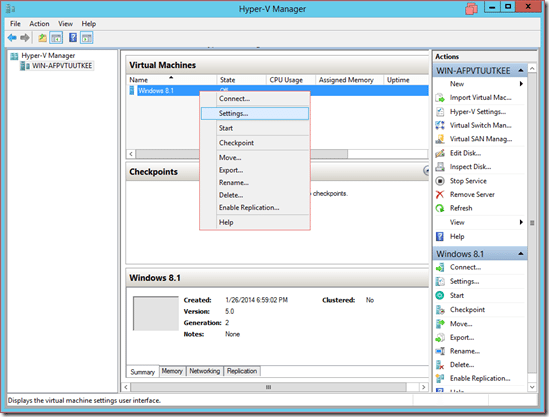
  • Implement VHDX mount to virtual machine
7

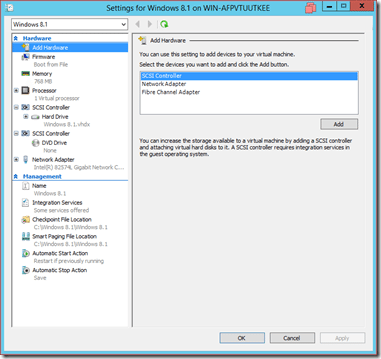
  • Add hardware –> Select SCSI controller to create a SCSI mechanism Device
8

  • Select the Hard Drive type for the newly created SCSI Device
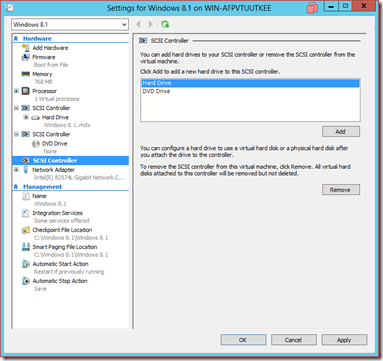
9

  • Then mount the newly created VHDX drive -> Select Browse and point to VHDX
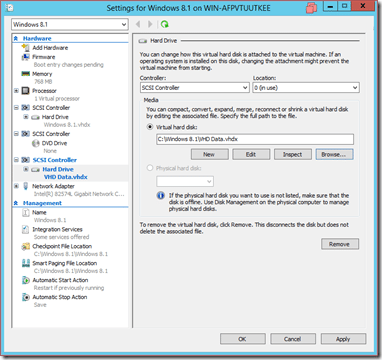
ten

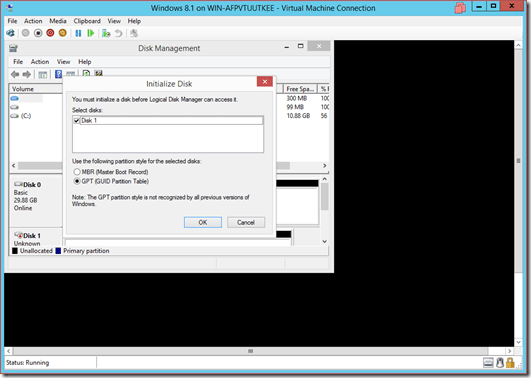
  • Open the virtual machine and check

11

IV) Expand VHDX drive (Allows VHDX expansion while the virtual machine is running)

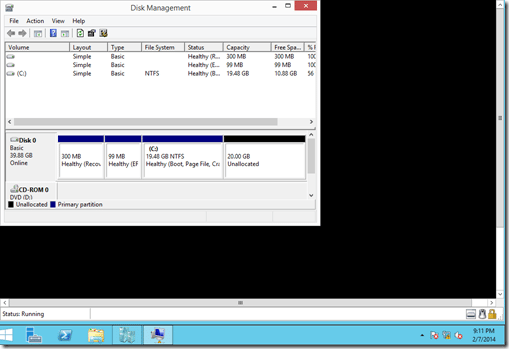
  • The virtual machine has a VHDX drive with a capacity of 20GB
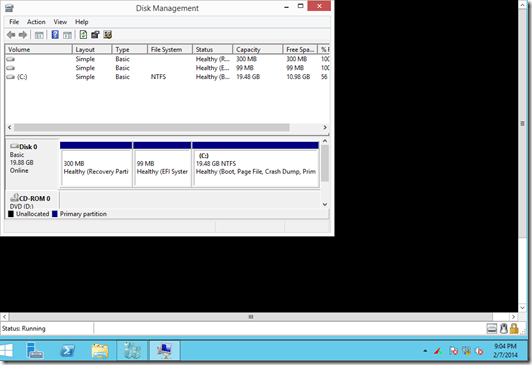
first

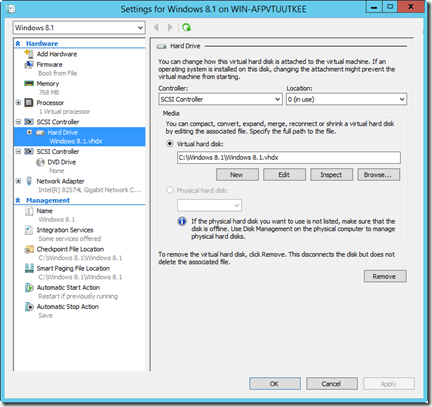
  • Right-click the virtual machine -> Select Settings
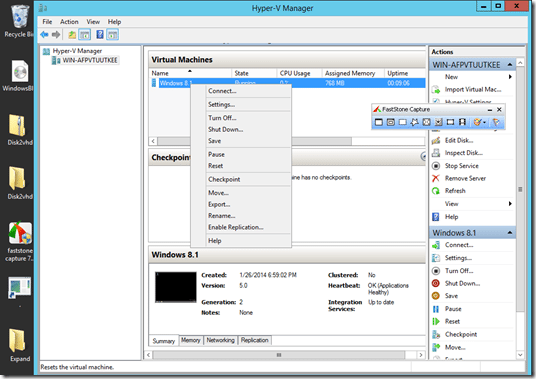
2

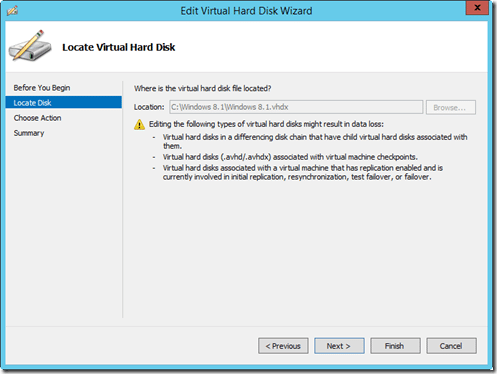
  • Select the VHDX drive -> Select Edit
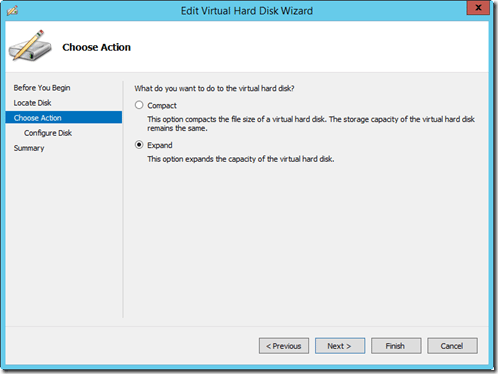
3

4

5

  • Available capacity is 20GB, you can increase up to 64TB (VHDX standard)
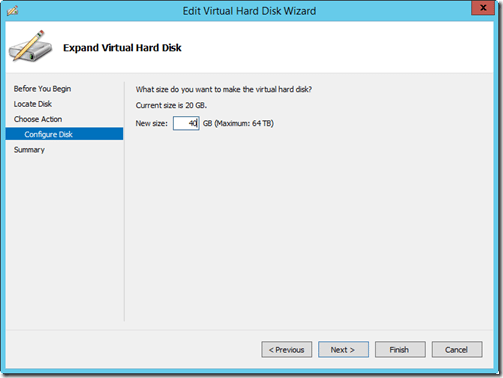
6

  • The result, 20GB more for the drive

7

V) Shrink VHDX drive (Reduce VHDX drive space while virtual machine is running)

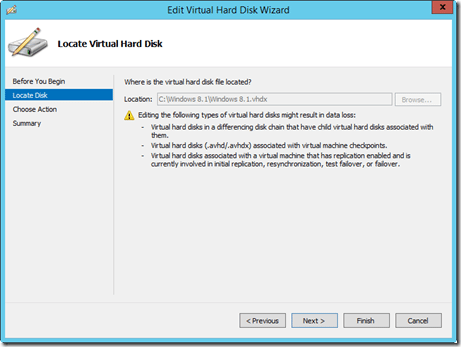
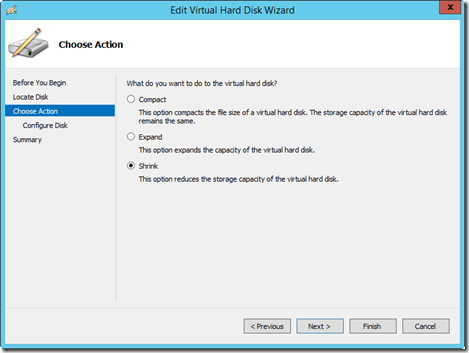
  • Same as above but choose Shrink

4

8

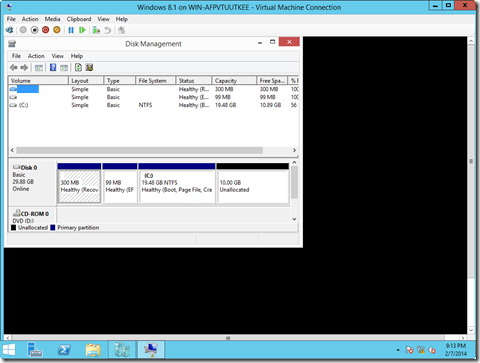
  • Current capacity is 40GB, at least 50% less disk space
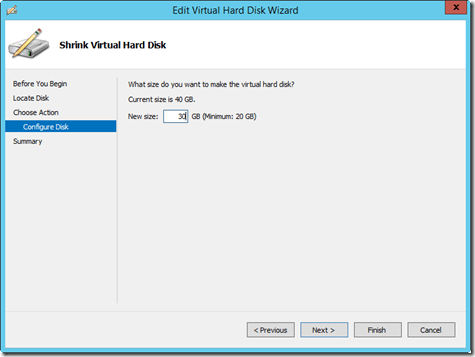
9

ten

The article achieved: 5/5 – (100 votes)

Tags: convertcreateExpandServerShrinkVHDVHDXWindows
Previous Post

Share Tool Hades used to Troll and Phishing Password Windows

Next Post

The best and free Windows 10 repair tools

AnonyViet

AnonyViet

Related Posts

Is Renting a Cheap VPS to Run Docker Really Effective?
Network

Is Renting a Cheap VPS to Run Docker Really Effective?

July 2, 2026
How to get a free domain for 1 year from Gravatar
Network

How to get a free domain for 1 year from Gravatar

June 23, 2026
Cloud Infrastructure Resilience: Mitigating Advanced Layer 7 Vulnerabilities and Securing High-Throughput Database Handshakes
Network

Cloud Infrastructure Resilience: Mitigating Advanced Layer 7 Vulnerabilities and Securing High-Throughput Database Handshakes

June 20, 2026
Save image as Type contains malicious code: Remove immediately before losing money unfairly!
Network

Save image as Type contains malicious code: Remove immediately before losing money unfairly!

March 19, 2026
Instructions on how to register a .co.uk domain name for free for 1 year
Network

Instructions on how to register a .co.uk domain name for free for 1 year

March 12, 2026
How to Setup Paperclip AI: Create a Company for AI Agent
Network

How to Setup Paperclip AI: Create a Company for AI Agent

March 12, 2026
Next Post
The best and free Windows 10 repair tools

The best and free Windows 10 repair tools

0 0 votes
Article Rating
Subscribe
Login
Notify of
guest

guest

0 Comments
Oldest
Newest Most Voted
Inline Feedbacks
View all comments

Recent News

Get Notion Business 30 days free of Claude Opus 4.7 and GPT-5.5

Get Notion Business 30 days free of Claude Opus 4.7 and GPT-5.5

July 6, 2026
The easiest way to convert Word File to PowerPoint – Convert DOCX File to PTTX

The easiest way to convert Word File to PowerPoint – Convert DOCX File to PTTX

July 6, 2026
The simplest way to log out of Gmail on Huawei phones

The simplest way to log out of Gmail on Huawei phones

July 5, 2026
Receive a free 6-month Smart Game Booster VIP license

Receive a free 6-month Smart Game Booster VIP license

July 5, 2026
Get Notion Business 30 days free of Claude Opus 4.7 and GPT-5.5

Get Notion Business 30 days free of Claude Opus 4.7 and GPT-5.5

July 6, 2026
The easiest way to convert Word File to PowerPoint – Convert DOCX File to PTTX

The easiest way to convert Word File to PowerPoint – Convert DOCX File to PTTX

July 6, 2026
The simplest way to log out of Gmail on Huawei phones

The simplest way to log out of Gmail on Huawei phones

July 5, 2026
AnonyViet - English Version

AnonyViet

AnonyViet is a website share knowledge that you have never learned in school!

We are ready to welcome your comments, as well as your articles sent to AnonyViet.

Follow Us

Contact:

Email: anonyviet.com[@]gmail.com

Main Website: https://anonyviet.com

Recent News

Get Notion Business 30 days free of Claude Opus 4.7 and GPT-5.5

Get Notion Business 30 days free of Claude Opus 4.7 and GPT-5.5

July 6, 2026
The easiest way to convert Word File to PowerPoint – Convert DOCX File to PTTX

The easiest way to convert Word File to PowerPoint – Convert DOCX File to PTTX

July 6, 2026
  • Home
  • Home 2
  • Home 3
  • Home 4
  • Home 5
  • Home 6
  • Next Dest Page
  • Sample Page

No Result
View All Result
  • Home
  • News
  • Software
  • Knowledge
  • MMO
  • Tips
  • Security
  • Network
  • Office

wpDiscuz
0
0
Would love your thoughts, please comment.x
()
x
| Reply