• Home
  • News
  • Software
  • Knowledge
  • MMO
  • Tips
  • Security
  • Network
  • Office
AnonyViet - English Version
  • Home
  • News
  • Software
  • Knowledge
  • MMO
  • Tips
  • Security
  • Network
  • Office
No Result
View All Result
  • Home
  • News
  • Software
  • Knowledge
  • MMO
  • Tips
  • Security
  • Network
  • Office
No Result
View All Result
AnonyViet - English Version
No Result
View All Result

How to find recently viewed ads on Facebook

AnonyViet by AnonyViet
January 25, 2023
in Tips
0

Facebook is very good that always shows ads according to your current needs. Thanks to the mechanism of analyzing user behavior and sharing cookies with 3rd parties, products you have viewed somewhere, will often appear in Facebook ads. But what if you miss a useful ad and want to watch it again? Please read this guide.

Join the channel Telegram of the AnonyViet 👉 Link 👈

How to find recently viewed ads on Facebook

The Facebook app on iPhone and Android has a separate setting for your advertising. Here, you can keep track of all the sponsored posts you’ve interacted with on your newsfeed. I will divide it into 2 operating system platforms to make it easier to guide.

Find recently viewed ads on Facebook for Android

You’ll find your recent ad activity in the Facebook menu. To get started, open Facebook app for Android. Then press the . button hamburger menu from the top toolbar.
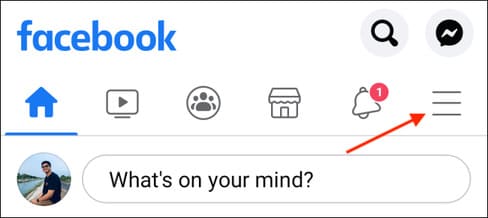
How to find recently viewed ads on Facebook 12

Select the “See More” option.

How to find recently viewed ads on Facebook 13

Now, tap on the “Recent Ad Activity” button.

How to find recently viewed ads on Facebook 14

From here, you’ll be able to see a list of all the ads and sponsored posts you’ve interacted with. Click on an ad to open it in the browser. From the menu you can also find the option to hide future ads.
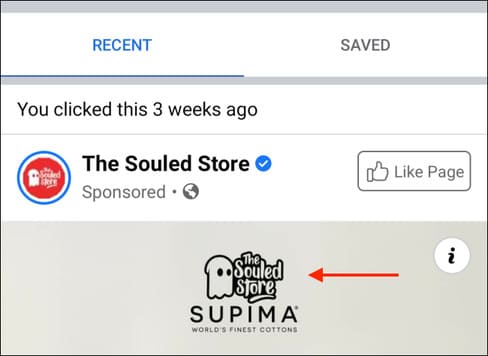
How to find recently viewed ads on Facebook 15

You can click the “Save” button to save the ad for later. You will find all saved ads in the Saved tab.
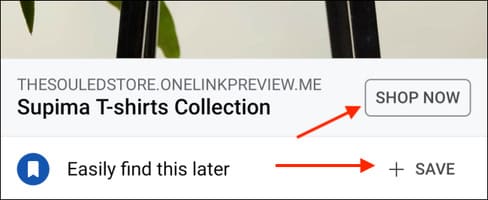
How to find recently viewed ads on Facebook 16

Find recently viewed ads on Facebook for iPhone and iPad

The steps to view recent Facebook ads in the iPhone and iPad apps are different than for Android. To get started, open Facebook app for iPhone and iPad.

Then, tap the hamburger Menu button in the bottom right corner.
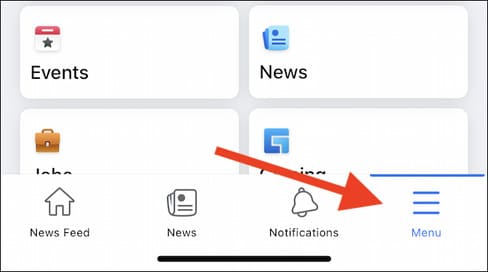
How to find recently viewed ads on Facebook 17

Next, scroll to the bottom of the page and select “Settings & Privacy”.
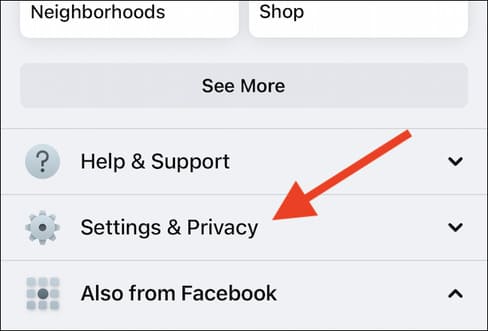
How to find recently viewed ads on Facebook 18

Select “Recent Ad Activity” from the expanded menu.
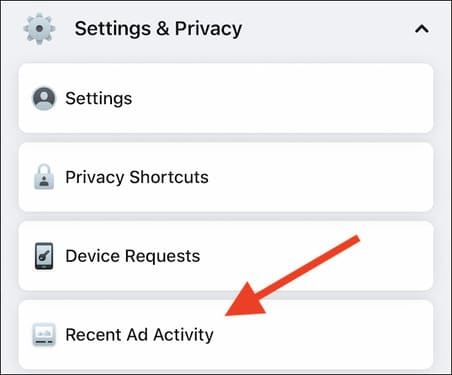
How to find recently viewed ads on Facebook 19

You will see all the ads that you have recently clicked on. Just tap on an ad to open it in your browser.

How to find recently viewed ads on Facebook 20

In addition, you can also replace all Facebook ad photos with hotgirl photos here.

The article achieved: 5/5 – (100 votes)

Tags: AdsFacebookFindviewed
Previous Post

Lesson 202: How to count unique values ​​in Excel

Next Post

Lesson 224: Managing Rules – Conditions in Excel

AnonyViet

AnonyViet

Related Posts

How to add sliders to Facebook Stories to easily rewind videos
Tips

How to add sliders to Facebook Stories to easily rewind videos

April 21, 2026
How to change the default font on Windows 10
Tips

How to change the default font on Windows 10

April 13, 2026
5 tips for using a Browser to replace an App (helps save RAM, time and money)
Tips

5 tips for using a Browser to replace an App (helps save RAM, time and money)

April 13, 2026
How to make funny MeMe photos without Photoshop within 10 seconds
Tips

How to make funny MeMe photos without Photoshop within 10 seconds

April 11, 2026
How to quickly design your own Logo without Photoshop
Tips

How to quickly design your own Logo without Photoshop

April 10, 2026
How to convert Website into App on Windows
Tips

How to convert Website into App on Windows

April 9, 2026
Next Post
Lesson 224: Managing Rules – Conditions in Excel

Lesson 224: Managing Rules - Conditions in Excel

0 0 votes
Article Rating
Subscribe
Login
Notify of
guest

guest

0 Comments
Oldest
Newest Most Voted
Inline Feedbacks
View all comments

Recent News

Top 5+ utilities to install for Gmail to speed up work processing

Top 5+ utilities to install for Gmail to speed up work processing

April 22, 2026
Decoding the problem of 4GB RAM and processing performance

Decoding the problem of 4GB RAM and processing performance

April 21, 2026
How to add sliders to Facebook Stories to easily rewind videos

How to add sliders to Facebook Stories to easily rewind videos

April 21, 2026
Reputable LG repair service in Hanoi & Ho Chi Minh City with LGservicecenter

Reputable LG repair service in Hanoi & Ho Chi Minh City with LGservicecenter

April 21, 2026
Top 5+ utilities to install for Gmail to speed up work processing

Top 5+ utilities to install for Gmail to speed up work processing

April 22, 2026
Decoding the problem of 4GB RAM and processing performance

Decoding the problem of 4GB RAM and processing performance

April 21, 2026
How to add sliders to Facebook Stories to easily rewind videos

How to add sliders to Facebook Stories to easily rewind videos

April 21, 2026
AnonyViet - English Version

AnonyViet

AnonyViet is a website share knowledge that you have never learned in school!

We are ready to welcome your comments, as well as your articles sent to AnonyViet.

Follow Us

Contact:

Email: anonyviet.com[@]gmail.com

Main Website: https://anonyviet.com

Recent News

Top 5+ utilities to install for Gmail to speed up work processing

Top 5+ utilities to install for Gmail to speed up work processing

April 22, 2026
Decoding the problem of 4GB RAM and processing performance

Decoding the problem of 4GB RAM and processing performance

April 21, 2026
No Result
View All Result
  • Home
  • News
  • Software
  • Knowledge
  • MMO
  • Tips
  • Security
  • Network
  • Office

wpDiscuz
0
0
Would love your thoughts, please comment.x
()
x
| Reply