• Home
  • News
  • Software
  • Knowledge
  • MMO
  • Tips
  • Security
  • Network
  • Office
AnonyViet - English Version
  • Home
  • News
  • Software
  • Knowledge
  • MMO
  • Tips
  • Security
  • Network
  • Office
No Result
View All Result
  • Home
  • News
  • Software
  • Knowledge
  • MMO
  • Tips
  • Security
  • Network
  • Office
No Result
View All Result
AnonyViet - English Version
No Result
View All Result

Instructions for self-passing hCaptcha without Click

AnonyViet by AnonyViet
January 25, 2023
in Tips
0

hCaptcha is a security solution to avoid spam login or website access from abnormal IPs. When you encounter hCaptcha you have to click on each image according to the suggestion of the main image. For example, you need to click on the correct image with “vehicle” as described by hCaptcha. However, if you encounter a lot of hCaptcha, it will cause inhibition and sometimes click the wrong one to have to click again. Today I will guide you to pass hCaptcha automatically, no need to click each image.

Join the channel Telegram of the AnonyViet 👉 Link 👈

What is hCaptcha?

Captcha is a simple test to distinguish humans from automated bots. Humans can solve it easily, but difficult for bots and other malware.

After the Google-owned reCAPTCHA changed its business model from free to paid, many were looking for a free alternative to hCaptcha.

hCaptcha (https://www.hcaptcha.com/) is currently the largest independent captcha service and runs on the Internet accounting for 15%.

hCaptcha helps protect user privacy and helps companies tag their data. It provides simple and reliable bot detection that can’t be solved by humans.

Instructions for self-passing hCaptcha without Click

How to bypass hCaptcha automatically without Click

However, nothing is impossible, now there is a script to help you pass the images of hCaptcha simply, just open the captcha and wait a bit, the images will be automatically selected and you just need to click OK done.

Method 1: Use userscript manager to overcome hCaptcha

Because the code beyond hCaptcha is written in javascript, so on the browser you need to have an extension that interferes with the code in the browser. You can install the following extensions:

Next turn on the hardware acceleration function of the Web browser according to the instructions below:

  1. Open chrome://settings in the browser address bar.
  2. Left window select Show Advanced settings
  3. Scroll down to find: System.
  4. Give it a check Use hardware acceleration when available is it turned on, if not, then open up and restart Chrome.

You can see the instructions with pictures in the article Hardware Acceleration in Chrome.

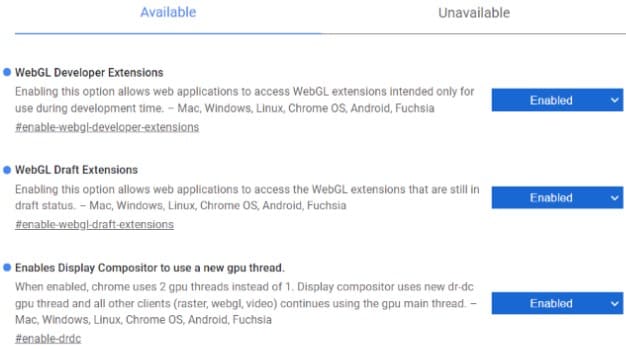
Now open the WebGL feature for Chrome:

  1. Open chrome://flags in the browser address bar.
  2. Press Ctrl + F to open the search dialog, press WebGL and Enable Anywhere with WebGL is fine.enable webgl
  3. Next press Ctrl + F to find Override software rendering list and enable it.
  4. Then press Relaunch Chrome to restart the browser

Now you access the page get script surpasses hcaptcha for the browser. Click install this script

install this script

Then press the . button Install on the browser.

Now try to go to a page with hcaptcha, click on Captcha in the question section wait 5 seconds , will see on the screen choose the correct captcha image for you. Now just press the button Verify done.

Method 2: Use Extension hCaptcha Solver to automatically solve Captcha

There is a simpler way on Chrome that you use hCaptcha Solver. This is an extension written specifically for Chrome, as well as using a script, the captcha solving will be completely automatic.

You just need to open hCaptcha and wait 5 seconds, this extension will automatically click the right image for you without having to manipulate the mouse to select each image.

Method 3: Use Cookies to authenticate as a real user

Previously, I had a tutorial on how to use it Cookie authentication so that the browser understands that you are a real person and not a Robot. Thus, Hcaptcha will let you pass easily without having to confirm the image. I think this is the safest way because I don’t have to use 3rd party scripts.

Hopefully through this article you will save more time when accessing websites that always ask for captcha confirmation.


The article achieved: 5/5 – (100 votes)

Tags: clickhCaptchaInstructionsselfpassing
Previous Post

How to find someone else’s IP address on Instagram

Next Post

Lesson 247: Thermometer chart in Excel

AnonyViet

AnonyViet

Related Posts

How to download documents on 123doc for free
Tips

How to download documents on 123doc for free

July 21, 2026
Instructions for Logo Design in just a few clicks with Logaster
Tips

Instructions for Logo Design in just a few clicks with Logaster

July 20, 2026
3 coolest ways to turn off your computer
Tips

3 coolest ways to turn off your computer

July 19, 2026
Instructions for checking Windows copyright using Powershell to avoid penalties
Tips

Instructions for checking Windows copyright using Powershell to avoid penalties

July 19, 2026
Who leaked Windows 11?
Tips

Who leaked Windows 11?

July 18, 2026
Instructions for Getting Netflix 30 Days Free to Watch Movies
Tips

Instructions for Getting Netflix 30 Days Free to Watch Movies

July 18, 2026
Next Post
Lesson 247: Thermometer chart in Excel

Lesson 247: Thermometer chart in Excel

0 0 votes
Article Rating
Subscribe
Login
Notify of
guest

guest

0 Comments
Oldest
Newest Most Voted

Recent News

How to download documents on 123doc for free

How to download documents on 123doc for free

July 21, 2026
Instructions for Logo Design in just a few clicks with Logaster

Instructions for Logo Design in just a few clicks with Logaster

July 20, 2026
Clean Tam – Accompanying the green space of every Vietnamese family

Clean Tam – Accompanying the green space of every Vietnamese family

July 20, 2026
3 coolest ways to turn off your computer

3 coolest ways to turn off your computer

July 19, 2026
How to download documents on 123doc for free

How to download documents on 123doc for free

July 21, 2026
Instructions for Logo Design in just a few clicks with Logaster

Instructions for Logo Design in just a few clicks with Logaster

July 20, 2026
Clean Tam – Accompanying the green space of every Vietnamese family

Clean Tam – Accompanying the green space of every Vietnamese family

July 20, 2026
AnonyViet - English Version

AnonyViet

AnonyViet is a website share knowledge that you have never learned in school!

We are ready to welcome your comments, as well as your articles sent to AnonyViet.

Follow Us

Contact:

Email: anonyviet.com[@]gmail.com

Main Website: https://anonyviet.com

Recent News

How to download documents on 123doc for free

How to download documents on 123doc for free

July 21, 2026
Instructions for Logo Design in just a few clicks with Logaster

Instructions for Logo Design in just a few clicks with Logaster

July 20, 2026
  • Home
  • Home 2
  • Home 3
  • Home 4
  • Home 5
  • Home 6
  • Next Dest Page
  • Sample Page

say88 tỷ lệ kèo nhà cái kèo nhà cái 5 febet

No Result
View All Result
  • Home
  • News
  • Software
  • Knowledge
  • MMO
  • Tips
  • Security
  • Network
  • Office

say88 tỷ lệ kèo nhà cái kèo nhà cái 5 febet

wpDiscuz
0
0
Would love your thoughts, please comment.x
()
x
| Reply