• Home
  • News
  • Software
  • Knowledge
  • MMO
  • Tips
  • Security
  • Network
  • Office
AnonyViet - English Version
  • Home
  • News
  • Software
  • Knowledge
  • MMO
  • Tips
  • Security
  • Network
  • Office
No Result
View All Result
  • Home
  • News
  • Software
  • Knowledge
  • MMO
  • Tips
  • Security
  • Network
  • Office
No Result
View All Result
AnonyViet - English Version
No Result
View All Result

How to remove System Requirements Not Met on Windows 11

AnonyViet by AnonyViet
January 25, 2023
in Tips
0

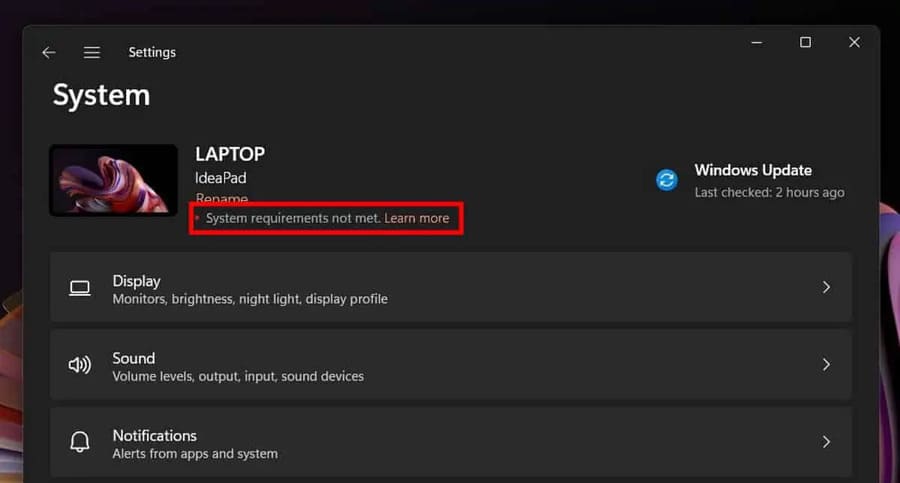
Microsoft has chosen two locations in Insider builds of Windows 11 to show the System Requirements Not Met: message first on the start page of the Settings app and secondly above the build number shown on the screen. Here’s how to remove System Requirements Not Met. Since the latter part of the message doesn’t show up on non-Insider builds, it’s likely that the prompt won’t show up on the desktop on official builds.

Join the channel Telegram of the AnonyViet 👉 Link 👈

How to remove System Requirements Not Met on Windows 11

Windows 11 can be installed on devices that do not meet the minimum system requirements. Microsoft has provided instructions for doing this, and there are a number of third-party tools, MediaCreationTool.bat, Ventoy or Rufus, that assist users in installing Windows 11 on incompatible devices. You can see more how to upgrade Windows 11 on incompatible devices here.

How to remove System Requirements Not Met on Windows 11

Windows 11 users definitely don’t want to see that message show up on their devices. So you can hide this message in the Windows Registry. The change only affects the message, it does not affect the state of the system regarding compatibility.

How to remove System Requirements Not Met on Windows 11

Step 1: Open Windows Registry Editorby pressing Start, type regedit and select the first one.

Step 2: Confirm the UAC prompt that Windows displays when you open it Registry Editor.

Step 3: Access HKEY_CURRENT_USER\Control Panel\UnsupportedHardwareNotificationCache.

Step 4: Double-click the SV2 value and change its data value to 0.

Step 5: Restart your PC after you’ve made the changes.

Windows 11 will no longer display the system incompatibility message. This message will be removed in both locations, the Desktop and the Settings app, on Insider builds. Official builds of Windows 11 currently don’t show the message and the Registry key doesn’t exist because of that. Microsoft will probably introduce it in the future on non-Insider versions of Windows 11.

This message has no functional purpose at this time and you can easily ignore it. Users who don’t want to see it can now remove System Requirements Not Met from their device by changing the Registry key.


The article achieved: 5/5 – (100 votes)

Tags: MetremoveRequirementssystemWindows
Previous Post

How to Unlock the phone to use SIM with multiple carriers

Next Post

Tool InstallerFileTakeOver escalates Admin privileges on Windows 10/11

AnonyViet

AnonyViet

Related Posts

How to create beautiful studio-like preschool graduation photos for your child
Tips

How to create beautiful studio-like preschool graduation photos for your child

May 21, 2026
Instructions on how to change iPhone fonts beautifully with Lara
Tips

Instructions on how to change iPhone fonts beautifully with Lara

May 20, 2026
Create images of guardian mascots using AI according to year of birth
Tips

Create images of guardian mascots using AI according to year of birth

May 20, 2026
Try the Shopee Profit Calculator now, avoid the risk of selling at a loss
Tips

Try the Shopee Profit Calculator now, avoid the risk of selling at a loss

May 19, 2026
Prompt converts photos into extremely impressive children’s drawings
Tips

Prompt converts photos into extremely impressive children’s drawings

May 17, 2026
Instructions for receiving 1 month of ChatGPT Plus for free
Tips

Instructions for receiving 1 month of ChatGPT Plus for free

May 12, 2026
Next Post
Tool InstallerFileTakeOver escalates Admin privileges on Windows 10/11

Tool InstallerFileTakeOver escalates Admin privileges on Windows 10/11

0 0 votes
Article Rating
Subscribe
Login
Notify of
guest

guest

0 Comments
Oldest
Newest Most Voted
Inline Feedbacks
View all comments

Recent News

How to create amazing flash effects for photos on Instagram

How to create amazing flash effects for photos on Instagram

May 21, 2026
How to create beautiful studio-like preschool graduation photos for your child

How to create beautiful studio-like preschool graduation photos for your child

May 21, 2026
Instructions on how to change iPhone fonts beautifully with Lara

Instructions on how to change iPhone fonts beautifully with Lara

May 20, 2026
Don’t rush to buy a new MacBook if you don’t know these differences

Don’t rush to buy a new MacBook if you don’t know these differences

May 20, 2026
How to create amazing flash effects for photos on Instagram

How to create amazing flash effects for photos on Instagram

May 21, 2026
How to create beautiful studio-like preschool graduation photos for your child

How to create beautiful studio-like preschool graduation photos for your child

May 21, 2026
Instructions on how to change iPhone fonts beautifully with Lara

Instructions on how to change iPhone fonts beautifully with Lara

May 20, 2026
AnonyViet - English Version

AnonyViet

AnonyViet is a website share knowledge that you have never learned in school!

We are ready to welcome your comments, as well as your articles sent to AnonyViet.

Follow Us

Contact:

Email: anonyviet.com[@]gmail.com

Main Website: https://anonyviet.com

Recent News

How to create amazing flash effects for photos on Instagram

How to create amazing flash effects for photos on Instagram

May 21, 2026
How to create beautiful studio-like preschool graduation photos for your child

How to create beautiful studio-like preschool graduation photos for your child

May 21, 2026
No Result
View All Result
  • Home
  • News
  • Software
  • Knowledge
  • MMO
  • Tips
  • Security
  • Network
  • Office

wpDiscuz
0
0
Would love your thoughts, please comment.x
()
x
| Reply