• Home
  • News
  • Software
  • Knowledge
  • MMO
  • Tips
  • Security
  • Network
  • Office
AnonyViet - English Version
  • Home
  • News
  • Software
  • Knowledge
  • MMO
  • Tips
  • Security
  • Network
  • Office
No Result
View All Result
  • Home
  • News
  • Software
  • Knowledge
  • MMO
  • Tips
  • Security
  • Network
  • Office
No Result
View All Result
AnonyViet - English Version
No Result
View All Result

Should stop using Notepad now

AnonyViet by AnonyViet
January 25, 2023
in Tips
0

To be honest: I really enjoy using Notepad in Windows for occasional notes or light text file editing. But if you’re using it for anything else, it might be time to look for better alternatives. Here’s why – and apps you should use to replace Notepad.

Join the channel Telegram of the AnonyViet 👉 Link 👈

Here's Why You Should Stop Using Notepad

Notepad’s Problems

Notepad is simple and fast, but the same rudimentary nature that makes it easy to use also leaves it short in other areas, especially when it comes to organizing notes. Let’s consider its disadvantages in more detail.

Cannot Undo (Ctrl + Z) multiple times

If you edit the text in Notepad, you can only do the backward operation once, if you want to go back to the first edit after many edits, it will be impossible.

If you make a mistake and want to go back to the old content, you may have to retype the text from somewhere. Instead, you should use Notepad++ or Wordpad if you want to quickly take notes on something.

No text formatting

While the lack of fancy text formatting — such as italic, bold, centered, bulleted, or font changes — is part of Notepad’s appeal, it can also be a major drawback when Try to organize the information in your notes document. For a free app with basic formatting, try WordPad, available on Windows 10 and 11. Or you can try Google Docs.

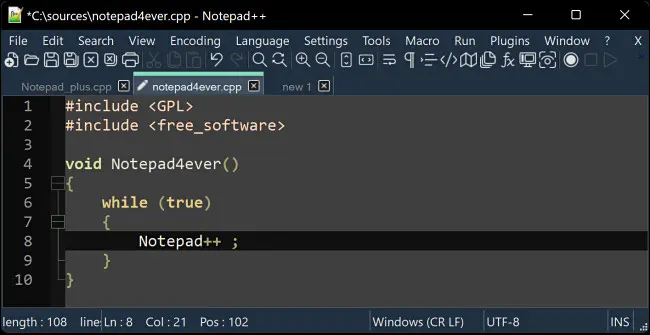
If you need substantial word processing power, try the aforementioned Microsoft Word or Google Docs. And if you like using Notepad for programming, you can take advantage of many things from Notepad++, which automatically formats code from different programming languages ​​to make it easier to read.

No cloud backup or access from multiple devices

Unless you save your Notepad text files to a cloud file service like OneDrive or Dropbox — or keep good backups, you can easily lose your notes by negligence. Try Google Docs or OneNote instead, both of which let you store your files in the cloud and access them from a variety of devices.

No deep search feature

Sure, you can press Ctrl + F in a Notepad file and search for text. But if you want to search for text in multiple text files created with Notepad, you need to use Windows’ built-in search feature, which is quite time consuming.

On the other hand, if you use an application like OneNote or Notepad++, you can easily search content between notes files. For example, with Notepad++ you can even perform powerful find and replace actions on multiple note files at once.

No encryption by default

By default, Notepad’s text files are not encrypted or secured in any way. You must manually store them in an encrypted file partition with a tool like Microsoft’s BitLocker to keep your data safe. Conversely, if you use OneNote, you can password-protect each note with 128-bit AES encryption.

Use Notepad++ instead

As mentioned many times above, Notepad+ by Don Ho is a completely free replacement for Notepad with many extra features, ideal for users who frequently configure or program. It is available as a free download at Notepad++ website.
Should stop using Notepad now 5

Even if you decide to stick with Notepad, you should know that there are other tools for different types of note-taking or word-processing tasks.

The article achieved: 5/5 – (100 votes)

Tags: Notepadstop
Previous Post

Lesson 254: Slicers in Excel

Next Post

How to use VPS Vultr for beginners – Give away 100$ Credit

AnonyViet

AnonyViet

Related Posts

Instructions for creating Minecraft-style food photos
Tips

Instructions for creating Minecraft-style food photos

June 9, 2026
Get free Cambridge courses to prepare for IELTS, Starters, Movers
Tips

Get free Cambridge courses to prepare for IELTS, Starters, Movers

June 4, 2026
How to record reaction videos with Android phones, no app needed
Tips

How to record reaction videos with Android phones, no app needed

June 1, 2026
Instructions on how to get Google AI Pro 1 year for free for new accounts
Tips

Instructions on how to get Google AI Pro 1 year for free for new accounts

June 1, 2026
Top free AI tools to help write, test and optimize content
Tips

Top free AI tools to help write, test and optimize content

June 1, 2026
Instructions for receiving Lovable Pro 12 months for free
Tips

Instructions for receiving Lovable Pro 12 months for free

May 29, 2026
Next Post
How to use VPS Vultr for beginners – Give away 100$ Credit

How to use VPS Vultr for beginners - Give away 100$ Credit

0 0 votes
Article Rating
Subscribe
Login
Notify of
guest

guest

0 Comments
Oldest
Newest Most Voted
Inline Feedbacks
View all comments

Recent News

Cách làm mờ khuôn mặt trên iPhone, không cần tải app

Cách làm mờ khuôn mặt trên iPhone, không cần tải app

June 11, 2026
Website to check the World Cup 2026 match schedule intuitively, with automatic calendar synchronization

Website to check the World Cup 2026 match schedule intuitively, with automatic calendar synchronization

June 11, 2026
PDF editing application on Android worth 199k is free

PDF editing application on Android worth 199k is free

June 10, 2026
Instructions for creating Minecraft-style food photos

Instructions for creating Minecraft-style food photos

June 9, 2026
Cách làm mờ khuôn mặt trên iPhone, không cần tải app

Cách làm mờ khuôn mặt trên iPhone, không cần tải app

June 11, 2026
Website to check the World Cup 2026 match schedule intuitively, with automatic calendar synchronization

Website to check the World Cup 2026 match schedule intuitively, with automatic calendar synchronization

June 11, 2026
PDF editing application on Android worth 199k is free

PDF editing application on Android worth 199k is free

June 10, 2026
AnonyViet - English Version

AnonyViet

AnonyViet is a website share knowledge that you have never learned in school!

We are ready to welcome your comments, as well as your articles sent to AnonyViet.

Follow Us

Contact:

Email: anonyviet.com[@]gmail.com

Main Website: https://anonyviet.com

Recent News

Cách làm mờ khuôn mặt trên iPhone, không cần tải app

Cách làm mờ khuôn mặt trên iPhone, không cần tải app

June 11, 2026
Website to check the World Cup 2026 match schedule intuitively, with automatic calendar synchronization

Website to check the World Cup 2026 match schedule intuitively, with automatic calendar synchronization

June 11, 2026
  • Home
  • Home 2
  • Home 3
  • Home 4
  • Home 5
  • Home 6
  • Next Dest Page
  • Sample Page

6789 kv999

No Result
View All Result
  • Home
  • News
  • Software
  • Knowledge
  • MMO
  • Tips
  • Security
  • Network
  • Office

6789 kv999

wpDiscuz
0
0
Would love your thoughts, please comment.x
()
x
| Reply