A Merry Christmas is coming, as a Coder you can design your own Noel in Python to increase your friends or relatives. If you don’t have time, you can use the Codes collected below. Each Code Python Noel has its own design but all have the common feature of having a Christmas tree with falling snow.
The Christmas tree code in Python will use the Turtle library to draw, so you need to import Turtle.
If you still don’t know how to use Python, read on Series of articles about Python on AnonyViet for background knowledge. Then you can easily execute the Merry Christmas python Code below:
Draw a Christmas tree with a For . loop
With basic Python knowledge, you can draw a Christmas tree with an extremely simple For loop. Here is the Full Code:
# Function to draw a Christmas tree with a given height
def draw_tree(height):
  # Loop through each row of the tree
  for i in range(1, height + 1):
    # Print the spaces before the asterisks on each row
    for j in range(height - i):
      print(" ", end="")
    # Print the asterisks on each row
    for j in range(2 * i - 1):
      print("*", end="")
    # Move to the next line
    print()
# Call the function to draw a tree with a height of 5
draw_tree(5)
On the last line: draw_tree(5)change the number 5 to another number to change the height of the Christmas tree in Python.
Here’s the result:
    *
   ***
  *****
 *******
*********
Code python Christmas tree with starry sky
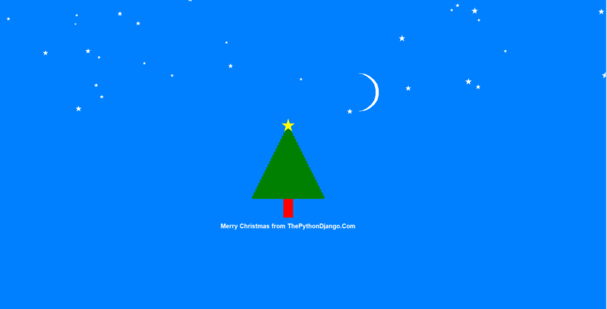
from turtle import *
from random import randint


def create_rectangle(turtle, color, x, y, width, height):
    turtle.penup()
    turtle.color(color)
    turtle.fillcolor(color)
    turtle.goto(x, y)
    turtle.pendown()
    turtle.begin_fill()

    turtle.forward(width)
    turtle.left(90)
    turtle.forward(height)
    turtle.left(90)
    turtle.forward(width)
    turtle.left(90)
    turtle.forward(height)
    turtle.left(90)

    # fill the above shape
    turtle.end_fill()
    # Reset the orientation of the turtle
    turtle.setheading(0)


def create_circle(turtle, x, y, radius, color):
    oogway.penup()
    oogway.color(color)
    oogway.fillcolor(color)
    oogway.goto(x, y)
    oogway.pendown()
    oogway.begin_fill()
    oogway.circle(radius)
    oogway.end_fill()


BG_COLOR = "#0080ff"

oogway = Turtle()
# set turtle speed
oogway.speed(2)
screen = oogway.getscreen()
# set background color
screen.bgcolor(BG_COLOR)
# set tile of screen
screen.title("Merry Christmas")
# maximize the screen
screen.setup(width=1.0, height=1.0)

y = -100
# create tree trunk
create_rectangle(oogway, "red", -15, y-60, 30, 60)

# create tree
width = 240
oogway.speed(10)
while width > 10:
    width = width - 10
    height = 10
    x = 0 - width/2
    create_rectangle(oogway, "green", x, y, width, height)
    y = y + height

# create a star a top of tree
oogway.speed(1)
oogway.penup()
oogway.color('yellow')
oogway.goto(-20, y+10)
oogway.begin_fill()
oogway.pendown()
for i in range(5):
    oogway.forward(40)
    oogway.right(144)
oogway.end_fill()

tree_height = y + 40

# create moon in sky
# create a full circle
create_circle(oogway, 230, 180, 60, "white")
# overlap with full circle of BG color to make a crescent shape
create_circle(oogway, 220, 180, 60, BG_COLOR)

# now add few stars in sky
oogway.speed(10)
number_of_stars = randint(20,30)
# print(number_of_stars)
for _ in range(0,number_of_stars):
    x_star = randint(-(screen.window_width()//2),screen.window_width()//2)
    y_star = randint(tree_height, screen.window_height()//2)
    size = randint(5,20)
    oogway.penup()
    oogway.color('white')
    oogway.goto(x_star, y_star)
    oogway.begin_fill()
    oogway.pendown()
    for i in range(5):
        oogway.forward(size)
        oogway.right(144)
    oogway.end_fill()

# print greeting message
oogway.speed(1)
oogway.penup()
msg = "Merry Christmas em iuuuuuuuu"
oogway.goto(0, -200)  # y is in minus because tree trunk was below x axis
oogway.color("white")
oogway.pendown()
oogway.write(msg, move=False, align="center", font=("Arial", 15, "bold"))

oogway.hideturtle()
screen.mainloop()
Snowman Christmas card in Python
This code will draw a snowman and have snowfall with arbitrary text. You can use the Python editor to rename your name however you like. Let’s convert python to exe and send it to your crush, he will surely love you.

import turtle
import random
import time

width = height = 500

window = turtle.Screen()
window.setup(width, height)
window.bgcolor("sky blue")
window.title("Happy Holidays")

snowball_rate = 1, 3
snowball_size = 5, 15
wind_change = 1, 5
max_wind = 3


# Create all circle-shaped objects
def make_circle(turtle_name, x, y, size, colour):
    turtle_name.color(colour)
    turtle_name.penup()
    turtle_name.setposition(x, y)
    turtle_name.dot(size)


# Create new snowballs and store in list
list_of_snowballs = []


def make_snowball():
    snowball = turtle.Turtle()
    snowball.color("white")
    snowball.penup()
    snowball.setposition(random.randint(-2 * width, width / 2), height / 2)
    snowball.hideturtle()
    snowball.size = random.randint(*snowball_size)
    list_of_snowballs.append(snowball)


def move_snowball(turtle_name, falling_speed=1, wind=0):
    turtle_name.clear()
    turtle_name.sety(turtle_name.ycor() - falling_speed)
    if wind:
        turtle_name.setx(turtle_name.xcor() + wind)
    turtle_name.dot(turtle_name.size)


# Snowman: body
snowman = turtle.Turtle()
x_position = 0
y_positions = 75, 0, -100
size = 75
for y in y_positions:
    make_circle(snowman, x_position, y, size, "white")
    size = size * 1.5

# Snowman: buttons
button_seperation = 25
button_y_positions = [y_positions[1] - button_seperation,
                      y_positions[1],
                      y_positions[1] + button_seperation]
for y in button_y_positions:
    make_circle(snowman, x_position, y, 10, "black")

# Snowman: eyes
y_offset = 10
x_seperation = 15
for x in x_position - x_seperation, x_position + x_seperation:
    make_circle(snowman, x, y_positions[0] + y_offset, 20, "green")
    make_circle(snowman, x, y_positions[0] + y_offset, 10, "black")

# Snowman: nose
snowman.color("orange")
snowman.setposition(x_position - 10, y_positions[0] - y_offset)
snowman.shape("triangle")
snowman.setheading(200)
snowman.turtlesize(0.5, 2.5)

window.tracer(0)

# Ground
grass = turtle.Turtle()
grass.fillcolor("forest green")
grass.penup()
grass.setposition(-width / 2, -height / 2)
grass.begin_fill()
for _ in range(2):
    grass.forward(width)
    grass.left(90)
    grass.forward(70)
    grass.left(90)
grass.end_fill()

ground = turtle.Turtle()
for x in range(int(-width / 2), int(width / 2), int(width / 200)):
    make_circle(ground, x, -180, random.randint(5, 20), "white")

text = turtle.Turtle()
text.color("red")
text.penup()
text.setposition(-100, 170)
#chữ thứ 1
text.write("Happy Holidays", font=("Apple Chancery", 30, "bold"), align="center")
text.setposition(130, 140)
text.color("dark green")
#chữ thứ 3
text.write("AnonyViet", font=("Avenir", 30, "bold"), align="right")
text.color("black")
#chữ thứ 4
text.write(".com", font=("Avenir", 30, "normal"), align="left")
text.setx(50)
#chữ thứ 2
text.write("from", font=("Apple Chancery", 20, "bold"), align="right")
text.hideturtle()

time_delay = 0
start_time = time.time()
wind = 0
wind_delay = 5
wind_timer = time.time()
wind_step = 0.1
while True:
    if time.time() - start_time > time_delay:
        make_snowball()
        start_time = time.time()
        time_delay = random.randint(*snowball_rate) / 10

    for snowball in list_of_snowballs:
        move_snowball(snowball, wind=wind)
        if snowball.ycor() < -height / 2:
            snowball.clear()
            list_of_snowballs.remove(snowball)

    if time.time() - wind_timer > wind_delay:
        wind += wind_step
        if wind >= max_wind:
            wind_step = -wind_step
        elif wind <= 0:
            wind_step = abs(wind_step)

        wind_timer = time.time()
        wind_delay = random.randint(*wind_change) / 10

    window.update()

turtle.done()
Code Python pine node with snow
The Python code below will draw a Christmas tree with surrounding lights and snow effect. You can also change the text in the form you like to send to friends and people on Christmas.
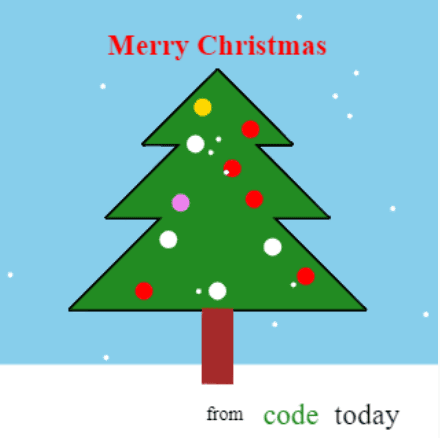
import turtle
import random

web_based = True
# web_based = False

if web_based:
    i_scale = 1.5
    snow_size = 4
    snow_speed = 3
    draw_speed = 10
    rate_of_snow_balls = 6
else:
    i_scale = 1
    snow_size = 7
    snow_speed = 2
    draw_speed = 10
    rate_of_snow_balls = 2

width = 600 / i_scale
height = 600 / i_scale

screen = turtle.Screen()
if not web_based:
    screen.setup(width, height)
    screen.title("Happy Christmas from AnonyViet")


# screen.tracer(0)


def make_triangle(x, y, size, outline, triangle):
    triangle.hideturtle()
    triangle.penup()
    triangle.setposition(x, y)
    triangle.pensize(3)
    if outline:
        triangle.pendown()
    if not outline:
        triangle.fillcolor("forest green")
        triangle.begin_fill()
    triangle.setposition(x + size, y - size)
    triangle.setposition(x - size, y - size)
    triangle.setposition(x, y)
    if not outline:
        triangle.end_fill()


def make_ball(x, y, size, colour, ball):
    ball.hideturtle()
    ball.penup()
    ball.setposition(x, y)
    ball.color(colour)
    ball.dot(size)


def move_snow(snow):
    position = snow.position()
    snow.clear()
    make_ball(position[0], position[1] - snow_speed, snow_size, "white", snow)


def snow_fall():
    rand_make_snow = random.randint(0, rate_of_snow_balls)
    if rand_make_snow == 0:
        snow = turtle.Turtle()
        snow.hideturtle()
        snow.penup()
        list_of_snow.append(snow)
        make_ball(random.randint(-width / 2, width / 2), width / 2, snow_size,
                  "white", snow)
    for snow in list_of_snow:
        move_snow(snow)
        if snow.position()[1] <= -width / 2:
            snow.clear()
            list_of_snow.remove(snow)
            del snow
    screen.update()


# make tree (main part)
triangle_1 = turtle.Turtle()
triangle_1.speed(draw_speed)
outline = True
for repeat in range(2):
    make_triangle(0, width / 3, width / 6, outline, triangle_1)
    make_triangle(0, width / 4, width / 4, outline, triangle_1)
    make_triangle(0, width / 8, width / 3, outline, triangle_1)
    outline = False

screen.tracer(0)
stem = turtle.Turtle()
# white snowy ground
stem.penup()
stem.hideturtle()
stem.setposition(-width, -width / 3)
stem.color("white")
stem.begin_fill()
stem.setposition(width, -width / 3)
stem.setposition(width, -width / 2)
stem.setposition(-width, -width / 2)
stem.end_fill()
screen.update()

# tree stem
stem.color("brown")
stem.setposition(-width / 30, -width / 4.8)
screen.tracer(1)
stem.pendown()
stem.begin_fill()
stem.setposition(width / 30, -width / 4.8)
stem.setposition(width / 30, -3 * width / 8)
stem.setposition(-width / 30, -3 * width / 8)
stem.setposition(-width / 30, -width / 4.8)
stem.end_fill()

screen.bgcolor("sky blue")

# decorations: balls
screen.tracer(2)
ball_colours = ["red", "red", "red", "gold", "violet", "white"]
ball_positions = [(-width / 30, width / 4), (3 * width / 40, width / 5),
                  (-width / 20, width / 6), (width / 30, width / 9),
                  (-width / 12, width / 30), (width / 12, width / 24),
                  (-width / 9, -width / 20), (width / 8, -width / 15),
                  (0, -width / 6), (-width / 6, -width / 6),
                  (width / 5, -width / 7.5)
                  ]
for position in ball_positions:
    make_ball(position[0], position[1], 20 / i_scale,
              random.choice(ball_colours),
              turtle.Turtle())
    screen.update()

# snow is falling…
list_of_snow = []

screen.tracer(0)
for _ in range(50):
    snow_fall()

text_1 = turtle.Turtle()
text_1.hideturtle()
text_1.penup()
text_1.setposition(0, width / 2.7)
text_1.color("red")
# text_1.write("Merry Christmas", font=("Georgia", 30, "bold"), align="center")
text_1.write("Merry Christmas",
             font=("Apple Chancery", max(int(30 / i_scale), 15), "bold"),
             align="center")

for _ in range(25):
    snow_fall()

text_1.setposition(width / 60, -width / 2.18)
text_1.color("black")
# text_1.write("from", font=("Georgia", 20, "normal"), align="center")
text_1.write("from",
             font=("Apple Chancery", max(int(20 / i_scale), 10), "normal"),
             align="center")
if web_based:
    text_1.setposition(width / 6, -width / 2.14)
else:
    text_1.setposition(width / 7.5, -width / 2.14)
text_1.color("forest green")
# text_1.write("code", font=("Arial", 30, "normal"), align="center")
text_1.write("code", font=("Avenir", max(int(30 / i_scale), 15), "normal"),
             align="center")
# text_1.setposition(150, -280)
if web_based:
    text_1.setposition(width / 2.95, -width / 2.14)
else:
    text_1.setposition(width / 3.85, -width / 2.14)
text_1.color("black")
# text_1.write("today", font=("Arial", 30, "normal"), align="center")
text_1.write("today", font=("Avenir", max(int(30 / i_scale), 15), "normal"),
             align="center")

if web_based:
    for _ in range(200):
        snow_fall()
else:
    while True:
        snow_fall()

turtle.done()