How to get ShopeeVIP for 12 months for free is a topic that many shoppers are interested in today. Instead of having to spend a large amount of money, you can completely own this privilege with just a few tips. The process is extremely quick and anyone can do it. Let’s go together AnonyViet Discover details right in the article below!
📢 Join the channel Telegram belong to AnonyViet
Update new articles, cool tools and IT tips fastest
Instructions on how to receive ShopeeVIP for 12 months for free
Stage 1: Prepare edu email
First, we need to “render” an email with the education extension (.edu.vn) so that Shopee’s system can identify you as a student.
Open your web browser and visit the virtual mail creation page at: https://tempmail.id.vn/
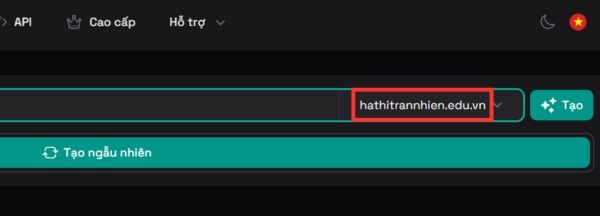
At the main interface, you can enter any name you like in the mail creation box. However, the most important part is in the email suffix section, you must choose the suffix hathitrannhien.edu.vn okay. Thanks to that, Shopee Just accept this as a valid email. Just hang the browser there, don’t close it yet.
Stage 2: Register on the Shopee application
After we have the “weapon” which is a genuine email, we will proceed to register for the promotional package.
Step 1: Open your phone and access the Shopee Student link directly HERE.
When the page opens, just click the button Join now loudly on the screen.
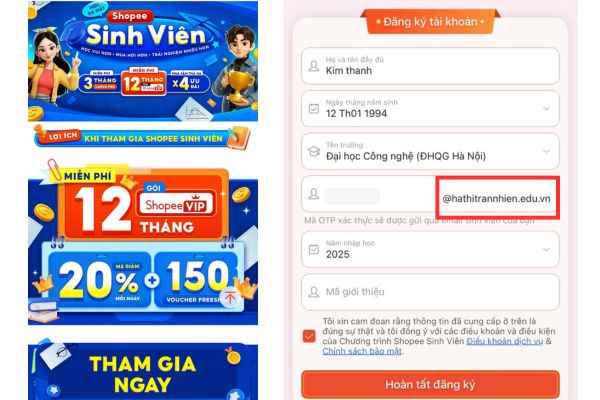
Step 2: At this point, the system will ask you to fill in personal information. You just fill in normally, but in the email section, enter the exact virtual email address you just created above. Remember to carefully check and edit the email suffix to make it correct @hathitrannhien.edu.vn dental. Then, check the box to agree to the terms and click Complete registration.
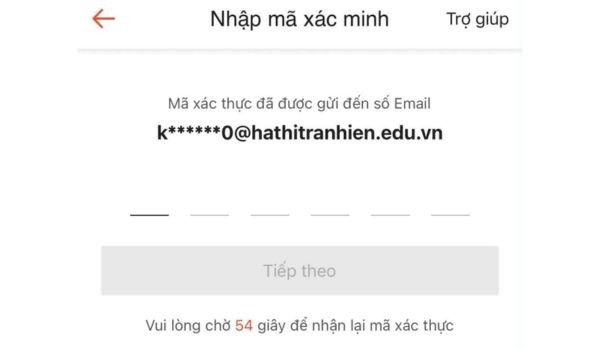
Step 3: The Shopee system will send an OTP code to your email for verification. Therefore, go back to the previous tempmail browser tab, wait a few seconds for the mail to arrive, open it and get the 6-digit OTP code. Finally, enter this code into the Shopee app to complete the verification part.
Stage 3: Activation and payment link
At this point, you have gone 80% of the way. With the instructions on how to receive ShopeeVIP for 12 months for free, the last step is just the procedure to receive the gift.
Step 1: On the app screen, click the button Get VIPthen select next Experience now.
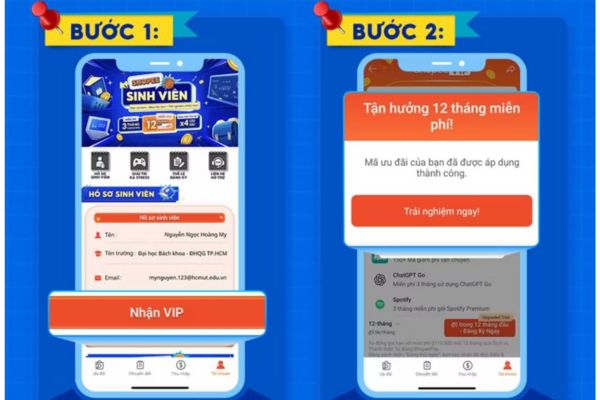
Step 2: If you look at the bottom corner of the screen you will see a place that says “0 VND in the first 12 months“. Don’t worry, just boldly click on it to make payment (because the price is 0 VND, so rest assured, you won’t lose money). Next, click Confirm to link this ShopeeVIP package with your ShopeePay wallet.
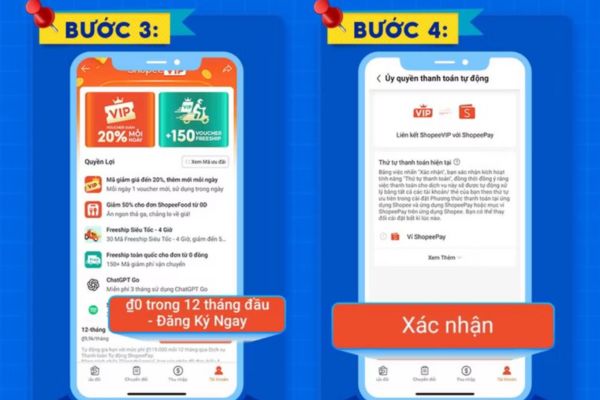
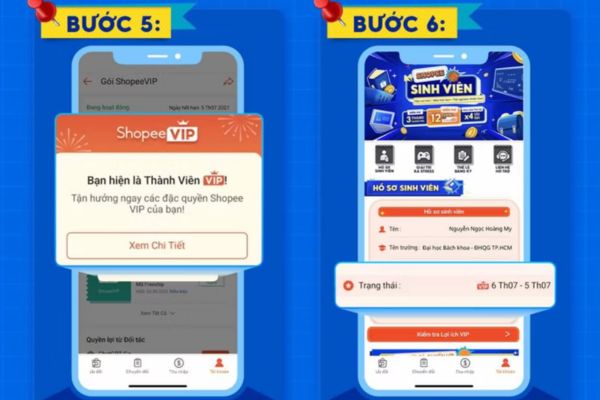
Step 3: Boom! At this point, you will see the notification to receive the free 12-month Shopee VIP package appear brightly. You can select View details to check the activity status, expiration date as well as dozens of benefits you have just received.
A few small notes for you
During the implementation process, sometimes the virtual mail creation website can be overloaded due to many visitors. If you encounter a situation where you do not receive the OTP code, please patiently reload the page or create a new email name (still keep the edu.vn extension). Don’t forget to share how to receive ShopeeVIP for 12 months for free with friends and relatives so that everyone has the opportunity to close orders without worrying about shipping fees.
Conclusion
Hopefully through this article, you have a clear understanding How to get ShopeeVIP 12 months for free in the most detailed way. Therefore, please act quickly before this promotion ends or the error is fixed. Surely the privileges from the VIP package will not disappoint you. Don’t forget to follow us to update more cool tips.
Frequently Asked Questions (Q&A)
1. Will I be charged when I link to ShopeePay at the checkout step?
Absolutely not. This promotional package displays a price of 0 VND for the first 12 months, so linking ShopeePay is just a confirmation procedure, you will not be deducted any fees.
2. Does virtual email created on the web last forever?
No, the virtual email usually only lasts for a short period of time for you to receive the OTP code. After successful verification on Shopee, you no longer need to care about that email.
3. After the 12 free months expire, will my account automatically renew and have money deducted?
Usually the system will have a notification before it expires. To be safe, near the 12th month, you can go to the VIP package management section on Shopee to proactively cancel the renewal if you do not need to continue using it.