How to take selfies with pets is being eagerly hunted by the lotus group to show off their “boss” on social networks. Instead of boring regular photos, AI technology will help you create an extremely vivid and surreal interactive moment. Are you ready to catch the trend? Let’s explore this divine formula with AnonyViet!
📢 Join the channel Telegram belong to AnonyViet
Update new articles, cool tools and IT tips fastest
What is the trend of taking wide-angle photos with the “boss”?
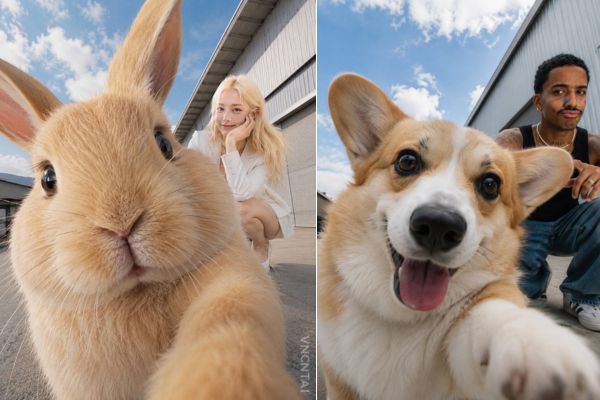
Recently, surfing social networking platforms such as Facebook, Tiktok or Instagram, you have surely come across extremely funny photos: A giant cat or dog is holding a camera to take a selfie, while the owner is tiny in the background. The scene has a high-end fashion magazine feel but is extremely humorous thanks to the ultra-wide-angle lens effect.
In fact, these are not real photos taken with expensive cameras or edited by hand Photoshop feat. All are products of artificial intelligence (AI). By applying this method of creating selfies with pets, you will easily create the illusion of depth and scale (forced perspective), turning small everyday animals into surreal giant friends.
Instructions on how to take selfies with pets
To keep up with this trend, you don’t need to be a technology expert. Below are the specific operations:
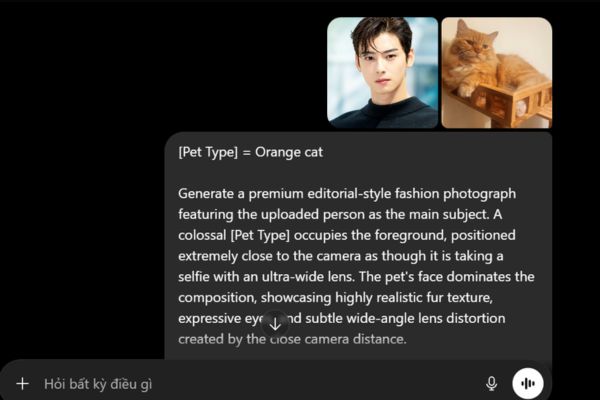
Step 1: Choose a clear photo of yourself and your pet. It is best if the photo is full or half body, the outfit clearly shows personal style (active, fashionable, cute,…). AI will analyze this photo to preserve your face, hairstyle and clothes in the new photo.
Step 2: Please copy the English command below exactly:
[Pet Type] = Your Pet Type/Breed
Create a high-end fashion editorial image using the uploaded photo's subject. In the extreme foreground, a gigantic [Pet Type] takes up most of the frame, giving the illusion of snapping a selfie with an ultra-wide-angle lens. The animal's face is up close and personal, featuring incredibly lifelike fur, large emotive eyes, and a noticeable wide-angle distortion due to its proximity to the camera.
In the background, the uploaded individual looks tiny thanks to a strong forced perspective effect. The person should be engaging playfully and naturally with the massive animal. Generate a pose that perfectly matches their original outfit, body language, and vibe, making their reaction to the giant pet look genuine—whether that translates as high-fashion, dynamic, funny, dramatic, or inquisitive.
Strictly preserve the person's exact likeness from the uploaded picture. This includes their facial structure, hair, apparel, accessories, and distinct personal style. Do not alter their clothing in any way.
Composition details:
Extreme foreground: A massive, lifelike [Pet Type]
Mid-to-background: The uploaded person engaging with the animal
Camera angle: Shot from a low perspective
Lens effect: 18mm ultra-wide look
Perspective: Exaggerated depth and spatial distortion
Vibe: Editorial fashion shoot
Illusion: A fun but realistic size contrast
Setting & Lighting:
Location: Urban cityscape outdoors
Background elements: Industrial structures and warehouses
Surroundings: Concrete floors under a clear, open sky
Lighting: Bright, natural sunlight
Focus: Crisp and sharp on both the person and the pet
Mood: Spontaneous, candid, and full of life
Aesthetic & Finish:
High-fashion brand campaign look
Top-tier commercial advertising standard
Hyper-realistic rendering
Intricate details and true-to-life textures
Flawless color grading
A gentle, cinematic film grain touch
Trendy, viral social media editorial style
Masterful use of forced perspective for scale trickery
Watermark Instructions:
Add a faint watermark at the bottom right of the image. The word must be "VNCNTAI", rotated 90 degrees vertically. Use the Montserrat typeface in white, set to a medium size with a semi-transparent (low opacity) effect.
Aspect Ratio:
4:5 (Portrait/Vertical)
Step 3: In the first line of the prompt, fill in the space [Pet Type] with the name of the animal you want in English.
For example:
- British Shorthair cat → British Shorthair cat
- Scottish Fold cat → Scottish Fold cat
- Orange cat → Orange tabby cat
- Corgi dog → Corgi dog
- Poodle dog → Toy Poodle dog
- Golden Dog → Golden Retriever dog
- Husky → Siberian Husky dog
- Rabbit → Rabbit
- Hamster → Hamster
Then, upload a photo of you and your pet into the AI chat box and click send.
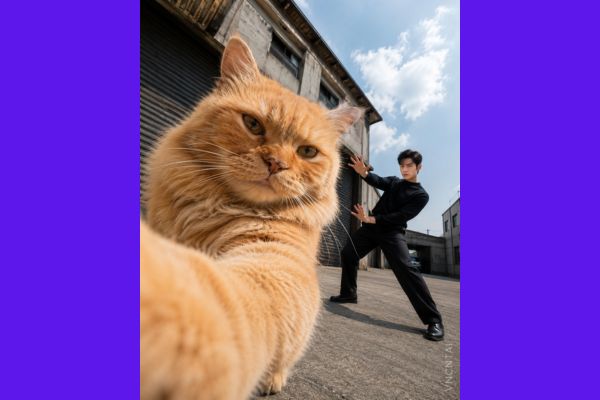
Wait about a few dozen seconds, AI will return you an excellent photo.
Conclusion
Now, How to take selfies with pets is no longer a secret only for graphic experts. Anyone can create funny moments between themselves and the “boss” with just a few mouse clicks. Wishing you have fun, relaxing moments with your pet!
Frequently Asked Questions (Q&A)
1. Is this method free?
Completely free! You don’t have to deposit money to buy an expensive account.
2. Can I change to another pet species besides dogs and cats?
Sure! You just need to change the English keyword in the prompt. You can try with Capybara (capybara), Tiger (tiger), or even Dinosaur (dinosaur) to make the photo more humorous.
3. Why is my face in the AI photo not 100% the same as the real photo?
Current AI only tries to simulate lines, hairstyles and outfits based on the original photo, but cannot “collage” exactly like Photoshop. For best recognition by AI, upload a photo of your face that is clear, unobstructed, and well-lit.