How to upgrade Wink app to VIP is the need of many photo editing enthusiasts today. With the VIP version, all tool limitations will be removed, allowing you unlimited creativity. If you are still looking for a simple method, let’s find out with AnonyViet in this article.
📢 Join the channel Telegram belong to AnonyViet
Update new articles, cool tools and IT tips fastest
Introducing the Wink app
Wink is one of the most popular video and image editing applications based on artificial intelligence (AI) platform today. With a user-friendly interface and tools like skin smoothing, facial structure changes, and professional color filters, Wink helps users turn ordinary videos into works of art.
The popularity of this application comes from its intelligent processing capabilities, helping non-professional users to create “million-view” products with just a few simple steps.
What features does Wink VIP have that is different from the Free version?
When learning how to upgrade the Wink app to VIP, many users wonder about the difference between these two versions. The paid version not only removes ads but also unlocks the entire store of valuable resources. Below is a basic comparison table for you to easily visualize:
| Features | Free version | VIP version |
| AI filters and effects | Limit | Fully unlocked |
| Video output quality | Maximum 1080P | Supports 2K/4K |
| Watermark | Have | Are not |
| Advanced editing tools | Basic | In-depth |
Upgrading to VIP will help you freely create without being constrained by technical limitations, ensuring the highest sharpness for all content shared on social networks.
Instructions on how to upgrade Wink app to VIP
This is the process to upgrade the Wink app to VIP. Please read carefully and follow the instructions exactly.
Important note: Only log in with your Apple ID account to the App Store, absolutely do not log in to the System Settings section of the device to ensure the safety of personal data.
Step 1: Visit the website https://idapple.csadata4g.me/ to retrieve shared Apple ID and password information. Please copy this account and password exactly.
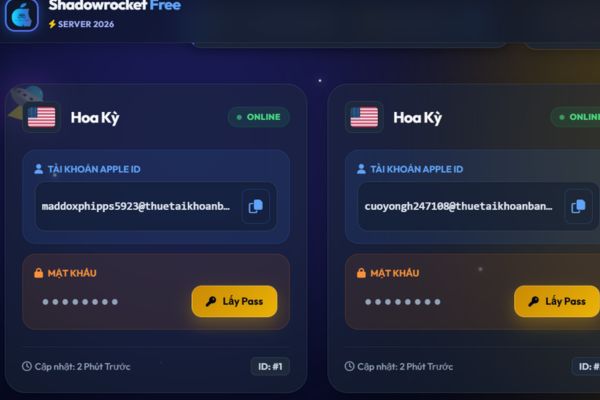
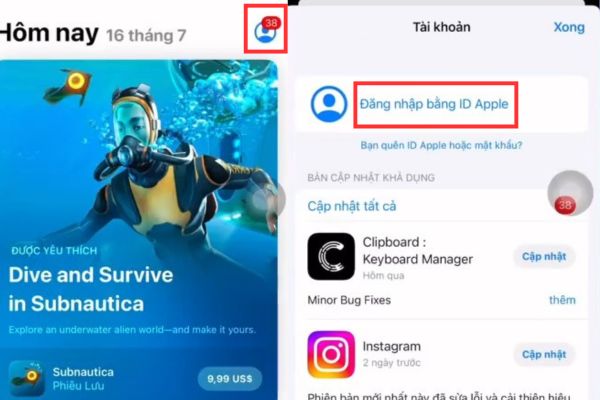
Step 2: Open the App Store on your iPhone or iPad. Click avatar > Press Sign in with your Apple ID. Paste the account and password you just copied to log in.
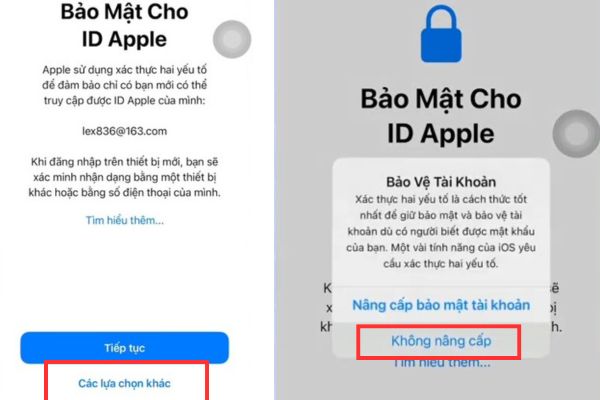
When the “Apple ID Security” pop-up appears, select it Other options > No upgrades.
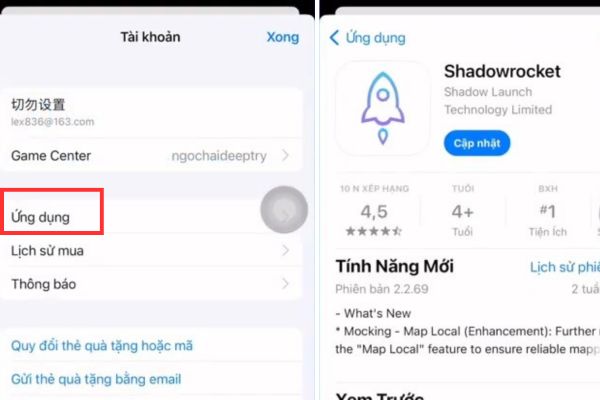
Step 3: Go to section Applicationfind Shadowrocket. (If you already have a device, you can skip this step).
After downloading, sign out of this Apple ID account from the App Store.
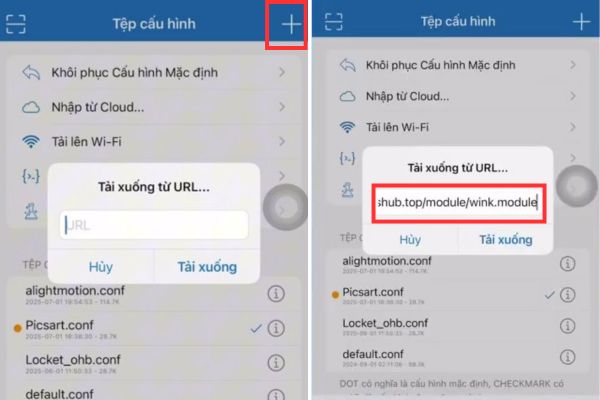
Step 4: Open the Shadowrocket app, click on the item Configuration. Tap the + sign in the upper right corner.
Paste the link https://whatshub.top/module/wink.module Go to the URL box then click Download.
- Click on the downloaded configuration file wink.conf, select it Use Config.
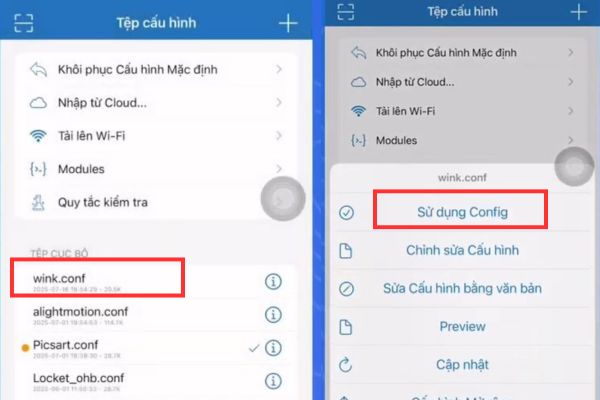
- Click on the icon i next to the selected wink.conf file.
- Find and select the item HTTPS decryptionturn on the check mark.
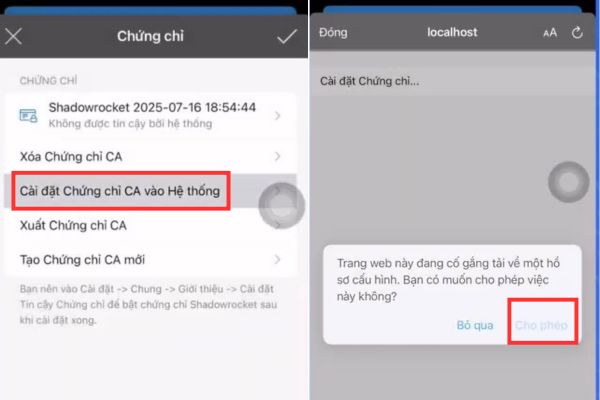
- Select Create a new CA Certificate > confirm Create a new CA Certificate > Click next Install the CA certificate into the System.
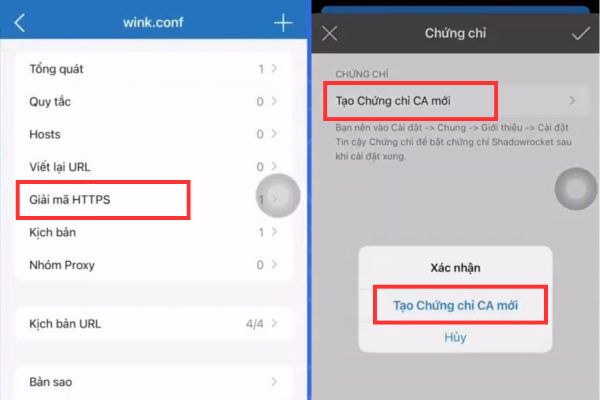
- When there is a notification, tap Allow and press 2 respectively traces v in the corner of the screen to exit.
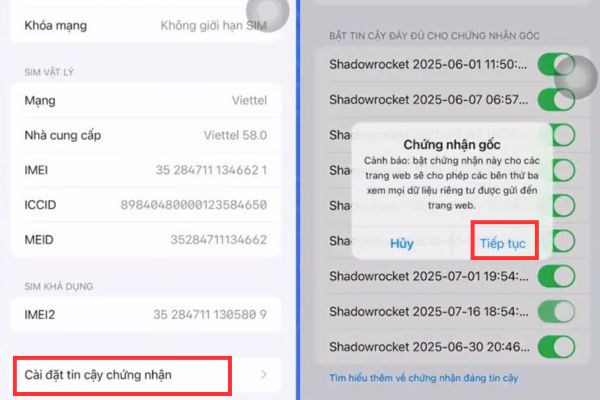
Step 5: Exit, enter section Setting of iPhone, tap the item Profile downloaded. Select Setting and enter the password screen to confirm.
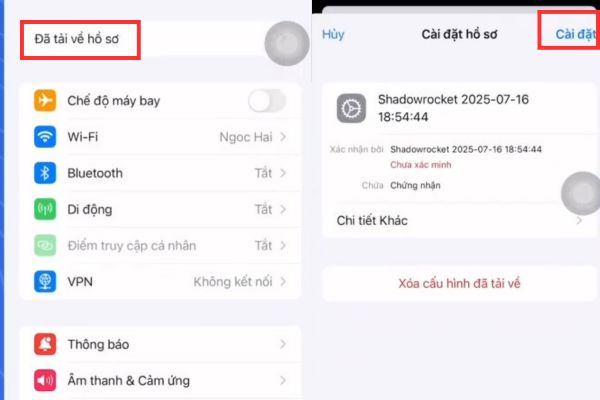
- Then enter Setting > General settings > Introduce > Install certificate trust. Here, find Shadowrocket and flip the toggle switch to trust the certificate.
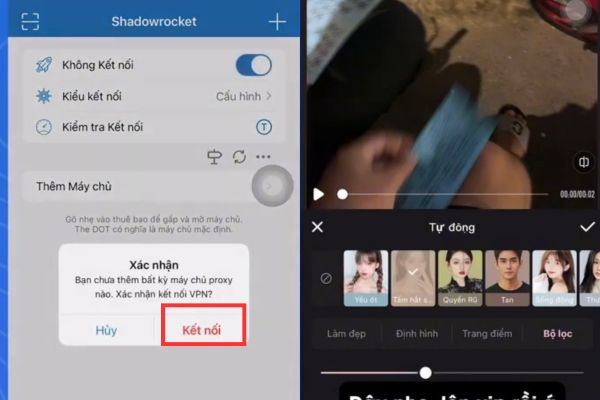
Step 6: Finally, go back to the Shadowrocket app, click on the tab Home and flip the switch to turn on VPN (connection). Now you can reopen the Wink app and enjoy the VIP features that have been successfully activated.
Conclusion
To summarize, How to upgrade Wink app to VIP is an effective solution for you to unlock all the premium editing tools. Wishing you success and immediately own the VIP version to unleash your editing passion. Don’t forget to follow our next articles to update more interesting tips!
Frequently Asked Questions (Q&A)
1. Is logging in to Apple ID this way safe for the device?
You only log in to the App Store and absolutely do not log in to iCloud (System Settings section), so your personal data on your device is guaranteed to be safe.
2. After upgrading, will my VIP account last forever?
This trick is based on using module configuration, so the VIP account will work as long as the configuration file and certificate are valid. You may need to do it again if the app is updated.
3. Why have I turned on VPN but the Wink app is not yet VIP?
Check that you trust the certificate in Settings > General > About > Certificate trust settings. If done correctly, restart the Wink application.