• Home
  • News
  • Software
  • Knowledge
  • MMO
  • Tips
  • Security
  • Network
  • Office
AnonyViet - English Version
  • Home
  • News
  • Software
  • Knowledge
  • MMO
  • Tips
  • Security
  • Network
  • Office
No Result
View All Result
  • Home
  • News
  • Software
  • Knowledge
  • MMO
  • Tips
  • Security
  • Network
  • Office
No Result
View All Result
AnonyViet - English Version
No Result
View All Result

Instructions for turning off automatic playlists on YouTube

AnonyViet by AnonyViet
May 10, 2026
in Software
0

Turn off automatic playlists on YouTube while listening to music is a way for you to keep your music enjoyment experience seamless. YouTube’s arbitrarily adding videos to the list makes users feel uncomfortable. Let’s join AnonyViet to learn simple tricks to fix it right away.

📢 Join the channel Telegram belong to AnonyViet


👉 Go to Telegram AnonyViet

Update new articles, cool tools and IT tips fastest

Why does YouTube automatically create playlists when listening to music?

YouTube Use algorithms to recommend related content to increase watch time. However, this mechanism often conflicts with users’ wishes. Here’s a comparison between having YouTube automatically create lists and managing them manually:

Criteria Playlist Mix (Automatic) Individual Queue (Queue)
Control Low,decision algorithm High, user decides
Seamless Suggested videos are available Play only what you choose
Experience Easy to insert many ads Be proactive in your interests
Discomfort Must manually delete strange videos No need for redundant operations
Instructions for turning off automatic playlists on YouTube
Why does YouTube automatically create playlists when listening to music?

Why should you turn off automatic playlists on YouTube?

The experience of watching videos on YouTube sometimes becomes annoying when the platform automatically activates the Mix feature. Every time you tap a video, a bunch of related content automatically appears in the playlist, turning your personal queue into a mess. Turning off automatic playlists on YouTube not only helps you keep your focus on your chosen playlist, but also saves time deleting it manually.

Instructions for turning off automatic playlists on YouTube

Using support tools is one of the effective ways to turn off automatic playlists on YouTube. Below are specific steps that you can apply immediately:

Method 1: Edit the URL manually

Step 1: Copy the link of the video you want to watch.

Step 2: Paste into the browser but remove the paragraph &list=… behind the link.

Step 3: Press Enter to start playing the video without the playlist attached.
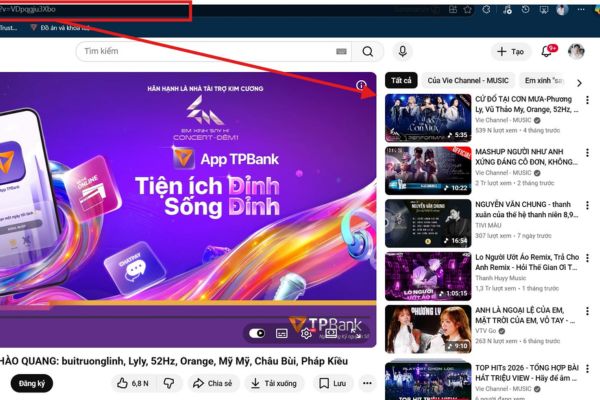
Delete the &list=... paragraph after the link
Delete the &list=… paragraph after the link

Method 2: Use extension

Step 1: Access the Chrome or Firefox extensions store.

Step 2: Search Less Mixes for YouTube or Enhancer for YouTube.
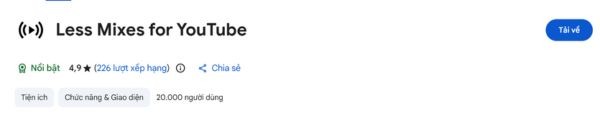
Use the extension to disable playlists

Step 3: Press “Add to browser” and grant permissions to the extension.

Step 4: Configure settings in the extension to block suggested playlists or autoplay.
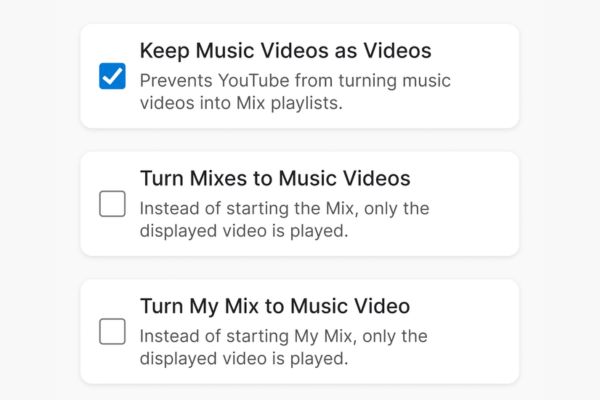
Customize settings in extension

Turning off automatic playlists on YouTube not only makes the experience smoother, but also limits the platform from forcing you to watch more unwanted advertising content. Although YouTube constantly updates its interface to force users to watch Mix, with the above tips, you can completely master the game.
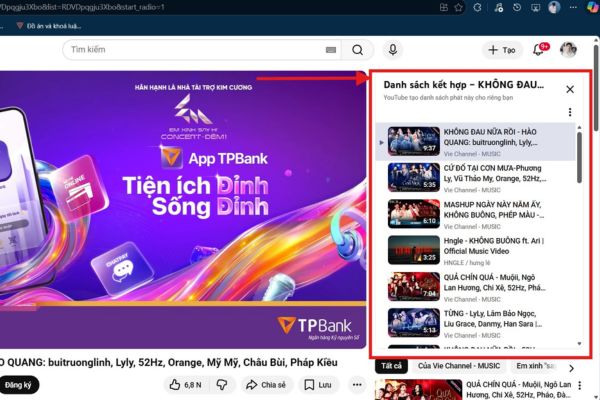
Instructions for turning off automatic playlists on YouTube

Conclusion

After applying the methods turn off automatic playlists on YouTubehopefully you will no longer feel annoyed every time you open a favorite song. Wishing you always have the most complete moments of relaxation with the selected music. Please apply today!

Frequently Asked Questions (Q&A)

1. Why does YouTube automatically create a playlist when I click a video?

This is the “Mix” feature to increase viewing time and suggest more content based on algorithms, sometimes causing discomfort for users who want to listen to personal music.

2. Does removing &list= in the URL affect the video?

No, deleting this segment only removes the accompanying playlist, your video will still play normally and stably.

3. Is it safe to use browser extensions?

Most popular extensions like “Enhancer for YouTube” are safe, but you should check the reviews before installing to ensure security.


Tags: AutomaticInstructionsplayliststurningYoutube
Previous Post

How to get ChatGPT Business 48 months discount from only 0 VND

Next Post

What changes does iPhone 17 Series bring?

AnonyViet

AnonyViet

Related Posts

Detailed review of realme C01: Breaking the stereotype of cheap smartphones with 6,500 mAh battery and 120Hz screen
Software

Detailed review of realme C01: Breaking the stereotype of cheap smartphones with 6,500 mAh battery and 120Hz screen

November 23, 2026
SubPeek – Extension to find vietsub on Youtube right on the thumbnail
Software

SubPeek – Extension to find vietsub on Youtube right on the thumbnail

November 19, 2026
Fun Learning for Children: Great app for learning letters and math for grade 1 for children
Software

Fun Learning for Children: Great app for learning letters and math for grade 1 for children

November 18, 2026
Tool to get transcript of entire YouTube channel extremely fast and free
Software

Tool to get transcript of entire YouTube channel extremely fast and free

November 10, 2026
How to create an Android App using Google AI Studio without code
Software

How to create an Android App using Google AI Studio without code

November 9, 2026
Holding OPPO Find X10 to watch movies all night: Real experience
Software

Holding OPPO Find X10 to watch movies all night: Real experience

November 9, 2026
Next Post
What changes does iPhone 17 Series bring?

What changes does iPhone 17 Series bring?

0 0 votes
Article Rating
Subscribe
Login
Notify of
guest

guest

0 Comments
Oldest
Newest Most Voted

Recent News

How to cancel Facebook Plus package to avoid automatic renewal

How to cancel Facebook Plus package to avoid automatic renewal

November 23, 2026
SSHWATCH: Dashboard to see realtime VPS attacks using Honeypot

SSHWATCH: Dashboard to see realtime VPS attacks using Honeypot

November 23, 2026
Detailed review of realme C01: Breaking the stereotype of cheap smartphones with 6,500 mAh battery and 120Hz screen

Detailed review of realme C01: Breaking the stereotype of cheap smartphones with 6,500 mAh battery and 120Hz screen

November 23, 2026
Purple Team: How to verify that the monitoring system can actually detect attacks

Purple Team: How to verify that the monitoring system can actually detect attacks

November 23, 2026
How to cancel Facebook Plus package to avoid automatic renewal

How to cancel Facebook Plus package to avoid automatic renewal

November 23, 2026
SSHWATCH: Dashboard to see realtime VPS attacks using Honeypot

SSHWATCH: Dashboard to see realtime VPS attacks using Honeypot

November 23, 2026
Detailed review of realme C01: Breaking the stereotype of cheap smartphones with 6,500 mAh battery and 120Hz screen

Detailed review of realme C01: Breaking the stereotype of cheap smartphones with 6,500 mAh battery and 120Hz screen

November 23, 2026
AnonyViet - English Version

AnonyViet

AnonyViet is a website share knowledge that you have never learned in school!

We are ready to welcome your comments, as well as your articles sent to AnonyViet.

Follow Us

Contact:

Email: anonyviet.com[@]gmail.com

Main Website: https://anonyviet.com

Recent News

How to cancel Facebook Plus package to avoid automatic renewal

How to cancel Facebook Plus package to avoid automatic renewal

November 23, 2026
SSHWATCH: Dashboard to see realtime VPS attacks using Honeypot

SSHWATCH: Dashboard to see realtime VPS attacks using Honeypot

November 23, 2026
  • Home
  • Home 2
  • Home 3
  • Home 4
  • Home 5
  • Home 6
  • Next Dest Page
  • Sample Page

say88 tỷ lệ kèo nhà cái kèo nhà cái 5 febet

No Result
View All Result
  • Home
  • News
  • Software
  • Knowledge
  • MMO
  • Tips
  • Security
  • Network
  • Office

say88 tỷ lệ kèo nhà cái kèo nhà cái 5 febet

wpDiscuz
0
0
Would love your thoughts, please comment.x
()
x
| Reply