• Home
  • News
  • Software
  • Knowledge
  • MMO
  • Tips
  • Security
  • Network
  • Office
AnonyViet - English Version
  • Home
  • News
  • Software
  • Knowledge
  • MMO
  • Tips
  • Security
  • Network
  • Office
No Result
View All Result
  • Home
  • News
  • Software
  • Knowledge
  • MMO
  • Tips
  • Security
  • Network
  • Office
No Result
View All Result
AnonyViet - English Version
No Result
View All Result

Instructions for turning off automatic playlists on YouTube

AnonyViet by AnonyViet
May 10, 2026
in Software
0

Turn off automatic playlists on YouTube while listening to music is a way for you to keep your music enjoyment experience seamless. YouTube’s arbitrarily adding videos to the list makes users feel uncomfortable. Let’s join AnonyViet to learn simple tricks to fix it right away.

📢 Join the channel Telegram belong to AnonyViet


👉 Go to Telegram AnonyViet

Update new articles, cool tools and IT tips fastest

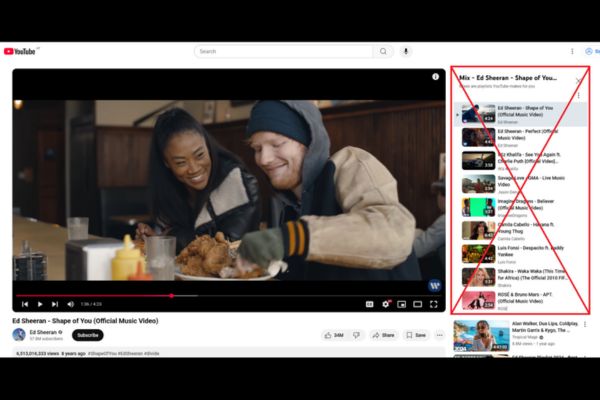
Why does YouTube automatically create playlists when listening to music?

YouTube Use algorithms to recommend related content to increase watch time. However, this mechanism often conflicts with users’ wishes. Here’s a comparison between having YouTube automatically create lists and managing them manually:

Criteria Playlist Mix (Automatic) Individual Queue (Queue)
Control Low,decision algorithm High, user decides
Seamless Suggested videos are available Play only what you choose
Experience Easy to insert many ads Be proactive in your interests
Discomfort Must manually delete strange videos No need for redundant operations
Instructions for turning off automatic playlists on YouTube
Why does YouTube automatically create playlists when listening to music?

Why should you turn off automatic playlists on YouTube?

The experience of watching videos on YouTube sometimes becomes annoying when the platform automatically activates the Mix feature. Every time you tap a video, a bunch of related content automatically appears in the playlist, turning your personal queue into a mess. Turning off automatic playlists on YouTube not only helps you keep your focus on your chosen playlist, but also saves time deleting it manually.

Instructions for turning off automatic playlists on YouTube

Using support tools is one of the effective ways to turn off automatic playlists on YouTube. Below are specific steps that you can apply immediately:

Method 1: Edit the URL manually

Step 1: Copy the link of the video you want to watch.

Step 2: Paste into the browser but remove the paragraph &list=… behind the link.

Step 3: Press Enter to start playing the video without the playlist attached.
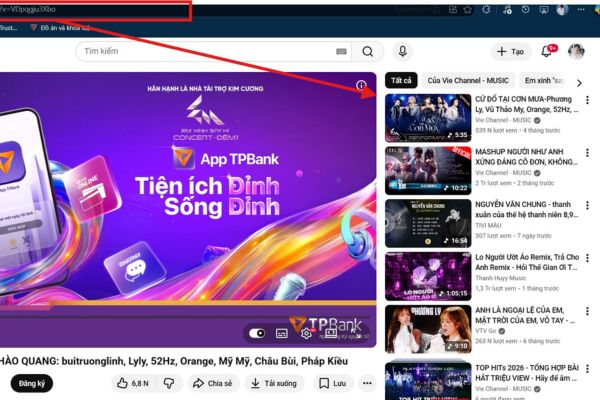
Delete the &list=... paragraph after the link
Delete the &list=… paragraph after the link

Method 2: Use extension

Step 1: Access the Chrome or Firefox extensions store.

Step 2: Search Less Mixes for YouTube or Enhancer for YouTube.
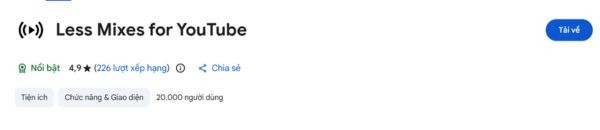
Use the extension to disable playlists

Step 3: Press “Add to browser” and grant permissions to the extension.

Step 4: Configure settings in the extension to block suggested playlists or autoplay.
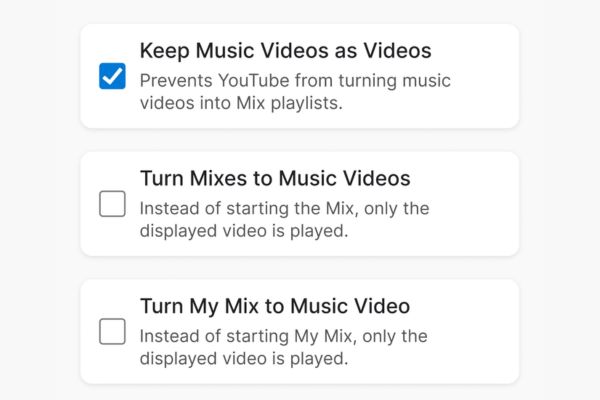
Customize settings in extension

Turning off automatic playlists on YouTube not only makes the experience smoother, but also limits the platform from forcing you to watch more unwanted advertising content. Although YouTube constantly updates its interface to force users to watch Mix, with the above tips, you can completely master the game.
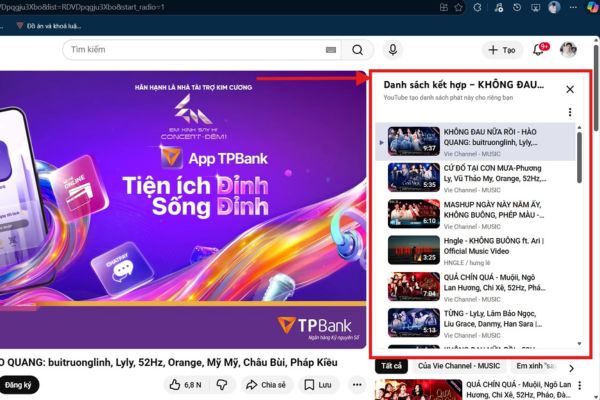
Instructions for turning off automatic playlists on YouTube

Conclusion

After applying the methods turn off automatic playlists on YouTubehopefully you will no longer feel annoyed every time you open a favorite song. Wishing you always have the most complete moments of relaxation with the selected music. Please apply today!

Frequently Asked Questions (Q&A)

1. Why does YouTube automatically create a playlist when I click a video?

This is the “Mix” feature to increase viewing time and suggest more content based on algorithms, sometimes causing discomfort for users who want to listen to personal music.

2. Does removing &list= in the URL affect the video?

No, deleting this segment only removes the accompanying playlist, your video will still play normally and stably.

3. Is it safe to use browser extensions?

Most popular extensions like “Enhancer for YouTube” are safe, but you should check the reviews before installing to ensure security.


Tags: AutomaticInstructionsplayliststurningYoutube
Previous Post

How to get ChatGPT Business 48 months discount from only 0 VND

AnonyViet

AnonyViet

Related Posts

Cat Gatekeeper: Cat gatekeeper utility, uniquely helps to “quit” social networks
Software

Cat Gatekeeper: Cat gatekeeper utility, uniquely helps to “quit” social networks

May 7, 2026
Instructions on how to upgrade CapCut Pro for free using Filza
Software

Instructions on how to upgrade CapCut Pro for free using Filza

May 5, 2026
TikTok Pro Tools: “all in one” utility for Top Top addicts
Software

TikTok Pro Tools: “all in one” utility for Top Top addicts

May 4, 2026
Create an avatar to celebrate April 30 with a beautiful red flag shirt with yellow stars
Software

Create an avatar to celebrate April 30 with a beautiful red flag shirt with yellow stars

April 30, 2026
How to get 2 months of Super Duolingo for free worth 300k
Software

How to get 2 months of Super Duolingo for free worth 300k

April 30, 2026
How to create a Face Sticker Collection using ChatGPT
Software

How to create a Face Sticker Collection using ChatGPT

April 29, 2026
0 0 votes
Article Rating
Subscribe
Login
Notify of
guest

guest

0 Comments
Oldest
Newest Most Voted
Inline Feedbacks
View all comments

Recent News

Instructions for turning off automatic playlists on YouTube

Instructions for turning off automatic playlists on YouTube

May 10, 2026
How to get ChatGPT Business 48 months discount from only 0 VND

How to get ChatGPT Business 48 months discount from only 0 VND

May 9, 2026
How to create a tiny version of yourself to follow the trend very easily

How to create a tiny version of yourself to follow the trend very easily

May 9, 2026
How to get 500GB pCloud for free, Swiss standard cloud storage

How to get 500GB pCloud for free, Swiss standard cloud storage

May 8, 2026
Instructions for turning off automatic playlists on YouTube

Instructions for turning off automatic playlists on YouTube

May 10, 2026
How to get ChatGPT Business 48 months discount from only 0 VND

How to get ChatGPT Business 48 months discount from only 0 VND

May 9, 2026
How to create a tiny version of yourself to follow the trend very easily

How to create a tiny version of yourself to follow the trend very easily

May 9, 2026
AnonyViet - English Version

AnonyViet

AnonyViet is a website share knowledge that you have never learned in school!

We are ready to welcome your comments, as well as your articles sent to AnonyViet.

Follow Us

Contact:

Email: anonyviet.com[@]gmail.com

Main Website: https://anonyviet.com

Recent News

Instructions for turning off automatic playlists on YouTube

Instructions for turning off automatic playlists on YouTube

May 10, 2026
How to get ChatGPT Business 48 months discount from only 0 VND

How to get ChatGPT Business 48 months discount from only 0 VND

May 9, 2026
No Result
View All Result
  • Home
  • News
  • Software
  • Knowledge
  • MMO
  • Tips
  • Security
  • Network
  • Office

wpDiscuz
0
0
Would love your thoughts, please comment.x
()
x
| Reply