• Home
  • News
  • Software
  • Knowledge
  • MMO
  • Tips
  • Security
  • Network
  • Office
AnonyViet - English Version
  • Home
  • News
  • Software
  • Knowledge
  • MMO
  • Tips
  • Security
  • Network
  • Office
No Result
View All Result
  • Home
  • News
  • Software
  • Knowledge
  • MMO
  • Tips
  • Security
  • Network
  • Office
No Result
View All Result
AnonyViet - English Version
No Result
View All Result

Complete set of AI training materials from the Ministry of Education at all levels (Elementary – High School)

AnonyViet by AnonyViet
April 13, 2026
in Knowledge
0

AI training materials from the Ministry of Education is the key to helping teachers become more confident when teaching technology lessons. With rich resources, lesson preparation will become faster and more professional than ever. Let’s exploit this entire set of documents right away with AnonyViet.

📢 Join the channel Telegram belong to AnonyViet


👉 Go to Telegram AnonyViet

Update new articles, cool tools and IT tips fastest

Explore AI training materials from the Ministry of Education

Bringing Artificial Intelligence into schools is a big step forward, helping students become familiar with technology early. Instead of teaching in the traditional way, teachers can use this set of materials to illustrate through visual images, helping students understand that computers can “learn” like humans through observation and practice.

To help teachers easily visualize the difference between traditional teaching methods and AI applications, we have compiled the comparison table below:

Criteria Traditional method AI integration method
Content Focus on textbook theory Combines hands-on and computational thinking
Tools White chalk, blackboard, pictures Software, AI models, digital lesson plans
Interact One-way from teacher to student Two-way, students explore on their own through examples

Complete set of AI training materials from the Ministry of Education at all levels (Elementary – High School)
Explore AI training materials from the Ministry of Education

How to download and use AI training materials from the Ministry of Education

To start applying AI training materials from the Ministry of Education into their lessons, teachers can follow these simple steps:

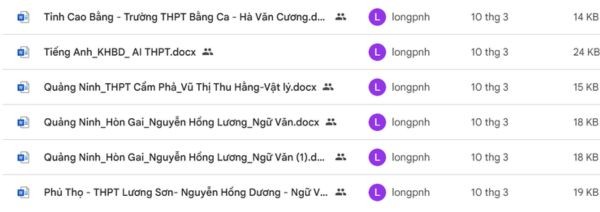
Step 1: Access the Google Drive link containing documents that have been shared publicly HERE.
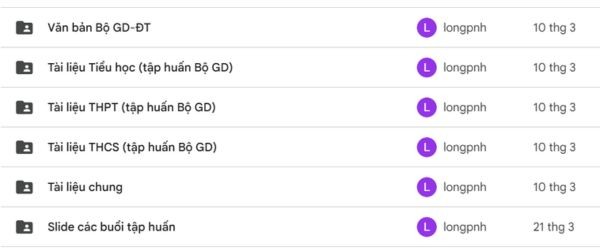
Access the Google Drive path containing the document

Step 2: Search the directory corresponding to the grade level or subject that the teacher is in charge of teaching.

Step 3: Select sample lesson plan files to download to your personal computer for content editing.

  • Look through sample textbook PDF files to grasp the method of imparting knowledge to students.
  • Use available lecture slides to present during class to increase vividness.
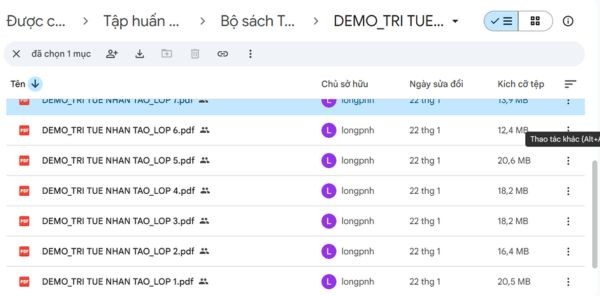
Search the directory corresponding to the level or subject

Using AI training materials from the Ministry of Education helps teachers save significant time drafting lesson plans. Instead of having to build your own from scratch, teachers can customize sample lesson plans to suit the level of students in their class. This is the highest quality resource available for teachers today.
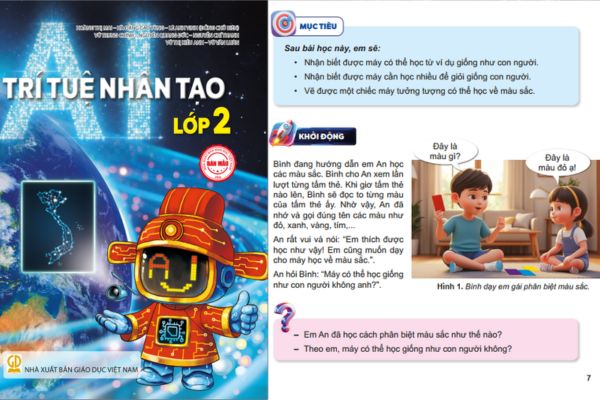
How to download and use AI training materials from the Ministry of Education

Conclusion

Set AI training materials from the Ministry of Education It is truly an effective support tool for teachers in the digital age. Make the most of sample lesson plans to provide the best learning experience for your students. Thank you teachers for following and I wish you successful teaching hours.

Frequently Asked Questions (Q&A)

1. Is this material suitable for elementary school teachers?

Yes, the kit provides complete lesson plans and sample books for both elementary, middle and high school levels.

2. Can I edit content in lesson plan files?

It’s entirely possible, because sample lesson plans are provided as Word files for teachers to easily customize according to classroom realities.

3. How to access this document repository?

Teachers just need to click on the Google Drive link shared in the article to view and download the necessary documents.

Tags: CompleteEducationElementaryhighLevelsMaterialsMinistrySchoolsetTraining
Previous Post

How to change the default font on Windows 10

Next Post

Review of Galaxy A57 and A37: Some are eight ounces, some are half a pound

AnonyViet

AnonyViet

Related Posts

How to turn off Gemini Nano on Chrome to free up 4GB of memory
Knowledge

How to turn off Gemini Nano on Chrome to free up 4GB of memory

May 30, 2026
How to turn on Voice Isolation, which helps eliminate noise when calling on iPhone
Knowledge

How to turn on Voice Isolation, which helps eliminate noise when calling on iPhone

May 27, 2026
How to transfer files between Windows and Mac over LAN
Knowledge

How to transfer files between Windows and Mac over LAN

May 26, 2026
Snapvie: Tool to download 8K YouTube videos, no installation required
Knowledge

Snapvie: Tool to download 8K YouTube videos, no installation required

May 24, 2026
How to create your own Video AI App to use Omni, Nano Banana without API Key
Knowledge

How to create your own Video AI App to use Omni, Nano Banana without API Key

May 23, 2026
Top 6 websites for 2026 high school graduation mock test, close to real questions, standard with Ministry of Education
Knowledge

Top 6 websites for 2026 high school graduation mock test, close to real questions, standard with Ministry of Education

May 16, 2026
Next Post
Review of Galaxy A57 and A37: Some are eight ounces, some are half a pound

Review of Galaxy A57 and A37: Some are eight ounces, some are half a pound

0 0 votes
Article Rating
Subscribe
Login
Notify of
guest

guest

0 Comments
Oldest
Newest Most Voted
Inline Feedbacks
View all comments

Recent News

How to turn off Gemini Nano on Chrome to free up 4GB of memory

How to turn off Gemini Nano on Chrome to free up 4GB of memory

May 30, 2026
Instructions for receiving Lovable Pro 12 months for free

Instructions for receiving Lovable Pro 12 months for free

May 29, 2026
How to extract text from photos using Zalo is super simple

How to extract text from photos using Zalo is super simple

May 29, 2026
HONOR 600 in hand – High-end design, 200MP camera, not cheap price

HONOR 600 in hand – High-end design, 200MP camera, not cheap price

May 28, 2026
How to turn off Gemini Nano on Chrome to free up 4GB of memory

How to turn off Gemini Nano on Chrome to free up 4GB of memory

May 30, 2026
Instructions for receiving Lovable Pro 12 months for free

Instructions for receiving Lovable Pro 12 months for free

May 29, 2026
How to extract text from photos using Zalo is super simple

How to extract text from photos using Zalo is super simple

May 29, 2026
AnonyViet - English Version

AnonyViet

AnonyViet is a website share knowledge that you have never learned in school!

We are ready to welcome your comments, as well as your articles sent to AnonyViet.

Follow Us

Contact:

Email: anonyviet.com[@]gmail.com

Main Website: https://anonyviet.com

Recent News

How to turn off Gemini Nano on Chrome to free up 4GB of memory

How to turn off Gemini Nano on Chrome to free up 4GB of memory

May 30, 2026
Instructions for receiving Lovable Pro 12 months for free

Instructions for receiving Lovable Pro 12 months for free

May 29, 2026
No Result
View All Result
  • Home
  • News
  • Software
  • Knowledge
  • MMO
  • Tips
  • Security
  • Network
  • Office

wpDiscuz
0
0
Would love your thoughts, please comment.x
()
x
| Reply