• Home
  • News
  • Software
  • Knowledge
  • MMO
  • Tips
  • Security
  • Network
  • Office
AnonyViet - English Version
  • Home
  • News
  • Software
  • Knowledge
  • MMO
  • Tips
  • Security
  • Network
  • Office
No Result
View All Result
  • Home
  • News
  • Software
  • Knowledge
  • MMO
  • Tips
  • Security
  • Network
  • Office
No Result
View All Result
AnonyViet - English Version
No Result
View All Result

Dell SE2426: A “lifesaver” solution for office workers’ eyes.

AnonyViet by AnonyViet
February 9, 2026
in News
0

In the modern office environment, where employees face computer screens for an average of 8 to 10 hours a day, eye diseases are becoming a constant obsession. Faced with that situation, the Dell SE2426 monitor appears not only as a display device, but also as a technological solution to minimize “Computer Vision Syndrome”.

Join the channel Telegram belong to AnonyViet 👉 Link 👈

With an accessible price and health-focused design, the Dell SE2426 promises to be a powerful “assistant” for office workers, from data processing to basic content creation.

Visual experience: Breakthrough sharpness and smoothness
Dell SE2426: A “lifesaver” solution for office workers’ eyes.

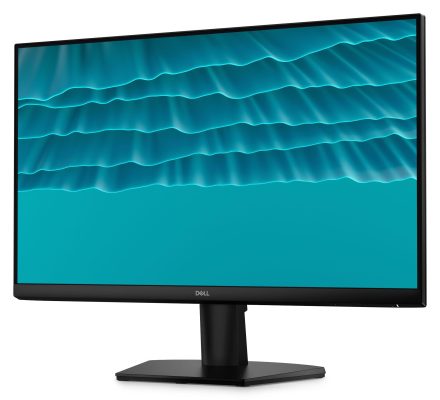
The brightest point of the Dell SE2426 lies in the combination of an IPS panel and a 144Hz refresh rate on a standard size of 23.8 inches (Full HD).

For office users, the 144Hz parameter brings a significantly different experience compared to the traditional 60Hz standard. Scrolling long text pages, dragging and dropping Excel spreadsheets, or switching between application windows goes smoothly, eliminating ghosting and latency. Combined with a 1ms response time (MPRT), the display helps minimize distractions, maintaining seamless user focus.

The IPS (In-Plane Switching) panel ensures a wide viewing angle of 178 degrees, helping colors display uniformly from all sides. With 99% sRGB color coverage and 1000:1 contrast, images are reproduced faithfully and clearly. Although not a graphics line, the SE2426 is still more than capable of handling light photo editing tasks or designing presentation slides.

“Shield” protects visual health

Understanding the characteristics of working continuously for 8-10 hours a day of office workers, Dell equips the SE2426 with technology ComfortView Plus. Unlike software solutions that often yellow the screen, this is a blue light filter built into the hardware (Low Blue Light Hardware). This technology eliminates harmful blue light while maintaining color accuracy.
Dell SE2426: Solution "lifesaver" for the eyes of office workers. 11

In addition, the Flicker-free feature uses direct current to adjust brightness, eliminating invisible flicker – the main cause of eye strain and headaches after long periods of use. The product has achieved TÜV Rheinland 3-star certification for eye protection.

Ergonomic design and smart connectivity
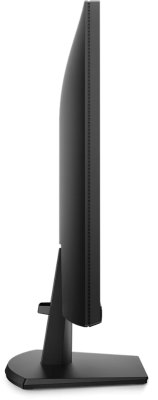
Dell SE2426: Solution "lifesaver" for the eyes of office workers. 12

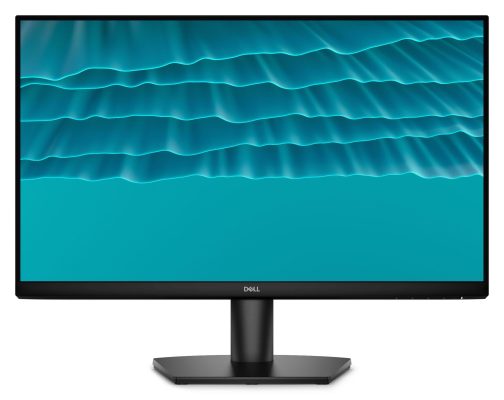
In terms of appearance, the Dell SE2426 maintains a minimalist language with ultra-thin screen borders on three sides. This design not only brings modern beauty but also optimizes the experience when pairing multiple screens, helping to expand the multitasking workspace without being interrupted by thick black borders.
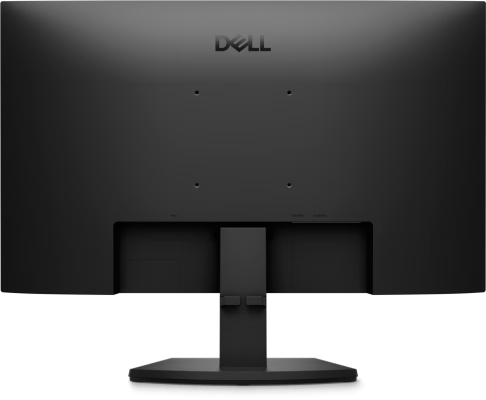
Dell SE2426: Solution "lifesaver" for the eyes of office workers. 13

The product stand is compactly designed with an integrated cable management tray, helping to keep the desk tidy. Users can also flexibly install the screen on a wall or arm thanks to the standard 100x100mm VESA mount, helping to save space and easily adjust to an ergonomic sitting position.

Dell SE2426: Solution "lifesaver" for the eyes of office workers. 14

Regarding connection, equipping 2 HDMI 1.4 ports allows users to connect a desktop computer and laptop in parallel, easily switching sources without having to remove and install complicated cables.

Sustainable commitment

Not only does Dell SE2426 optimize performance, it is also a green product. Crafted from 85% recycled plastic and packaged in 100% renewable packaging, this monitor meets rigorous standards such as Energy Star 8.0 and RoHS. With a power consumption of only about 13.3W when operating, this is an effective operating cost saving solution for businesses.

Conclude

Dell SE2426 is proof that cheap office monitors do not mean low configuration. By popularizing the 144Hz refresh rate and advanced eye protection technology to the popular segment, Dell offers a perfect balance between Performance – Health – Price. This is an option worth considering to upgrade your working corner this year.

Learn more at: USA Tech HUB – Your Tech In Your Hand – Genuine Dell components – Fast delivery – Easy to upgrade – Clear warranty.


Tags: DelleyeslifesaverOfficeSE2426SolutionWorkers
Previous Post

How to block Update to Windows 10 21H1 to avoid errors

Next Post

How to blur photos on iPhone after taking them is extremely simple

AnonyViet

AnonyViet

Related Posts

Don’t rush to buy a new MacBook if you don’t know these differences
News

Don’t rush to buy a new MacBook if you don’t know these differences

May 20, 2026
Reputable LG repair service in Hanoi & Ho Chi Minh City with LGservicecenter
News

Reputable LG repair service in Hanoi & Ho Chi Minh City with LGservicecenter

April 21, 2026
Japanese Watch Week: Choose the color that suits your destiny, start the new year well at Mobile World
News

Japanese Watch Week: Choose the color that suits your destiny, start the new year well at Mobile World

April 20, 2026
MacBook Air M2 review: 2026 price hits rock bottom, what else?
News

MacBook Air M2 review: 2026 price hits rock bottom, what else?

March 14, 2026
Ứng dụng cầu nguyện của Iran bị hack, gửi thông điệp kêu gọi đầu hàng
News

Ứng dụng cầu nguyện của Iran bị hack, gửi thông điệp kêu gọi đầu hàng

March 1, 2026
How many colors does the Samsung Galaxy S26 Series come in and what are the shades that will cause a stir in 2026?
News

How many colors does the Samsung Galaxy S26 Series come in and what are the shades that will cause a stir in 2026?

February 26, 2026
Next Post
How to blur photos on iPhone after taking them is extremely simple

How to blur photos on iPhone after taking them is extremely simple

0 0 votes
Article Rating
Subscribe
Login
Notify of
guest

guest

0 Comments
Oldest
Newest Most Voted
Inline Feedbacks
View all comments

Recent News

Instructions for receiving Lovable Pro 12 months for free

Instructions for receiving Lovable Pro 12 months for free

May 29, 2026
How to extract text from photos using Zalo is super simple

How to extract text from photos using Zalo is super simple

May 29, 2026
HONOR 600 in hand – High-end design, 200MP camera, not cheap price

HONOR 600 in hand – High-end design, 200MP camera, not cheap price

May 28, 2026
Instructions for getting 4 months of Adobe copyright for free

Instructions for getting 4 months of Adobe copyright for free

May 28, 2026
Instructions for receiving Lovable Pro 12 months for free

Instructions for receiving Lovable Pro 12 months for free

May 29, 2026
How to extract text from photos using Zalo is super simple

How to extract text from photos using Zalo is super simple

May 29, 2026
HONOR 600 in hand – High-end design, 200MP camera, not cheap price

HONOR 600 in hand – High-end design, 200MP camera, not cheap price

May 28, 2026
AnonyViet - English Version

AnonyViet

AnonyViet is a website share knowledge that you have never learned in school!

We are ready to welcome your comments, as well as your articles sent to AnonyViet.

Follow Us

Contact:

Email: anonyviet.com[@]gmail.com

Main Website: https://anonyviet.com

Recent News

Instructions for receiving Lovable Pro 12 months for free

Instructions for receiving Lovable Pro 12 months for free

May 29, 2026
How to extract text from photos using Zalo is super simple

How to extract text from photos using Zalo is super simple

May 29, 2026
No Result
View All Result
  • Home
  • News
  • Software
  • Knowledge
  • MMO
  • Tips
  • Security
  • Network
  • Office

wpDiscuz
0
0
Would love your thoughts, please comment.x
()
x
| Reply