If you often have to work with invoices, receipts, payment slips, contracts or payroll, then recording amount in words certainly no longer strange. However, if you misspell just one word or miss thousands or millions, you may have to redo the document from the beginning.
| Join the channel Telegram belong to AnonyViet 👉 Link 👈 |
To save time and limit errors, you can use Tool to convert numbers into words, exchange money into words online integrated right on AnonyViet. This article will provide detailed instructions on how to use, with step-by-step illustrations for you to easily follow.
Step 1: Visit the number-to-word conversion tool page
First, open your web browser (Chrome, Edge, Firefox, Safari…) on your computer or phone and access the address:
https://anonyviet.com/doi-so-thanh-chu/
After accessing, you will see the tool interface as shown below:
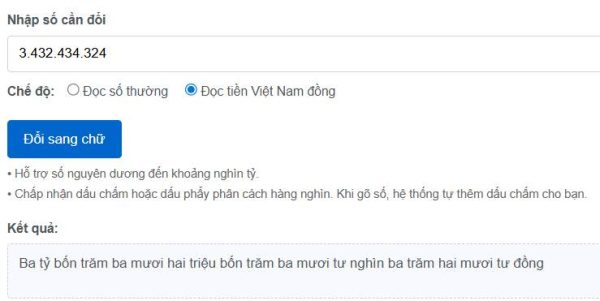
The top of the page is the prominent title “Convert numbers into words, exchange money into words online for free”below is the area to enter numbers and view results.
Step 2: Enter the number to change (add the thousands dot yourself)
In section “Enter the number to change”you type the amount or value you want to convert to text. Maybe:
- Type directly using the keyboard, for example: 15000000.
- Or copy from Excel, accounting software, quote file and paste into the input box.
As soon as you type, the tool will automatically Add a thousands separator Makes numbers easier to read. For example:
- Type: 15000000
- Display: 15,000,000
With very long numbers (hundreds of millions, billions), automatically adding dots will help you limit confusion when rechecking.
Step 3: Select number reading mode or Vietnamese Dong currency reading mode
Below the number input box, the tool provides two modes for you to choose from:
- Read normal numbers: Shows how to read numbers and capitalize the first letter of a sentence. Suitable when you just want to know how to read numbers, without the word “copper” at the end.
- Read Vietnamese Dong currency: Display amount in words, capitalize first letter and automatically add text “copper” at the end of the sentence. Suitable for recording invoices, receipts, payment slips, contracts…
To change the mode, you just need to click on the corresponding circle box. As soon as you change the mode, the results will automatically update again.
Illustration of the mode selection area:
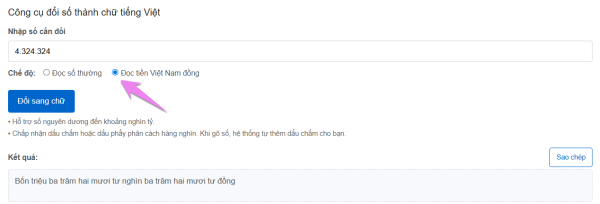
Step 4: See results and copy quickly
One convenient point of the tool on AnonyViet is: you don’t need to press the buttonjust enter the number as part Results in words will automatically appear below.
For example:
- Enter number: 1,250,000
- Money reading mode: Display results: “One million two hundred and fifty thousand dong”
The results area is presented in a separate, easy-to-see pane, as shown below:
Copy the results using the “Copy” button or clicking on the cell
To help you quickly use invoices, contracts or Word/Excel files, the tool supports two ways to copy results:
- Method 1: Press the button “Copy” in the right corner of the line “Results”.
- Method 2: Click directly on the box displaying results in text.
After successful copying, the tool will display a small message “Copied results” right below so you know the operation has been completed.
Illustration of the copy button and notification:

Then you just do it paste (Ctrl + V) into invoices, receipts, payment slips, contracts or any documents being prepared.
A few tips when using the tool
- If you mistakenly enter a non-numeric character, the tool will notify you “Please enter a valid number”delete the strange character and enter again.
- Should recheck the part total amount in numbers before converting to text to ensure there are no errors.
- With large amounts of money, you can read the results again to get used to the correct reading.
- Let’s bookmark (save page) https://anonyviet.com/doi-so-thanh-chu/ on the browser to reopen faster next time.
Conclude
Instead of sitting down and spelling out each number and then writing it by hand, you can completely take advantage of it Tool to convert numbers into words, exchange money into words online on AnonyViet to work faster, more accurately and more professionally.
With just a few simple steps: Go to page → enter number → select mode → copy resultyou now have complete text to put into invoices, vouchers, contracts or any documents that need to write amounts in words.
After completing this article, you just need to screenshot each step, upload the image to WordPress and then change the link src="" in the tags