• Home
  • News
  • Software
  • Knowledge
  • MMO
  • Tips
  • Security
  • Network
  • Office
AnonyViet - English Version
  • Home
  • News
  • Software
  • Knowledge
  • MMO
  • Tips
  • Security
  • Network
  • Office
No Result
View All Result
  • Home
  • News
  • Software
  • Knowledge
  • MMO
  • Tips
  • Security
  • Network
  • Office
No Result
View All Result
AnonyViet - English Version
No Result
View All Result

Namecheap offers 3 Domains for $0

AnonyViet by AnonyViet
October 7, 2025
in Network
0

Namecheap is one of the world’s leading providers of domain names, hosting and website management services. Founded in 2000, Namecheap has served millions of customers globally thanks to its affordable prices, easy-to-use interface and 24/7 support. In particular, Namecheap regularly launches groundbreaking promotions to help users save on new domain registration costs. Currently Namecheap is promoting 3 Domains priced at $0 including .site, .online,. .store. Here’s how to buy these 3 domains for free:

Join the channel Telegram belong to AnonyViet 👉 Link 👈

3 free domains for $0 at Namecheap

For a limited time, Namecheap special promotion Allows users to register 3 popular domains completely free of charge, including: .site, .online and .store. Each domain has its own meaning and is suitable for many different uses.

.site domain name

The .site domain represents simplicity, flexibility and is suitable for any type of website. Whether you want to build a personal blog, business introduction page or portfolio, .site is an ideal choice.

.online domain name

The .online domain is suitable for individuals or businesses that want to demonstrate a large online presence. It carries the meaning of modernity, professionalism and constant connection in the digital world.

.store domain name

Domain .store is reserved for online sales activities. If you are planning to open an online shop, .store helps customers immediately recognize your business purpose. This is also a highly commercial domain, helping to increase reliability and optimize SEO effectively.

Instructions on how to buy a domain for $0 at Namecheap

To buy a Domain at Namecheap you need to prepare a VISA/Master Card or Paypal account with at least 5,000 VND.

To receive 3 free domains at Namecheap, you need to follow these steps:

Step 1: Visit the Namecheap promotion page

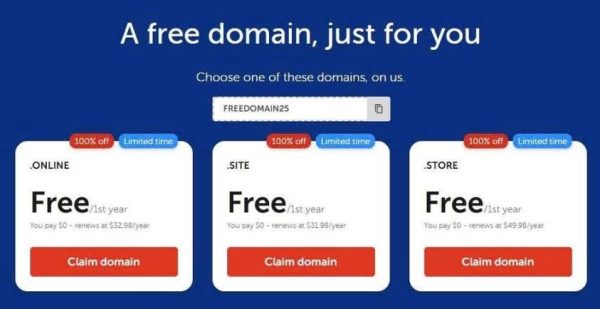
Visit Namecheap promotion page to view program details and select the domain you want to register.
Namecheap offers 3 Domains for alt=

Step 2: Search for the desired domain

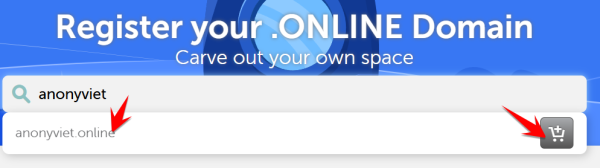
Choose the domain you like, then click the button Claim domains orange. Enter the domain name you want into the search bar on the main interface. The system will check for availability and display the corresponding .site, .online, or .store options.
choose domain 0$ namecheap

Once you have chosen the appropriate domain, click the “Add to Cart” button to add to the cart. You can choose one or all 3 domains depending on your needs. If you choose all 3 domains, the first domain will be $0, the 2nd and 3rd domains will be $0.98 (quite cheap)

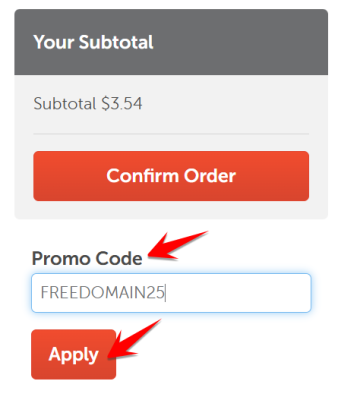
Step 4: Enter promo code FREEDOMAIN25

At the checkout page, enter the code FREEDOMAIN25 to apply a 100% discount promotion, helping you get a domain for $0. Double check the total price before confirming payment.
Code FREEDOMAIN25 to apply 100% discount

After applying the discount code, the domain will return to $0, but there is still an ICANN fee of about $0.20. 5k VNDwhich is a fee paid to a provider that coordinates the maintenance and procedures of certain databases related to the namespaces and digital spaces of the Internet.

Step 5: Complete registration

Complete the necessary information, confirm the terms and click “Confirm Order”. After confirmation, you will receive a confirmation email and the domain will be activated immediately.

Conclude

The Namecheap promotion of 3 domains for $0 is a good opportunity for those who want to build a personal website or start a business, especially those who want to start a business. temp mail to add domains to receive mail. Hurry and experience and own your own domain before the promotion ends!


Tags: DomainsNameCheapoffers
Previous Post

How to draw charts with AI to make a quick report

Next Post

Transfer.it – ​​Send a free large file, no account need

AnonyViet

AnonyViet

Related Posts

Save image as Type contains malicious code: Remove immediately before losing money unfairly!
Network

Save image as Type contains malicious code: Remove immediately before losing money unfairly!

March 19, 2026
Instructions on how to register a .co.uk domain name for free for 1 year
Network

Instructions on how to register a .co.uk domain name for free for 1 year

March 12, 2026
How to Setup Paperclip AI: Create a Company for AI Agent
Network

How to Setup Paperclip AI: Create a Company for AI Agent

March 12, 2026
Compilation of free and cheap APIs to run OpenClaw stably
Network

Compilation of free and cheap APIs to run OpenClaw stably

March 10, 2026
3 Services to Determine IP Location for Website (IP Geolocation API)
Network

3 Services to Determine IP Location for Website (IP Geolocation API)

March 10, 2026
How to buy a .STORE domain name for 1 USD (2026): Detailed instructions from A–Z
Network

How to buy a .STORE domain name for 1 USD (2026): Detailed instructions from A–Z

March 3, 2026
Next Post
Transfer.it – ​​Send a free large file, no account need

Transfer.it - ​​Send a free large file, no account need

0 0 votes
Article Rating
Subscribe
Login
Notify of
guest

guest

0 Comments
Oldest
Newest Most Voted
Inline Feedbacks
View all comments

Recent News

Tips for pinning the step counter to the iPhone screen to monitor your health

Tips for pinning the step counter to the iPhone screen to monitor your health

April 28, 2026
How to turn off password suggestions on iPhone: Prevent Safari from auto-filling passwords

How to turn off password suggestions on iPhone: Prevent Safari from auto-filling passwords

April 27, 2026
Instructions for looking up prescriptions on VNeID instead of paper medical books

Instructions for looking up prescriptions on VNeID instead of paper medical books

April 26, 2026
Tips to completely turn off CAPTCHA codes on iPhone and Mac are super simple

Tips to completely turn off CAPTCHA codes on iPhone and Mac are super simple

April 25, 2026
Tips for pinning the step counter to the iPhone screen to monitor your health

Tips for pinning the step counter to the iPhone screen to monitor your health

April 28, 2026
How to turn off password suggestions on iPhone: Prevent Safari from auto-filling passwords

How to turn off password suggestions on iPhone: Prevent Safari from auto-filling passwords

April 27, 2026
Instructions for looking up prescriptions on VNeID instead of paper medical books

Instructions for looking up prescriptions on VNeID instead of paper medical books

April 26, 2026
AnonyViet - English Version

AnonyViet

AnonyViet is a website share knowledge that you have never learned in school!

We are ready to welcome your comments, as well as your articles sent to AnonyViet.

Follow Us

Contact:

Email: anonyviet.com[@]gmail.com

Main Website: https://anonyviet.com

Recent News

Tips for pinning the step counter to the iPhone screen to monitor your health

Tips for pinning the step counter to the iPhone screen to monitor your health

April 28, 2026
How to turn off password suggestions on iPhone: Prevent Safari from auto-filling passwords

How to turn off password suggestions on iPhone: Prevent Safari from auto-filling passwords

April 27, 2026
No Result
View All Result
  • Home
  • News
  • Software
  • Knowledge
  • MMO
  • Tips
  • Security
  • Network
  • Office

wpDiscuz
0
0
Would love your thoughts, please comment.x
()
x
| Reply