• Home
  • News
  • Software
  • Knowledge
  • MMO
  • Tips
  • Security
  • Network
  • Office
AnonyViet - English Version
  • Home
  • News
  • Software
  • Knowledge
  • MMO
  • Tips
  • Security
  • Network
  • Office
No Result
View All Result
  • Home
  • News
  • Software
  • Knowledge
  • MMO
  • Tips
  • Security
  • Network
  • Office
No Result
View All Result
AnonyViet - English Version
No Result
View All Result

How to comment on Facebook by nickname is not detected

AnonyViet by AnonyViet
September 13, 2025
in Tips
0

Comments on Facebook by nickname It is an extremely interesting feature for you to freely express your views that you may not know. Have you ever wanted to participate in a fiery debate in a group but fear for fear of affecting your personal image? Now, you can create a unique “character” with a unique nickname to freely express your opinion without worrying.

Join the channel Telegram belong to Anonyviet 👉 Link 👈

Why use comment features by nickname?

Imagine you are a genuine “movie” and want to make “extreme” analysis of a blockbuster film in a community group. Instead of using a personal account can make friends and colleagues look at you with another eye, a nickname such as “a critic” or “holy details” will help you:

  • Comfortable to express your personality, you can be anyone you want, from humor, witty to serious and profound.
  • Protect privacy, completely separate between personal life and exciting discussions on social networks.
  • People will pay attention to your argument instead of judging who you are, what to do in real life.
  • This is the ideal playground for you to create creativity and contribute multi -dimensional perspectives to the community.

Why use comment features by nickname?

Comments on Facebook by nickname

With just a few simple steps, you can successfully “incarnate”. Please follow these steps:

Step 1: At the above article Facebook You want to interact, click on the comment box as usual. Pay close attention to the left corner, you will see avatar Your miniature, click on it.
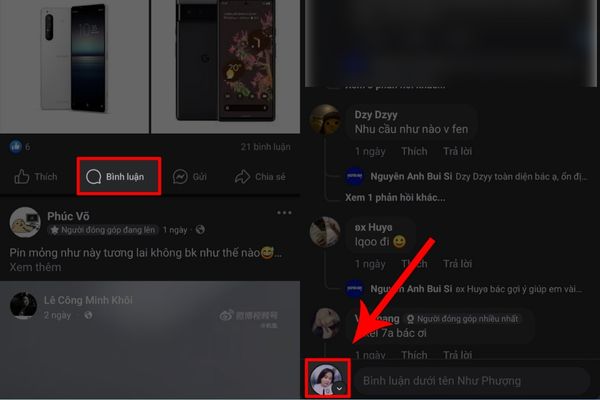
Click on the miniature avatar

Step 2: A small menu will appear, choose “Anonymous participants“Soon after, the interface will change. Do not rush to comment, click on the anonymous image icon again. At this point, you will see the option.”Customize nickname” appear.
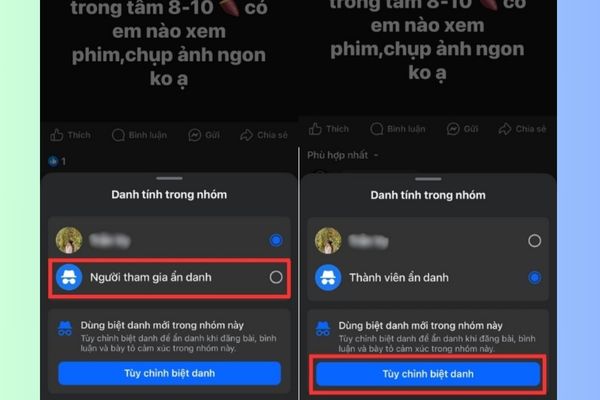
Select "Customize nickname"
Select “Customity Nickname”

Step 3: Choose a real nickname and show your style. If the valid nickname and not violate the community standards of Facebooka green traces will appear.
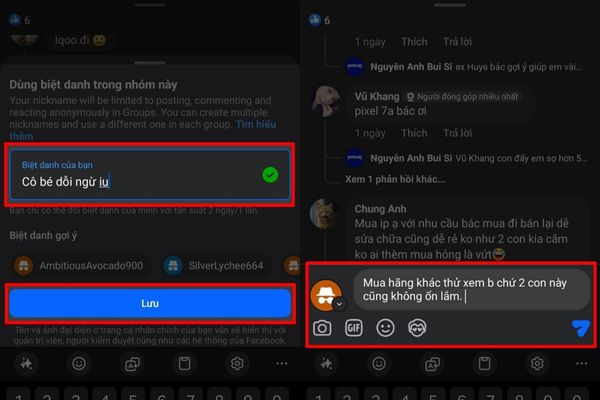
Put a real nickname "call"
Put a real nickname “calling”

Step 4: After being satisfied with the name I chose, click Save. That’s it! From now on, all your comments in this article will display under the brand new nickname you just created.
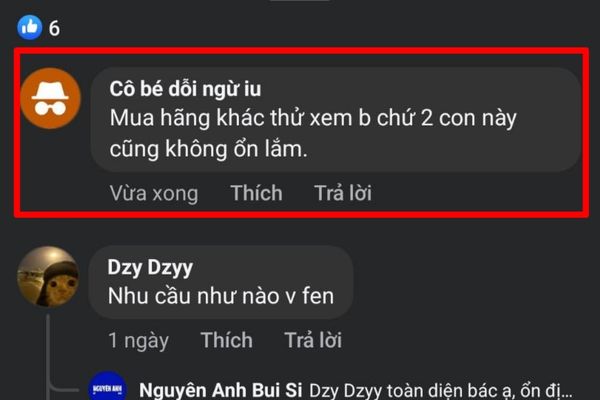
Press saving is done

A few important notes you need to know

  • Although other users do not see real identity, the group’s administrator (admin) can still see your original account. This is to ensure a civilized, safe and responsible discussion environment.
  • Choose polite nicknames, avoid words that cause hatred, offensive or violate Facebook’s policy.

Conclusion

This feature is great, right? Now, work Comments on Facebook by nickname It is no longer a difficult thing, helping you confidently participate in every discussion. Apply immediately to create exciting, colorful debate and express your own unique personality. What nickname will you choose for you?


Tags: commentdetectedFacebooknickname
Previous Post

[Cẩm nang cho người mới] 5 simple steps to conquer golf

Next Post

Code finding comments of a person on any page

AnonyViet

AnonyViet

Related Posts

How to add sliders to Facebook Stories to easily rewind videos
Tips

How to add sliders to Facebook Stories to easily rewind videos

April 21, 2026
How to change the default font on Windows 10
Tips

How to change the default font on Windows 10

April 13, 2026
5 tips for using a Browser to replace an App (helps save RAM, time and money)
Tips

5 tips for using a Browser to replace an App (helps save RAM, time and money)

April 13, 2026
How to make funny MeMe photos without Photoshop within 10 seconds
Tips

How to make funny MeMe photos without Photoshop within 10 seconds

April 11, 2026
How to quickly design your own Logo without Photoshop
Tips

How to quickly design your own Logo without Photoshop

April 10, 2026
How to convert Website into App on Windows
Tips

How to convert Website into App on Windows

April 9, 2026
Next Post
Code finding comments of a person on any page

Code finding comments of a person on any page

0 0 votes
Article Rating
Subscribe
Login
Notify of
guest

guest

0 Comments
Oldest
Newest Most Voted
Inline Feedbacks
View all comments

Recent News

How to turn off password suggestions on iPhone: Prevent Safari from auto-filling passwords

How to turn off password suggestions on iPhone: Prevent Safari from auto-filling passwords

April 27, 2026
Instructions for looking up prescriptions on VNeID instead of paper medical books

Instructions for looking up prescriptions on VNeID instead of paper medical books

April 26, 2026
Tips to completely turn off CAPTCHA codes on iPhone and Mac are super simple

Tips to completely turn off CAPTCHA codes on iPhone and Mac are super simple

April 25, 2026
Compare Poco X8 Pro and Poco X7 Pro: A new step for the “king” of mid-range performance

Compare Poco X8 Pro and Poco X7 Pro: A new step for the “king” of mid-range performance

April 24, 2026
How to turn off password suggestions on iPhone: Prevent Safari from auto-filling passwords

How to turn off password suggestions on iPhone: Prevent Safari from auto-filling passwords

April 27, 2026
Instructions for looking up prescriptions on VNeID instead of paper medical books

Instructions for looking up prescriptions on VNeID instead of paper medical books

April 26, 2026
Tips to completely turn off CAPTCHA codes on iPhone and Mac are super simple

Tips to completely turn off CAPTCHA codes on iPhone and Mac are super simple

April 25, 2026
AnonyViet - English Version

AnonyViet

AnonyViet is a website share knowledge that you have never learned in school!

We are ready to welcome your comments, as well as your articles sent to AnonyViet.

Follow Us

Contact:

Email: anonyviet.com[@]gmail.com

Main Website: https://anonyviet.com

Recent News

How to turn off password suggestions on iPhone: Prevent Safari from auto-filling passwords

How to turn off password suggestions on iPhone: Prevent Safari from auto-filling passwords

April 27, 2026
Instructions for looking up prescriptions on VNeID instead of paper medical books

Instructions for looking up prescriptions on VNeID instead of paper medical books

April 26, 2026
No Result
View All Result
  • Home
  • News
  • Software
  • Knowledge
  • MMO
  • Tips
  • Security
  • Network
  • Office

wpDiscuz
0
0
Would love your thoughts, please comment.x
()
x
| Reply