Sometimes it’s hard to find what you want in a search engine like Google. However, there is a technique called Google Fu (or Google Dorks) that will help you improve your search technique and find more specific results.
| Join the channel Telegram of the AnonyViet 👉 Link 👈 |

What is Google Fu?
According to the Wikipedia:
Google-fu is often used as a general term that applies to any search engine and is usually written in lowercase, google-fu. Use google-fu by combining search operators for more accurate results.
Google provides special terms called advanced operators to help you perform more advanced query searches. These operators (if used correctly) can help you get exactly what you’re looking for without spending too much time navigating from page to page. When advanced operators are not provided in a query, Google will look for your search terms in any area of the Web page, including title, text, URL.
For example, if you are searching specifically for a PDF document or just want results from 1 web page.
Use operators for deep search
Operators are keywords that have a specific meaning to a search engine. Advanced Google operators help improve search performance.
- As part of a standard query in Google.
- Advanced operators use syntax like:
operator: search_term - There are no spaces between the operator, the colon, and the search term.
List of operators
Here is a list of operators that will help you:
- intitle, allintitle
- inurl, allinurl
- filetype
- site
- link
- inanchor
- cache
- info
- related
- phonebook
- rphonebook
- bphonebook
- author
- group
- msgid
- insubject
- stocks
- define
Explanation of operators
You can use different operators depending on your needs.
intitle
- Find the text in the title of a page
- Combines well with other operators
inurl
- Find the text contained in the URL of a page
- Combines well with other operators
- Best used with Web and image searches
filetype
- Find specific file types based on file extension
- Synonymous with ext
- Request an additional search term
- Combines well with other operators
- Best used with Web and group searches
link
- Search for links to a website or URL
- Do not combine with other operators or search terms
- Best used with Web searches
inanchor
- Find text in descriptions of links
- Combines well with other operators and search terms
- Best used for Web, Image and News searches
numrange
- Find a number in a specific range
- Combines well with other operators and search terms
- Best used with Web searches
- Synonymous with ext.
cache
- Display Google cached copy of page
- Do not combine with other operators or search terms
- Best used with Web searches
info
- Display summary information about a page
- Do not combine with other operators or search terms
- Best used with Web searches
related
- Display web pages related to the provided website or URL
- Do not combine with other operators or search terms
- Best used with Web searches
phonebook, rphonebook, bphonebook
- Show personal or business phone list
- Do not combine with other operators or search terms
- Best used as a Web query
author
- Search for the author of a post in Group
- Combines well with other operators and search terms
group
- Search for Group Names, select individual Groups
- Combines well with other operators
insubject
- Locate a text in the subject of a Group post
- Combines well with other operators and search terms
msgid
- Locate Group messages by message ID
- Do not combine with other operators or search terms
stocks
- Show Yahoo Finance stock list for a ticker symbol
- Do not combine with other operators or search terms
define
- Displays different definitions of a given word or phrase
- Do not combine with other operators or search terms
How to use Google-Fu
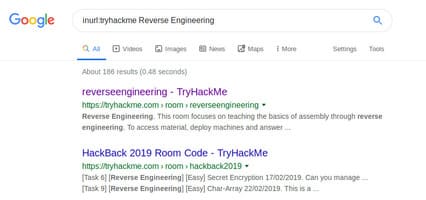
Example of inurl
With this operator, I will try to find all the pages related to reverse engineering on tryhackme:
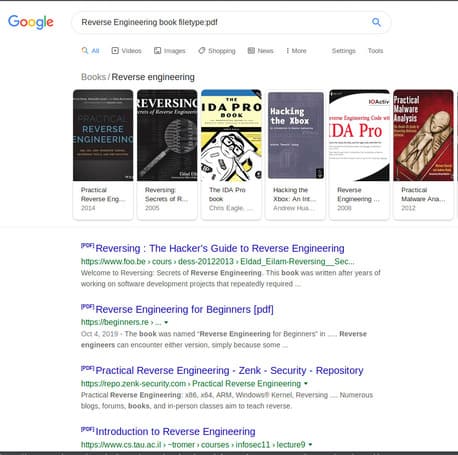
Example of filetype
With this operator, I will try to find all the pdf books for reverse engineering:
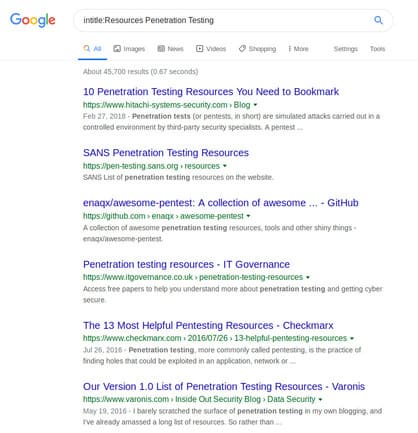
Example of intitle
With this operator, I will try to find resources for pentesting:
Site example
With this operator, I will try to find all available Vulnhub servers on tryhackme:

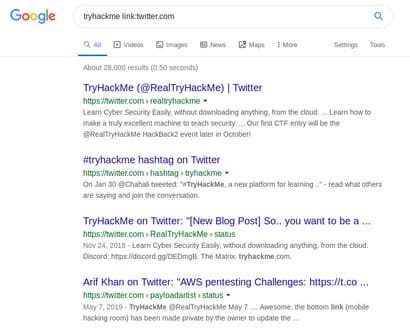
Examples of links
With this operator I will try to find all related tryhackme stuff on twitter:
The Google Fu technique is very useful for bug bountry because you can easily locate vulnerable web servers. In addition, you can also read more articles about tryhackme here.