• Home
  • News
  • Software
  • Knowledge
  • MMO
  • Tips
  • Security
  • Network
  • Office
AnonyViet - English Version
  • Home
  • News
  • Software
  • Knowledge
  • MMO
  • Tips
  • Security
  • Network
  • Office
No Result
View All Result
  • Home
  • News
  • Software
  • Knowledge
  • MMO
  • Tips
  • Security
  • Network
  • Office
No Result
View All Result
AnonyViet - English Version
No Result
View All Result

Discover Supermix – Smart playlist on YouTube Music

AnonyViet by AnonyViet
May 20, 2025
in Software
0

Have you ever felt your music library became boring and needed a new wind? Supermix On YouTube Music is the answer for you. This is a smart playlist, constantly updating, bringing unique suggestions based on your music preferences. Let’s find out what Supermix is, how to use and whether it is superior to Spotify’s Discover Weekly or not!

Join the channel Telegram belong to Anonyviet 👉 Link 👈

What is Supermix?

Supermix is ​​a special playlist on YouTube Musicdesigned to refresh the user’s music listening experience. Unlike conventional playlists, Supermix automatically changes based on your history of listening to music and music taste. It can recall the old songs that you have not heard for a long time, and introduce new unexpected songs.

Compared to Discover Weekly of SpotifySupermix brings more diversity when not limited by the number of songs or specific genres. If you want to discover music naturally without choosing yourself, Supermix is ​​the ideal “companion”.

What is Supermix?
What is Supermix?

How to access Supermix

To find this tool, you can check in the YouTube Music library under the “Playlists” section. However, not everyone saw it appeared. The simplest way is to go to the search tab on the application, enter the keyword “Supermix“, And select” My Supermix “when the results appear.
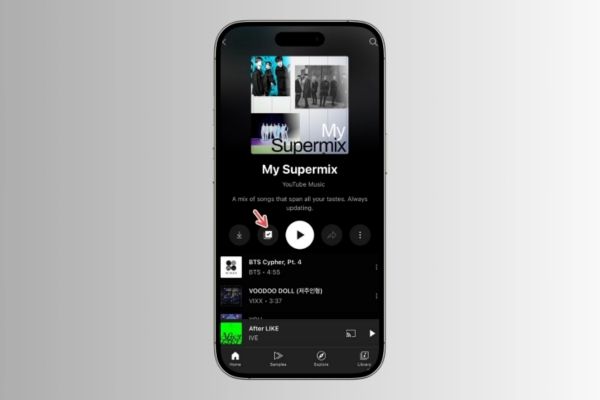
How to access Supermix

Want to access faster? Save this tool to the library by pressing the “Save to playlist”(The second symbol below describes the playlist).Battery To Speed ​​Dial“After that, Supermix will always appear right on the homepage tab, ready to wait for you to explore.

Select
Select “Battery to Speed ​​Dial”

Supermix compared to Discover Weekly: Which is better?

Supermix and Discover Weekly are all great tools to explore new music, but they have a clear difference. Spotify’s Discover Weekly updates every second with 30 songs, while Supermix offers up to 100 songs and refreshed continuously. This gives supermix advantages if you want a richer list, combining old and new music.

For those who like the surprise and do not want to wait weekly, Supermix is ​​an outstanding choice. On the contrary, if you want a short, completely new list every week, Discover Weekly is still worth considering.
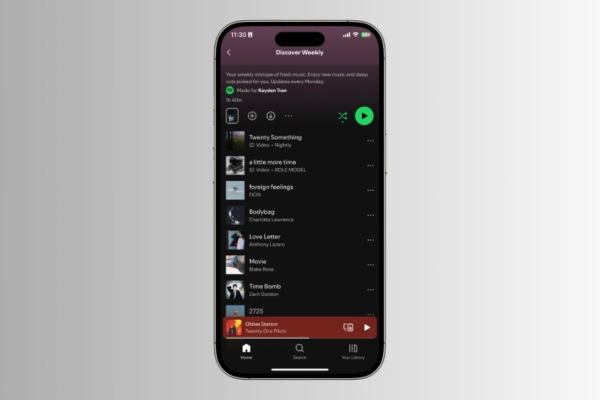
Compare with Discover Weekly

How to tweak Supermix according to preferences

To Supermix Really reflect your music taste, tweak is indispensable. Sometimes, the playlist can “be lost” if you have just heard a new genre. Go to the homepage tab, press the profile photo, select Settings> Proposals> Improve music suggestions. Here, you can choose five favorite artists to shape more accurate suggestions.

In addition, turning on private mode when listening to music is not related to the main hobby will help Supermix not be “interfered” by improvised options.
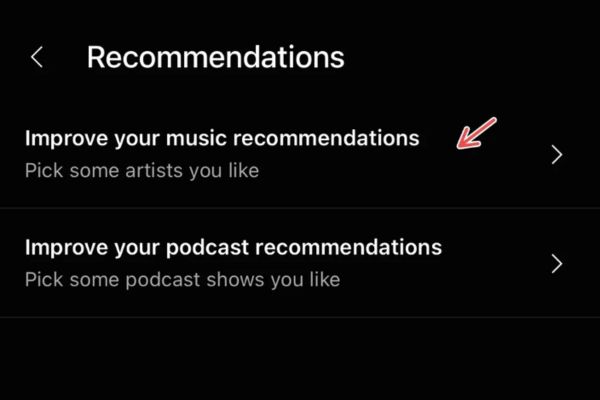
How to tweak according to your preferences

Conclusion

Supermix Not only refreshing music but also brings flexibility and rare diversity. With the ability to update continuously and not limited by the genre, it becomes the perfect choice when you do not know what to hear. Compared to other playlists on Youtube Music, Supermix is ​​a “music party” combining familiar and novel!

Tags: discovermusicplaylistSmartSupermixYoutube
Previous Post

The 10 best Torrent websites today – 100% still operate

Next Post

7 ways to release RAM to accelerate your Windows computer

AnonyViet

AnonyViet

Related Posts

How to create a Face Sticker Collection using ChatGPT
Software

How to create a Face Sticker Collection using ChatGPT

April 29, 2026
How to install the cute Bongo Cat mouse pointer for Windows
Software

How to install the cute Bongo Cat mouse pointer for Windows

April 29, 2026
Instructions for looking up prescriptions on VNeID instead of paper medical books
Software

Instructions for looking up prescriptions on VNeID instead of paper medical books

April 26, 2026
Compare Poco X8 Pro and Poco X7 Pro: A new step for the “king” of mid-range performance
Software

Compare Poco X8 Pro and Poco X7 Pro: A new step for the “king” of mid-range performance

April 24, 2026
Top 5 apps to view good days 2026 for free on iOS and Android
Software

Top 5 apps to view good days 2026 for free on iOS and Android

April 23, 2026
Top 5+ utilities to install for Gmail to speed up work processing
Software

Top 5+ utilities to install for Gmail to speed up work processing

April 22, 2026
Next Post
7 ways to release RAM to accelerate your Windows computer

7 ways to release RAM to accelerate your Windows computer

0 0 votes
Article Rating
Subscribe
Login
Notify of
guest

guest

0 Comments
Oldest
Newest Most Voted
Inline Feedbacks
View all comments

Recent News

How to create a Face Sticker Collection using ChatGPT

How to create a Face Sticker Collection using ChatGPT

April 29, 2026
How to install the cute Bongo Cat mouse pointer for Windows

How to install the cute Bongo Cat mouse pointer for Windows

April 29, 2026
Tips for pinning the step counter to the iPhone screen to monitor your health

Tips for pinning the step counter to the iPhone screen to monitor your health

April 28, 2026
How to turn off password suggestions on iPhone: Prevent Safari from auto-filling passwords

How to turn off password suggestions on iPhone: Prevent Safari from auto-filling passwords

April 27, 2026
How to create a Face Sticker Collection using ChatGPT

How to create a Face Sticker Collection using ChatGPT

April 29, 2026
How to install the cute Bongo Cat mouse pointer for Windows

How to install the cute Bongo Cat mouse pointer for Windows

April 29, 2026
Tips for pinning the step counter to the iPhone screen to monitor your health

Tips for pinning the step counter to the iPhone screen to monitor your health

April 28, 2026
AnonyViet - English Version

AnonyViet

AnonyViet is a website share knowledge that you have never learned in school!

We are ready to welcome your comments, as well as your articles sent to AnonyViet.

Follow Us

Contact:

Email: anonyviet.com[@]gmail.com

Main Website: https://anonyviet.com

Recent News

How to create a Face Sticker Collection using ChatGPT

How to create a Face Sticker Collection using ChatGPT

April 29, 2026
How to install the cute Bongo Cat mouse pointer for Windows

How to install the cute Bongo Cat mouse pointer for Windows

April 29, 2026
No Result
View All Result
  • Home
  • News
  • Software
  • Knowledge
  • MMO
  • Tips
  • Security
  • Network
  • Office

wpDiscuz
0
0
Would love your thoughts, please comment.x
()
x
| Reply