

VNeTraffic promises to become an effective tool to help people easily monitor and handle traffic violations. Starting from 2025, how to punish coldly When you accidentally run a red light, it will become simpler and faster than ever through this application. The following article will provide you with detailed instructions on the process of looking up and handling fines through VNeTraffic, helping you be more proactive in obeying traffic laws.
| Join the channel Telegram belong to AnonyViet 👉 Link 👈 |
VNeTraffic: Convenient cold penalty lookup solution from 2025
With the goal of building a smart and transparent traffic system, the VNeTraffic application was born to bring many conveniences to traffic participants. From January 1, 2025, if you unfortunately violate a red light violation and are recorded by the surveillance camera system, the penalty investigation will be done easily right on your smartphone.

See more: How to submit a traffic violation reportreceive rewards up to 5 million VND!
Instructions for downloading and installing VNeTraffic application
Step 1: If you are using an Android phone, visit the Google Play store (CH Play). For iPhone users, the App Store will be where you search for apps.
Make sure you download the application from a reputable source to ensure the safety of your device.
Step 2: Then, open the VNeTraffic application. To register for an account, you will need to use a chip-embedded Citizen Identification Card (CCCD).
Navigate to the registration option and go for it scan QR code integrated on CCCD. The system will automatically identify basic personal information > Next, you need to provide the owner's mobile phone number to receive the authentication code (OTP).
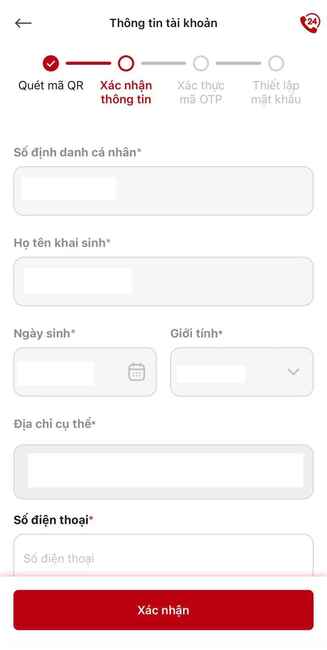
Step 3: An OTP code will be sent to the phone number you registered. Please enter this code exactly into the request box on the application to authenticate.
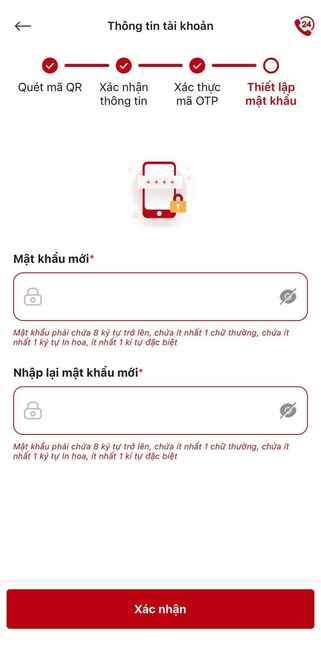
Finally, you will be asked to create one password for your VNeTraffic account. Choose a password that is strong enough, combining both letters and numbers, but still easy to remember for convenience in future logins.
How to look up fines for running red lights on VNeTraffic
After completing the registration process and having a VNeTraffic account, you are ready to apply a cold fine when you suspect you have violated traffic laws, specifically running a red light.
Step 1: Open the VNeTraffic application on your phone and enter the previously created login information (phone number and password). After successfully logging in, you will be taken to the main interface of the application.
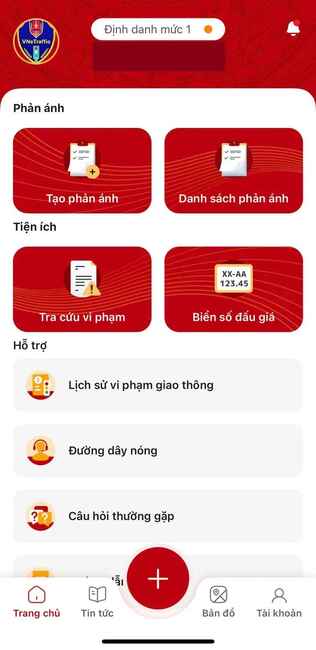
Step 2: On the main interface of the application, search and select the item named Look up violations.
Step 3: The system will conduct checks and display results if there are any violations related to your vehicle. Detailed information about the red light violation will be displayed, including time of violation (date, time), location of violation (street name, area), images or videos recording the behavior violation (if any), the traffic police unit that detected and handled the violation, along with the contact phone number of that unit so you can contact when necessary.

Procedure for handling fines when receiving notice
When the VNeTraffic system records your violation, you will receive a cold penalty notice through many different channels. A notification will be sent directly via the VNeTraffic application. In addition, an official written notice will also be sent to the permanent address of the registered vehicle owner. In addition, you can also proactively check fine information on the official website of the Traffic Police Department.
To proceed with handling violations, you have two options:
- Go directly to the police headquarters: You can go directly to the police headquarters where your violation was discovered to carry out handling procedures according to regulations.
- Handling at ward/commune police: If traveling to the location of the violation is difficult, you can go to the ward/commune police headquarters where you reside to receive support with the necessary procedures.
The important advice is that you should proactively handle cold penalty violation notices as soon as possible. Delay can lead to unnecessary problems and issues later. Quick processing not only helps you comply with the law but also avoids procedural hassles.
See more: How to buy medicine online from FPT Long Chau using VNeID
Conclusion
VNeTraffic application will be a useful tool when you search how to punish coldly running red lights and other traffic violations from 2025. With a simple installation and use process, people can easily access and take advantage of the benefits that the application brings. Download and install VNeTraffic today to be more proactive in participating in traffic and complying with the law, contributing to building a more civilized and safer traffic environment!






![[Lập Trình Game] Lesson 10: Creating Enemies in Godot programming – Part 1](https://anonyviet.com/wp-content/uploads/2020/04/image010.png "[Lập Trình Game] Lesson 10: Creating Enemies in Godot programming – Part 1")



