• Home
  • News
  • Software
  • Knowledge
  • MMO
  • Tips
  • Security
  • Network
  • Office
AnonyViet - English Version
  • Home
  • News
  • Software
  • Knowledge
  • MMO
  • Tips
  • Security
  • Network
  • Office
No Result
View All Result
  • Home
  • News
  • Software
  • Knowledge
  • MMO
  • Tips
  • Security
  • Network
  • Office
No Result
View All Result
AnonyViet - English Version
No Result
View All Result

How to get a refund on the App Store when buying the wrong app

AnonyViet by AnonyViet
November 19, 2024
in Tips
0

If you accidentally purchased the wrong app or forgot to cancel your App Store service renewal, this article will show you how Refunds on App Store Extremely simple and detailed. Let's follow along!

Join the channel Telegram belong to AnonyViet 👉 Link 👈

When do you get a refund on the App Store?

  • Request a refund within 90 days: You can request a refund for transactions made no more than 90 days ago.
  • Forgot to cancel the trial package: In case you forget to cancel your free trial renewal.
  • The application costs money unnecessarily: When you no longer want to use paid applications and forget to cancel renewal.
  • Buy the game arbitrarily: If children in the family buy games without your consent.
  • Using the wrong iTunes/App Store account: When you purchase the app using account no Exactly.
  • Confusion in app purchases: When mistakenly purchasing an application among applications with similar names.
  • Product is not as advertised: For applications/services that do not work as described.
When do you get <yoastmark class=

Instructions on how to refund on the App Store

Step 1: Visit Problem Report page of Apple Store.

Step 2: Enter Apple ID and Password to log in to the system.
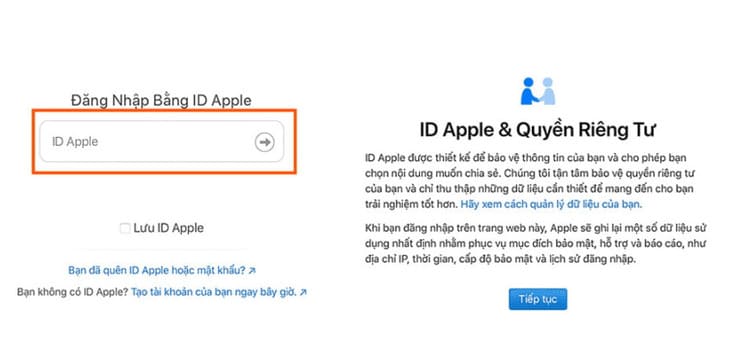
Enter Apple ID and Password

Step 3: Under 'How can we help you?', select 'I want to…' and then select 'Request a refund' as your goal.
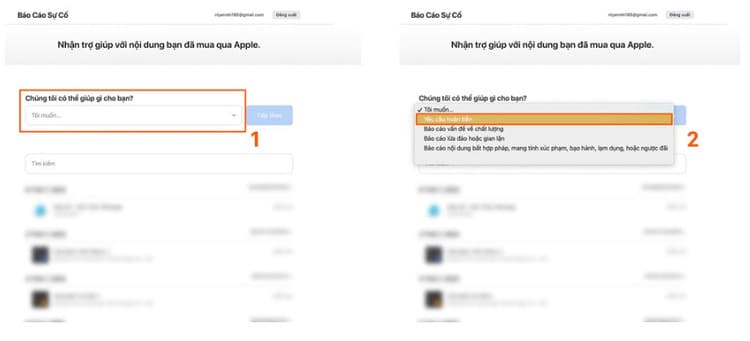
select your goal as 'Request Refund'.
Select your goal as 'Request Refund'.

Step 4: In the 'Tell us more' section, select the reason you want a refund and press 'Next'.
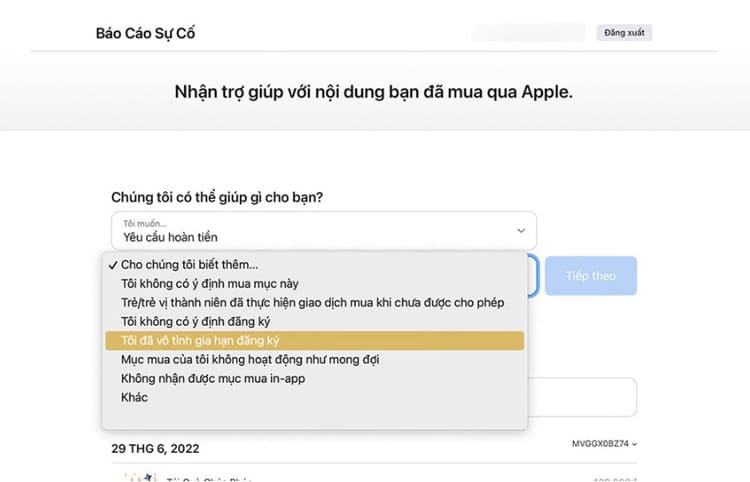
Select the reason you want an App Store refund
Select the reason you want a refund

Step 5: Select the App Store app or service you want to refund and then select 'Submit'.
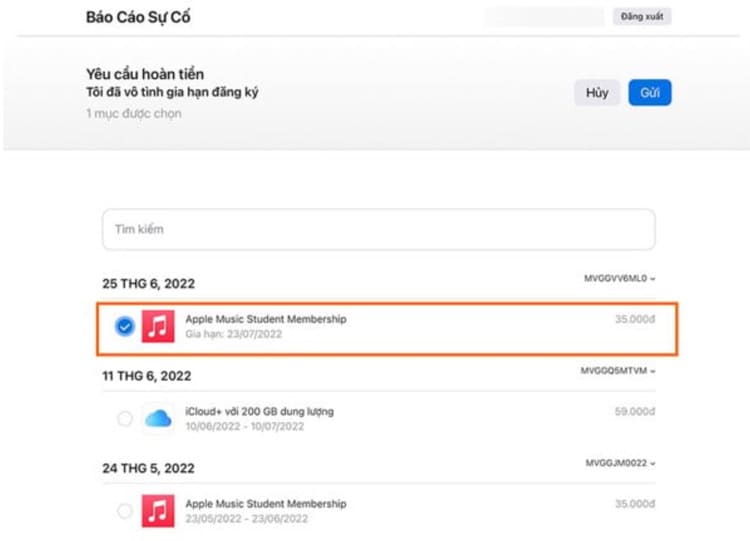
Select the app or service you want a refund for
Select the app or service you want to refund

Step 6: Apple will email you a notification with a link to track the status of your request.
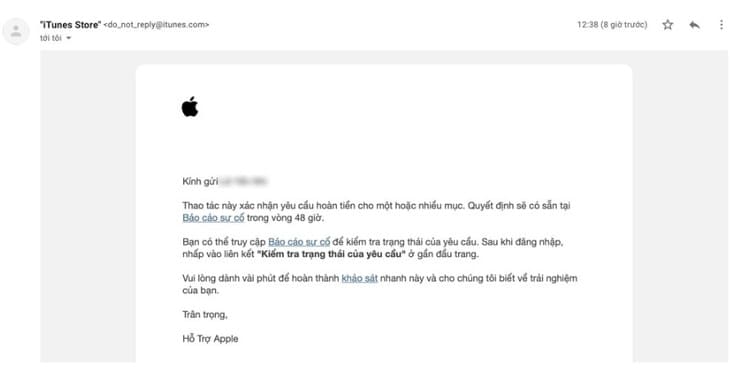
Apple will send a refund notification email on the App Store
Apple will send an email notifying you of your refund request

Refund process and procedures

  1. Request Refunds on App Store Your application will be reviewed within 48 hours of submission. You will receive a confirmation email and can check the processing via the link provided.
  2. When you receive a confirmation email from Apple, this means your refund request is under review. In some cases, our support team Apple can contact to request more detailed information about your situation.
  3. If your request is in the 'Pending' stage, this signals that the refund has been successful. You just need to wait for the money to be transferred back to the payment method you used.

Note: You may no longer have access to applications/services once your money has been refunded.

Reasons why a refund cannot be requested

If the charge is still in process and you have not completed payment, you will not be able to request a refund. You need to complete payment before making the request!

Time to receive money back

The time it takes to receive your refund will depend on the payment method you chose. The amount will be refunded using the same method you originally used. For example, if you pay via credit card, the money will be refunded to your card, or if you used Momo, the money will be refunded to your Momo wallet.

Conclusion

Job Refunds on the App Store Buying the wrong app or service is a simple and quick process. If you need support, don't hesitate to contact us to have all your questions answered. If you feel the information is useful, don't forget to share it with your relatives and friends. Wish you success!


Tags: AppbuyingrefundStorewrong
Previous Post

Reacher: Tool to check whether email is still working or not

Next Post

Simple instructions for installing WordPress on cPanel

AnonyViet

AnonyViet

Related Posts

Windows 7/8.1/10 users will be upgraded to Windows 11 for free
Tips

Windows 7/8.1/10 users will be upgraded to Windows 11 for free

July 30, 2026
Instructions for receiving ChatGPT Plus for 1 month for free in 2026
Tips

Instructions for receiving ChatGPT Plus for 1 month for free in 2026

July 28, 2026
Some reasons I don’t like Windows 11
Tips

Some reasons I don’t like Windows 11

July 27, 2026
Instructions on how to get free Facebook white ticks
Tips

Instructions on how to get free Facebook white ticks

July 27, 2026
Collection of Windows 11 wallpapers for computers and phones
Tips

Collection of Windows 11 wallpapers for computers and phones

July 26, 2026
Don’t install leaked Windows 11
Tips

Don’t install leaked Windows 11

July 25, 2026
Next Post
Simple instructions for installing WordPress on cPanel

Simple instructions for installing Wordpress on cPanel

0 0 votes
Article Rating
Subscribe
Login
Notify of
guest

guest

0 Comments
Oldest
Newest Most Voted

Recent News

Windows 7/8.1/10 users will be upgraded to Windows 11 for free

Windows 7/8.1/10 users will be upgraded to Windows 11 for free

July 30, 2026
Instructions for receiving the free Certified LLM Security Expert certificate

Instructions for receiving the free Certified LLM Security Expert certificate

July 30, 2026
MSI laptops are not just for gamers: Which line is suitable for students, office workers and creative people?

MSI laptops are not just for gamers: Which line is suitable for students, office workers and creative people?

July 29, 2026
What is quantum resistant cryptography? Why must the Internet change?

What is quantum resistant cryptography? Why must the Internet change?

July 29, 2026
Windows 7/8.1/10 users will be upgraded to Windows 11 for free

Windows 7/8.1/10 users will be upgraded to Windows 11 for free

July 30, 2026
Instructions for receiving the free Certified LLM Security Expert certificate

Instructions for receiving the free Certified LLM Security Expert certificate

July 30, 2026
MSI laptops are not just for gamers: Which line is suitable for students, office workers and creative people?

MSI laptops are not just for gamers: Which line is suitable for students, office workers and creative people?

July 29, 2026
AnonyViet - English Version

AnonyViet

AnonyViet is a website share knowledge that you have never learned in school!

We are ready to welcome your comments, as well as your articles sent to AnonyViet.

Follow Us

Contact:

Email: anonyviet.com[@]gmail.com

Main Website: https://anonyviet.com

Recent News

Windows 7/8.1/10 users will be upgraded to Windows 11 for free

Windows 7/8.1/10 users will be upgraded to Windows 11 for free

July 30, 2026
Instructions for receiving the free Certified LLM Security Expert certificate

Instructions for receiving the free Certified LLM Security Expert certificate

July 30, 2026
  • Home
  • Home 2
  • Home 3
  • Home 4
  • Home 5
  • Home 6
  • Next Dest Page
  • Sample Page

say88 tỷ lệ kèo nhà cái kèo nhà cái 5 febet

No Result
View All Result
  • Home
  • News
  • Software
  • Knowledge
  • MMO
  • Tips
  • Security
  • Network
  • Office

say88 tỷ lệ kèo nhà cái kèo nhà cái 5 febet

wpDiscuz
0
0
Would love your thoughts, please comment.x
()
x
| Reply