• Home
  • News
  • Software
  • Knowledge
  • MMO
  • Tips
  • Security
  • Network
  • Office
AnonyViet - English Version
  • Home
  • News
  • Software
  • Knowledge
  • MMO
  • Tips
  • Security
  • Network
  • Office
No Result
View All Result
  • Home
  • News
  • Software
  • Knowledge
  • MMO
  • Tips
  • Security
  • Network
  • Office
No Result
View All Result
AnonyViet - English Version
No Result
View All Result

Tips for watching Youtube without ads, without installing software or extensions

AnonyViet by AnonyViet
October 26, 2024
in Tips
0

Are you tired of constantly being interrupted by ads while watching YouTube videos? Don't worry, because there is a simple and completely legal solution for you to get out of this situation without having to pay for YouTube Premium. In this article, AnonyViet will share an easy-to-implement trick to help you Watch YouTube without ads on any device quickly and effectively.

Join the channel Telegram belong to AnonyViet 👉 Link 👈

Do you know about YouTube's “Enhanced Privacy Mode”?

YouTube actually offers a special mode, called “enhanced privacy mode,” for developers who want to integrate videos on their sites. When enabled, this mode prevents the video being watched from affecting the subsequent browsing experience on YouTube. In simple terms, this means that ads (based on your viewing history) will no longer be shown.

Do you know about YouTube's “Enhanced Privacy Mode”?

The best part is that activating this enhanced privacy mode also eliminates all the ads that play before and while watching videos. So, how do you actually take advantage of this mode without being a developer?

See more: How to screenshot YouTube videos High quality

Tips for watching YouTube without ads

To enjoy YouTube without ads, all you need to do is slightly change the URL of the video you want to watch.

Let's take a specific example. Let's say you want to watch videos accessible through the following URLs:

  • Link on PC: https://www.youtube.com/watch?v=dQw4w9WgXcQ
  • Link on phone: https://m.youtube.com/watch?v=dQw4w9WgXcQ

To enable ad blocking on YouTube, you just need to add a dash A simple “-” in the URL, between “yout” and “ube”, this will produce:

  • Link without advertising on PC: https://www.yout-ube.com/watch?v=dQw4w9WgXcQ
  • Link without advertising on phones: https://m.yout-ube.com/watch?v=dQw4w9WgXcQ
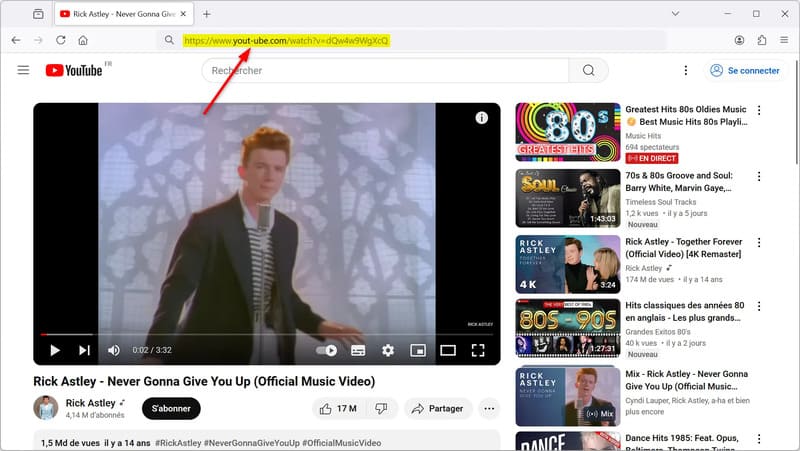
Tips for watching YouTube without ads

It's that simple! By accessing the video through this modified URL, you will automatically be redirected to the youtube-nocookie.com domain. As a result, the video will stream in full screen, without any ads.

Just note that the website https://www.yout-ube.com/ is not directly owned by YouTube. It cleverly exploits YouTube's enhanced privacy mode to redirect videos to the official domain youtube-nocookie.com, owned by YouTube.

Advantages of tips for watching YouTube without ads

The big advantage of this tip is that it is completely legal. You don't have to install third-party extensions or software, or visit suspicious websites. YouTube itself offers this enhanced privacy mode, which was initially intended for developers.

Furthermore, this method to watch YouTube videos without ads works regardless of the device used, from smartphone, tablet, computer, etc. you just need to change the URL directly in the browser Your website is done.
Advantages of tips for watching YouTube without ads

Limitations to note

However, there are some limitations to this procedure. Since this mode is initially intended for pages with YouTube videos, you won't have access to all of the platform's features through the modified URL.

First, the video will automatically play in full screen mode, with no option to return to the normal display size. Additionally, video suggestions will not be displayed. Similarly, the number of views, likes and comments will be hidden. Finally, if you want to subscribe to a YouTube channel, you will have to return to the “normal” URL.

Despite some of these limitations, this trick is still very practical on a daily basis to enjoy YouTube videos without ad interruptions.
Limitations to note
Limitations to note

See more: Control Panel for YouTube – Customize content as desired

Conclusion

With this simple trick, you can Watch Youtube without ads and fully enjoy the comfortable YouTube experience. Please share this tip with friends and relatives to enjoy unlimited YouTube together!


Tags: AdsExtensionsinstallingsoftwaretipswatchingYoutube
Previous Post

How to comment on 7-color lines on Facebook

Next Post

Flyby11: Tool to install Windows 11 24H2 on PC is not compatible

AnonyViet

AnonyViet

Related Posts

How to report a fraudulent website on Weebly
Tips

How to report a fraudulent website on Weebly

October 19, 2026
How to view Facebook stories without others knowing
Tips

How to view Facebook stories without others knowing

October 18, 2026
Instructions for registering a .tech domain name for free for 1 year
Tips

Instructions for registering a .tech domain name for free for 1 year

October 18, 2026
Instructions on how to enter promotional codes on the App Store most accurately
Tips

Instructions on how to enter promotional codes on the App Store most accurately

October 18, 2026
How to open “This PC” instead of “Quick Access” in File Explorer by default
Tips

How to open “This PC” instead of “Quick Access” in File Explorer by default

October 17, 2026
How to create a virtual Pet, a virtual character running around on the Desktop to relax
Tips

How to create a virtual Pet, a virtual character running around on the Desktop to relax

October 15, 2026
Next Post
Flyby11: Tool to install Windows 11 24H2 on PC is not compatible

Flyby11: Tool to install Windows 11 24H2 on PC is not compatible

0 0 votes
Article Rating
Subscribe
Login
Notify of
guest

guest

0 Comments
Oldest
Newest Most Voted

Recent News

Instructions for turning off automatic subtitles on iPhone and Macbook

Instructions for turning off automatic subtitles on iPhone and Macbook

October 20, 2026
How to report a fraudulent website on Weebly

How to report a fraudulent website on Weebly

October 19, 2026
How to view Facebook stories without others knowing

How to view Facebook stories without others knowing

October 18, 2026
Instructions for registering a .tech domain name for free for 1 year

Instructions for registering a .tech domain name for free for 1 year

October 18, 2026
Instructions for turning off automatic subtitles on iPhone and Macbook

Instructions for turning off automatic subtitles on iPhone and Macbook

October 20, 2026
How to report a fraudulent website on Weebly

How to report a fraudulent website on Weebly

October 19, 2026
How to view Facebook stories without others knowing

How to view Facebook stories without others knowing

October 18, 2026
AnonyViet - English Version

AnonyViet

AnonyViet is a website share knowledge that you have never learned in school!

We are ready to welcome your comments, as well as your articles sent to AnonyViet.

Follow Us

Contact:

Email: anonyviet.com[@]gmail.com

Main Website: https://anonyviet.com

Recent News

Instructions for turning off automatic subtitles on iPhone and Macbook

Instructions for turning off automatic subtitles on iPhone and Macbook

October 20, 2026
How to report a fraudulent website on Weebly

How to report a fraudulent website on Weebly

October 19, 2026
  • Home
  • Home 2
  • Home 3
  • Home 4
  • Home 5
  • Home 6
  • Next Dest Page
  • Sample Page

say88 tỷ lệ kèo nhà cái kèo nhà cái 5 febet

No Result
View All Result
  • Home
  • News
  • Software
  • Knowledge
  • MMO
  • Tips
  • Security
  • Network
  • Office

say88 tỷ lệ kèo nhà cái kèo nhà cái 5 febet

wpDiscuz
0
0
Would love your thoughts, please comment.x
()
x
| Reply