• Home
  • News
  • Software
  • Knowledge
  • MMO
  • Tips
  • Security
  • Network
  • Office
AnonyViet - English Version
  • Home
  • News
  • Software
  • Knowledge
  • MMO
  • Tips
  • Security
  • Network
  • Office
No Result
View All Result
  • Home
  • News
  • Software
  • Knowledge
  • MMO
  • Tips
  • Security
  • Network
  • Office
No Result
View All Result
AnonyViet - English Version
No Result
View All Result

Multiple Tools for Facebook – Extension supports many Facebook features

AnonyViet by AnonyViet
September 28, 2024
in Tips
0

Multiple Tools for Facebook is an extension that adds Facebook features written by Vietnamese author Loc Mai. This tool supports quick operations with features that Facebook does not have. The highlight is friend filtering.

Join the channel Telegram belong to AnonyViet 👉 Link 👈

Facebook is the social network with the largest operating scale in Vietnam. However, it is also the social network with the most problems. Sometimes we make friends with strangers, which over time will lead to a surplus of friends. Don't know which are real friends and which are virtual friends and you want to filter your friends. Specifically, filter out friends who do not interact on Facebook.

In this tutorial, I would like to share with you a pretty great Extension Multiple Tools for Facebook. It can help you filter friends very quickly. In addition to the friend filtering function, it also has many other pretty good features. However, we will learn about how to filter non-interactive friends first!!

New feature

  • Search for virtual friends, friends whose accounts have been locked and show their names!
  • Speed ​​up functions such as counting messages and interactions.

Nice feature

  • No need to log in to the utility.
  • Don't be afraid of checkpoints.

FREE FUNCTIONS:

  • Delete friends.
  • Search for groups of friends
  • Interaction statistics
  • Change privacy by time period.
  • Statistics on the number of messages from friends.
  • Download messages from friends.
  • Open the avatar's shield.
  • Search for virtual friends, friends whose accounts have been locked.
  • See who is online.
  • View messages, send messages without seeing Seen or “message received”.

PREMIUM FUNCTIONS:

You need to pay a fee of $5 to use the features below for life. If possible, please support the author

  • Interaction statistics and filtering of non-interactive friends. (Data includes: number of messages, number of comments, number of likes, last date of chat, last date of comment, last date of liking, and when added to Facebook).
  • Statistics on the number of messages and downloads of messages from friends, groups, and friends whose accounts have been locked. You can also download individual photos, audio or just files sent via text message.
  • Friends diary: See at a glance when you deleted or added friends.

Instructions for filtering inactive friends on Facebook

First of all, I would like to briefly mention the advantages of filtering friends, especially filtering inactive friends. What kind of impact will it have in Online business and in everyday life? You should briefly learn about the benefits of filtering friends on Facebook.

Multiple Tools for Facebook – Extension supports many Facebook features

Why you should filter out people you don't interact with

  • You'll improve the quality of your feed and see less trashy news from strangers.
  • Limit bad people taking advantage of you to track and hack your account.
  • Helps you have a cleaner and better quality friends list.
  • Helps you have potential friends for online business or virtual living.
  • The most important issue is still Facebook security higher.

Instructions for filtering inactive friends on Facebook

Getting to the main issue, I would like to introduce to you a Chrome browser extension called Multiple Tools for Facebook. This utility has a lot of functions to help you manage Facebook better and the good news is that it free of charge. Visit the link below to install the Chrome browser extension.

Download Multiple Tools for Facebook

Press the button Add to Chrome to install the add-on for your browser.

Multiple Tools for Facebook Extension supports many Facebook features

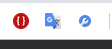
After installation you will see a blue tool icon on the right corner of the browser.
Multiple Tools for Facebook Extension supports many Facebook features

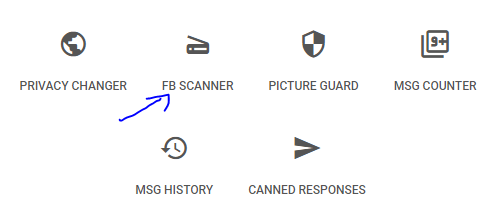
Click on it and select Facebook Scanner to use the Facebook scanning function.
Multiple Tools for Facebook Extension supports many Facebook features

You will be redirected to the interface of a website.
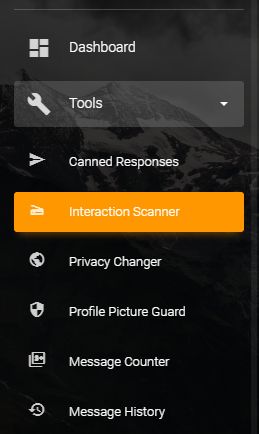
Now look at the right corner and select the item Internation Scanner.
Multiple Tools for Facebook Extension supports many Facebook features

Press select Interaction Scanner.

Multiple Tools for Facebook Extension supports many Facebook features

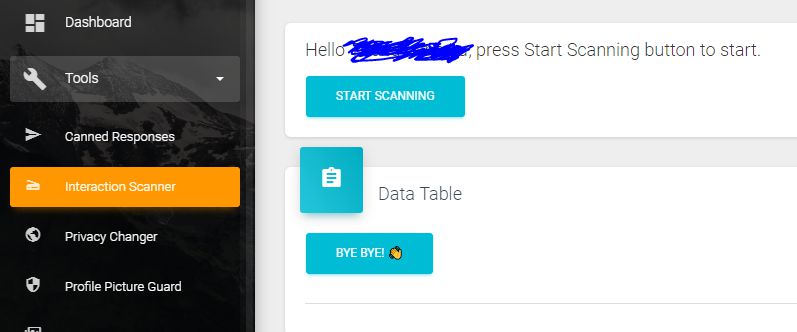
You will see an interface like the image above. Now press the button START SCANNING and wait for the program to run.
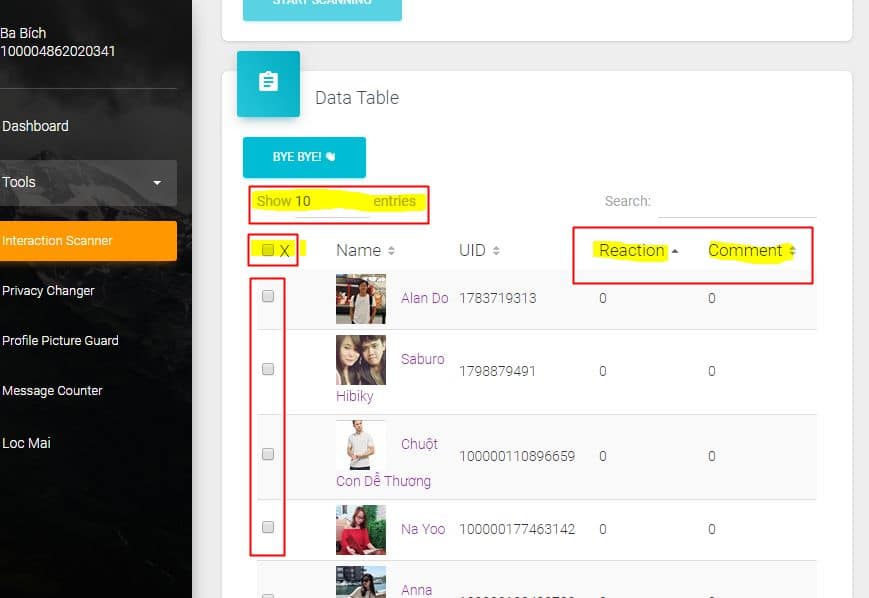
Multiple Tools for Facebook Extension supports many Facebook features

After the program finishes running, you will see a list of inactive friends as shown above.
At this point, you can filter friends by checking the top box (X box). select all.
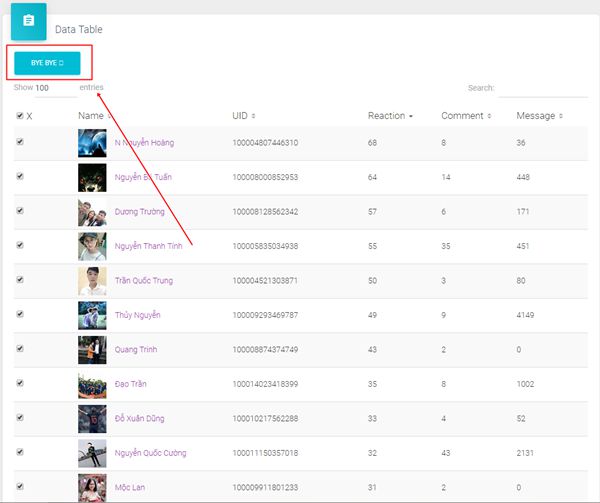
Instructions for filtering inactive friends on Facebook are extremely fast and concise

Finally press the button Bye Bye to unfriend them en masse.

This program is developed for free and has many good features besides filtering inactive friends. You can learn more when using it!!!


Previous Post

TinyJPG – Smart image compression tool, preserving quality

Next Post

Download Tool Reg Clone Facebook – Facebook Account Auto Registration

AnonyViet

AnonyViet

Related Posts

How to change the default font on Windows 10
Tips

How to change the default font on Windows 10

April 13, 2026
5 tips for using a Browser to replace an App (helps save RAM, time and money)
Tips

5 tips for using a Browser to replace an App (helps save RAM, time and money)

April 13, 2026
How to make funny MeMe photos without Photoshop within 10 seconds
Tips

How to make funny MeMe photos without Photoshop within 10 seconds

April 11, 2026
How to quickly design your own Logo without Photoshop
Tips

How to quickly design your own Logo without Photoshop

April 10, 2026
How to convert Website into App on Windows
Tips

How to convert Website into App on Windows

April 9, 2026
Instructions for getting 3 months of Adobe Express Pro for free
Tips

Instructions for getting 3 months of Adobe Express Pro for free

April 9, 2026
Next Post
Download Tool Reg Clone Facebook – Facebook Account Auto Registration

Download Tool Reg Clone Facebook - Facebook Account Auto Registration

0 0 votes
Article Rating
Subscribe
Login
Notify of
guest

guest

0 Comments
Oldest
Newest Most Voted
Inline Feedbacks
View all comments

Recent News

Reputable LG repair service in Hanoi & Ho Chi Minh City with LGservicecenter

Reputable LG repair service in Hanoi & Ho Chi Minh City with LGservicecenter

April 21, 2026
Japanese Watch Week: Choose the color that suits your destiny, start the new year well at Mobile World

Japanese Watch Week: Choose the color that suits your destiny, start the new year well at Mobile World

April 20, 2026
4K Video Downloader Plus – Tool to download YouTube videos on macOS

4K Video Downloader Plus – Tool to download YouTube videos on macOS

April 20, 2026
How to add Watermark to Google Docs to protect copyright

How to add Watermark to Google Docs to protect copyright

April 19, 2026
Reputable LG repair service in Hanoi & Ho Chi Minh City with LGservicecenter

Reputable LG repair service in Hanoi & Ho Chi Minh City with LGservicecenter

April 21, 2026
Japanese Watch Week: Choose the color that suits your destiny, start the new year well at Mobile World

Japanese Watch Week: Choose the color that suits your destiny, start the new year well at Mobile World

April 20, 2026
4K Video Downloader Plus – Tool to download YouTube videos on macOS

4K Video Downloader Plus – Tool to download YouTube videos on macOS

April 20, 2026
AnonyViet - English Version

AnonyViet

AnonyViet is a website share knowledge that you have never learned in school!

We are ready to welcome your comments, as well as your articles sent to AnonyViet.

Follow Us

Contact:

Email: anonyviet.com[@]gmail.com

Main Website: https://anonyviet.com

Recent News

Reputable LG repair service in Hanoi & Ho Chi Minh City with LGservicecenter

Reputable LG repair service in Hanoi & Ho Chi Minh City with LGservicecenter

April 21, 2026
Japanese Watch Week: Choose the color that suits your destiny, start the new year well at Mobile World

Japanese Watch Week: Choose the color that suits your destiny, start the new year well at Mobile World

April 20, 2026
No Result
View All Result
  • Home
  • News
  • Software
  • Knowledge
  • MMO
  • Tips
  • Security
  • Network
  • Office

wpDiscuz
0
0
Would love your thoughts, please comment.x
()
x
| Reply