• Home
  • News
  • Software
  • Knowledge
  • MMO
  • Tips
  • Security
  • Network
  • Office
AnonyViet - English Version
  • Home
  • News
  • Software
  • Knowledge
  • MMO
  • Tips
  • Security
  • Network
  • Office
No Result
View All Result
  • Home
  • News
  • Software
  • Knowledge
  • MMO
  • Tips
  • Security
  • Network
  • Office
No Result
View All Result
AnonyViet - English Version
No Result
View All Result

How to check the location of the NFC reader on your phone

AnonyViet by AnonyViet
July 10, 2024
in Knowledge
0

Check NFC reader location on smartphones is an important step to perform biometric authentication transactions, especially in the context that many banks now require the use of NFC to read data from citizen identification cards (CCCD). This article AnonyViet will guide you on how to locate the NFC reader on your smartphone easily and effectively.

Join the channel Telegram belong to AnonyViet 👉 Link 👈

The Importance of NFC in Banking Transactions

From July 1, 2024, online banking transactions worth over VND10 million will require biometric authentication. However, many users have difficulty knowing the exact location of the NFC reader on their phones. This causes inconvenience and delays in completing transactions.

Luckily, there are now completely free online tools that can help you quickly locate the NFC reader on your phone. These tools support a variety of devices such as phones, computers, and tablets.

The online tool currently supports NFC reader location lookup for more than 750 phone and tablet models currently on the market, including the two main operating systems iOS (Apple) and Android (Google).
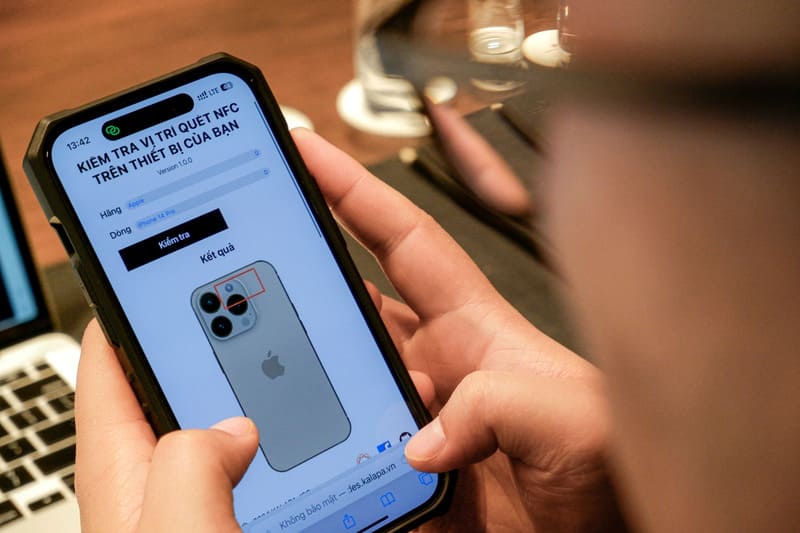
NFC Reader Location Checker Tool

See more: Banking Biometric Update Guide on the phone at home

Benefits of Checking NFC Reader Location

Knowing the exact location of the NFC reader saves users time and increases the success rate of biometric transactions. This is especially useful in the context of banks increasingly demanding high security and transaction authentication.

Instructions for checking the location of the NFC reader

Step 1: First, you need to access the online lookup website at HERE

Step 2: Here, you choose the phone manufacturer you are using, such as Apple, Samsung, Oppo, Xiaomi… Then, choose the specific device line you want to check, such as iPhone 11, Galaxy S23 Ultra…
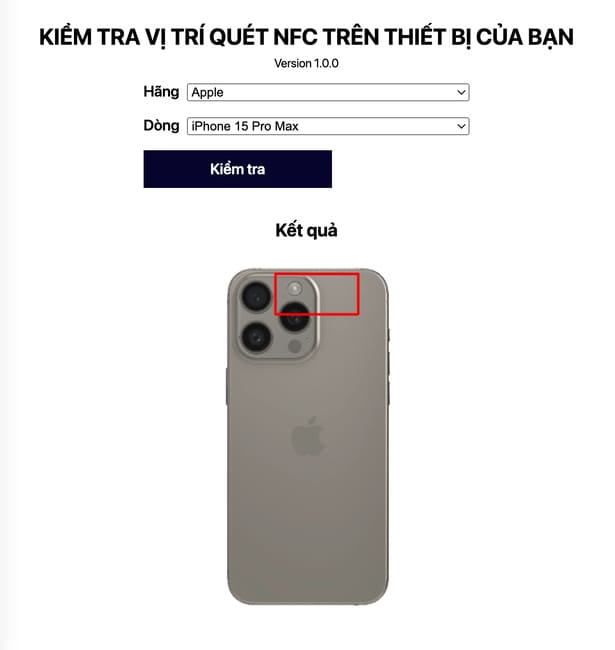
Select the brand and model of phone you are using

Step 3: Click the “Check” button. The system will search for data and display an image of the back of the device. On this image, there will be a red rectangular area, marking the location of the NFC reader. You just need to put the part with the NFC chip on the CCCD card into this area to start the data reading process.

Notes on using NFC

  • Wait for vibration signal: Once the NFC reader is located, insert the CCCD card into the correct position and hold it there until you hear a vibration signal from the phone.
  • Avoid swiping cards back and forth: To allow the system to accumulate enough magnetic field and “wake up” the chip, avoid swiping the card back and forth. This helps the data reading process to be successful.

See also: Use Extension Auto Tab Discard Speed ​​up web surfing for Chrome

Epilogue

With the detailed instructions above, hopefully you can easily Check NFC reader location on your smartphone and perform biometric authentication transactions efficiently. Using online tools not only saves time but also ensures high accuracy, providing maximum support for users in the information authentication process.

Tags: checkLocationNFCphonereader
Previous Post

How to enable auto-delete messages on Messenger

Next Post

Tips to update all Windows applications using CMD

AnonyViet

AnonyViet

Related Posts

Tips for pinning the step counter to the iPhone screen to monitor your health
Knowledge

Tips for pinning the step counter to the iPhone screen to monitor your health

April 28, 2026
How to turn off password suggestions on iPhone: Prevent Safari from auto-filling passwords
Knowledge

How to turn off password suggestions on iPhone: Prevent Safari from auto-filling passwords

April 27, 2026
Tips to completely turn off CAPTCHA codes on iPhone and Mac are super simple
Knowledge

Tips to completely turn off CAPTCHA codes on iPhone and Mac are super simple

April 25, 2026
How to compress online videos for free without losing quality
Knowledge

How to compress online videos for free without losing quality

April 24, 2026
Common errors when using Bosch products and how to fix them
Knowledge

Common errors when using Bosch products and how to fix them

April 22, 2026
How to avoid Adblock detection on Youtube with 4 good tips
Knowledge

How to avoid Adblock detection on Youtube with 4 good tips

April 17, 2026
Next Post
Tips to update all Windows applications using CMD

Tips to update all Windows applications using CMD

0 0 votes
Article Rating
Subscribe
Login
Notify of
guest

guest

0 Comments
Oldest
Newest Most Voted
Inline Feedbacks
View all comments

Recent News

Instructions on how to make money from personal Facebook

Instructions on how to make money from personal Facebook

May 2, 2026
Create an avatar to celebrate April 30 with a beautiful red flag shirt with yellow stars

Create an avatar to celebrate April 30 with a beautiful red flag shirt with yellow stars

April 30, 2026
How to get 2 months of Super Duolingo for free worth 300k

How to get 2 months of Super Duolingo for free worth 300k

April 30, 2026
How to create a Face Sticker Collection using ChatGPT

How to create a Face Sticker Collection using ChatGPT

April 29, 2026
Instructions on how to make money from personal Facebook

Instructions on how to make money from personal Facebook

May 2, 2026
Create an avatar to celebrate April 30 with a beautiful red flag shirt with yellow stars

Create an avatar to celebrate April 30 with a beautiful red flag shirt with yellow stars

April 30, 2026
How to get 2 months of Super Duolingo for free worth 300k

How to get 2 months of Super Duolingo for free worth 300k

April 30, 2026
AnonyViet - English Version

AnonyViet

AnonyViet is a website share knowledge that you have never learned in school!

We are ready to welcome your comments, as well as your articles sent to AnonyViet.

Follow Us

Contact:

Email: anonyviet.com[@]gmail.com

Main Website: https://anonyviet.com

Recent News

Instructions on how to make money from personal Facebook

Instructions on how to make money from personal Facebook

May 2, 2026
Create an avatar to celebrate April 30 with a beautiful red flag shirt with yellow stars

Create an avatar to celebrate April 30 with a beautiful red flag shirt with yellow stars

April 30, 2026
No Result
View All Result
  • Home
  • News
  • Software
  • Knowledge
  • MMO
  • Tips
  • Security
  • Network
  • Office

wpDiscuz
0
0
Would love your thoughts, please comment.x
()
x
| Reply