• Home
  • News
  • Software
  • Knowledge
  • MMO
  • Tips
  • Security
  • Network
  • Office
AnonyViet - English Version
  • Home
  • News
  • Software
  • Knowledge
  • MMO
  • Tips
  • Security
  • Network
  • Office
No Result
View All Result
  • Home
  • News
  • Software
  • Knowledge
  • MMO
  • Tips
  • Security
  • Network
  • Office
No Result
View All Result
AnonyViet - English Version
No Result
View All Result

How to enable Microsoft Edge's new CrapWare blocker

AnonyViet by AnonyViet
June 13, 2024
in Tips
0

Microsoft Edge just got a new crapware blocker, but it's not enabled by default. It is now available to all users of version 80 updated on February 7, 2020.

Join the channel Telegram belong to AnonyViet 👉 Link 👈

Crapware, also known as bloatware and junk, is software that is pre-installed with the computer and does not bring any benefit because it is a trial version or expires after a few days. Computer manufacturers often include this software in exchange for special agreements with publishers, which often helps reduce the overall cost of the computer for consumers.

If you haven't downloaded and experienced this new browser yet, please stop by This Please.

Still This are tips for Edge and how to transfer bookmarks from Chrome to Edge.

What is Crapware?

Crapware are malware on the internet. Includes features like adware, trackers, browser toolbars, cryptocurrency miners, and other junk you don't need.

By default, Microsoft Edge does not block crapware when we download software online. But you'll know how to turn it on soon. It works similarly to the hidden option that helps Windows Defender block crapware on your computer.

How to enable Crapware blocking on Edge

To enable the Crapware blocker, tap Menu > Settings.

Settings

Click “Privacy and service” in the left pane.

How to enable Microsoft Edge's new CrapWare blocker

Scroll to the bottom of the list. In the Services section, enable the “Block potentially unwanted apps” option.

Note: If you don't see this option, you haven't upgraded to version 80 yet. To see the current version, go to Menu > Help & feedback > About Microsoft Edge.)
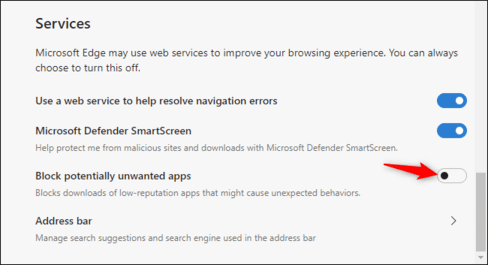
Microsoft Edge's new CrapWare blocker

So that's it then. Microsoft Edge will be more aggressive in blocking downloads that contain junk software.
Previous Post

Instructions for installing iOS 18 Beta to try new features

Next Post

How to hide cookie notifications on your computer browser

AnonyViet

AnonyViet

Related Posts

Instructions for registering for free Google AI Ultra + Youtube Premium
Tips

Instructions for registering for free Google AI Ultra + Youtube Premium

November 18, 2026
How to create a virtual Android phone with US IP for free forever
Tips

How to create a virtual Android phone with US IP for free forever

November 17, 2026
Instructions for buying a free .com domain name on Checkdomain
Tips

Instructions for buying a free .com domain name on Checkdomain

November 16, 2026
Test how well ChatGPT understands you with the box
Tips

Test how well ChatGPT understands you with the box

November 15, 2026
Grand Valley – Website to watch trains run, listen to relaxing lofi music
Tips

Grand Valley – Website to watch trains run, listen to relaxing lofi music

November 14, 2026
Instructions on how to turn off the blue dot on the MacBook screen
Tips

Instructions on how to turn off the blue dot on the MacBook screen

November 13, 2026
Next Post
How to hide cookie notifications on your computer browser

How to hide cookie notifications on your computer browser

0 0 votes
Article Rating
Subscribe
Login
Notify of
guest

guest

0 Comments
Oldest
Newest Most Voted

Recent News

SubPeek – Extension to find vietsub on Youtube right on the thumbnail

SubPeek – Extension to find vietsub on Youtube right on the thumbnail

November 19, 2026
Fun Learning for Children: Great app for learning letters and math for grade 1 for children

Fun Learning for Children: Great app for learning letters and math for grade 1 for children

November 18, 2026
Instructions for registering for free Google AI Ultra + Youtube Premium

Instructions for registering for free Google AI Ultra + Youtube Premium

November 18, 2026
How to create a virtual Android phone with US IP for free forever

How to create a virtual Android phone with US IP for free forever

November 17, 2026
SubPeek – Extension to find vietsub on Youtube right on the thumbnail

SubPeek – Extension to find vietsub on Youtube right on the thumbnail

November 19, 2026
Fun Learning for Children: Great app for learning letters and math for grade 1 for children

Fun Learning for Children: Great app for learning letters and math for grade 1 for children

November 18, 2026
Instructions for registering for free Google AI Ultra + Youtube Premium

Instructions for registering for free Google AI Ultra + Youtube Premium

November 18, 2026
AnonyViet - English Version

AnonyViet

AnonyViet is a website share knowledge that you have never learned in school!

We are ready to welcome your comments, as well as your articles sent to AnonyViet.

Follow Us

Contact:

Email: anonyviet.com[@]gmail.com

Main Website: https://anonyviet.com

Recent News

SubPeek – Extension to find vietsub on Youtube right on the thumbnail

SubPeek – Extension to find vietsub on Youtube right on the thumbnail

November 19, 2026
Fun Learning for Children: Great app for learning letters and math for grade 1 for children

Fun Learning for Children: Great app for learning letters and math for grade 1 for children

November 18, 2026
  • Home
  • Home 2
  • Home 3
  • Home 4
  • Home 5
  • Home 6
  • Next Dest Page
  • Sample Page

say88 tỷ lệ kèo nhà cái kèo nhà cái 5 febet

No Result
View All Result
  • Home
  • News
  • Software
  • Knowledge
  • MMO
  • Tips
  • Security
  • Network
  • Office

say88 tỷ lệ kèo nhà cái kèo nhà cái 5 febet

wpDiscuz
0
0
Would love your thoughts, please comment.x
()
x
| Reply