• Home
  • News
  • Software
  • Knowledge
  • MMO
  • Tips
  • Security
  • Network
  • Office
AnonyViet - English Version
  • Home
  • News
  • Software
  • Knowledge
  • MMO
  • Tips
  • Security
  • Network
  • Office
No Result
View All Result
  • Home
  • News
  • Software
  • Knowledge
  • MMO
  • Tips
  • Security
  • Network
  • Office
No Result
View All Result
AnonyViet - English Version
No Result
View All Result

How to turn HDR mode on and off on iOS and Android

AnonyViet by AnonyViet
June 6, 2024
in Software
0

Nowadays, smartphones are not only a means of communication but also miniature cameras with many unique features, including HDR mode. This mode enhances color contrast, delivering vivid and artistic images. The following article will guide you how Turn HDR mode on and off with just a few simple steps.

Join the channel Telegram belong to AnonyViet 👉 Link 👈

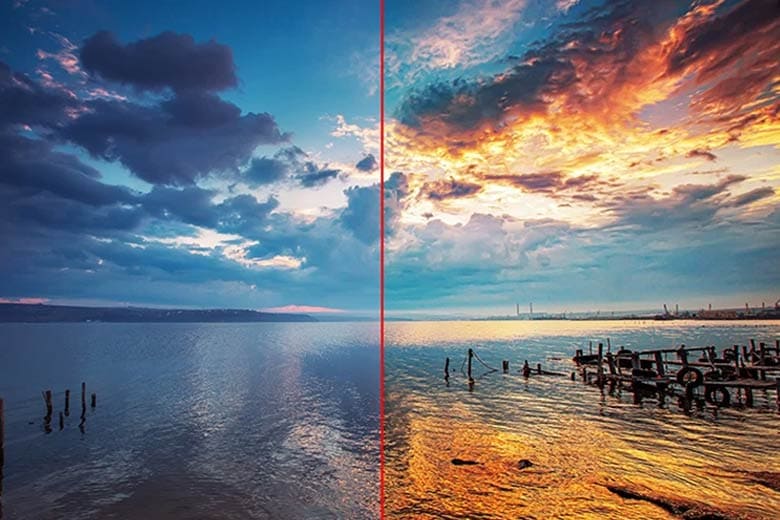
HDR stands for “High Dynamic Range” or “Wide Contrast Range”, is a photography mode that enhances color contrast, providing vivid and realistic images.

HDR mode makes dark areas deeper and bright areas highlighted, thereby enhancing the artistry of the photo. This feature is not only available on mobile phones but is also applied in cameras and television technology.

Turn HDR mode on and off
HDR mode (right)

How HDR works

HDR works by capturing and stitching multiple photos with different brightness levels to create a balance of light, enhance details, and create a harmonious, vivid photo.

HDR mode on professional cameras often gives better results than smartphones, requiring the photographer to take many photos with different exposure values ​​to combine them into a work of art.

toggle HDR mode on and off
How HDR works

HDR photography method

HDR mode allows taking photos in two methods: automatic and manual. Automatic shooting is preferred for convenience and simplicity, while manual shooting requires more skill and experience.

Instructions for turning HDR mode on and off on Android and iOS

How to turn HDR mode on and off on Android

Step 1: Open the camera app.

Step 2: Tap the gear icon to enter settings.

Step 3: Drag the slider to the right to activate HDR. Similarly, drag the slider to the left if you want to turn off this mode.
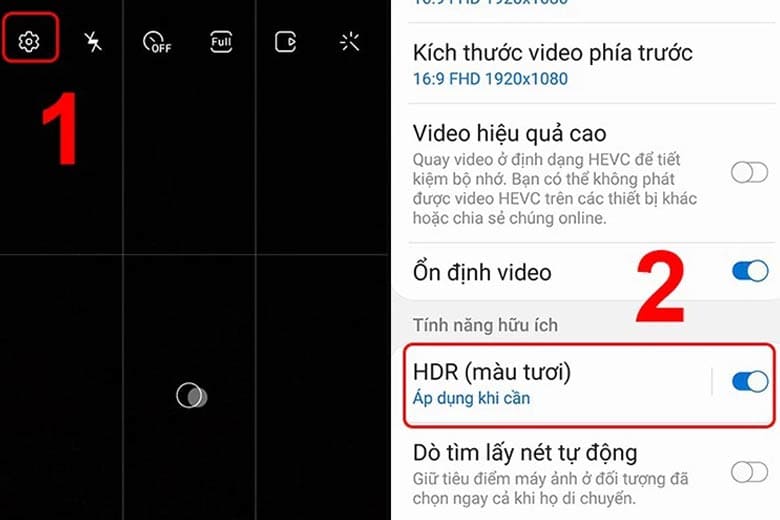
Turn HDR mode on and off
How to turn HDR mode on and off on Android

How to turn HDR mode on and off on iOS

Step 1: Access the settings section and navigate to the section Camera.
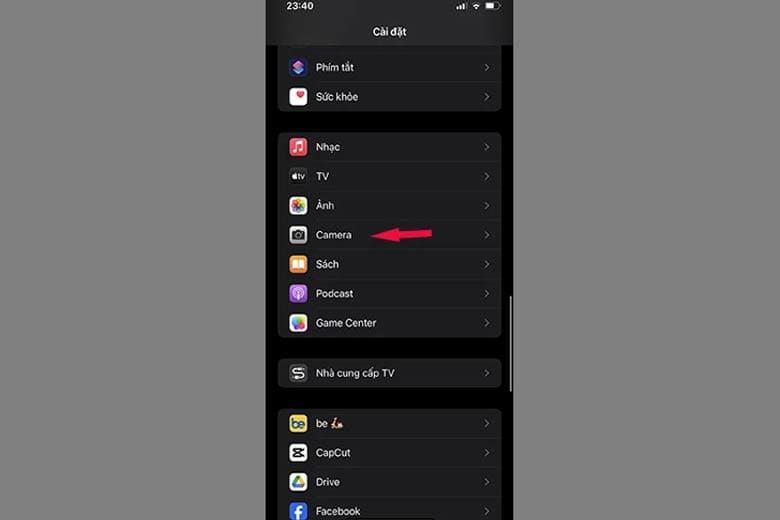
Turn HDR mode on and off
Find the Camera section

Step 2: Scroll down to the HDR option and move the slider towards the right to open the mode.
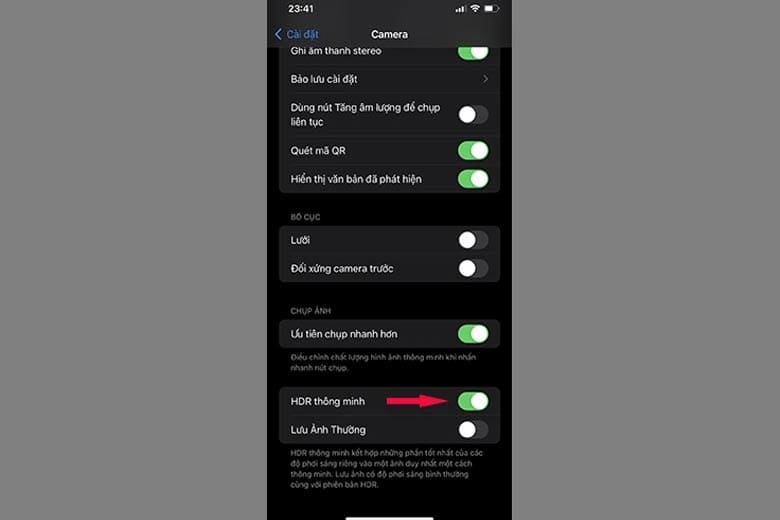
Turn HDR mode on and off
Move the slider towards the right to enable HDR mode

To disable this feature, simply repeat the above process and this time, move the slider to the left.

Epilogue

With the simple steps above, you know how Turn HDR mode on and off on Android and iOS. Follow AnonyViet every day to update the latest technology information and tips. Good luck!
Tags: AndroidHDRiOSModeturn
Previous Post

Instructions for designing an Online Logo with DesignEvo – many beautiful templates

Next Post

Instructions for emulating Windows 10X on Windows 10 to try it out

AnonyViet

AnonyViet

Related Posts

Besides the 7500 mAh battery and 6.9 inch screen, what else does the POCO C95 Pro 4G have to make it a secondary device worth buying?
Software

Besides the 7500 mAh battery and 6.9 inch screen, what else does the POCO C95 Pro 4G have to make it a secondary device worth buying?

November 5, 2026
App fixes printer errors automatically, effective immediately with 1 click
Software

App fixes printer errors automatically, effective immediately with 1 click

November 5, 2026
What to do when your company opening information is stolen?
Software

What to do when your company opening information is stolen?

November 4, 2026
Experience Galaxy Tab S12 Ultra: Price of 40 million is a worthy investment to replace a laptop
Software

Experience Galaxy Tab S12 Ultra: Price of 40 million is a worthy investment to replace a laptop

November 2, 2026
Receive Driver Booster 14 license key immediately for free for 6 months
Software

Receive Driver Booster 14 license key immediately for free for 6 months

November 1, 2026
Online pagoda game: Experience practice and relieve stress at home
Software

Online pagoda game: Experience practice and relieve stress at home

November 1, 2026
Next Post
Instructions for emulating Windows 10X on Windows 10 to try it out

Instructions for emulating Windows 10X on Windows 10 to try it out

0 0 votes
Article Rating
Subscribe
Login
Notify of
guest

guest

0 Comments
Oldest
Newest Most Voted

Recent News

Besides the 7500 mAh battery and 6.9 inch screen, what else does the POCO C95 Pro 4G have to make it a secondary device worth buying?

Besides the 7500 mAh battery and 6.9 inch screen, what else does the POCO C95 Pro 4G have to make it a secondary device worth buying?

November 5, 2026
App fixes printer errors automatically, effective immediately with 1 click

App fixes printer errors automatically, effective immediately with 1 click

November 5, 2026
What to do when your company opening information is stolen?

What to do when your company opening information is stolen?

November 4, 2026
How to get 0 in Docker credits to run AI Agent for free

How to get $250 in Docker credits to run AI Agent for free

November 3, 2026
Besides the 7500 mAh battery and 6.9 inch screen, what else does the POCO C95 Pro 4G have to make it a secondary device worth buying?

Besides the 7500 mAh battery and 6.9 inch screen, what else does the POCO C95 Pro 4G have to make it a secondary device worth buying?

November 5, 2026
App fixes printer errors automatically, effective immediately with 1 click

App fixes printer errors automatically, effective immediately with 1 click

November 5, 2026
What to do when your company opening information is stolen?

What to do when your company opening information is stolen?

November 4, 2026
AnonyViet - English Version

AnonyViet

AnonyViet is a website share knowledge that you have never learned in school!

We are ready to welcome your comments, as well as your articles sent to AnonyViet.

Follow Us

Contact:

Email: anonyviet.com[@]gmail.com

Main Website: https://anonyviet.com

Recent News

Besides the 7500 mAh battery and 6.9 inch screen, what else does the POCO C95 Pro 4G have to make it a secondary device worth buying?

Besides the 7500 mAh battery and 6.9 inch screen, what else does the POCO C95 Pro 4G have to make it a secondary device worth buying?

November 5, 2026
App fixes printer errors automatically, effective immediately with 1 click

App fixes printer errors automatically, effective immediately with 1 click

November 5, 2026
  • Home
  • Home 2
  • Home 3
  • Home 4
  • Home 5
  • Home 6
  • Next Dest Page
  • Sample Page

say88 tỷ lệ kèo nhà cái kèo nhà cái 5 febet

No Result
View All Result
  • Home
  • News
  • Software
  • Knowledge
  • MMO
  • Tips
  • Security
  • Network
  • Office

say88 tỷ lệ kèo nhà cái kèo nhà cái 5 febet

wpDiscuz
0
0
Would love your thoughts, please comment.x
()
x
| Reply