You just installed Wifi or have been using Wifi in the house for a long time, but suddenly the network is very slow even though the package you pay is very high. There are many reasons why your home wifi is slow, please check if you have encountered the 6 cases below and learn how to fix it.
6 reasons why your home wifi is slow
Rate your general network
Before we dive into the reasons why your Wi-Fi is slower than expected, let’s learn a few things you can do to make your Wi-Fi speed better.
First, Don’t rely on your phone (or laptop using Wi-Fi) to test your wifi speed. Phone test does not give accurate results to test internet connection speed. Instead, use a computer with a network cable connection to the Wifi/Internet Router to check.
Second, Wi-Fi speed is not the same as advertised. Don’t believe the carrier’s advertising, the actual Wifi speed and the advertised one are completely different.
TuesdayYou can’t make a faster 5Mbps network connection with expensive Wi-Fi equipment, and even with the latest Wi-Fi hardware, a low plan plan won’t make Wifi faster.
Wednesday, Vietnam’s network is very often broken, ask the people around to see if the network is slow like your home? Then continue to check the 6 content below.
Old Wi-Fi Router
Everyone hates spending money and it’s annoying to have to buy something new, even though it’s underperforming. But the reality is that Wi-Fi hardware has evolved quite steadily over the years.
If you are still using the old router you bought a while ago ten years or the Wi-Fi router is integrated in the modem that the carrier provides you, the Wifi speed will not be as stable as the Wifi purchased from the 3rd party. Moreover, although some of the tips below may help you. if you have an old Wi-Fi router, but there’s really nothing like buying a new router. This is TOP Wifi Routers priced under 500K CZK currently popular in Vietnam.
Especially for those with new hardware – newer phones, new smart TVs, etc., it is advisable to upgrade the router because pairing newer devices with older hardware is reducing their performance.
Put the Wifi Router in the wrong place in the house
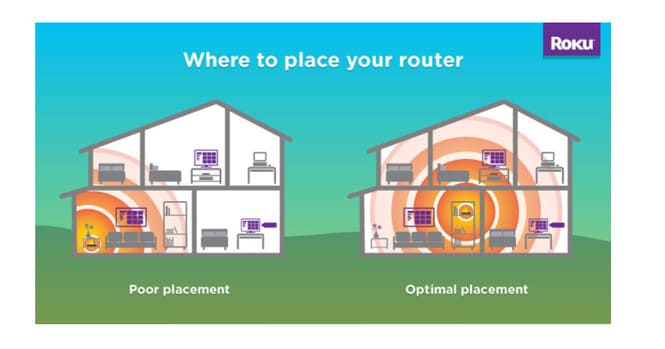
A serious mistake that many people make is placing the Wifi Router in a hidden location, many obstacles make the Wifi wave unable to cover your house, and if you use an old and poor-quality router, it will make the Wifi speed worse. significantly reduced.
If you want strong Wi-Fi where you actually use your Wi-Fi devices — like the living room and bedroom — then you shouldn’t have your Wi-Fi router in the kitchen or upstairs.
Changing the location of the Wi-Fi router is the easiest fix. Just make sure to place it where the signal is most concentrated for your day-to-day activities and avoid placing it near things that block Wi-Fi. Refer to the picture below, you will see that the Wifi signal has improved a lot.
Exceeded the number of connected devices
One of the biggest advantages of buying a new Wifi device is that it helps to increase the load capacity of many devices when connected at the same time. The Wifi Routers provided by the network operator can only meet about 10-15 devices at the same time. If your home has 4 people using laptops, phones, smart TVs, etc. then you should buy a better router to increase speed and load capacity when connecting to the network.
I want to emphasize that it is the number of devices, not the number of users that you want to focus on. There are more and more devices, even when they are not in use.
Security cameras use a lot of bandwidth, as do many other smart home devices. You will be surprised to have bandwidth-sucking devices around your house. All the devices that use that bandwidth also typically use your home Wi-Fi.
Add up all the computers, tablets, phones, streaming devices, smart TVs, smart home devices etc found in a modern home, it can exceed the processing capacity of old routers.
I recommend that you remove unnecessary devices from the WIFI connection, which means that any device that can use a LAN cable should use a wire such as a camera, TV, etc.
Choose the wrong switch, network cable
Some notes when you use Internet packages over 100Mbpsthen you must choose a Switch that supports 1Gbps or more ports.
If you use an outdated Cat5 cable or a 10/100 Switch, your Internet speed will only stop at 100Mbps.
For networks with less than 100Mbps of bandwidth, you may never notice a difference but if you have more bandwidth, those old cables and hardware will reduce your top speed.
To avoid this, check the physical network cables to make sure they are at least Cat5E or better Cat6 (see how to choose the right network cable). And if you’re using a Switch, upgrade from 10/100 to a 10/100/1000 gigabit switch.
Channel congestion
Wi-Fi channel congestion occurs when multiple Wi-Fi devices are using the same frequency or channel in the same space.
If your neighbors have their Wi-Fi router configured similarly to yours that leads to the possibility of channel/channel conflict. Therefore you should Configure carrier Wifi in another channel to avoid interference.
The problem of channel congestion occurs in the 2.4Ghz band rather than the 5Ghz band. You will need to determine which channels are most congested and change that to less congested channels.
Wi-Fi extender increases range but reduces network speed
If the carrier’s Wifi wave is not wide enough to cover the rooms, usually you will use a Wifi extender (Wifi Repeater), but one thing you don’t know is that the Wifi wave passing through the Repeater will take 1/3 – 1 /2 speed. Therefore, although the wave is transmitted farther, the speed will be slower.
Instead, you should use a LAN wire to connect to the secondary Wifi Router, then the speed will be more stable.
In addition, you can also see 24 more ways to speed up wifi here.