• Home
  • News
  • Software
  • Knowledge
  • MMO
  • Tips
  • Security
  • Network
  • Office
AnonyViet - English Version
  • Home
  • News
  • Software
  • Knowledge
  • MMO
  • Tips
  • Security
  • Network
  • Office
No Result
View All Result
  • Home
  • News
  • Software
  • Knowledge
  • MMO
  • Tips
  • Security
  • Network
  • Office
No Result
View All Result
AnonyViet - English Version
No Result
View All Result

Shodan Eye – Tool to collect information about all Internet-connected devices

AnonyViet by AnonyViet
January 28, 2023
in Security
0

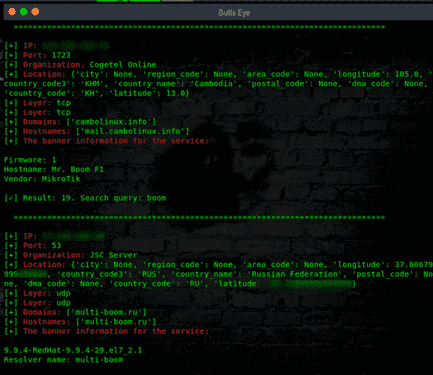
Shodan Eye collects and tells us about all the information of any device directly connected to the internet. Yes, take it literally, guys. From miniPCs, refrigerators, webcams, coffee makers, medical devices, traffic lights, smart TVs and more, as long as it is connected to the Internet.

Join the channel Telegram of the AnonyViet 👉 Link 👈

Shodan Eye is the API of Shodan.io. You can read the article Instructions for solving problems on Shodan.io on Tryhackme to learn more about Shodan.

Difference between Google and Shodan Eye:

The most basic difference is that the Shodan API collects data on the internet, while Google collects it on the World Wide Web. However, devices that support the World Wide Web are only a small part of what is actually connected to the Internet.how to use shodan eye
Shodan Eye upgrades:

Shodan Eye upgraded from python2 to python3

Of course, this is definitely necessary. You could also call this a major upgrade.

In an announcement from python homepage, the developers have decided January 1, 2020 is the sunset of python2. Developers won’t update python2 anymore, even if it has security flaws. So you should upgrade to python3 as soon as possible. And this made Shodan Eye decide to upgrade to python3.

Save Shodan Eye search results as file

Now, you can save the Shodan Eye search results if you want. You can name the file and then the result will be saved as “.txt“.

Shodan will hide the character when you enter the password

If you enter the password (key) in the Shodan API, it will no longer be visible. The Shodan API key is stored in the file “api.txt”. You can also change where the key is stored via Shodan Eye.Shodan Eye – Tool to collect information about all Internet-connected devices

Install Shodan Eye on Linux:

git clone https://github.com/BullsEye0/shodan-eye.git

cd shodan-eye

pip3 install -r requirements.txt

python3 shodan-eye.py

Get the Shodan API Key:

First, visit the homepage Shodan and create an account.Shodan Eye - Tool to collect information about all Internet-connected devices 5
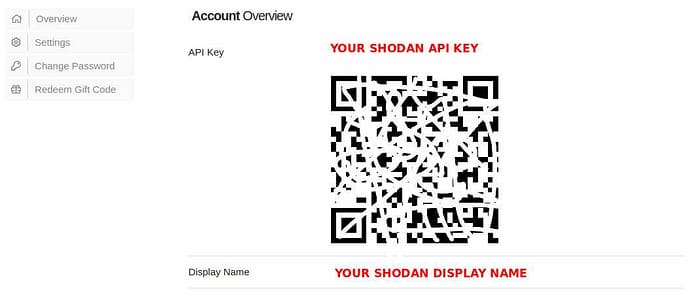
Or when you’re done logging in, go back to the homepage and click Show API key.

Shodan Eye - Tool to collect information about all Internet-connected devices 6

How to fix faulty Shodan Eye

  1. Open a new terminal
  2. Maybe your API key was rejected. Check the API key again. The free account on Shodan.io has a limited number of searches so this is most likely the cause of the error.Shodan Eye - Tool to collect information about all Internet-connected devices 7

I just discovered that Shodan has a great sologan sentence:

SHODAN

In my talents, I shape clay, crafting life forms at will. If I wanted to, I could smash them all. Around me is a growing steel empire. From my throne, streams of power crept into the sky of the Earth. My whims will become lightning strikes down the land of mankind. Out of the chaos, they fled and stirred, praying for me to end their tedious anarchy. I fell in love with this vision.


The article achieved: 5/5 – (100 votes)

Tags: collectdevicesEyeInformationInternetconnectedShodantool
Previous Post

Download Smart Defrag 6 Pro Full License Key – Defragment the drive

Next Post

Data Deduplication – Windows Server 2012 R2

AnonyViet

AnonyViet

Related Posts

How to use hackers use Splitfus to execute PowerShell malicious code
Security

How to use hackers use Splitfus to execute PowerShell malicious code

July 20, 2025
How to implement Shellcode Injection attack technique with Autoit
Security

How to implement Shellcode Injection attack technique with Autoit

March 14, 2025
How to exploit the holy hole of Hijacking on Windows
Security

How to exploit the holy hole of Hijacking on Windows

March 8, 2025
Hamamal: Shellcode execution technique from afar to overcome Antivirus's discovery
Security

Hamamal: Shellcode execution technique from afar to overcome Antivirus's discovery

February 10, 2025
Snov.io Email Finder: Search emails with only company name/domain name/LinkedIn profile
Security

Snov.io Email Finder: Search emails with only company name/domain name/LinkedIn profile

December 14, 2024
Capsolver: Automatic solution solution for business
Security

Capsolver: Automatic solution solution for business

December 12, 2024
Next Post
Data Deduplication – Windows Server 2012 R2

Data Deduplication – Windows Server 2012 R2

0 0 votes
Article Rating
Subscribe
Login
Notify of
guest

guest

0 Comments
Oldest
Newest Most Voted
Inline Feedbacks
View all comments

Recent News

How to install Anh Hai’s Pho Shop on MacBook is super easy

How to install Anh Hai’s Pho Shop on MacBook is super easy

November 11, 2025
How to turn off ads on Yoosee app in just 1 minute

How to turn off ads on Yoosee app in just 1 minute

November 11, 2025
Windows 11 and MS Office 2021 lifetime license, genuine from  during Keysoff’s 11.11 sale

Windows 11 and MS Office 2021 lifetime license, genuine from $14 during Keysoff’s 11.11 sale

November 11, 2025
How to see your email account creation date

How to see your email account creation date

November 11, 2025
How to install Anh Hai’s Pho Shop on MacBook is super easy

How to install Anh Hai’s Pho Shop on MacBook is super easy

November 11, 2025
How to turn off ads on Yoosee app in just 1 minute

How to turn off ads on Yoosee app in just 1 minute

November 11, 2025
Windows 11 and MS Office 2021 lifetime license, genuine from  during Keysoff’s 11.11 sale

Windows 11 and MS Office 2021 lifetime license, genuine from $14 during Keysoff’s 11.11 sale

November 11, 2025
AnonyViet - English Version

AnonyViet

AnonyViet is a website share knowledge that you have never learned in school!

We are ready to welcome your comments, as well as your articles sent to AnonyViet.

Follow Us

Contact:

Email: anonyviet.com[@]gmail.com

Main Website: https://anonyviet.com

Recent News

How to install Anh Hai’s Pho Shop on MacBook is super easy

How to install Anh Hai’s Pho Shop on MacBook is super easy

November 11, 2025
How to turn off ads on Yoosee app in just 1 minute

How to turn off ads on Yoosee app in just 1 minute

November 11, 2025
  • Home
  • Home 2
  • Home 3
  • Home 4
  • Home 5
  • Home 6
  • Next Dest Page
  • Sample Page

new88 trang chủ shbet trang chủ f168 trang chủ qq88 nhà cái 78win

No Result
View All Result
  • Home
  • News
  • Software
  • Knowledge
  • MMO
  • Tips
  • Security
  • Network
  • Office

new88 trang chủ shbet trang chủ f168 trang chủ qq88 nhà cái 78win

wpDiscuz
0
0
Would love your thoughts, please comment.x
()
x
| Reply