How to review comments on TikTok is a lifesaver solution when you want to find an old video. Instead of having to scroll through hundreds of videos you’ve watched, you just need to go to the comment history section and you’re done. Let’s go together AnonyViet Learn more about this great feature!
📢 Join the channel Telegram belong to AnonyViet
Update new articles, cool tools and IT tips fastest
Why is it important to know how to review comments on TikTok?
TikTok is now not only a place to watch entertainment videos but also a miniature community where people freely express their personal opinions. Every day, you can leave dozens, even hundreds of messages under different videos. However, our memory is limited, and sometimes you will want to find an old conversation to see if the other person responded to you or not.
Therefore, understanding how to review comments on TikTok is extremely necessary. Instead, you don’t need to rack your brain to remember which channel or video you commented on. Thanks to that, you can easily manage what you have shared, promptly delete angry statements or simply find a delicious cooking video that you once interacted with.

Instructions on how to review comments on TikTok
To not waste any more of your time, below are the most accurate steps. You just need to turn on the phone and follow the following order:
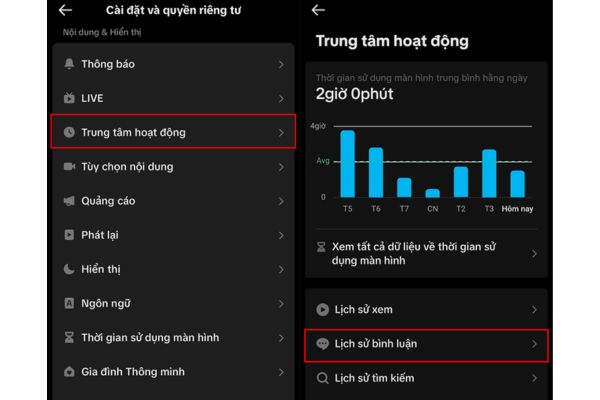
Step 1: Open the TikTok app on your phone. In the bottom right corner of the screen, click on the icon File to go to personal page. Next, look at the top right corner, click on the icon 3 dashes and select item Settings and privacy.
Step 2: In the new interface that appears, swipe down and find the item Hub. When you click here, the system will display many options, you just need to click on Comment history.
Step 3: At this point, a long list containing all the messages you have ever written will appear in chronological order. If you want to review the context of that statement, just click directly on the text, the system will automatically redirect you to the correct video containing that comment.
A few notes about privacy when interacting
Besides finding their own history, many users also wonder about the security of this platform. Can others pry into where you’ve been commenting? The answer is Are not okay. TikTok The security of the “Activity Center” section is very good, only the account owner has access to this area. Therefore, you cannot see other people’s aggregate interaction history.
However, you need to remember that the messages you leave under public videos can be read by anyone who browses the video. Instead, if you don’t want people you know to see it, think carefully before typing or set up stricter privacy for your account.

Conclusion
Thus, with just a few basic operations, How to review comments on TikTok has been thoroughly resolved. This platform is always updated with new features to provide maximum user support. Therefore, you should regularly check the activity center to better manage your account.
Frequently Asked Questions (Q&A)
1. What to do if you want to see TikTok comment history?
You can review your entire history by going to Profile > Select the 3 dashes icon > Settings and privacy > Activity center > Comment history.
2. Can I review other people’s comment history?
Are not. The history feature in the Activity Center is personal privacy, you can only see the comment list of the account you are logged into.
3. Can other people see TikTok comments?
Have. Even though other people can’t see your aggregated history, if they watch the same public video you commented on, they can see the text you left under that video.